
Community listing page, reviews here may not be monitored by the author.
F-Sweep


No reviews yet
F-Sweep is a quick-store helper mod for container workflows. When a container is open, click the button or press F to transfer eligible items into supported targets.
Community voices
Reviews
No reviews yet. Be the first to review this project!
Get it on
Available Platforms
Compatibility
Supported Environments
Must be installed on both the client and the server.
About
Project Details
For authors
Embed Badge
If you're the author of this project, you can embed a live badge anywhere that supports HTML or Markdown. It updates automatically whenever ratings change.
Use HTML for any page that supports it, or Markdown for README files and Markdown-based descriptions.
Identifiers
Platform IDs
Resources
External Links
About
Description
项目介绍
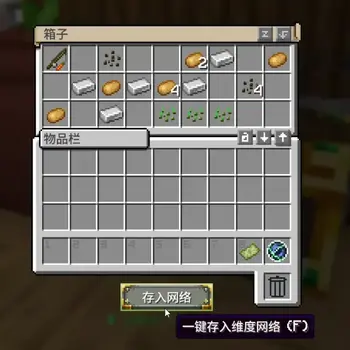
F-Sweep 是一个容器场景的一键存入辅助模组。
打开容器后,点击按钮或按 F,即可把可转移物品快速存入已兼容目标。

核心功能
- 容器界面新增
存入按钮。 - 支持快捷键
F一键存入。 - 已修复 Forge
1.20.1下 RS2、AE2、Tom's 终端在 Curios 饰品栏中的识别与使用。 存入:RS2现已同时支持原版 RS2 无线网格与 Refined Storage Addons 无线合成终端。- 右键按钮最多可轮切 8 种内置模式:
存入:默认存入:自定义存入:超越维度存入:RS2存入:AE2存入:Tom's 存储存入:精妙背包存入:机械动力背包
- 自动记住上次模式(
config/fsweep.properties)。 - 服主可通过
config/fsweep-server.properties或/fmode全服统一关闭不需要的模式。 - 统一前缀提示,快速识别本次存入目标。

默认模式逻辑(固定)
默认模式顺序:
超越维度 -> AE2 -> RS2 -> Tom's 存储 -> 精妙背包 -> 机械动力背包
说明:
- 前一个目标未完全存入时,会继续尝试下一个目标。
- 默认模式顺序固定,不通过
/fset修改。
自定义模式与命令
/fset 仅作用于“自定义模式”,并按玩家独立保存。
/fset list:查看模式轮切、默认顺序、自定义顺序、可用目标 ID。/fset set <id,id,id...>:设置自定义顺序。/fset swap <id1> <id2>:交换两个目标位置。/fset reset:重置自定义顺序为默认顺序。
可用目标 ID:network, ae2, rs2, toms, sb, fxnt
全服模式开关
服主可统一控制哪些内置模式对全服显示并允许使用。
/fmode list:查看当前启用模式。/fmode enable <mode>:启用一个模式。/fmode disable <mode>:禁用一个模式。/fmode reset:恢复默认启用列表。
服务端配置文件:config/fsweep-server.properties
按钮显示控制
- 服务端配置:
config/fsweep-server.properties - 规则文件:
config/fsweep-button-rules.json - 支持全局按钮/F 快捷键开关,以及
screen_rule/menu_rule/mod_rule自定义筛选 - 可通过
/fbutton重载配置并切换白名单/黑名单模式
兼容模组
- Beyond Dimensions(超越维度)
- Applied Energistics 2 (AE2)
- Refined Storage 2 (RS2)
- Refined Storage Addons(通过
存入:RS2使用无线合成终端) - Tom's Storage(高级无线终端)
- Sophisticated Backpacks(精妙背包)
- fxntstorage(机械动力背包)

使用方式
- 打开任意容器界面。
- 右键
存入按钮切换模式(可选)。 - 左键按钮或按
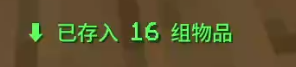
F执行存入。 - 查看提示确认结果。
运行环境
- Minecraft
1.20.1 - Forge
47.x
English Version
Overview
F-Sweep is a quick-store helper mod for container workflows.
When a container is open, click the button or press F to transfer eligible items into supported targets.
Core Features
- Adds a
Storebutton to container screens. - Supports hotkey
Ffor one-tap transfer. - Fixed Curios slot support on Forge
1.20.1for RS2, AE2, and Tom's portable terminals. Store: RS2now supports both the native RS2 wireless grid and Refined Storage Addons wireless crafting terminals.- Right-click mode cycling with up to 8 built-in modes:
Store: DefaultStore: CustomStore: BeyondStore: RS2Store: AE2Store: Tom's StorageStore: Sophisticated BackpackStore: Create Backpack
- Remembers the last mode in
config/fsweep.properties. - Server admins can hide unused modes globally with
config/fsweep-server.propertiesor/fmode. - Unified prefixed feedback messages for clear target/result recognition.
Default Mode Logic (Fixed)
Default order:
Beyond -> AE2 -> RS2 -> Tom's Storage -> Sophisticated Backpack -> Create Backpack
Notes:
- If a target cannot fully accept items, F-Sweep continues to the next target.
- Default mode order is fixed and not edited by
/fset.
Custom Mode & Commands
/fset configures Custom mode only, and settings are saved per player.
/fset list: show mode cycle, default order, custom order, and available target IDs./fset set <id,id,id...>: set custom order./fset swap <id1> <id2>: swap two targets./fset reset: reset custom order to default.
Available target IDs: network, ae2, rs2, toms, sb, fxnt
Server Mode Toggle
Server admins can control which built-in modes are visible and usable for the whole server.
/fmode list: view enabled modes./fmode enable <mode>: enable a mode./fmode disable <mode>: disable a mode./fmode reset: restore the default enabled list.
Server config file: config/fsweep-server.properties
Supported Mods
- Beyond Dimensions
- Applied Energistics 2 (AE2)
- Refined Storage 2 (RS2)
- Refined Storage Addons (wireless crafting terminal support through
Store: RS2) - Tom's Storage (Advanced Wireless Terminal)
- Sophisticated Backpacks
- fxntstorage (Create Backpack)
How To Use
- Open any container screen.
- Right-click the
Storebutton to switch mode (optional). - Left-click the button or press
Fto transfer. - Check the feedback message for results.
Environment
- Minecraft
1.20.1 - Forge
47.x
项目介绍
F-Sweep 是一个容器场景的一键存入辅助模组。
打开容器后,点击按钮或按 F,即可把可转移物品快速存入已兼容目标。
核心功能
- 容器界面新增
存入按钮。 - 支持快捷键
F一键存入。 - 已修复 Forge
1.20.1下 RS2、AE2、Tom's 终端在 Curios 饰品栏中的识别与使用。 存入:RS2现已同时支持原版 RS2 无线网格与 Refined Storage Addons 无线合成终端。- 右键按钮最多可轮切 8 种内置模式:
存入:默认存入:自定义存入:超越维度存入:RS2存入:AE2存入:Tom's 存储存入:精妙背包存入:机械动力背包
- 自动记住上次模式(
config/fsweep.properties)。 - 服主可通过
config/fsweep-server.properties或/fmode全服统一关闭不需要的模式。 - 统一前缀提示,快速识别本次存入目标。
默认模式逻辑(固定)
默认模式顺序:
超越维度 -> AE2 -> RS2 -> Tom's 存储 -> 精妙背包 -> 机械动力背包
说明:
- 前一个目标未完全存入时,会继续尝试下一个目标。
- 默认模式顺序固定,不通过
/fset修改。
自定义模式与命令
/fset 仅作用于“自定义模式”,并按玩家独立保存。
/fset list:查看模式轮切、默认顺序、自定义顺序、可用目标 ID。/fset set <id,id,id...>:设置自定义顺序。/fset swap <id1> <id2>:交换两个目标位置。/fset reset:重置自定义顺序为默认顺序。
可用目标 ID:network, ae2, rs2, toms, sb, fxnt
全服模式开关
服主可统一控制哪些内置模式对全服显示并允许使用。
/fmode list:查看当前启用模式。/fmode enable <mode>:启用一个模式。/fmode disable <mode>:禁用一个模式。/fmode reset:恢复默认启用列表。
服务端配置文件:config/fsweep-server.properties
按钮显示控制
- 服务端配置:
config/fsweep-server.properties - 规则文件:
config/fsweep-button-rules.json - 支持全局按钮/F 快捷键开关,以及
screen_rule/menu_rule/mod_rule自定义筛选 - 可通过
/fbutton重载配置并切换白名单/黑名单模式
兼容模组
- Beyond Dimensions(超越维度)
- Applied Energistics 2 (AE2)
- Refined Storage 2 (RS2)
- Refined Storage Addons(通过
存入:RS2使用无线合成终端) - Tom's Storage(高级无线终端)
- Sophisticated Backpacks(精妙背包)
- fxntstorage(机械动力背包)
使用方式
- 打开任意容器界面。
- 右键
存入按钮切换模式(可选)。 - 左键按钮或按
F执行存入。 - 查看提示确认结果。
运行环境
- Minecraft
1.20.1 - Forge
47.x
English Version
Overview
F-Sweep is a quick-store helper mod for container workflows.
When a container is open, click the button or press F to transfer eligible items into supported targets.
Core Features
- Adds a
Storebutton to container screens. - Supports hotkey
Ffor one-tap transfer. - Fixed Curios slot support on Forge
1.20.1for RS2, AE2, and Tom's portable terminals. Store: RS2now supports both the native RS2 wireless grid and Refined Storage Addons wireless crafting terminals.- Right-click mode cycling with up to 8 built-in modes:
Store: DefaultStore: CustomStore: BeyondStore: RS2Store: AE2Store: Tom's StorageStore: Sophisticated BackpackStore: Create Backpack
- Remembers the last mode in
config/fsweep.properties. - Server admins can hide unused modes globally with
config/fsweep-server.propertiesor/fmode. - Unified prefixed feedback messages for clear target/result recognition.
Default Mode Logic (Fixed)
Default order:
Beyond -> AE2 -> RS2 -> Tom's Storage -> Sophisticated Backpack -> Create Backpack
Notes:
- If a target cannot fully accept items, F-Sweep continues to the next target.
- Default mode order is fixed and not edited by
/fset.
Custom Mode & Commands
/fset configures Custom mode only, and settings are saved per player.
/fset list: show mode cycle, default order, custom order, and available target IDs./fset set <id,id,id...>: set custom order./fset swap <id1> <id2>: swap two targets./fset reset: reset custom order to default.
Available target IDs: network, ae2, rs2, toms, sb, fxnt
Server Mode Toggle
Server admins can control which built-in modes are visible and usable for the whole server.
/fmode list: view enabled modes./fmode enable <mode>: enable a mode./fmode disable <mode>: disable a mode./fmode reset: restore the default enabled list.
Server config file: config/fsweep-server.properties
Supported Mods
- Beyond Dimensions
- Applied Energistics 2 (AE2)
- Refined Storage 2 (RS2)
- Refined Storage Addons (wireless crafting terminal support through
Store: RS2) - Tom's Storage (Advanced Wireless Terminal)
- Sophisticated Backpacks
- fxntstorage (Create Backpack)
How To Use
- Open any container screen.
- Right-click the
Storebutton to switch mode (optional). - Left-click the button or press
Fto transfer. - Check the feedback message for results.
Environment
- Minecraft
1.20.1 - Forge
47.x
Screenshots
Gallery
-
 b9a509735ebc3850816798bdad3c321dda81bb01_0.webp b9a509735ebc3850816798bdad3c321dda81bb01_0.webp
 -
 55c7438e40f04107bd6df5e21fd133a9a82ce4e1.webp 55c7438e40f04107bd6df5e21fd133a9a82ce4e1.webp
 -
 9c65179b8a9f302b88b49124670da53d81e04d95_0.webp 9c65179b8a9f302b88b49124670da53d81e04d95_0.webp
-
 mc003 支持模组 超越维度,AE2,RS2,Tom,精妙背包,机械动力背包
 -
 mc02 切换模式
 -
 mc01 快捷存入
Versions
Files
Relations
Project Relations
More like this
Similar Mods
Suggestions use data such as tags, dependencies, dependents, descriptions, titles, and more to rank how much they overlap with this mod.
On ModDex
Community snapshot
By the numbers
Statistics
Want to reach Minecraft players?
We're looking for a server hosting partner to feature here and other parts of the site. Interested? Send us a message!
Get in touchGet it on
Available Platforms
On ModDex
Community snapshot
By the numbers
Statistics
Resources