
Community listing page, reviews here may not be monitored by the author.
Faga's Discord Bridge

No reviews yet
MC Discord Bridge is a server-side NeoForge mod that links Minecraft 1.21.x and Discord with event logs, /mc chat relay, account linking, and leaderboards.
Community voices
Reviews
No reviews yet. Be the first to review this project!
Get it on
Available Platforms
Compatibility
Supported Environments
Runs on a dedicated server only; does not work in singleplayer.
About
Project Details
For authors
Embed Badge
If you're the author of this project, you can embed a live badge anywhere that supports HTML or Markdown. It updates automatically whenever ratings change.
Use HTML for any page that supports it, or Markdown for README files and Markdown-based descriptions.
Identifiers
Platform IDs
About
Description
Features
- Minecraft -> Discord bridge for server lifecycle, player join/leave, deaths, advancements, and day milestone announcements
- Discord -> Minecraft chat relay via
/mcslash command in the configured channel (with mention sanitization) /mcrelays to Minecraft and echoes plain text back to Discord (**name:** message)/mcuses linked Minecraft nickname when the Discord user is linked- Rich Discord embeds with per-event colors, timestamps, optional player head thumbnails, and plain-text fallback
- Bot activity rotation with configurable activity list, interval, and type (
PLAYING,WATCHING,LISTENING,COMPETING) - Admin logging channel with command redaction and structured admin embeds
- Discord config slash command for admins:
/configto update chat/admin channels and whitelist guild - Discord/Minecraft account linking via
/link(ephemeral one-time code) and in-game/bridge link <code> /leaderboardslash command with categories, pagination, and visibility (privatedefault, optionalpublic)- Leaderboards include online and offline players with saved stats
- Linked players are shown as Discord mentions (
<@discordUserId>) in leaderboard and embeds - Bot activity rotation includes a built-in online/max players status entry
- Resilient startup/runtime behavior: Discord failures are logged, startup messages are queued until JDA is ready
Discord Bot Permissions
Bot permissions:
- Read Messages / View Channels
- Send Messages
- Read Message History
Configuration
First run creates config/mcdiscordbridge-common.toml.
# Discord bot token or env:DISCORD_BOT_TOKEN
discordApiKey = "env:DISCORD_BOT_TOKEN"

# Only messages from this guild are accepted
whitelistGuildId = "123456789012345678"

# Discord channel for chat bridge
chatChannelId = "123456789012345678"

# Discord channel for admin logs
adminLogChannelId = "123456789012345678"

# Legacy toggle for text-message relay mode (slash command `/mc` does not require this)
enableMessageContentIntent = false

# Send Discord embeds for richer event logs
enableEmbeds = true

# Hex color for embeds, for example #57A5FF
embedColorHex = "#57A5FF"

# Include player head thumbnail in embeds when UUID is available
includePlayerHeadInEmbeds = true

# URL template with %uuid% placeholder
playerHeadUrlTemplate = "https://crafatar.com/avatars/%uuid%?size=128&overlay"

# Rotate bot activity text from botActivities
enableBotActivityRotation = true
botActivities = ["Watching the server", "Bridging chat", "Tracking events"]
botActivityRotateSeconds = 20

# PLAYING, WATCHING, LISTENING, COMPETING
botActivityType = "WATCHING"

# Send day milestone message every N minecraft days (0 disables)
dayMilestoneGap = 10

# Enable Discord account linking to Minecraft players
enableAccountLinking = true

# How long link codes remain valid
linkCodeExpirySeconds = 600

# Length of one-time account link code
linkCodeLength = 6
Token via environment variable
Set:
export DISCORD_BOT_TOKEN="your_token"
Then set in config:
discordApiKey = "env:DISCORD_BOT_TOKEN"
Setup
In your whitelisted Discord server, run /config with one or more of:
chat_channel_idadmin_channel_idwhitelist_guild_id
Only Discord admins can run /config.
Account Linking
- On Discord, run slash command:
/link - The bot replies ephemerally with a one-time code
- In Minecraft, run:
/bridge link <code> linkCodeExpirySecondscontrols how long the code remains valid
Discord to Minecraft Relay
- On Discord in the configured chat channel, run:
/mc <message> - The message is relayed to Minecraft chat as
[Discord] <name> message - The same message is echoed in Discord as plain text:
**name:** message - If the Discord account is linked,
nameuses the linked Minecraft nickname
Leaderboard
- On Discord, run:
/leaderboard <category> - Optional page:
/leaderboard <category> <page> - Optional visibility:
/leaderboard <category> <page> <visibility>wherevisibilityisprivate(default) orpublic - Linked players are shown with Discord mention tags (
<@discordUserId>) - Categories:
playtime,deaths,player_kills,mob_kills,mined_blocks,distance_walked - Leaderboard responses are ephemeral by default
Notes
- This is server-only. Do not install on clients.
- Discord failures are logged and do not intentionally crash server startup.
- Avoid logging secrets in command usage; redaction is enabled by default.
Screenshots
Gallery
-
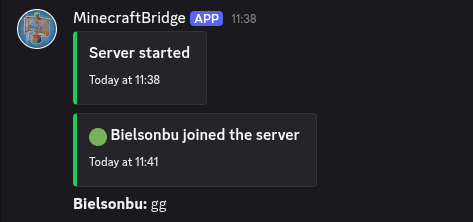 Server started, player joined, minecraft chat message
 -
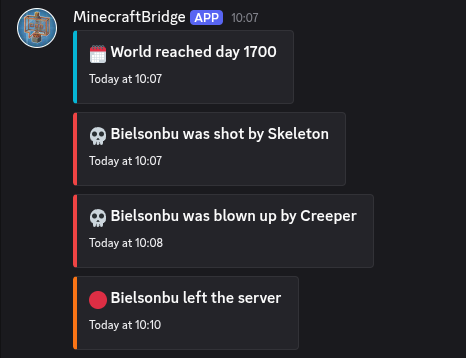 World day, player death, player left
 -
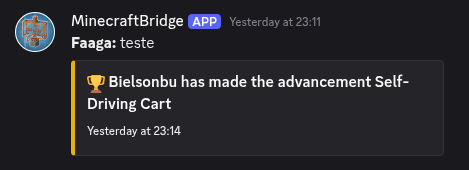 Player achievement
 -
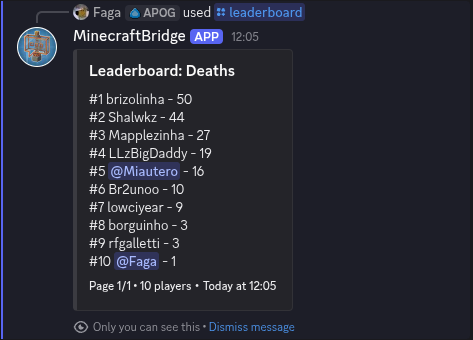 Leaderboard
Versions
Files
Relations
Project Relations
More like this
Similar Mods
Suggestions use data such as tags, dependencies, dependents, descriptions, titles, and more to rank how much they overlap with this mod.
On ModDex
Community snapshot
By the numbers
Statistics

Want to reach Minecraft players?
We're looking for a server hosting partner to feature here and other parts of the site. Interested? Send us a message!
Get in touchGet it on
Available Platforms
On ModDex
Community snapshot
By the numbers