Community listing page, reviews here may not be monitored by the author.
Falling Blocks FPS Fix


No reviews yet
Removes Falling Gravel & Sand From The Game to Reduce Lag 📈

Community voices
Reviews
No reviews yet. Be the first to review this project!
Get it on
Available Platforms
Compatibility
Supported Environments
Must be installed on both the client and the server.
About
Project Details
For authors
Embed Badge
If you're the author of this project, you can embed a live badge anywhere that supports HTML or Markdown. It updates automatically whenever ratings change.
Use HTML for any page that supports it, or Markdown for README files and Markdown-based descriptions.
Identifiers
Platform IDs
About
Description
🧱 Falling Blocks FPS Fix
Clean up falling sand and gravel before they can destroy your performance!
Falling Blocks FPS Fix is a lightweight performance and utility mod that removes nearby falling sand and gravel entities while still preserving their item drops.
This is especially useful in modpacks, large builds, collapsing terrain, world-generation areas, or situations where hundreds of falling blocks can cause heavy FPS drops, server lag, or temporary freezes.
✨ Features
-
🧹 Removes nearby falling block entities
-
🪨 Separate setting for falling gravel
-
🏖️ Separate setting for falling sand and red sand
-
🎁 Removed blocks still drop their normal item
-
👤 Settings are stored separately for each player
-
🖥️ Server-side entity cleanup
-
🎛️ Simple in-game configuration screen
-
⚡ Designed to reduce FPS drops and lag
-
🔄 Settings automatically reset when appropriate
-
🪶 Lightweight and easy to use
🎛️ Falling Block Cleaner GUI
Press:
H
to open the Falling Block Cleaner screen.
Inside the GUI, you can configure the following options independently:
-
🪨
Falling Gravel: Allowed / Disabled -
🏖️
Falling Sand: Allowed / Disabled
This allows you to disable only the falling block types that are causing problems.
🪨 Falling Gravel
When Falling Gravel is set to Disabled:
-
Nearby falling gravel entities are detected
-
The moving falling block entity is removed
-
A gravel item is dropped in its place
This means the gravel is not completely deleted. You can still collect the resource normally.
🏖️ Falling Sand
When Falling Sand is set to Disabled, the mod removes:
-
Sand falling entities
-
Red sand falling entities
Just like gravel, the removed falling block still drops its corresponding item.
🎁 Item Drops Are Preserved
The mod does not simply delete your sand or gravel.
Before a matching falling block entity is removed, the mod creates an item drop for that block.
For example:
-
Falling gravel becomes a gravel item
-
Falling sand becomes a sand item
-
Falling red sand becomes a red sand item
You keep the resources while avoiding large numbers of animated falling entities.
📍 Cleanup Radius
The mod searches for matching falling blocks within a radius of:
96 blocks
around players who have disabled sand, gravel, or both.
Only the selected falling block types are removed.
For example:
-
Gravel disabled + sand allowed = only gravel is cleaned
-
Sand disabled + gravel allowed = only sand and red sand are cleaned
-
Both disabled = all supported falling blocks are cleaned
-
Both allowed = nothing is removed
👤 Per-Player Settings
Each player controls their own cleanup settings.
When you disable falling sand or gravel:
-
The setting only applies around your player
-
Other players do not automatically receive the same setting
-
The server stores your selection using your player UUID
This makes the mod useful on multiplayer servers where different players may want different behavior.
🔄 Setting Resets
The settings are temporary server-session settings.
-
When a player disconnects, their saved selection is removed
-
When the server restarts, all settings return to
Allowed
Players can simply press H again after reconnecting if they want to disable falling blocks.
⚙️ How It Works
The mod uses a simple client-server system:
-
Press
Hto open the GUI. -
Select whether falling sand or gravel should be allowed or disabled.
-
The client sends your selection to the server.
-
The server stores the selection using your UUID.
-
During server ticks, the mod checks players with cleanup enabled.
-
Matching falling block entities within 96 blocks are detected.
-
The corresponding item is dropped.
-
The falling entity is removed.
All important entity removal is handled by the server.
⚠️ Important Behavior
Falling Blocks FPS Fix does not prevent sand or gravel from starting to fall.
Instead, it removes the falling entity after it appears and enters your cleanup radius.
This is intentional.
Because the falling block already exists, the mod can replace it with the correct item drop before removing the moving entity.
The result is:
-
✅ You keep the dropped block
-
✅ Large amounts of falling entities are cleaned up
-
✅ Fewer animated entities remain active
-
✅ Sand and gravel are less likely to destroy your FPS
-
❌ The falling block will not automatically turn back into a placed block
🚀 Recommended For
This mod can be especially helpful for:
-
🧱 Large sand or gravel collapses
-
🌍 Heavy world generation
-
🏗️ Large building projects
-
💥 Explosions near sand or gravel
-
⛏️ Quarry and mining systems
-
🧩 Large modpacks
-
🖥️ Multiplayer servers
-
📉 Low-end systems experiencing FPS drops
-
⚙️ Machines or mods that create falling blocks
⌨️ Default Control
| Action | Key |
|---|---|
| Open Falling Block Cleaner | H |
The key can be changed through Minecraft’s normal Controls menu.
📌 Summary
Falling Blocks FPS Fix gives every player a simple way to clean up nearby falling sand, red sand, and gravel entities.
Disable the problematic block types, preserve their item drops, and prevent huge amounts of falling entities from causing unnecessary FPS drops or server lag.

Disclaimer about product: NOT AN OFFICIAL MINECRAFT PRODUCT. NOT APPROVED BY OR ASSOCIATED WITH MOJANG OR MICROSOFT
🧱 Falling Blocks FPS Fix
Clean up falling sand and gravel before they can destroy your performance!
Falling Blocks FPS Fix is a lightweight performance and utility mod that removes nearby falling sand and gravel entities while still preserving their item drops.
This is especially useful in modpacks, large builds, collapsing terrain, world-generation areas, or situations where hundreds of falling blocks can cause heavy FPS drops, server lag, or temporary freezes.
✨ Features
- 🧹 Removes nearby falling block entities
- 🪨 Separate setting for falling gravel
- 🏖️ Separate setting for falling sand and red sand
- 🎁 Removed blocks still drop their normal item
- 👤 Settings are stored separately for each player
- 🖥️ Server-side entity cleanup
- 🎛️ Simple in-game configuration screen
- ⚡ Designed to reduce FPS drops and lag
- 🔄 Settings automatically reset when appropriate
- 🪶 Lightweight and easy to use
🎛️ Falling Block Cleaner GUI
Press:
H
to open the Falling Block Cleaner screen.
Inside the GUI, you can configure the following options independently:
- 🪨
Falling Gravel: Allowed / Disabled - 🏖️
Falling Sand: Allowed / Disabled
This allows you to disable only the falling block types that are causing problems.
🪨 Falling Gravel
When Falling Gravel is set to Disabled:
- Nearby falling gravel entities are detected
- The moving falling block entity is removed
- A gravel item is dropped in its place
This means the gravel is not completely deleted. You can still collect the resource normally.
🏖️ Falling Sand
When Falling Sand is set to Disabled, the mod removes:
- Sand falling entities
- Red sand falling entities
Just like gravel, the removed falling block still drops its corresponding item.
🎁 Item Drops Are Preserved
The mod does not simply delete your sand or gravel.
Before a matching falling block entity is removed, the mod creates an item drop for that block.
For example:
- Falling gravel becomes a gravel item
- Falling sand becomes a sand item
- Falling red sand becomes a red sand item
You keep the resources while avoiding large numbers of animated falling entities.
📍 Cleanup Radius
The mod searches for matching falling blocks within a radius of:
96 blocks
around players who have disabled sand, gravel, or both.
Only the selected falling block types are removed.
For example:
- Gravel disabled + sand allowed = only gravel is cleaned
- Sand disabled + gravel allowed = only sand and red sand are cleaned
- Both disabled = all supported falling blocks are cleaned
- Both allowed = nothing is removed
👤 Per-Player Settings
Each player controls their own cleanup settings.
When you disable falling sand or gravel:
- The setting only applies around your player
- Other players do not automatically receive the same setting
- The server stores your selection using your player UUID
This makes the mod useful on multiplayer servers where different players may want different behavior.
🔄 Setting Resets
The settings are temporary server-session settings.
- When a player disconnects, their saved selection is removed
- When the server restarts, all settings return to
Allowed
Players can simply press H again after reconnecting if they want to disable falling blocks.
⚙️ How It Works
The mod uses a simple client-server system:
- Press
Hto open the GUI. - Select whether falling sand or gravel should be allowed or disabled.
- The client sends your selection to the server.
- The server stores the selection using your UUID.
- During server ticks, the mod checks players with cleanup enabled.
- Matching falling block entities within 96 blocks are detected.
- The corresponding item is dropped.
- The falling entity is removed.
All important entity removal is handled by the server.
⚠️ Important Behavior
Falling Blocks FPS Fix does not prevent sand or gravel from starting to fall.
Instead, it removes the falling entity after it appears and enters your cleanup radius.
This is intentional.
Because the falling block already exists, the mod can replace it with the correct item drop before removing the moving entity.
The result is:
- ✅ You keep the dropped block
- ✅ Large amounts of falling entities are cleaned up
- ✅ Fewer animated entities remain active
- ✅ Sand and gravel are less likely to destroy your FPS
- ❌ The falling block will not automatically turn back into a placed block
🚀 Recommended For
This mod can be especially helpful for:
- 🧱 Large sand or gravel collapses
- 🌍 Heavy world generation
- 🏗️ Large building projects
- 💥 Explosions near sand or gravel
- ⛏️ Quarry and mining systems
- 🧩 Large modpacks
- 🖥️ Multiplayer servers
- 📉 Low-end systems experiencing FPS drops
- ⚙️ Machines or mods that create falling blocks
⌨️ Default Control
| Action | Key |
|---|---|
| Open Falling Block Cleaner | H |
The key can be changed through Minecraft’s normal Controls menu.
📌 Summary
Falling Blocks FPS Fix gives every player a simple way to clean up nearby falling sand, red sand, and gravel entities.
Disable the problematic block types, preserve their item drops, and prevent huge amounts of falling entities from causing unnecessary FPS drops or server lag.

Disclaimer about product: NOT AN OFFICIAL MINECRAFT PRODUCT. NOT APPROVED BY OR ASSOCIATED WITH MOJANG OR MICROSOFT
Screenshots
Gallery
-
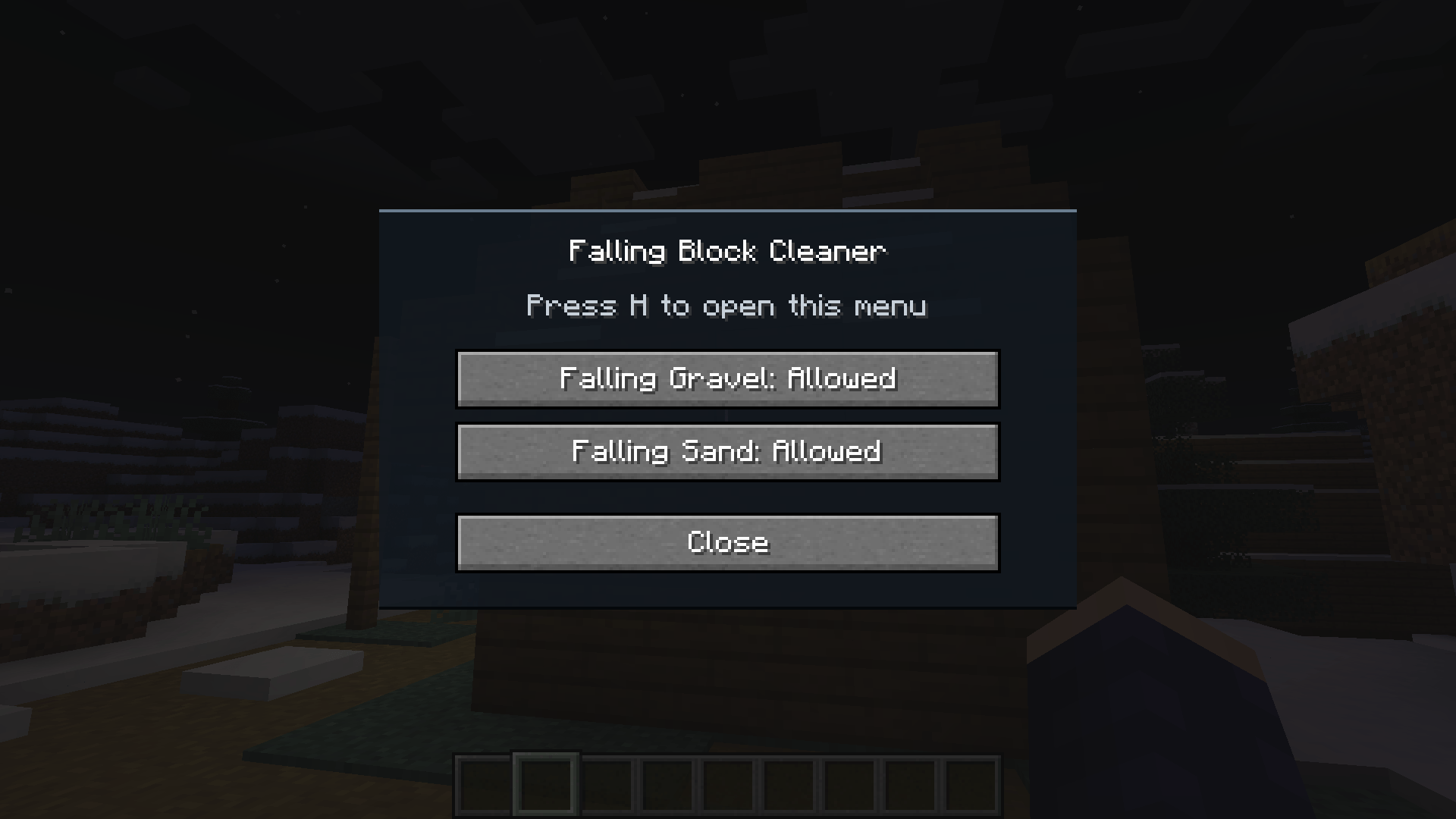 GUI. open with H keybine.png GUI. open with H keybine.png
 -
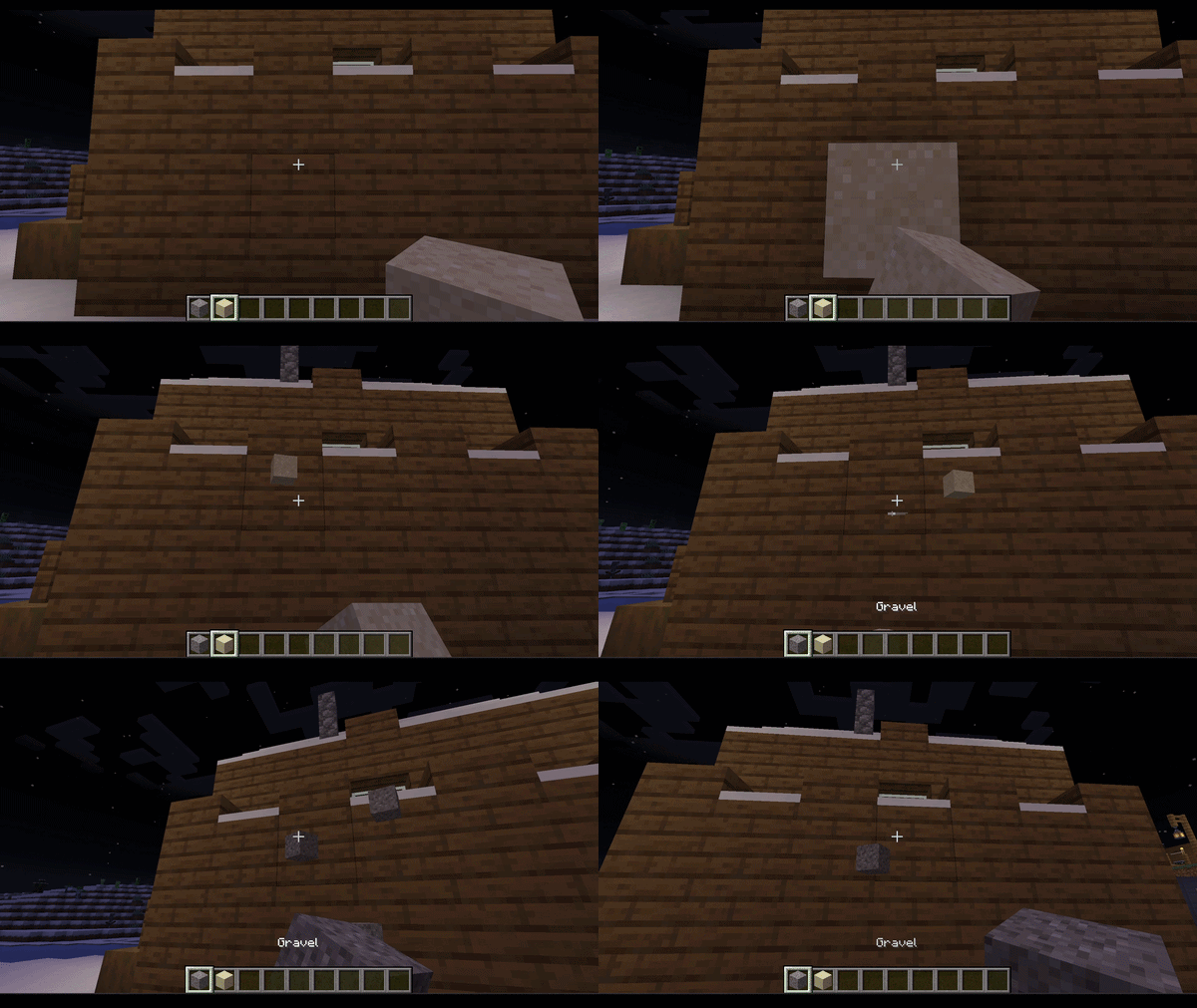 in game showcase.gif in game showcase.gif
-
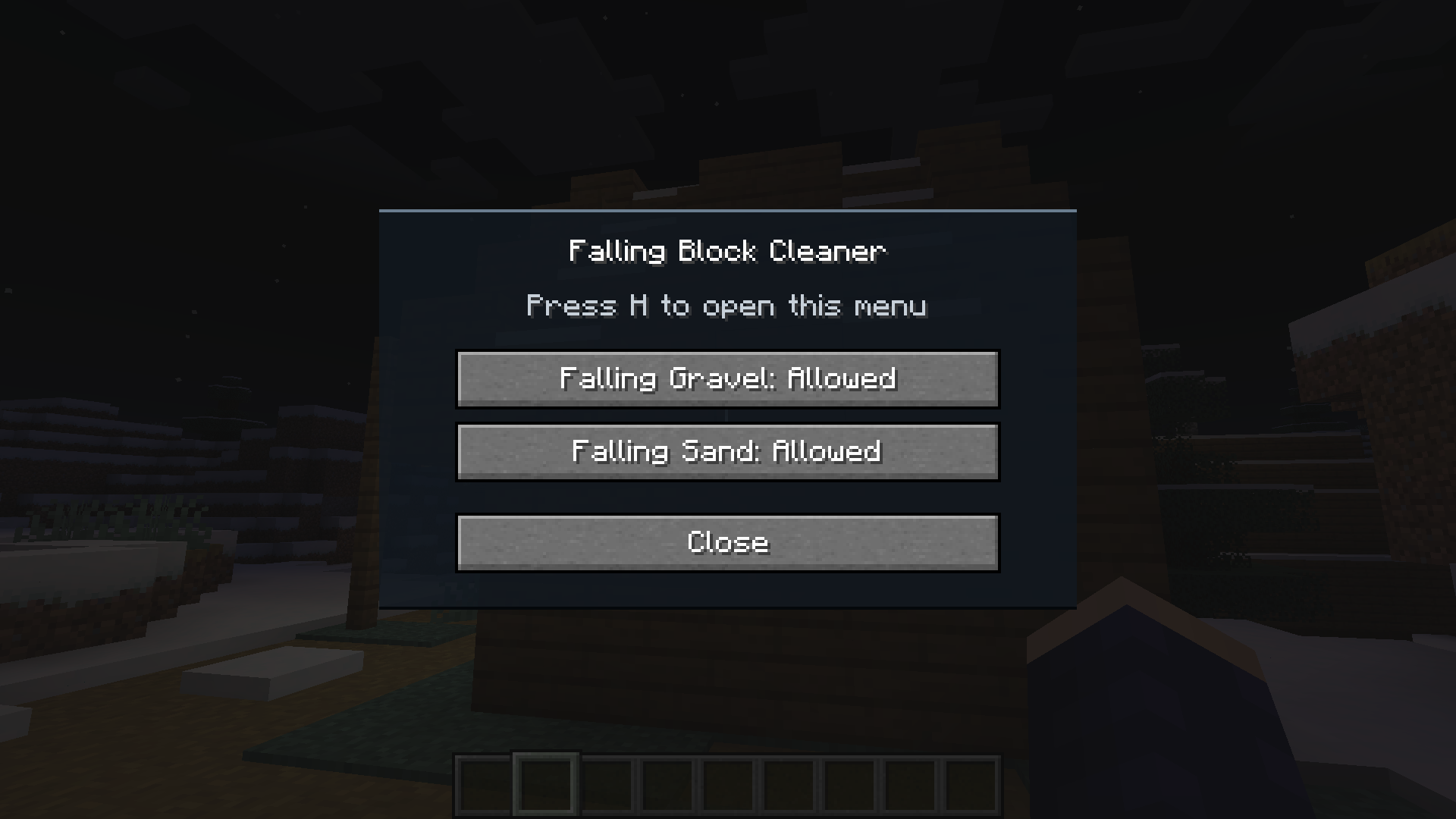 GUI. open with H keybine
 -
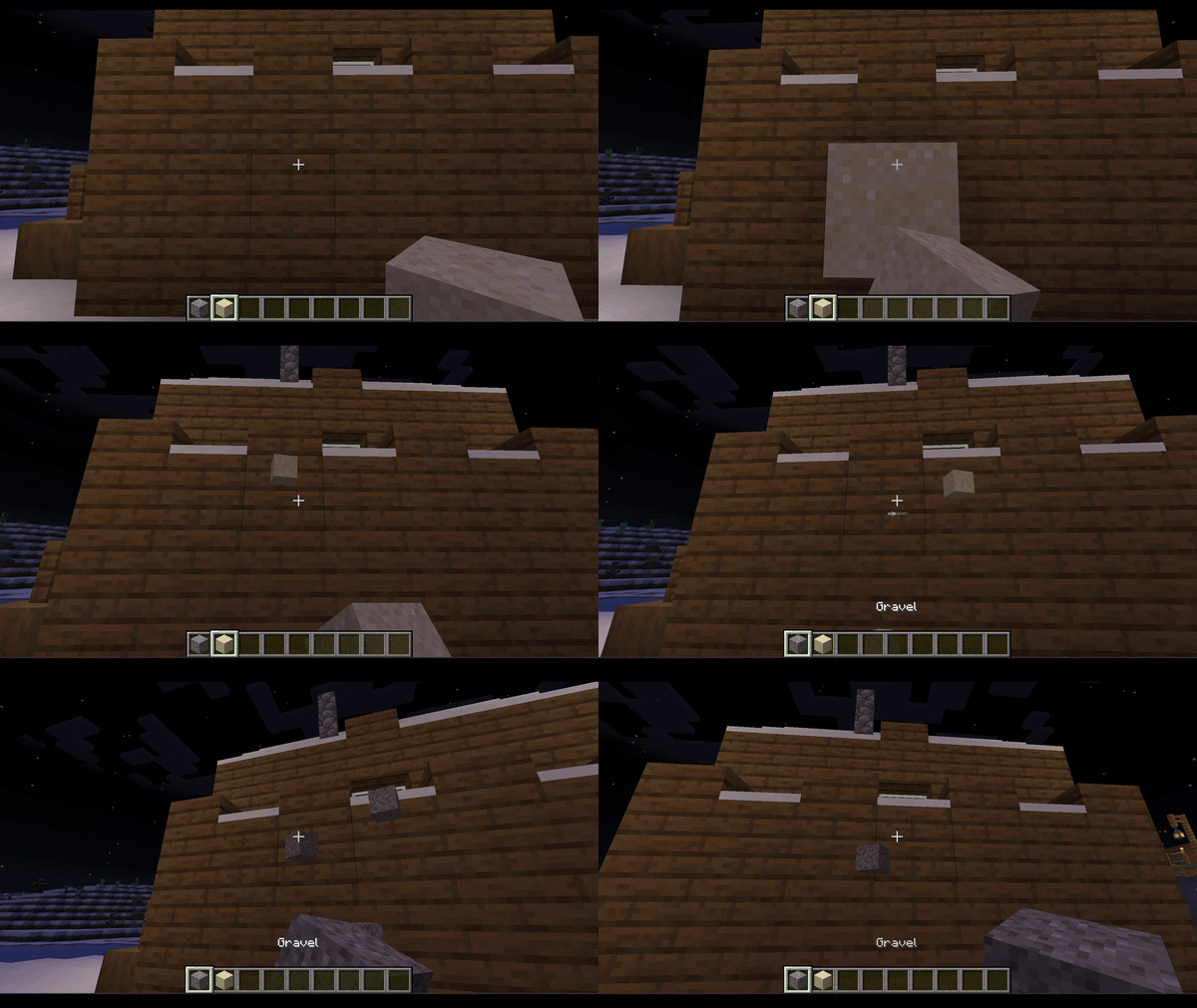 in game showcase
Versions
Files
Relations
Project Relations
More like this
Similar Mods
Suggestions use data such as tags, dependencies, dependents, descriptions, titles, and more to rank how much they overlap with this mod.
On ModDex
Community snapshot
By the numbers
Statistics
 (opens in a new tab)
Get it on
Available Platforms
On ModDex
Community snapshot
By the numbers