
Community listing page, reviews here may not be monitored by the author.
Faster Hoppers

No reviews yet
A plugin that introduces TurboHoppers, allowing specific hoppers to transfer items at a faster rate.
Community voices
Reviews
No reviews yet. Be the first to review this project!
Get it on
Available Platforms
About
Project Details
For authors
Embed Badge
If you're the author of this project, you can embed a live badge anywhere that supports HTML or Markdown. It updates automatically whenever ratings change.
Use HTML for any page that supports it, or Markdown for README files and Markdown-based descriptions.
Identifiers
Platform IDs
About
Description
Faster Hoppers
This plugin introduces TurboHoppers which are upgraded hoppers that transfer items at a much a faster rate, with speeds and recipes all customized and managed through an in-game GUI.
⭐ Core Features
- Craftable, Tiered Hoppers: Create multiple levels of hoppers, each with its own unique recipe and transfer speed.
- Advanced Item Filtering: Set a whitelist or blacklist for each individual hopper to control exactly which items passes through. (Accessed by sneak-right-clicking a TurboHopper with an empty hand).
- Full In-Game GUI Control: Use the /fh settings command to access a menu where you can:
- Visually edit the crafting recipe for each hopper tier.
- Enable or disable the crafting recipe for each tier.
📺 See It In Action
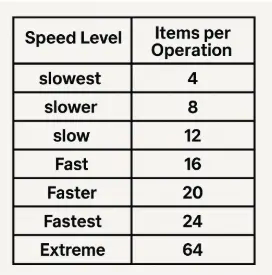
Default TurboHopper Speeds:
⌨️ Commands & Permissions
The main command is /fasterhopper (alias: /fh).
-
/fh settings
- Opens the main settings and editing menu.
- Permission:
fasterhoppers.command.gui
-
/fh give [amount]
- Gives a player a specific type of TurboHopper.
- Permission:
fasterhoppers.command.give
-
/fh reload
- Reloads the plugin's configuration files.
- Permission:
fasterhoppers.command.reload
-
/fh recipes
- Opens a read-only GUI for players to view TurboHopper recipes.
- Permission:
fasterhoppers.command.recipes
-
/sethopperseed
- Advanced hopper configuration and debugging.
- Permission:
fasterhoppers.command.sethopperseed
-
Filter Permission:
fasterhoppers.filter- Allows opening the item filter GUI on a TurboHopper. (Defaults to everyone).
-
Admin Permission:
fasterhoppers.*- Grants access to all plugin commands. (Defaults to OP)
📖 More Information
For detailed instructions, guides, and extra info, check out my wiki page:
🔗 https://xsueddoom.gitbook.io/fasterhoppers-wiki
💡 Suggestions & Feedback
Want to request changes or need support? Join my Discord and share your ideas!
Screenshots
Gallery
-
 Logo
Logo
Versions
Files
Relations
Project Relations
More like this
Similar Mods
Suggestions use data such as tags, dependencies, dependents, descriptions, titles, and more to rank how much they overlap with this mod.
On ModDex
Community snapshot
By the numbers
Statistics

Want to reach Minecraft players?
We're looking for a server hosting partner to feature here and other parts of the site. Interested? Send us a message!
Get in touchGet it on
Available Platforms
On ModDex
Community snapshot
By the numbers