
Community listing page, reviews may not be monitored by the author.
FastFind


No reviews yet
FastFind helps you locate specific items inside any inventory block — chests, furnaces, hoppers, shulker boxes, barrels, you name it.

Community voices
Reviews
No reviews yet. Be the first to review this project!
Get it on
Available Platforms
Compatibility
Supported Environments
Must be installed on both the client and the server.
About
Project Details
For authors
Embed Badge
If you're the author of this project, you can embed a live badge anywhere that supports HTML or Markdown. It updates automatically whenever ratings change.
Use HTML for any page that supports it, or Markdown for README files and Markdown-based descriptions.
Identifiers
Platform IDs
Resources
External Links
About
Description
FastFind
FastFind helps you locate specific items inside any inventory block — chests, furnaces, hoppers, shulker boxes, barrels, you name it. Type what you're looking for and the mod scans nearby containers, marking the right one with an ESP overlay so you're not digging through forty chests by hand.
Requires installation on both server and client
This is not a client-only mod. The scanning logic runs server-side, and the visual markers are rendered client-side — install only one side and the other half simply won't work. If you're running a server, make sure everyone joining has the client version too.
Commands
| Command | Description |
|---|---|
/fastfind scan <itemname> |
Scans nearby inventory blocks and marks the ones containing the item |
/fastfind clear |
Clears all active ESP markers |
/fastfind setrange <value> |
Sets the scan radius |
/fastfind help |
Lists all available commands |
How it works
- Run
/fastfind scan <itemname>with the item you're looking for - The server scans loaded inventory blocks within your set range
- Matching containers get outlined with an ESP marker
- Use
/fastfind clearanytime to remove the markers
Features
- Inventory scanning – searches nearby chests, furnaces, hoppers, barrels, and shulker boxes for a given item
- ESP markers – highlights the exact block containing your item so you can spot it at a glance
- Adjustable range – tune the scan radius with
/fastfind setrangeto fit your build - Multiplayer-ready – built around a proper server/client sync, so it behaves correctly on SMP servers instead of just guessing
- Minimal config – simple command-based usage, no setup maze
Notes
- Check the version compatibility list below before adding this to a modpack.
FastFind
FastFind helps you locate specific items inside any inventory block — chests, furnaces, hoppers, shulker boxes, barrels, you name it. Type what you're looking for and the mod scans nearby containers, marking the right one with an ESP overlay so you're not digging through forty chests by hand.
Requires installation on both server and client
This is not a client-only mod. The scanning logic runs server-side, and the visual markers are rendered client-side — install only one side and the other half simply won't work. If you're running a server, make sure everyone joining has the client version too.
Commands
| Command | Description |
|---|---|
/fastfind scan <itemname> |
Scans nearby inventory blocks and marks the ones containing the item |
/fastfind clear |
Clears all active ESP markers |
/fastfind setrange <value> |
Sets the scan radius |
/fastfind help |
Lists all available commands |
How it works
- Run
/fastfind scan <itemname>with the item you're looking for - The server scans loaded inventory blocks within your set range
- Matching containers get outlined with an ESP marker
- Use
/fastfind clearanytime to remove the markers
Features
- Inventory scanning – searches nearby chests, furnaces, hoppers, barrels, and shulker boxes for a given item
- ESP markers – highlights the exact block containing your item so you can spot it at a glance
- Adjustable range – tune the scan radius with
/fastfind setrangeto fit your build - Multiplayer-ready – built around a proper server/client sync, so it behaves correctly on SMP servers instead of just guessing
- Minimal config – simple command-based usage, no setup maze
Notes
- Check the version compatibility list below before adding this to a modpack.
Screenshots
Gallery
-
 image-attachment_5e74394c-a4bb-4d02-98cc-52f3b9c99676.png Finding the Right Chest
-
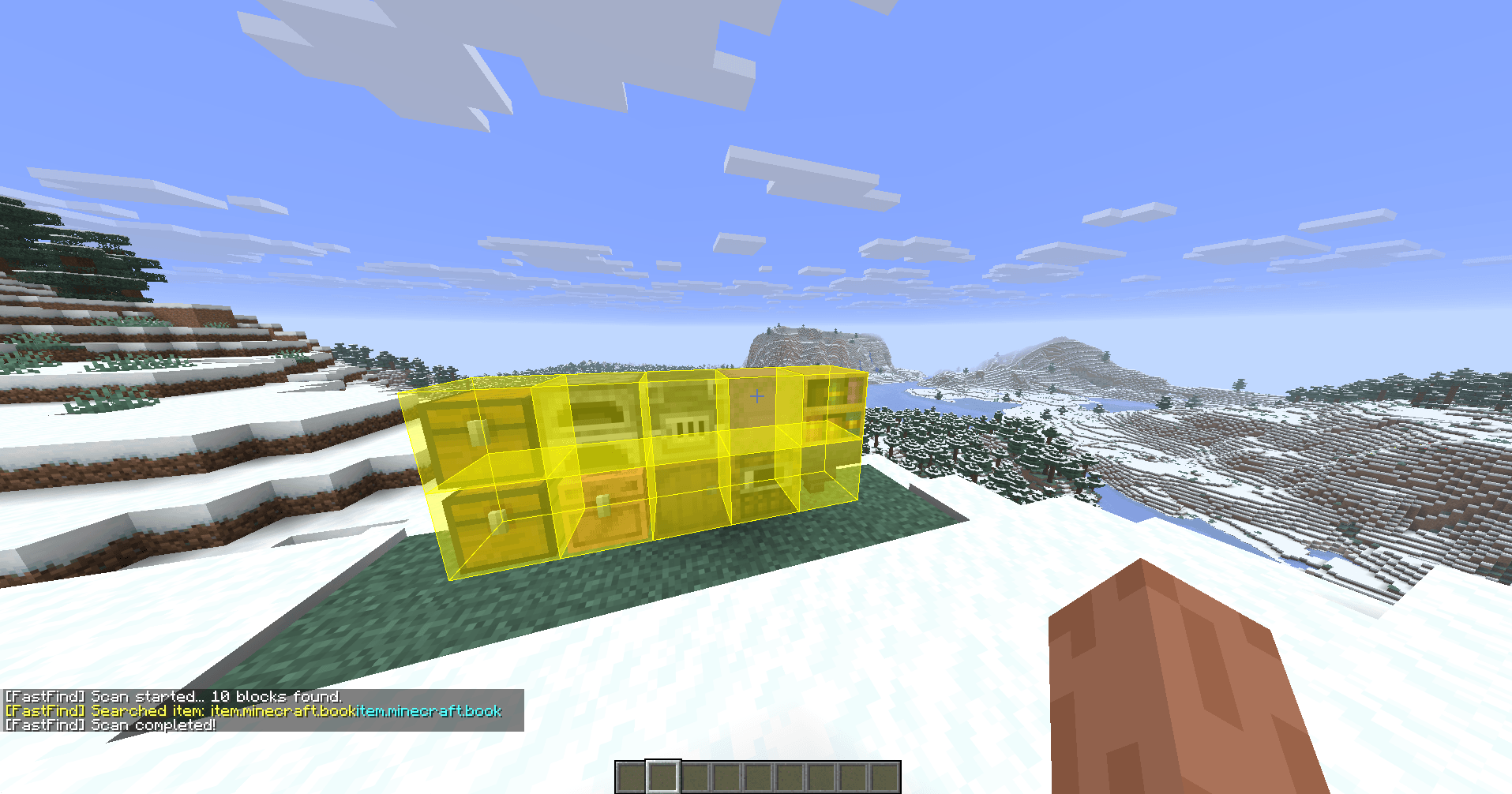 image-attachment_275b2da1-15f6-40dc-b903-2a9b4593f436.png Multi-Container ESP Scan
-
 Multi-Container ESP Scan Command run across multiple containers — every match gets an ESP marker instantly.
-
 Finding the Right Chest FastFind scans them all and marks only the one containing the searched item.
-
 Command in Action /fastfind runs across five chests, each holding a diamond, and marks the one that actually matches.
Versions
Files
Relations
Project Relations
More like this
Similar Mods
Suggestions use data such as tags, dependencies, dependents, descriptions, titles, and more to rank how much they overlap with this mod.
On ModDex
Community snapshot
By the numbers
Statistics

Get it on
Available Platforms
On ModDex
Community snapshot
By the numbers
Statistics
Resources