
Community listing page, reviews here may not be monitored by the author.
Fated Inventory


No reviews yet
A unique take on preserving the inventory and experience on death

Community voices
Reviews
No reviews yet. Be the first to review this project!
Get it on
Available Platforms
Compatibility
Supported Environments
Must be installed on both the client and the server.
About
Project Details
For authors
Embed Badge
If you're the author of this project, you can embed a live badge anywhere that supports HTML or Markdown. It updates automatically whenever ratings change.
Use HTML for any page that supports it, or Markdown for README files and Markdown-based descriptions.
Identifiers
Platform IDs
About
Description
Fated Inventory
The Altar of Fate
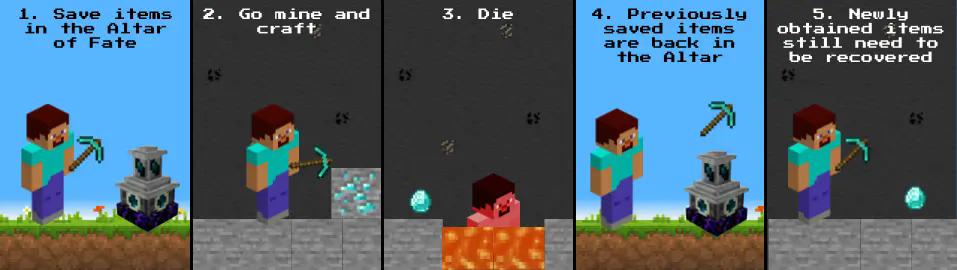
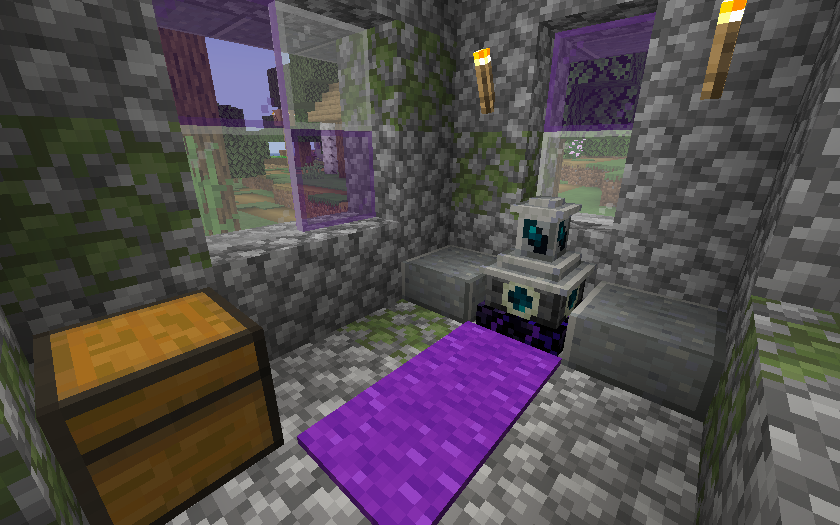 Fated Inventory is centered around one block, the Altar of Fate, which can be found in villages or crafted. When you interact with the Altar of Fate, the items and experience currently in your inventory will be sealed to your fate. If you then die, anything that were sealed to your fate that remains in your inventory when you died will not be dropped. Instead, they remain as part of your fate and can be collected by interacting with the Altar of Fate again (it does not need to be the same altar). If you want to clear your fate for whatever reason, you can interact with the Altar of Fate using shears.
Charging
By default, the Altar of Fate can be used at no cost other than obtaining it. There is a configuration option to enable a charging mechanic similar to the respawn anchor. Interacting with the Altar of Fate using Glowstone will increase its charge by 1, for a maximum of 4 charges (the current charge level is indicated by a dial on the altar, similar to the respawn anchor). When enabled, you will need at least one charge to seal your fate, and retrieving your items will cost one charge.
Container Items
Items that store other items, such as Shulker Boxes, Bundles, and Backpacks are too complex to be fully sealed with your fate. Thus they will only be sealed with your fate if their contents do not change in between being sealed and dying. If you ever can't find an item in the Altar of Fate, check to see if it was dropped at your death location instead.
Compatibility
Fated Inventory includes compatibility with Trinkets (including Trinkets Canary, Trinkets Updated, and Trinkets Canary Fork for 1.21.11), Curios, and Accessories (not yet available for 1.21.11) - items placed in the inventory slots added by those mods should correctly be saved and retrieved using the Altar of Fate.
Fated Inventory may be incompatible with some gravestone mods, from testing Pneumono's Gravestones, You're in Grave Danger and the graves from Quark Oddities work as expected.
Fated Inventory may have compatibility issues with mods that alter death mechanics.
If upgrading to 1.21.11 or above from an earlier version, all fated inventory data will be reset as the data format changed. After upgrading, remember to seal your fate again.
Commands
Fated Inventory adds one new command, /fatedinventory which can be used by operators to manage the fated inventory mechanic. It takes in a player target selector and one of six subcommands:
seal- Seals the player's current inventory to their fate, replacing any existing contentsunseal- Clears the player's fate (equivalent to right-clicking on the altar with shears)sealed- Lists all items currently in the player's fateretrieve- Retrieves and clears all stored items after a player has diedclear- Clears all stored items after a player has diedlist- Lists all items currently stored after a player has died
Configuration
Fated Inventory is highly customizable, providing several configuration options and datapack item tags. Note that not all of these configuration options are present on all versions, in particular the 1.20.1 versions are missing some features.
As of release 1.3.0, configuration for the generation of the village structures is now done using datapacks.
Config File
The config file (fated_inventory.json) is not automatically synced between clients, make sure that the server and all clients have identical config files, otherwise unexpected behavior may occur.
fateStoresXp- whether experience is saved when your fate is sealed, defaults to truefateStoresItems- whether items are saved when your fate is sealed, defaults to true - could be disabled if you only want to store experiencefatedAltarRequiresCharges- whether the Altar of Fate requires charges to function, defaults to falserunningOutOfChargesClearsFate- whether to automatically clear your fate when the altar runs out of charges to prevent items from getting stuck in the altar, defaults to true - has no effect unless charges are enabledshowMessageOnRespawn- whether to show a message when you respawn with items in the Altar of Fate that can be retrieved - defaults to trueanyNonstackableAllowsModifiedComponents- whether all nonstackable items should persist in the Altar of Fate even if their components have changed between being added and retrieved - defaults to falseanyDurabilityItemAllowsModifiedComponents- whether all items with durability bars should persist in the Altar of Fate even if their components have changed between being added and retrieved - defaults to true
Item Tags
fated_inventory:charges_fated_altar- items that can be used to charge to Altar of Fate when charging is enabled - defaults to Glowstone- Note that this item will also be generated in the loot chests in some of the village altar buildings added by this mod - to disable that, modify the loot table
fated_inventory:chests/altar_building
- Note that this item will also be generated in the loot chests in some of the village altar buildings added by this mod - to disable that, modify the loot table
fated_inventory:not_saved_in_altar- items that will not be saved with the Altar of Fate - defaults to a few appropriate items from other modsfated_inventory:allow_modified_components- items that considered to be the same item in the Altar of Fate even if their item components (durability, enchantments, etc.) have changes - only works for non-stackable items - defaults to tools, armor, and enchantable items (as determined by thec:tools,c:armors, andc:enchantablesitem tags)
Enchantments Tags
fated_inventory:not_saved_in_altar- enchantments that will prevents the enchanted item from being saved with the Altar of Fate - defaults to the soulbound enchantments from several mods that add it
Fated Inventory
The Altar of Fate
Fated Inventory is centered around one block, the Altar of Fate, which can be found in villages or crafted. When you interact with the Altar of Fate, the items currently in your inventory will be sealed to your fate. If you then die, any items that were sealed to your fate that remain in your inventory when you died will not be dropped. Instead, they remain as part of your fate and can be collected by interacting with the Altar of Fate again (it does not need to be the same altar). This also works with experience. If you want to clear your fate for whatever reason, you can interact with the Altar of Fate using shears.
Charging
By default, the Altar of Fate can be used at no cost other than obtaining it. There is a configuration option to enable a charging mechanic similar to the respawn anchor. Interacting with the Altar of Fate using Glowstone will increase its charge by 1, for a maximum of 4 charges (the current charge level is indicated by a dial on the altar, similar to the respawn anchor). When enabled, you will need at least one charge to seal your fate, and retrieving your items will cost one charge.
Container Items
Items that store other items, such as Shulker Boxes, Bundles, and Backpacks are too complex to be fully sealed with your fate. Thus they will only be sealed with your fate if their contents do not change in between being sealed and dying. If you ever can't find an item in the Altar of Fate, check to see if it was dropped at your death location instead.
Compatibility
Fated Inventory includes compatibility with Trinkets (including Trinkets Canary, Trinkets Updated, and Trinkets Canary Fork for 1.21.11), Curios, and Accessories (not yet available for 1.21.11) - items placed in the inventory slots added by those mods should correctly be saved and retrieved using the Altar of Fate.
Fated Inventory may be incompatible with some gravestone mods, from testing Pneumono's Gravestones, You're in Grave Danger and the graves from Quark Oddities work as expected.
Fated Inventory may have compatibility issues with mods that alter death mechanics.
If upgrading to 1.21.11 or above from an earlier version, all fated inventory data will be reset as the data format changed. After upgrading, remember to seal your fate again.
Configuration
Fated Inventory is highly customizable, providing several configuration options and datapack item tags. Note that not all of these configuration options are present on all versions, in particular the 1.20.1 versions are missing some features. As of release 1.3.0, configuration for the generation of the village structures is now done using datapacks.
Config File
The config file (fated_inventory.json) is not automatically synced between clients, make sure that the server and all clients have identical config files, otherwise unexpected behavior may occur.
fateStoresXp- whether experience is saved when your fate is sealed, defaults to truefatedAltarRequiresCharges- whether the Altar of Fate requires charges to function, defaults to falseshowMessageOnRespawn- whether to show a message when you respawn with items in the Altar of Fate that can be retrieved - defaults to trueanyNonstackableAllowsModifiedComponents- whether all nonstackable items should persist in the Altar of Fate even if their components have changed between being added and retrieved - defaults to falseanyDurabilityItemAllowsModifiedComponents- whether all items with durability bars should persist in the Altar of Fate even if their components have changed between being added and retrieved - defaults to true
Item Tags
fated_inventory:charges_fated_altar- items that can be used to charge to Altar of Fate when charging is enabled - defaults to Glowstone- Note that this item will also be generated in the loot chests in some of the village altar buildings added by this mod - to disable that, modify the loot table
fated_inventory:chests/altar_building
fated_inventory:not_saved_in_altar- items that will not be saved with the Altar of Fate - defaults to a few appropriate items from other modsfated_inventory:allow_modified_components- items that considered to be the same item in the Altar of Fate even if their item components (durability, enchantments, etc.) have changes - only works for non-stackable items - defaults to tools, armor, and enchantable items (as determined by thec:tools,c:armors, andc:enchantablesitem tags)
- Note that this item will also be generated in the loot chests in some of the village altar buildings added by this mod - to disable that, modify the loot table
Enchantments Tags
fated_inventory:not_saved_in_altar- enchantments that will prevents the enchanted item from being saved with the Altar of Fate - defaults to the soulbound enchantments from several mods that add it
Screenshots
Gallery
-
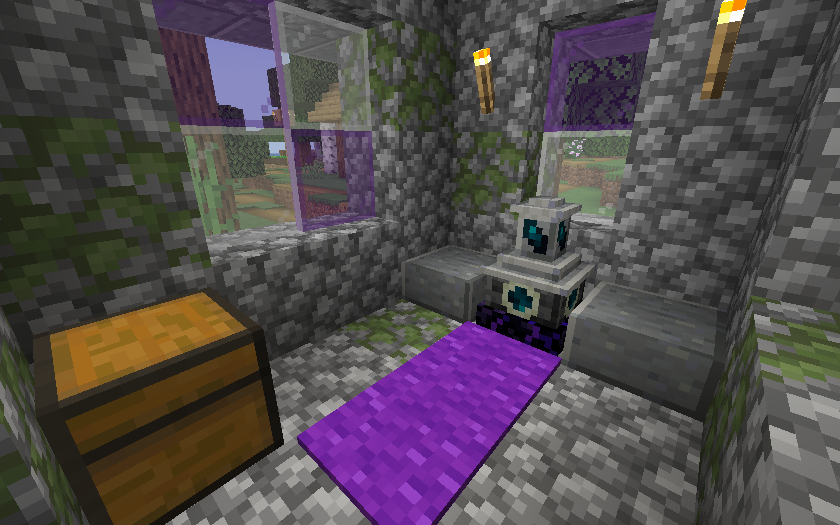 Altar of Fate in a Plains Village The Altar of Fate can be found in crafted or found in villages
Versions
Files
Relations
Project Relations
More like this
Similar Mods
Suggestions use data such as tags, dependencies, dependents, descriptions, titles, and more to rank how much they overlap with this mod.
On ModDex
Community snapshot
By the numbers
Statistics
 (opens in a new tab)
Get it on
Available Platforms
On ModDex
Community snapshot
By the numbers