
Community listing page, reviews may not be monitored by the author.
Find It


No reviews yet
Find any item around with a press of a button!

Community voices
Reviews
No reviews yet. Be the first to review this project!
Get it on
Available Platforms
Compatibility
Supported Environments
Must be installed on both the client and the server.
About
Project Details
For authors
Embed Badge
If you're the author of this project, you can embed a live badge anywhere that supports HTML or Markdown. It updates automatically whenever ratings change.
Use HTML for any page that supports it, or Markdown for README files and Markdown-based descriptions.
Identifiers
Platform IDs
About
Description

Find It
Find It allows you to find items you want in nearby inventories around you. Simply press 'Y' (Default keybind) on any item in your inventory (or JEI or similar) and look around for all the highlighted storage around you!
Note: It doesn't look at chest where loot has not been generated (For example dungeons and such). This is in line with how the Spectator works.
Config
Client sided config that allows you to change the colour of the highlight as well as how long it will appear for. Accessible via your usual config files or changable in game using commands.
Colour
Changes the colour of the highlight.
/findit color red green blue where the red, green and blue values are between 0 and 255.
Timer:
Changes the time the higlight is shown for.
/findit timer time where time is the amount of ticks the highlight is displayed for, between 10 and 300.
Find It
Find It allows you to find items you want in nearby inventories around you. Simply press 'Y' (Default keybind) on any item in your inventory (or JEI or similar) and look around for all the highlighted storage around you!
Note: It doesn't look at chest where loot has not been generated (For example dungeons and such). This is in line with how the Spectator works.
Config
Client sided config that allows you to change the colour of the highlight as well as how long it will appear for. Accessible via your usual config files or changable in game using commands.
Colour
Changes the colour of the highlight.
/findit color <red> <green> <blue> where the red, green and blue values are between 0 and 255.
Timer:
Changes the time the higlight is shown for.
/findit timer <time> where time is the amount of ticks the highlight is displayed for, between 10 and 300.
Screenshots
Gallery
-
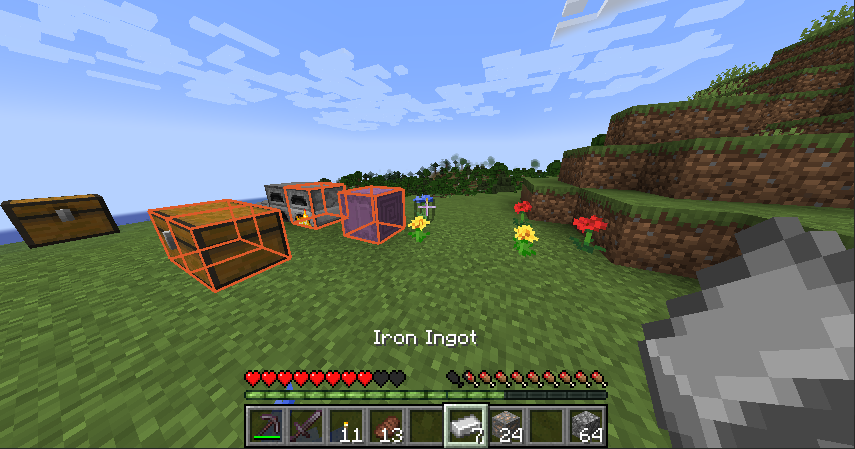 Highlights Highlighted inventories showing where iron ingots are
-
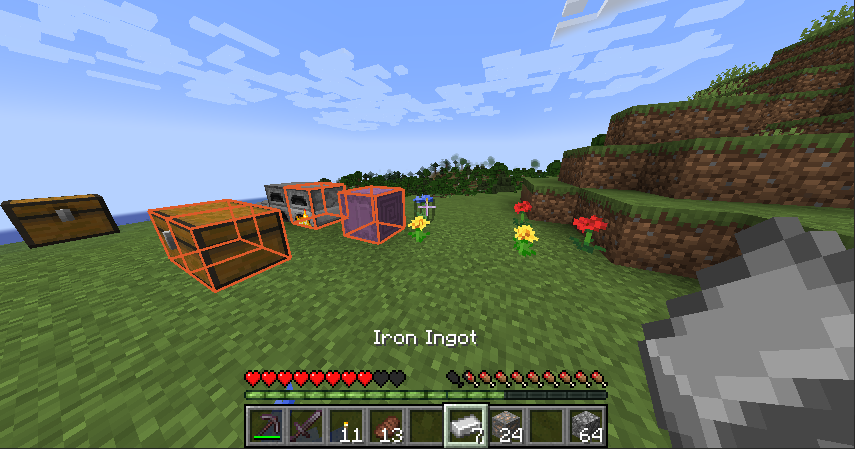 Highlights Highlighted inventories finding Iron Ingots
Versions
Files
Relations
Project Relations
More like this
Similar Mods
Suggestions use data such as tags, dependencies, dependents, descriptions, titles, and more to rank how much they overlap with this mod.
On ModDex
Community snapshot
By the numbers
Statistics

Get it on
Available Platforms
On ModDex
Community snapshot
By the numbers