Community listing page, reviews may not be monitored by the author.
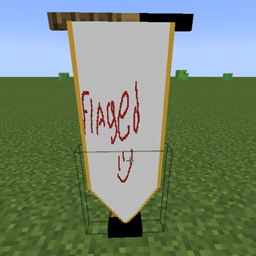
Flaged

No reviews yet
Design, import, and build fully customizable multi-block flags and banners in-game with a built-in Paint Engine, custom shapes, and dual-sided support.

Community voices
Reviews
No reviews yet. Be the first to review this project!
Get it on
Available Platforms
About
Project Details
For authors
Embed Badge
If you're the author of this project, you can embed a live badge anywhere that supports HTML or Markdown. It updates automatically whenever ratings change.
Use HTML for any page that supports it, or Markdown for README files and Markdown-based descriptions.
Identifiers
Platform IDs
Resources
External Links
About
Description
Flagged
Flagged is a feature-packed Minecraft mod that lets you design, customize, and display fully custom banners and flags right inside your world. Whether you want to paint pixel art in-game or import real images, Flagged gives you complete creative freedom to fly your colors in style.
🌟 Key Features
🎨 In-Game Paint Engine
Interact with the Weaver's Easel to open an intuitive, feature-rich pixel art editor:
-
Tools Included: Brush, Pencil, Fill Bucket, Eraser, and Eyedropper.
-
Canvas Controls: Adjustable brush sizes (1px, 2px, 4px), Undo/Redo actions, and clear coordinate tracking ($X, Y$).
-
Color Palette: Full Hex/HSV picker along with instant access to standard Minecraft dye colors.
-
Design Presets: Save, load, and overwrite your favorite templates for quick reuse.
🖼️ External Image Import
-
Drag-and-Drop: Easily import custom images by dragging them into the game window.
-
Smart Scaling: Choose between Keep Aspect, Crop, or Stretch modes.
-
Color Reduction: Convert images to match the Minecraft color palette automatically.
📐 Unmatched Customization
-
Flexible Sizing: Adjust flag width and height dynamically, supporting resolutions up to 128px per side.
-
Unique Edge Shapes:
-
Straight Edge
-
Swallowtail
-
Pointed
-
Rounded
-
Battlement
-
Concave Arch
-
Pennant
-
-
Decorative Trims: Enhance your borders with Gold or Silver trims using nuggets.
-
Two-Sided Customization: Set back-face rendering to Mirror, Readable (flip text correctly), or draw Separate Art on each side.
🧵 Crafting & Usage
-
Craft a Weaver's Easel and place it in your world.
-
Open the GUI to start painting or import an image.
-
Gather Materials: Creating or updating a flag requires wool, dyes (1 per block size), and metallic nuggets if adding trims.
-
Place Your Flag: Hang your new custom banner on wall mounts or ground poles.
💬 Support
Found a bug or have an idea? Join the Discord: **[https://discord.gg/uEyNJYWcGM]**
Screenshots
Gallery
Versions
Files
Relations
Project Relations
More like this
Similar Mods
Suggestions use data such as tags, dependencies, dependents, descriptions, titles, and more to rank how much they overlap with this mod.
On ModDex
Community snapshot
By the numbers
Statistics

Get it on
Available Platforms
On ModDex
Community snapshot
By the numbers
Statistics
Resources