Community listing page, reviews here may not be monitored by the author.
Flat Trans

No reviews yet
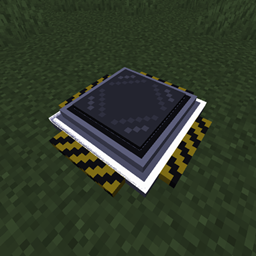
Turn a simple floor block into a teleporter network. Place Flat Trans blocks to form a rectangle and they merge into one nameable pad. Right-click to pick a destination, travel across dimensions, rename or remove pads, and see them on JourneyMap.

Community voices
Reviews
No reviews yet. Be the first to review this project!
Get it on
Available Platforms
About
Project Details
For authors
Embed Badge
If you're the author of this project, you can embed a live badge anywhere that supports HTML or Markdown. It updates automatically whenever ratings change.
Use HTML for any page that supports it, or Markdown for README files and Markdown-based descriptions.
Identifiers
Platform IDs
Resources
External Links
About
Description
Flat Trans
A lightweight NeoForge mod for Minecraft 1.21.1 that turns a simple floor block into a rectangular teleporter network — no portal frame to craft, no complex machinery. Place one or more Flat Trans blocks edge-to-edge to fill a rectangle, and it becomes a single teleport pad you can name, rename, and jump between.
Features
- Placement is the setup. Drop a single
Flat Transblock and it's immediately a working teleporter. - Multi-block pads. Place several blocks edge-to-edge so they exactly fill a rectangle (no gaps, no notches) and they automatically merge into one larger teleport pad, registered at the rectangle's lowest-coordinate corner. A connected shape that isn't a perfect rectangle isn't registered as a destination, but any already-named pad involved keeps its name intact until the shape is completed.
- Cross-dimension travel. Destinations aren't limited to the current dimension — teleporters in the Nether, the End, or any other dimension appear in the destination list too, with same-dimension destinations sorted first by distance.
- In-world destination picker. Right-click any block of a valid pad to open a paginated menu listing every other registered teleporter.
- Naming. Rename a pad from the destination screen, or place a block using an anvil-renamed item to name it on placement.
- Safe deletion. Hold the "X" button next to a destination for one second to permanently remove it from the network — the deliberate hold prevents accidental deletes.
- Optional JourneyMap integration. If JourneyMap is installed, every valid teleporter pad automatically gets a shared waypoint marker visible to every player, kept in sync as pads are built, merged, or renamed.
Requirements
| Minecraft | 1.21.1 |
| Mod Loader | NeoForge 21.1.235+ |
| Java | 21 |
| JourneyMap | (optional) 1.21.1-6.0.0-beta.1+ — only needed for teleporter waypoints on the map |
Installation
- Install NeoForge for Minecraft 1.21.1.
- Download the latest
flattrans-*.jarfrom Releases / CurseForge / Modrinth. - Drop the jar into your
modsfolder. - (Optional) Install JourneyMap if you want teleporter locations to show up on the map. No configuration needed — it's detected automatically.
Crafting
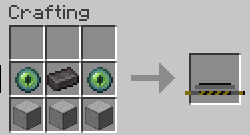
2 Ender Eyes + 1 Netherite Ingot + 3 Smooth Stone → 1 Flat Trans block. The two rows can be swapped (Ender Eyes/Netherite Ingot on top or bottom row both work).
How It Works
Building a teleporter
Place Flat Trans blocks on solid ground. A single block is already a working 1×1 teleporter. Placing more blocks edge-to-edge so they exactly fill a rectangle (say, a 2×3 area with no missing corners) merges them into one larger pad.
Teleporting
Right-click any block of a valid pad to open the destination screen. Pick a destination to teleport there, landing in the center of the pad if it's larger than 1×1.
Naming
- Type a name into the field at the top of the destination screen — it saves when the screen closes.
- Or rename the item in an anvil before placing it; the block takes that name on placement.
Deleting a destination
Open the destination screen and hold the "X" button next to any entry for one second. This removes that teleporter from the network — including its JourneyMap marker, if any — without needing to physically break the blocks.
JourneyMap Integration
Flat Trans has a soft (optional) dependency on JourneyMap — the mod works fully without it, and there's nothing to configure if it's installed. When present:
- Forming a valid rectangular pad creates a shared waypoint, visible to every player, at the pad's anchor corner.
- Renaming a pad updates its waypoint's name to match.
- Breaking blocks does not remove the waypoint automatically — waypoints are only removed by deleting the destination from the in-game menu (see above), so the map doesn't lose a marker just because a pad is being rebuilt.
Building From Source
git clone https://github.com/BadlyacX/FlatTrans.git
cd FlatTrans
./gradlew build
The built jar will be in build/libs/.
License
Licensed under the MIT License.
Screenshots
Gallery
Versions
Files
Relations
Project Relations
More like this
Similar Mods
Suggestions use data such as tags, dependencies, dependents, descriptions, titles, and more to rank how much they overlap with this mod.
On ModDex
Community snapshot
By the numbers
Statistics
 (opens in a new tab)
Get it on
Available Platforms
On ModDex
Community snapshot
By the numbers
Statistics
Resources