
Community listing page, reviews here may not be monitored by the author.
FM Resource Pack Updater


No reviews yet
Add button and ticker actions that make you able to check your resource pack version and update from a Github repository !
Community voices
Reviews
No reviews yet. Be the first to review this project!
Get it on
Available Platforms
Compatibility
Supported Environments
Runs entirely on the client. Works on vanilla servers.
About
Project Details
For authors
Embed Badge
If you're the author of this project, you can embed a live badge anywhere that supports HTML or Markdown. It updates automatically whenever ratings change.
Use HTML for any page that supports it, or Markdown for README files and Markdown-based descriptions.
Identifiers
Platform IDs
About
Description
FM Resource Pack Updater
Resource Pack Updater is an extension for the mod Fancy Menu.
It allows you to set a GitHub repository as a source for updating a resource pack.
Fast setup
Github side
You need to have a GitHub repository on which you have the right to create a release. To publish a new version of your resource pack, you just need to publish a new release with your .zip attached to it.
Minecraft side
You need to have FancyMenu and FM Resource Pack Updater installed. Be careful, FancyMenu depends on other mods to run, you should install them too.
There is a fm_setup.zip provided with the release as secondary file (Download it here). Download it, copy it to your .minecraft/fancymenu_setups/exported_setups, and unzip it there.
Launch Minecraft for the first time and from the Setup menu in the top customization bar, import the setup you just downloaded. Close minecraft.
Then you need to go and modify your .minecraft/config/upgraderp_config.properties. Put your repository references in the corresponding variables. "rp.name.regex" should be a regular expression corresponding to your RP name. "*.zip" should work with all names possible, but the update will override the first resource pack in your selected list.
Launch Minecraft again. If you did well and the RP is not already set in your game, the update button should appear.
FM Resource Pack Updater
Resource Pack Updater is an extension for the mod Fancy Menu.
It allows you to set a GitHub repository as a source for updating a resource pack.
Fast setup
Github side
You need to have a GitHub repository on which you have the right to create a release. To publish a new version of your resource pack, you just need to publish a new release with your .zip attached to it.
Minecraft side
You need to have FancyMenu and FM Resource Pack Updater installed. Be careful, FancyMenu depends on other mods to run, you should install them too.
There is a fm_setup.zip provided with the release as a secondary file (Download it here). Download it, copy it to your .minecraft/fancymenu_setups/exported_setups, and unzip it here.
Launch Minecraft for the first time and from the Setup menu in the top customization bar, import the setup you just downloaded. Close minecraft.
Then you need to go and modify your .minecraft/config/upgraderp_config.properties. Put your repository references in the corresponding variables. "rp.name.regex" should be a regular expression corresponding to your RP name. "*.zip" should work with all names possible, but the update will override the first resource pack in your selected list.
Launch Minecraft again. If you did well and the RP is not already set in your game, the update button should appear.
Screenshots
Gallery
-
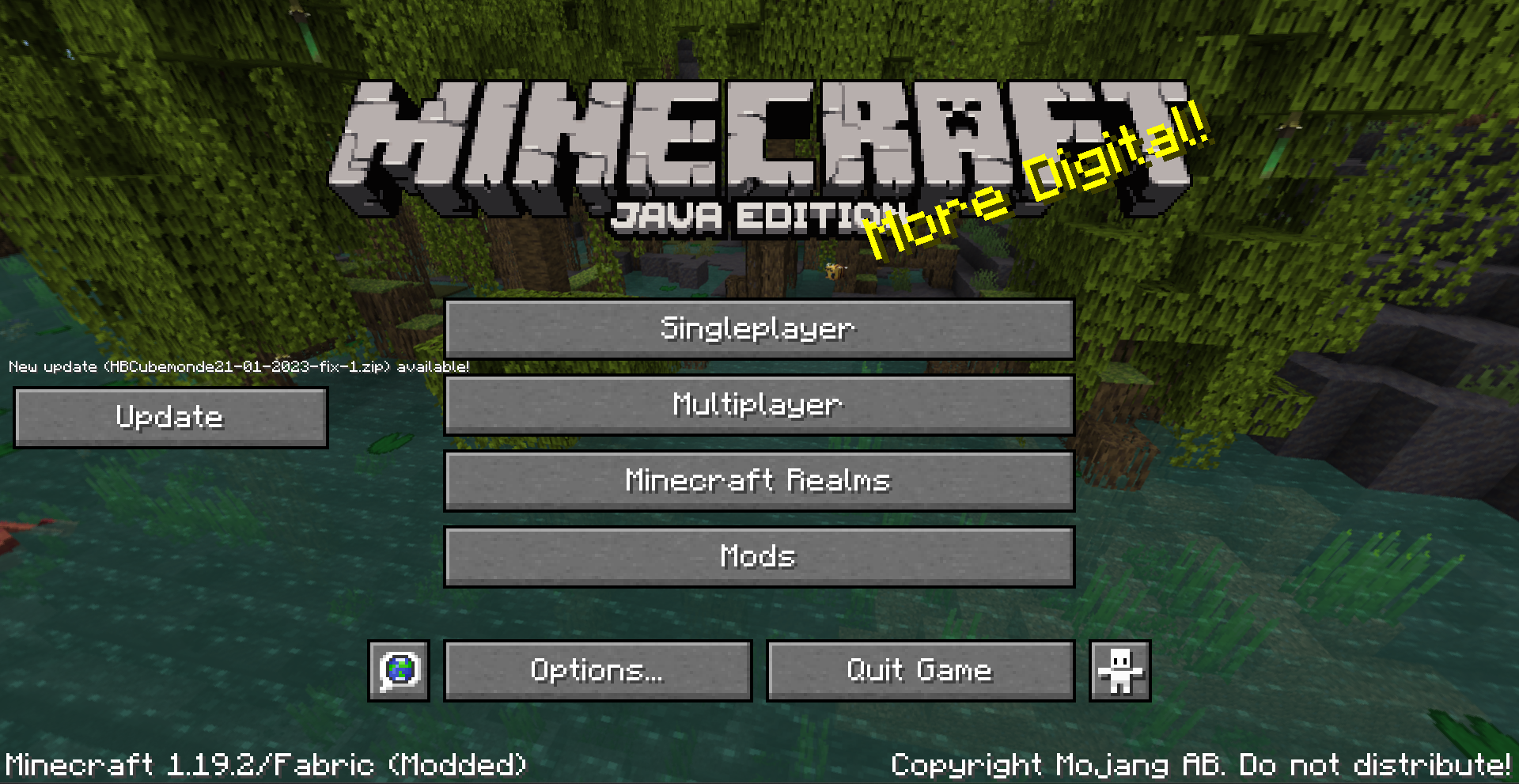 Basic Update Button Basic main menu screen with an update button
Versions
Files
Relations
Project Relations
More like this
Similar Mods
Suggestions use data such as tags, dependencies, dependents, descriptions, titles, and more to rank how much they overlap with this mod.
On ModDex
Community snapshot
By the numbers
Statistics
Want to reach Minecraft players?
We're looking for a server hosting partner to feature here and other parts of the site. Interested? Send us a message!
Get in touchGet it on
Available Platforms
On ModDex
Community snapshot
By the numbers