
Community listing page, reviews here may not be monitored by the author.
Fog


No reviews yet
A total overhaul of Minecraft's fog, offering options to customize fog color, start, and end points. Enjoy a more immersive experience with enhanced depth and visuals, all while keeping the same view distance.

Community voices
Reviews
No reviews yet. Be the first to review this project!
Get it on
Available Platforms
Compatibility
Supported Environments
Runs entirely on the client. Works on vanilla servers.
Required on the client. Installing it on the server adds functionality.
Varies by version.
About
Project Details
For authors
Embed Badge
If you're the author of this project, you can embed a live badge anywhere that supports HTML or Markdown. It updates automatically whenever ratings change.
Use HTML for any page that supports it, or Markdown for README files and Markdown-based descriptions.
Identifiers
Platform IDs
About
Description
 
 
Fog
As it says on the tin - Fog is a mod that completely revamps how Minecraft handles fog, including its color, start, and end points. It creates a greater sense of depth and atmosphere in Minecraft by shifting the fog start forward, maintaining the same view distance while greatly improving the visuals of the game.
Features
It should be noted that the majority of these features can be fully customized via the configuration screen or resource packs - if you're using Fabric, you will need Mod Menu to access the configuration screen.
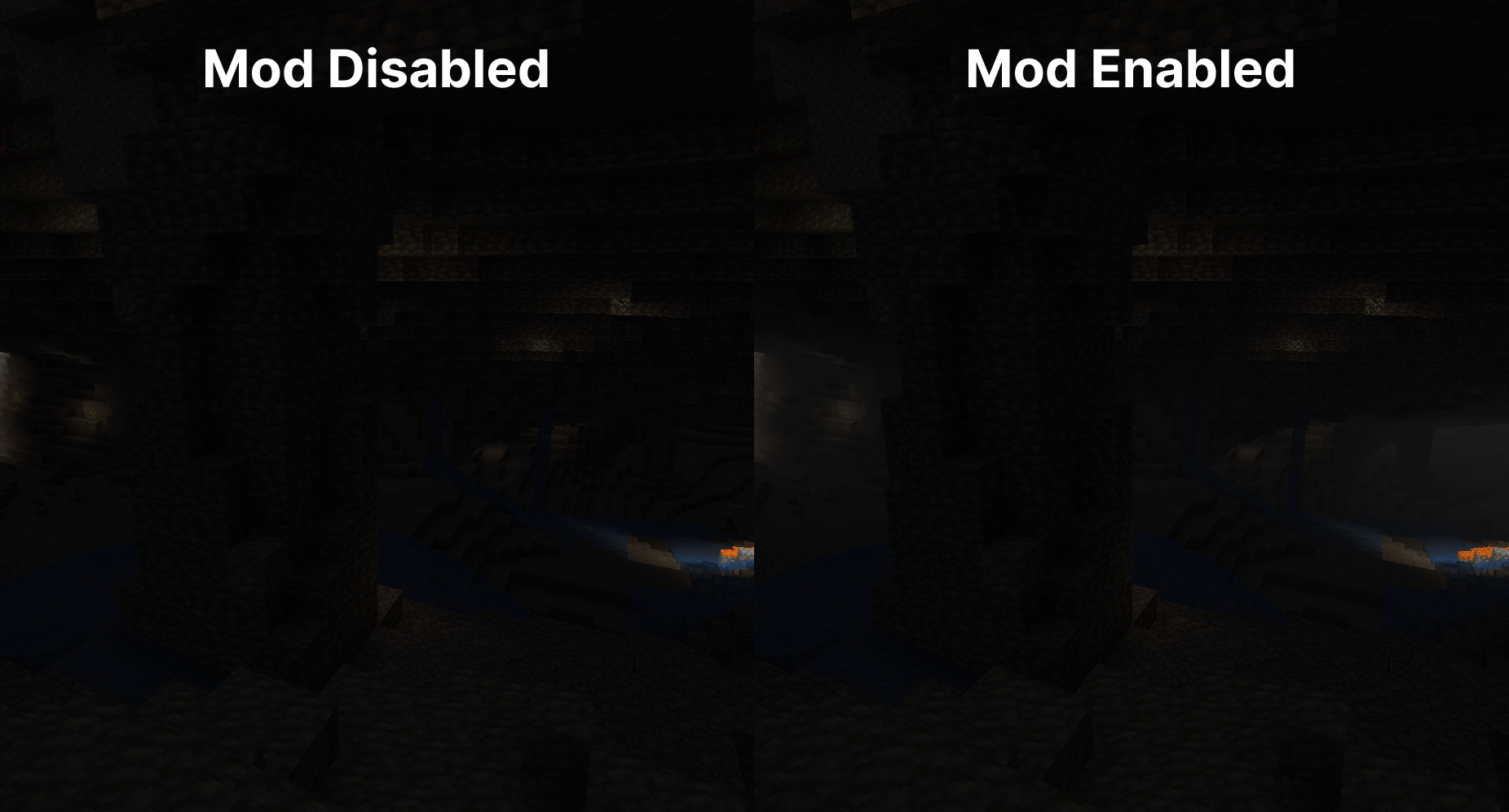
Cave Fog
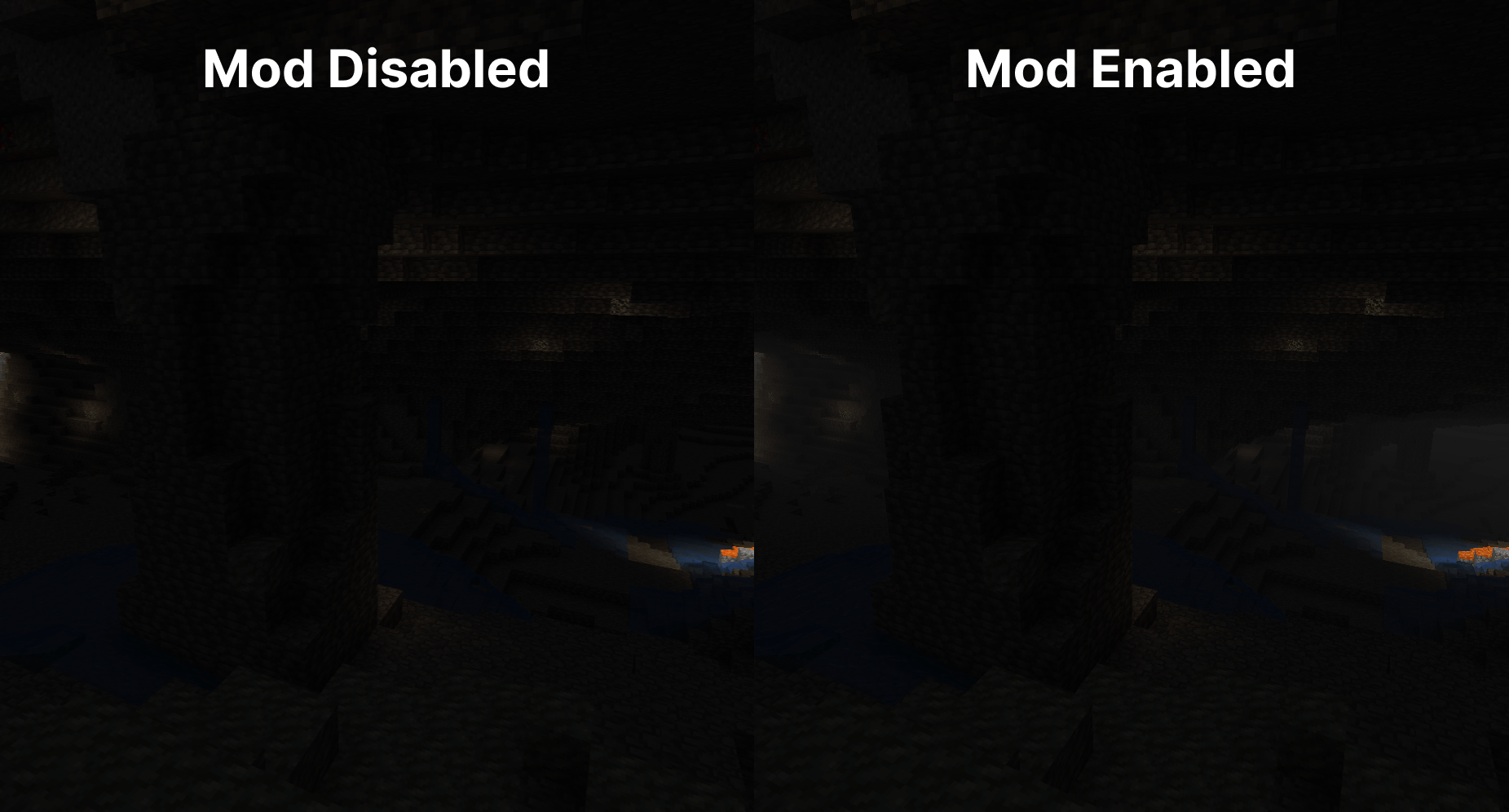
As you go deeper underground, the fog gets thicker. This adds to the spooky and mysterious feel of caves, making exploration more intense and immersive. It helps create a sense of depth, making the underground environment feel more alive and engaging.
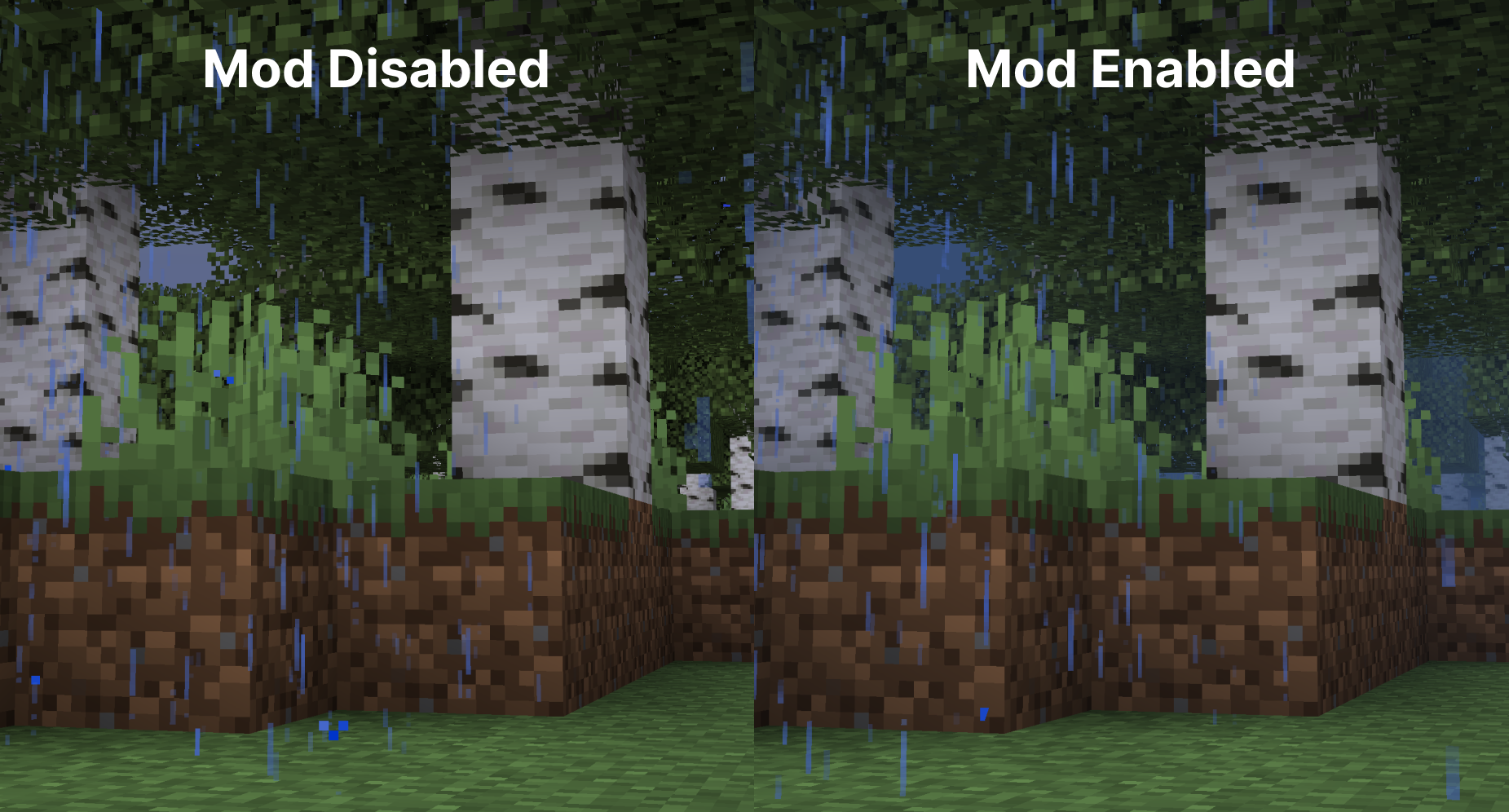
Weather Fog Modifiers
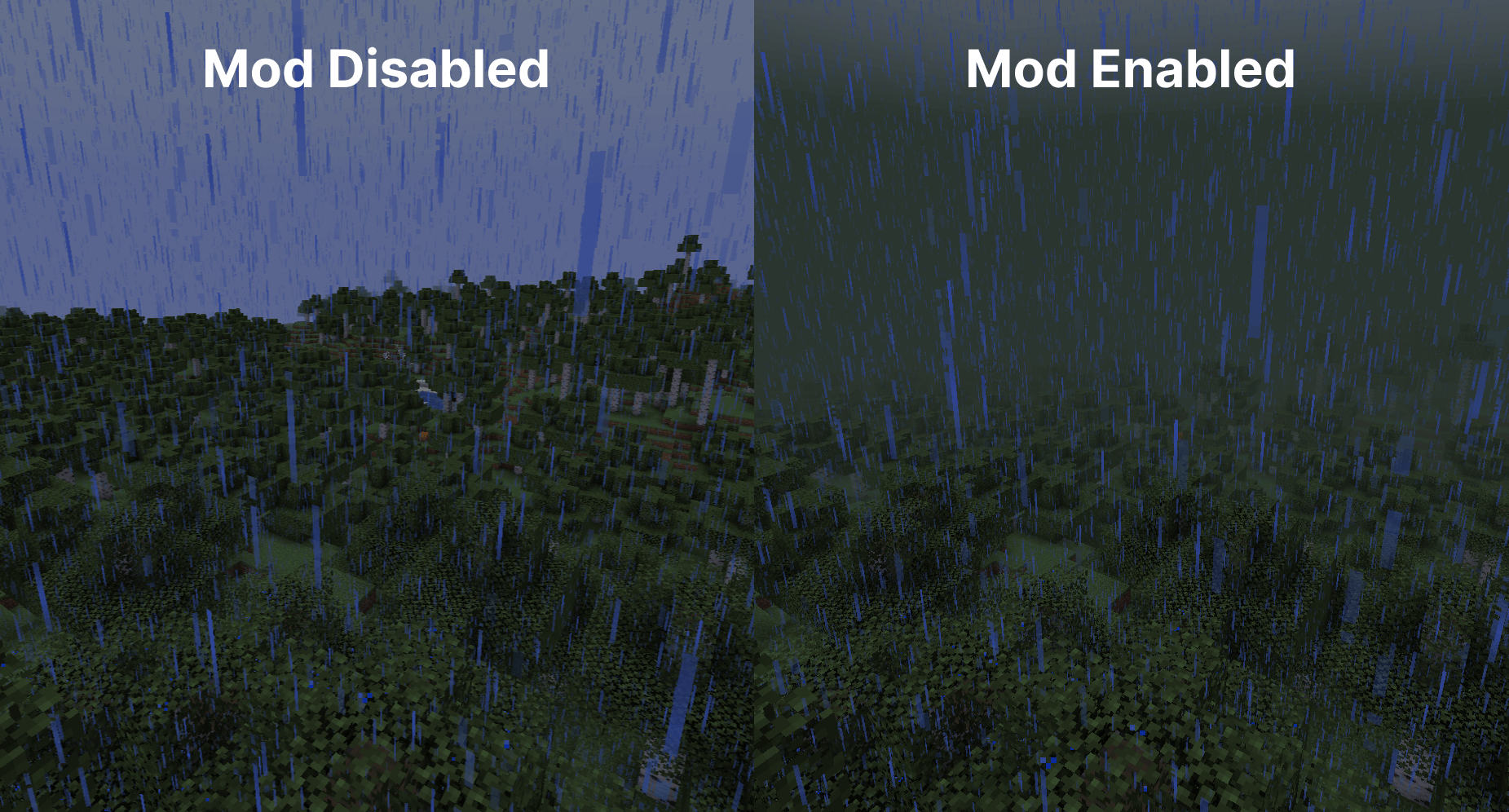
The fog adjusts with the weather, so during rain or snow, the fog will change accordingly. This adds to the overall atmosphere, making each weather condition feel distinct and visually appealing.
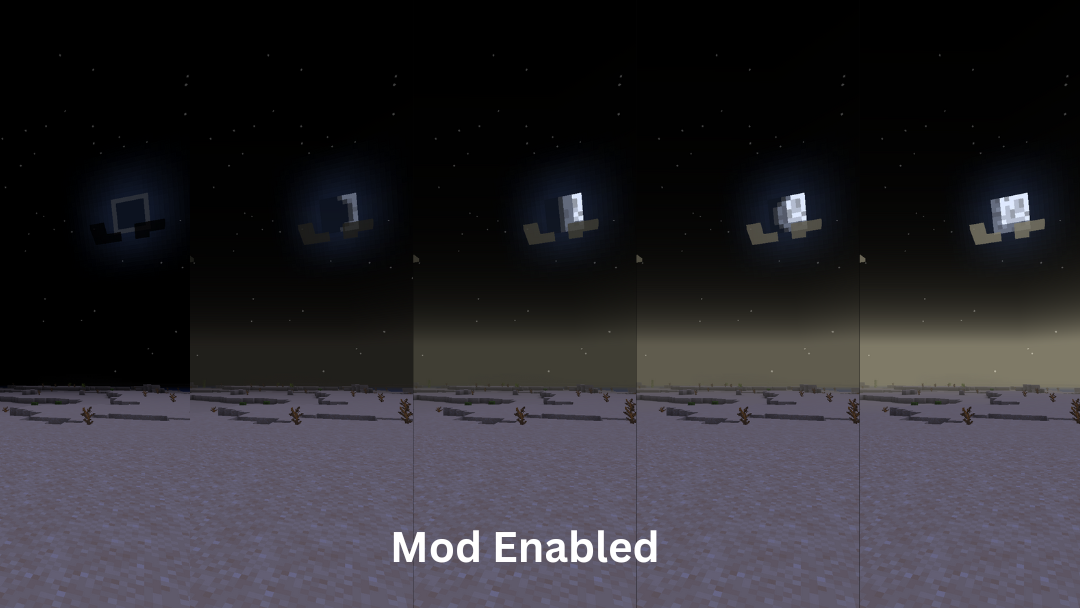
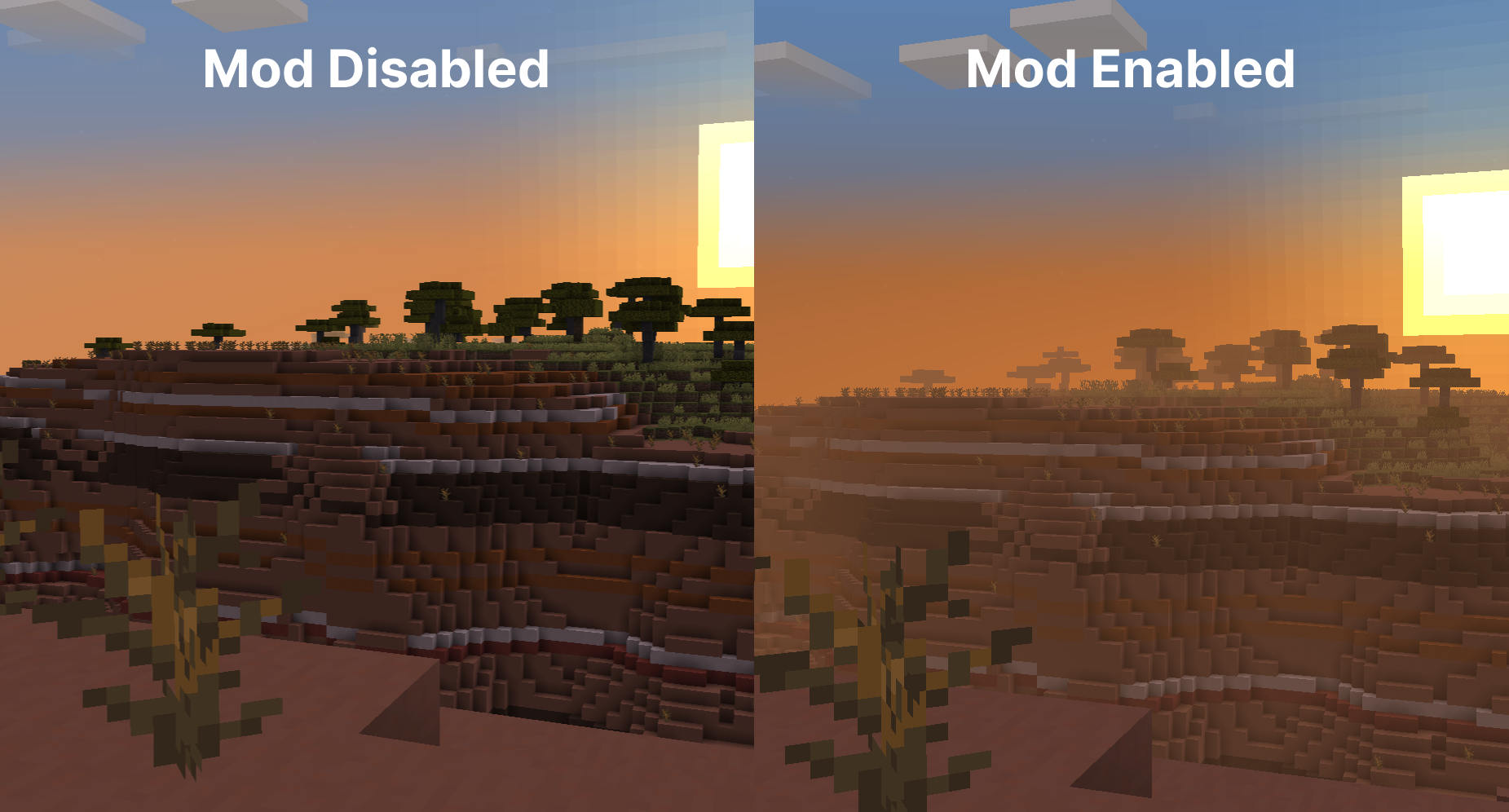
Time-based Modifiers
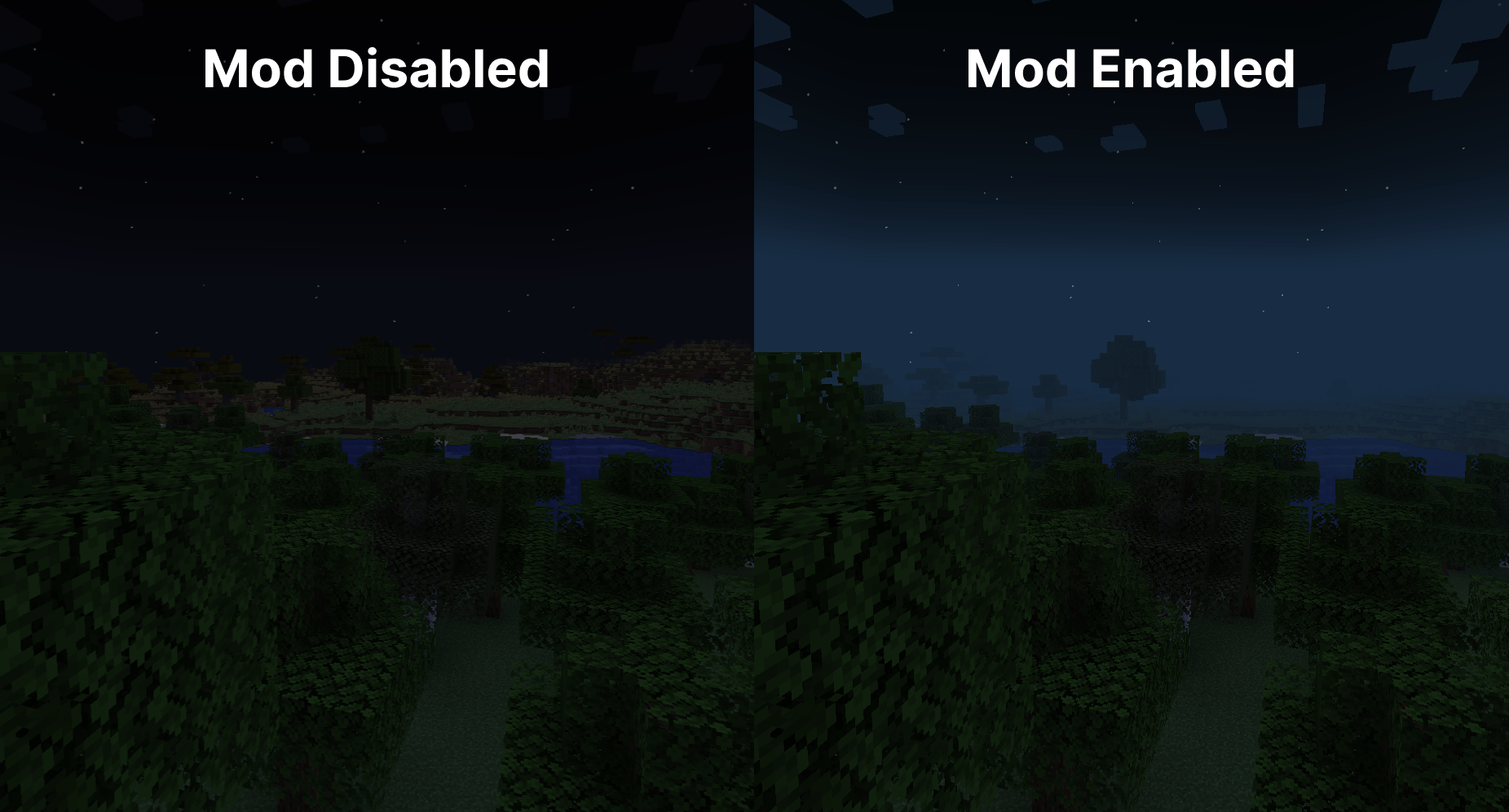
Fog becomes more colorful and vibrant during sunsets, sunrises. During night the fog colour will be dependent on the current moon cycle.
Biome Fog Colors
Fog changes color based on the biome you're in, giving each area a unique look and feel. This helps create a coherent visual experience as you move through different biomes. It supports modded biomes and is easy to customize using resource packs, allowing for a highly personalized game experience. 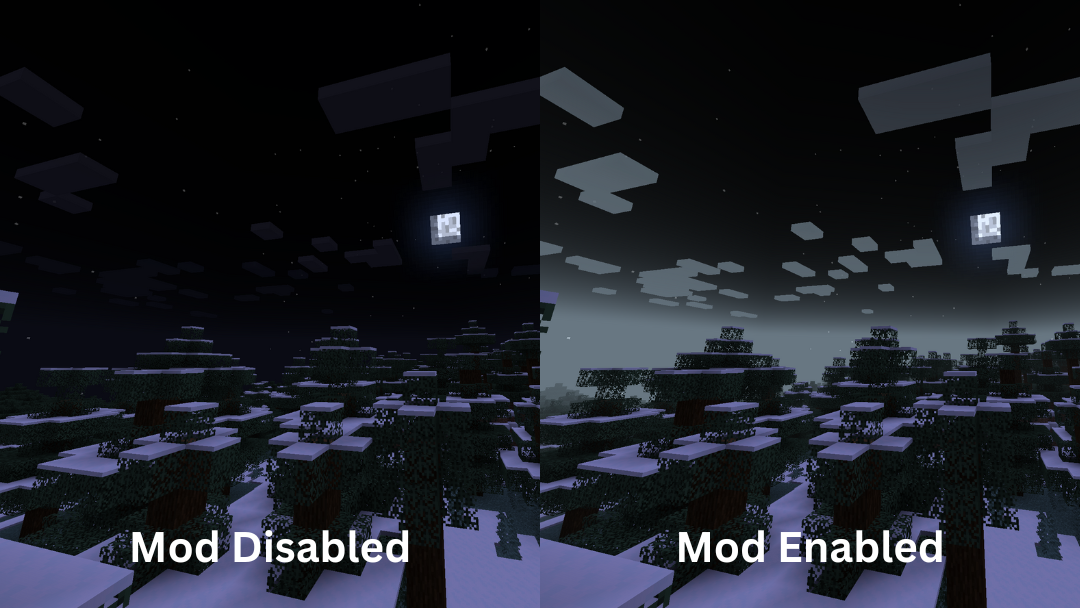
Sky Fixes
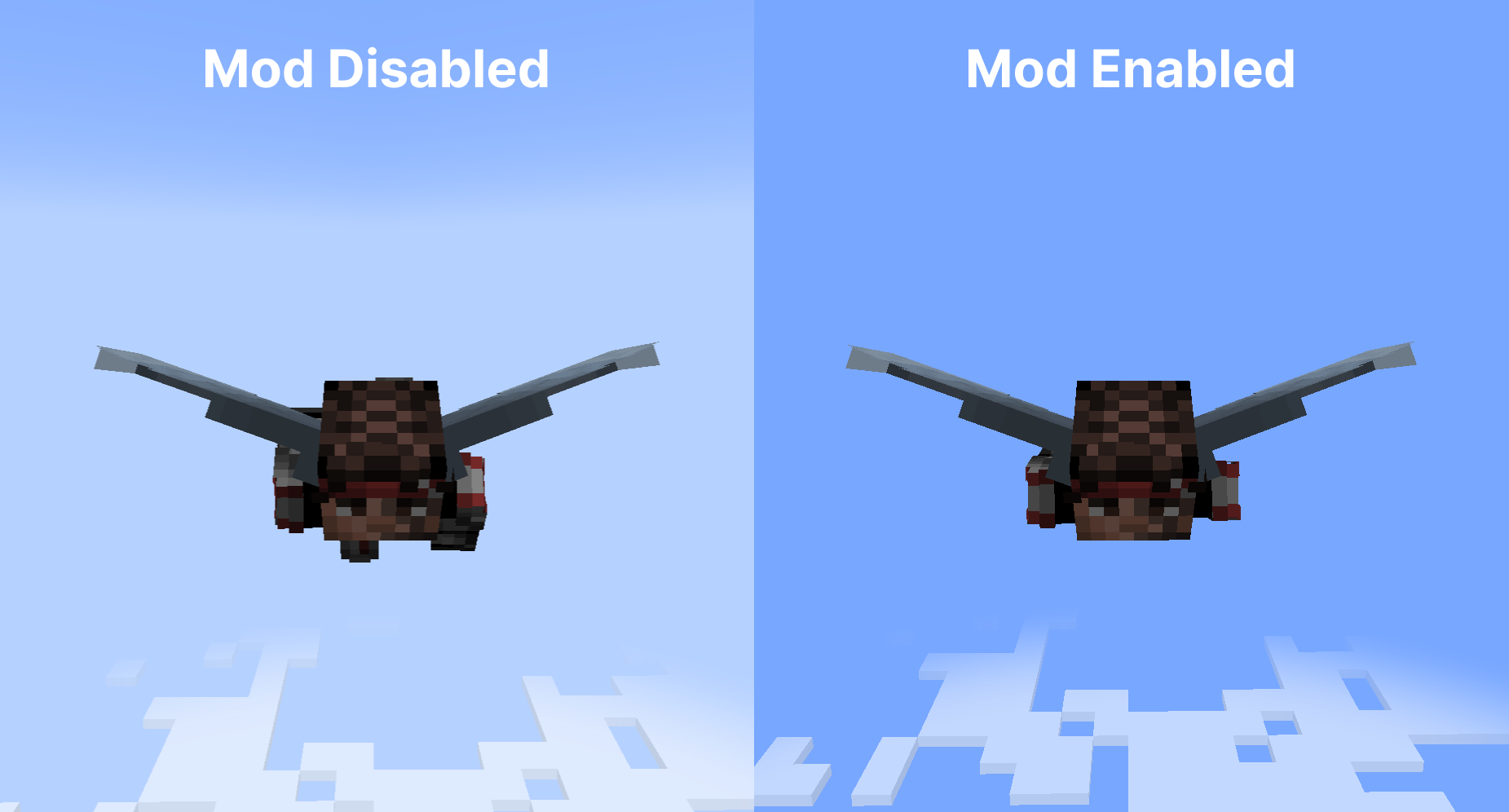
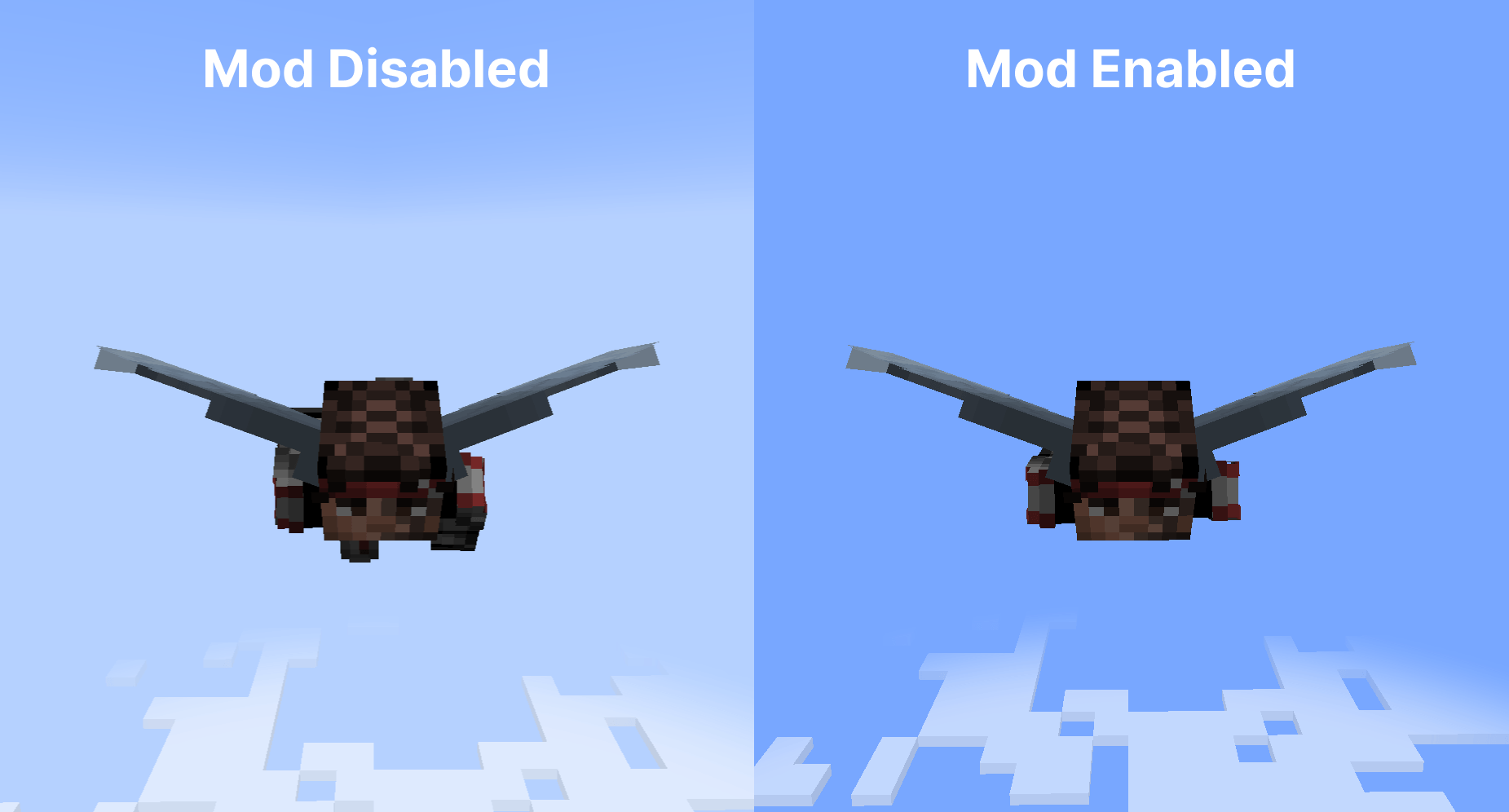
When flying with an elytra above the clouds, the fog gradually fades away, offering a clear view of the sky without any strange horizon lines.
Additionally, clouds maintain their natural look and are not affected by fog color, ensuring they always appear consistent and visually appealing.
Configuration
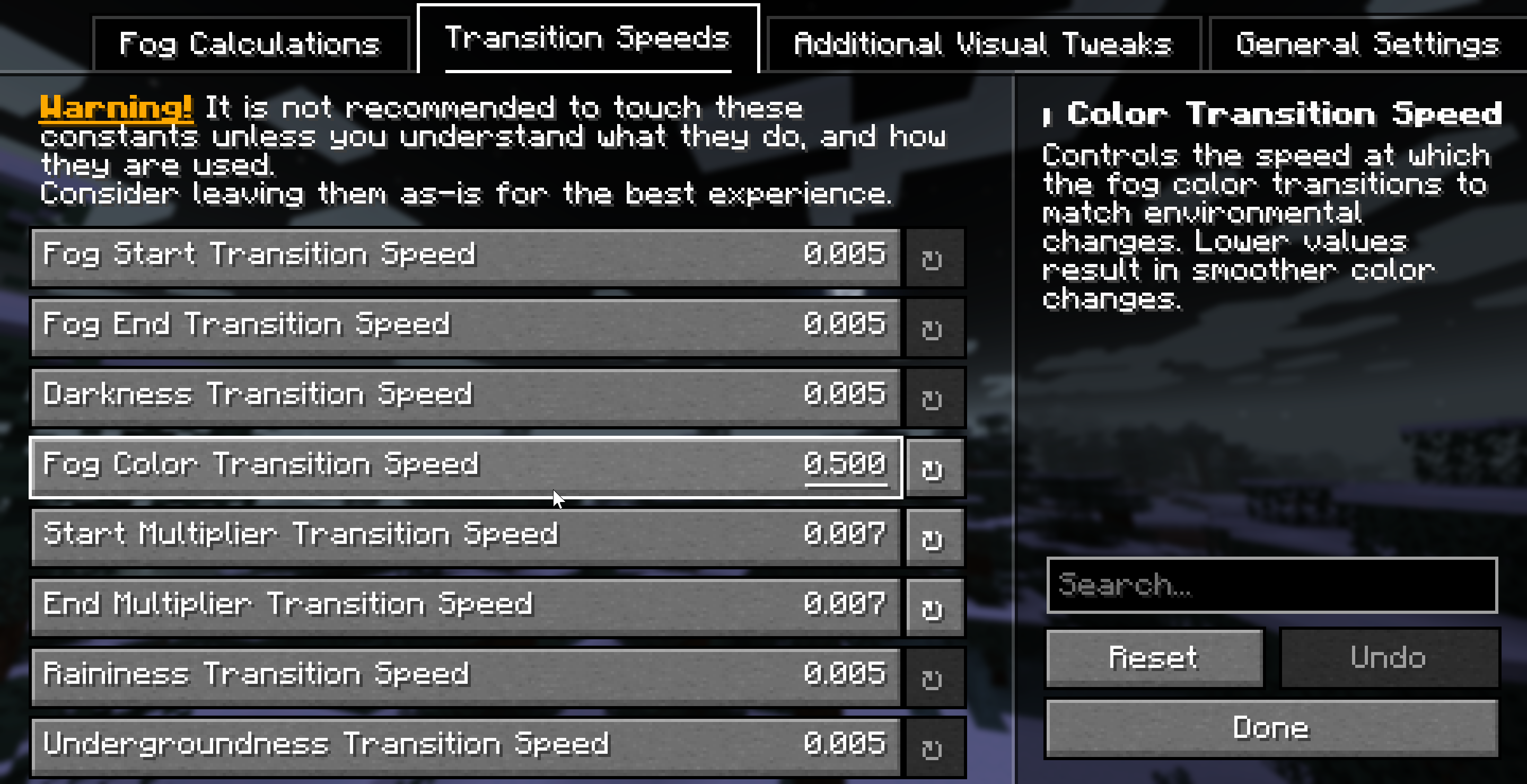
Fog is extremely customizable thanks to Yet Another Config Library, you should check the configuration screen accessible via Mod Menu on Fabric, or the Mods List on NeoForge for a full list of configuration options.
Dependencies
Required
Compatibility info
Compatible mods
- Mod Menu: allows access to the configuration screen
- Sodium: fully compatible, ensuring that your visuals remain consistent even with performance-enhancing mods
- True Darkness - Whilst we haven't added explicit compatibility, the mod works well with our moon phase modifiers that weaken biome fog strength depending on the moon phase.
- Shaders that use Minecraft’s default fog settings: fully compatible
- Distant Horizons: planned for the future
Incompatibilities
See the issue tracker for a list of incompatibilities.
Download
Fog is available for NeoForge and Fabric for 1.21-1.21.4 versions. You can download Fog from the following locations:
FAQ
- Q: Will you be backporting this mod to lower Minecraft versions?
No - it takes too much time and effort to backport to older versions, and it's not worth the time investment as very little of the community is on those versions.
- Q: Will you be supporting Forge for 1.21+?
No, you should consider moving to the NeoForge mod loader.
- Q: Do you support Quilt?
Unfortunately, we are unable to provide support for issues arising from attempting to use this mod with Quilt - you are welcome to try to use it at your own risk.
- Q: Does this mod work in multiplayer?
Yes! This mod is fully multiplayer compatible - only clients need to have the mod installed, but if your friends have the mod installed, you should have similar visuals.
- Q: Does only the client need this mod or does the server need it too?
This is a completely client side mod, so only the client needs to have it installed. The server does not need to have it installed.
For Developers and Server Admins
If you want to add support for your modded biomes, you can utilize Fog's custom JSON fog definition format to create unique fog effects. The mod is fully customizable via resource packs and a dedicated configuration file.
Furthermore, if you're developing a Fabric mod, you can utilize Fog's custom datagen providers to speed your development workflow up when adding compatability with the mod.
Server owners can adjust fog start/end points and biome colors to match their server's aesthetic.
For more information, check out Fog's documentation.
License
This project is licensed under All Rights Reserved, see LICENSE.
Attribution
- birsy, the original author of Fog Looks Good Now - many of the systems and ideas were expanded from this mod.
- Steveplays, the author of the Biome Fog mod - who collaborated with IMB11 to bring biome fog colors to Fog.


Requires Fabric API (for Fabric) and M.R.U.
Fog
As it says on the tin - Fog is a mod that completely revamps how Minecraft handles fog, including its color, start, and end points. It creates a greater sense of depth and atmosphere in Minecraft by shifting the fog start forward, maintaining the same view distance while greatly improving the visuals of the game.
Features
It should be noted that the majority of these features can be fully customized via the configuration screen or resource packs - if you're using Fabric, you will need Mod Menu to access the configuration screen.
Cave Fog
As you go deeper underground, the fog gets thicker. This adds to the spooky and mysterious feel of caves, making exploration more intense and immersive. It helps create a sense of depth, making the underground environment feel more alive and engaging.
Weather Fog Modifiers
The fog adjusts with the weather, so during rain or snow, the fog will change accordingly. This adds to the overall atmosphere, making each weather condition feel distinct and visually appealing.
Time-based Modifiers
Fog becomes more colorful and vibrant during sunsets, sunrises. During night the fog colour will be dependent on the current moon cycle.
Biome Fog Colors
Fog changes color based on the biome you're in, giving each area a unique look and feel. This helps create a coherent visual experience as you move through different biomes. It supports modded biomes and is easy to customize using resource packs, allowing for a highly personalized game experience.
Sky Fixes
When flying with an elytra above the clouds, the fog gradually fades away, offering a clear view of the sky without any strange horizon lines.
Additionally, clouds maintain their natural look and are not affected by fog color, ensuring they always appear consistent and visually appealing.
Configuration
Fog is extremely customizable thanks to Yet Another Config Library, you should check the configuration screen accessible via Mod Menu on Fabric, or the Mods List on NeoForge for a full list of configuration options.
Dependencies
Required
Compatibility info
Compatible mods
- Mod Menu: allows access to the configuration screen
- Sodium: fully compatible, ensuring that your visuals remain consistent even with performance-enhancing mods
- True Darkness - Whilst we haven't added explicit compatibility, the mod works well with our moon phase modifiers that weaken biome fog strength depending on the moon phase.
- Shaders that use Minecraft’s default fog settings: fully compatible
- Distant Horizons: planned for the future
Incompatibilities
See the issue tracker for a list of incompatibilities.
Download
Fog is available for NeoForge and Fabric for 1.21-1.21.4 versions. You can download Fog from the following locations:
FAQ
-
Q: Will you be backporting this mod to lower Minecraft versions?
No - it takes too much time and effort to backport to older versions, and it's not worth the time investment as very little of the community is on those versions.
-
Q: Will you be supporting Forge for 1.21+?
No, you should consider moving to the NeoForge mod loader.
-
Q: Do you support Quilt?
Unfortunately, we are unable to provide support for issues arising from attempting to use this mod with Quilt - you are welcome to try to use it at your own risk.
-
Q: Does this mod work in multiplayer?
Yes! This mod is fully multiplayer compatible - only clients need to have the mod installed, but if your friends have the mod installed, you should have similar visuals.
-
Q: Does only the client need this mod or does the server need it too?
This is a completely client side mod, so only the client needs to have it installed. The server does not need to have it installed.
For Developers and Server Admins
If you want to add support for your modded biomes, you can utilize Fog's custom JSON fog definition format to create unique fog effects. The mod is fully customizable via resource packs and a dedicated configuration file.
Furthermore, if you're developing a Fabric mod, you can utilize Fog's custom datagen providers to speed your development workflow up when adding compatability with the mod.
Server owners can adjust fog start/end points and biome colors to match their server's aesthetic.
For more information, check out Fog's documentation.
License
This project is licensed under All Rights Reserved, see LICENSE.
Attribution
- birsy, the original author of Fog Looks Good Now - many of the systems and ideas were expanded from this mod.
- Steveplays, the author of the Biome Fog mod - who collaborated with IMB11 to bring biome fog colors to Fog.
Screenshots
Gallery
-
 Frame 3.png Frame 3.png
 -
 Frame 3 (3).png Frame 3 (3).png
 -
 Frame 3 (4).png Frame 3 (4).png
 -
 Frame 3 (1).png Frame 3 (1).png
 -
 Frame 3 (2).png Frame 3 (2).png
-
Cave fog comparison Left: Mod Disabled - Right: Mod Enabled
-
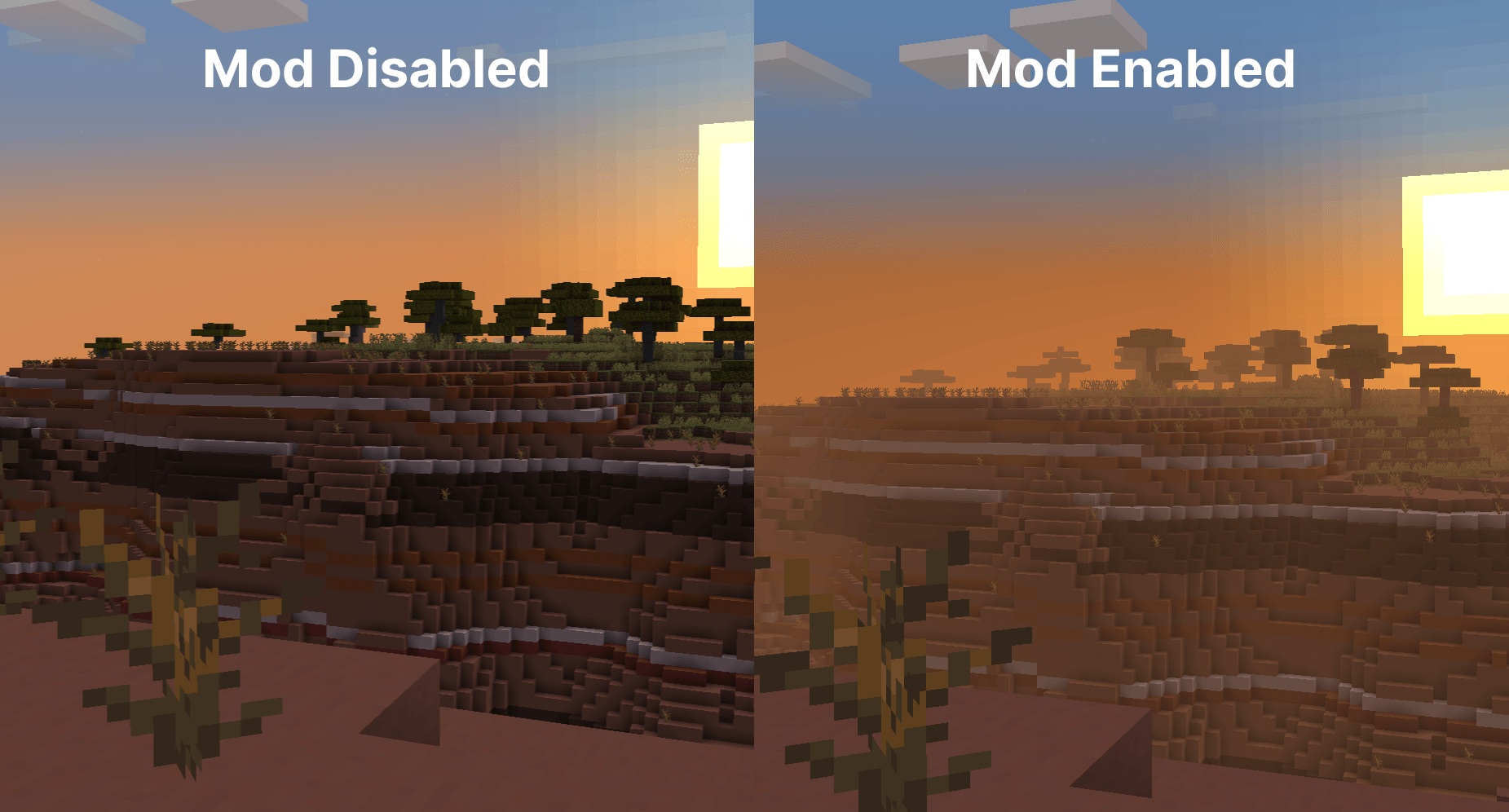
Badlands fog comparison Left: Mod Disabled - Right: Mod Enabled
-
Moon phases desert fog The Moon phases impacting desert fog, from left to right, with the left images being the least foggy (new Moon) and the right images being the most foggy (full Moon).
-
Weather Fog Comparison Left: Mod disabled, Right: Mod Enabled, In birch forest biome
-
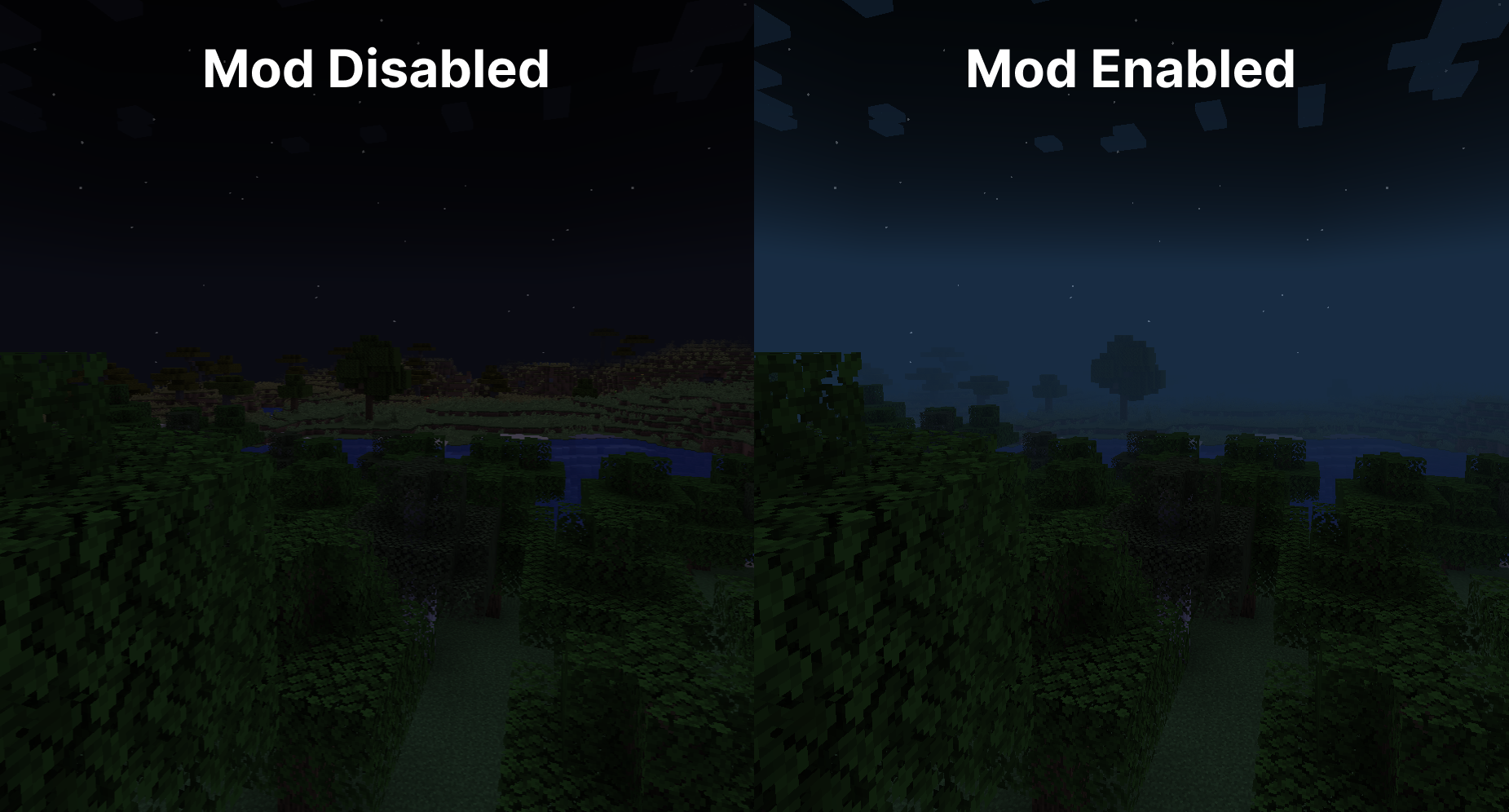 Oak/birch forest fog comparison At nighttime. Left: Mod Disabled - Right: Mod Enabled
 -
Snowy taiga fog comparison Left: Mod Disabled - Right: Mod Enabled
-
Above the clouds fog comparison Left: Mod Disabled - Right: Mod Enabled
-
Configuration screen Made using YetAnotherConfigLib.
Versions
Files
Relations
Project Relations
More like this
Similar Mods
Suggestions use data such as tags, dependencies, dependents, descriptions, titles, and more to rank how much they overlap with this mod.
On ModDex
Community snapshot
By the numbers
Statistics
 (opens in a new tab)
Get it on
Available Platforms
On ModDex
Community snapshot
By the numbers