

Food Spoilage
Add realistic food decay mechanics to your Minecraft survival experience!
No ratings yet
Be the first to rate it.
Community listing page
Community listing page, reviews may not be monitored by the author.

Community voices
Reviews
No reviews yet. Be the first to review this project!
Get it on
Available Platforms
About
Project Details
For authors
Embed Badge
If you're the author of this project, you can embed a live badge anywhere that supports HTML or Markdown. It updates automatically whenever ratings change.
Use HTML for any page that supports it, or Markdown for README files and Markdown-based descriptions.
Identifiers
Platform IDs
About
Description
Food Spoilage introduces a comprehensive food preservation system that makes food management a strategic part of survival gameplay. All food items gradually decay over time, but you have multiple ways to preserve them and extend their shelf life.
🍎 Dynamic Food Decay System
- All food items gradually lose freshness over time
- - Visual feedback with colored overlays on items (hotbar & inventory)
- - Detailed tooltips showing freshness percentage - Spoiled food converts to rotten flesh
❄️ Preservation Methods
Ice-based freezing: Place ice blocks in containers with food to freeze it
Modded refrigerators: Compatible with furniture mods (configurable)
Container-based preservation: Different containers have different decay rates
Underground storage: Items stored deep underground decay slower (Done!!)
🧊 Freezing & Thawing
- Frozen food doesn't decay
- Ice consumption system (realistic resource management)
- Automatic thawing when removed from cold storage
- Thawing items become edible after configured time
🎨 **Visual Indicators**
- Color-coded overlays on items:
- - 🟢 Green: Fresh (100-75%)
- - 🟡 Yellow: Stale (75-50%)
- - 🟠 Orange: Spoiling (50-25%)
- - 🔴 Red: Rotten (25-0%)
- - 🔵 Blue: Frozen
- - 🟣 Purple: Thawing
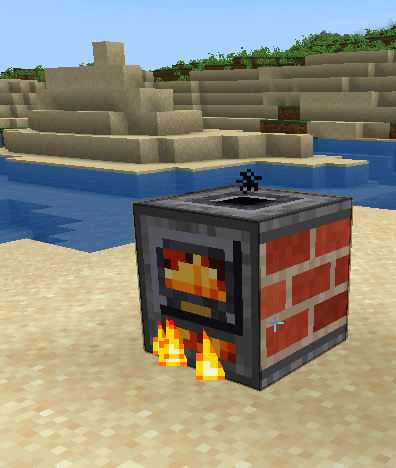
Cooking Oven
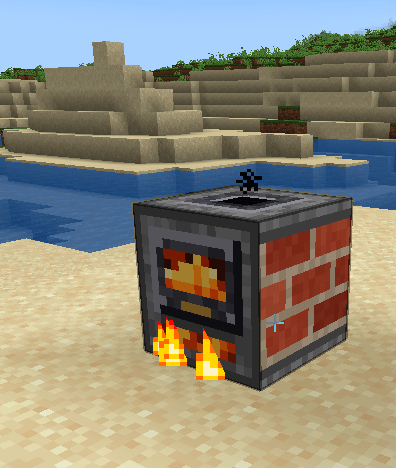
Food Spoilage adds a new Cooking Oven that works just like a vanilla furnace,
but respects food freshness.
Vanilla furnaces, smokers and campfires reset any food to 100% freshness when
it's cooked, even if it was almost rotten. The Cooking Oven doesn't:
- Cooked food keeps its freshness, plus a small +10% bonus (max 95%).
- Rotten food stays rotten. Cooking won't save it.
- Smelts ores and everything else a vanilla furnace can.
- Works with hoppers.
Recipe: furnace surrounded by 4 bricks.
🌍 **Seasonal Integration**
Full compatibility with Serene Seasons, Food decays faster in summer, slower in winter – Configurable seasonal multipliers. Possibly also with Ecliptic Seasons
⚙️ **Highly Configurable**
- Custom decay rates per item (`minecraft:egg|1.5`)
- - Whitelist/blacklist for spoilable items
- - Container preservation multipliers
- - Configurable refrigerator blocks
- - Seasonal multipliers
- - Ice consumption rates
- - Everything is customizable!
🌐 **Translations** Currently available in: - English - Spanish (Español)
Important : The mod will not have versions below 1.20.1 and no new features will be added, only bug fixes and/or issue corrections.
Screenshots
Gallery
-
 2026-02-20_21.03.png Items inside chest with green (fresh items) overlay
-
 fridge.png Items inside fridge with blue overlay
-
 2026-11-19_11.07.46.png 2026-11-19_11.07.46.png
Versions
Files
Relations
Project Relations
More like this
Similar Mods
Suggestions use data such as tags, dependencies, dependents, descriptions, titles, and more to rank how much they overlap with this mod.
Stats
- Downloads
- 18k
- Used in
- 18 modpacks
- Followers
- 0
- In stacks
- 0
- Created
- Last synced
-
Nov 19, 2026 11:01 AM UTC
New file updates sync automatically.
When ModDex last fully re-synced this project from CurseForge or Modrinth. A new file release triggers a resync usually within minutes, and every project is also re-synced on a schedule. Edits that don't ship a file, such as a new description or screenshots, are checked every few hours and can appear before this date changes.
How syncing works
External Links

Stats
- Downloads
- 18k
- Used in
- 18 modpacks
- Followers
- 0
- In stacks
- 0
- Created
- Last synced
-
Nov 19, 2026 11:01 AM UTC
New file updates sync automatically.
When ModDex last fully re-synced this project from CurseForge or Modrinth. A new file release triggers a resync usually within minutes, and every project is also re-synced on a schedule. Edits that don't ship a file, such as a new description or screenshots, are checked every few hours and can appear before this date changes.
How syncing works