
Community listing page, reviews here may not be monitored by the author.
Forever Enough Items

No reviews yet
Bringing back what wasn't taken from NEI.
Community voices
Reviews
No reviews yet. Be the first to review this project!
Get it on
Available Platforms
About
Project Details
For authors
Embed Badge
If you're the author of this project, you can embed a live badge anywhere that supports HTML or Markdown. It updates automatically whenever ratings change.
Use HTML for any page that supports it, or Markdown for README files and Markdown-based descriptions.
Identifiers
Platform IDs
About
Description
News time:

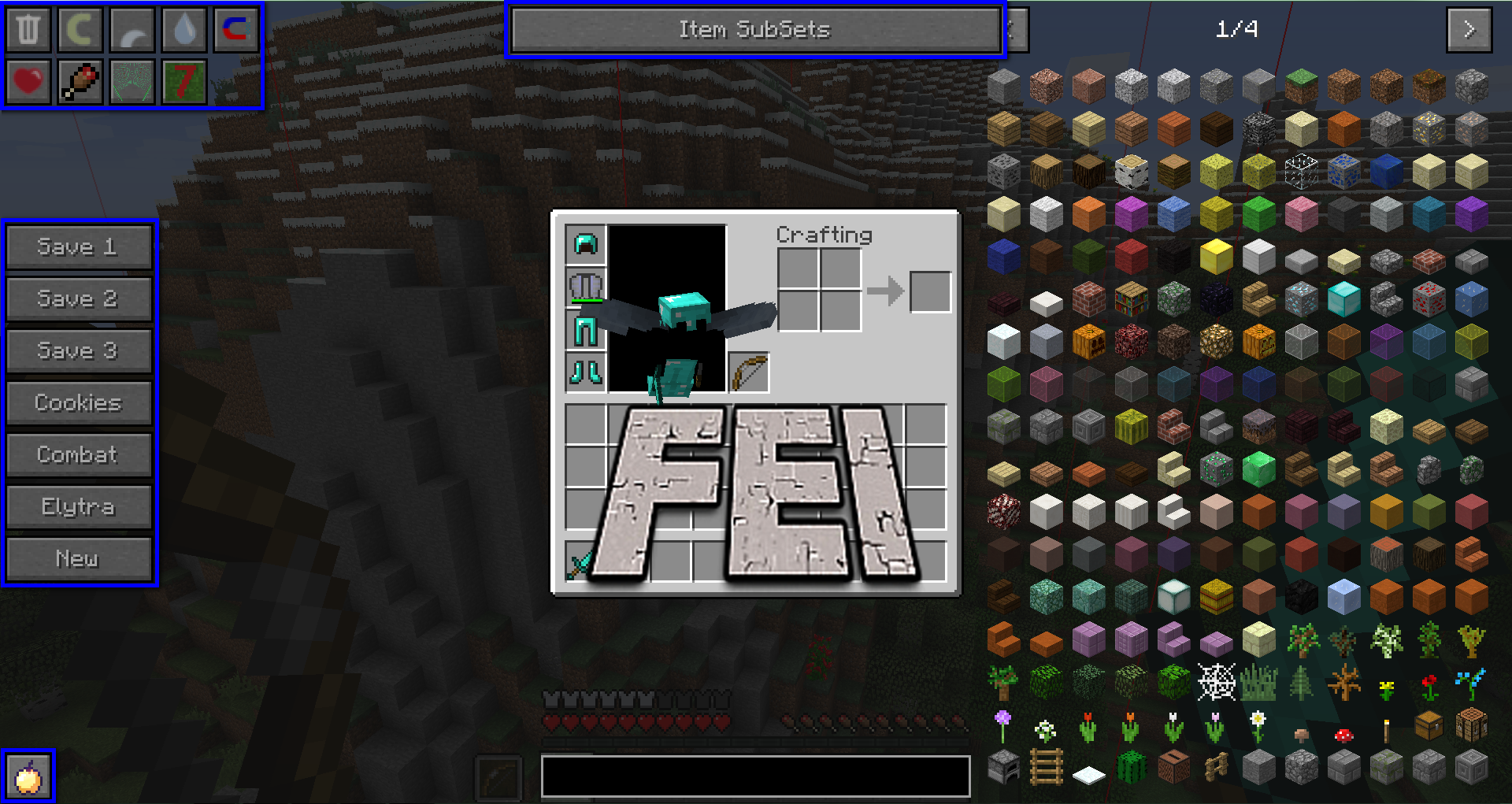
Bringing back NEI to latest minecraft versions.
-Utilities grid on top left!
-Inventory save & load.
-Item Subsets.
But with improvements, and a lot more!
-Unlimited amount of profiles.
-Full configurability: from background color to disabling whole element.
-API for easier integration.
-PLAYABLE BY UR PETS, THX 2 FULL LOLCAT SUPPORT!
Little message from author:
-First, thanks everybody for 50000 downloads!
-1.10 is out, and vote below is now useless :D >D muhahaha!
-Second, lately a lot of mods providing chunk edges start to appear. FEI was designed when only CEI existed, then because you requested, i added More Overlays support. Now there are tons of mods doing the same thing and i can't support all of them. So here comes my question: what should i do? Go vote here (if widget below isn't working) and decision will be taken when i'll finish working on 1.1 (enc#?$ and @&^ons!).
EDIT: Please don't tell me that you're all choosing this because of the reference.
Getting Started
-Install FEI, Excore, JEI.
-It is also recommended to install LLOR and CEI or More Overlays (If installing CEI and More Ovelays, CEI will take priority over More Overlays for chunk edges. If installing LLOR and More Overlays, you can display light level with crosses and numbers).
-Launch your game and enjoy!
(Sometimes FEI gui elements may not adapt properly to your screen size. Just right click on profile icon in bottom left corner, or hit ctrl+P, right click on selected profile, right click on element that's not properly postionned in the list, click on "Position and Size" settings to move your element around with mouse or align it with numpad).
Configuring FEI for your look and feel!
Basics:
-If you hover over anything (from FEI) and hold shift, tooltip explaining how to use it will appear.
-In the bottom left corner, you have profiles selector. Left clicking will display quick selector, right clicking will bring up profiles manager. In there you can change, remove and create new profiles. From there eveything is annotated and intuitive to use!
-You can also go to profiles manager anytime (in gui), by hitting ctrl + P.
Detailed:
This is detailed description of settings beginning from profiles manager screen.
I'll start off by saying that most of elements in FEI follow same control pattern, which can be viewed in details by hovering over element and holding shift. Controls pattern is as follows:
-Left Click: Select.
-Rigth Click: Edit.
-Shift + Left Click: Alternative Select (Ex: Copy / Reload, ...).
-Shift + Right Click: Alternative Edit (Mostly Delete).
When you right clicked on profiles selector, or hit Ctrl+P, you enter FEI settings tree. It begins with profiles manager.
-In profiles manager screen, you can, well, manage profiles:
--Left click to select as current profile.
--Right click to edit (more about it in a second).
--Shift + Left Click to create a copy of profile.
--And Shift + Right Click to delete.
When right clicking on profile, you enter profile editing screen. In there, you can change name, icon and elements:

In elements list, you can left click to disable element completely (some elements are not disableable) or right click to change element's settings.
Most elements have settings of position & size, borders and text & background colors. Some elements may have additionals settings.
Position & Size settings brings up gui where you can move and resize (if element is reszeiable) element. While you can move elements with your mouse, you have some shorcut keys: numpad (2 axis alignement) and your arrows (1 axis alignment: left & right, up & down):

Advanced:
In you config folder, you have "Forever Enough Items" folder. In there you have static.cfg file and profiles folder. Profiles folder holds all profiles and their settings, while static.cfg holds settings which are not affected by profiles and not configurable in-game. They include JEI override options and permission levels as well as something only for me >P.
Custom permissions system!
-FEI has custom permissions system. It consists of user, moderator, administrator and owner. You can use /feiop to OP others. You can OP to any level below yours.
-In order to OP first player (owner), use server console with /feiop <PLAYER> (server), which will make PLAYER and owner, or /feiop (single player / lan), to OP yourself (works only if you're hosting the singleplayer world).
-Each "game changing" action has permission level that user must have. For example: game mode utility or inventory loader. But, displaying chunk edges or saving inventory is not game changing, so you can save your inventory without any permission level.
JEI overriden!
FEI overrides some JEI functionality in order to corespond to profile system. For example, (by default), search bar is moved to center. You may also notice that wrench icon in bottom right corner is gone. That's because JEI is now configured per profile.
WARNING: FEI does not do anything that JEI does (nor CEI, nor LLOR, nore More Overlays). On top of that, you must install JEI in order for FEI to work.
WARNING: If issues concerning JEI and JEI pluggins appear with FEI installed, report them to me first and then to mezz. FEI might be causing them.
PS: Lately, mezz was recieving a lot of issues caused by FEI and they had nothing to do with JEI. Crash reports didn't contain any FEI reference, but this was caused by FEI.
FAQ
-I don't see profiles manager icon, all elements are horribly big and go out of screen! Plz halp!
-Hit ctrl+P, right click on profile, right click on "Profiles Manager", click on "Position and Size", press numpad 8.
Check out all my mods here: Elix'x mods hub!
SUPPORT ME!
If you like my mods, your support is very appreciated and will speed me up improving my mods!
If you would like to support me, you have 2 options, patreon is prefered one:


LICENSE

Forever Enough Items by Elix_x is licensed under a Creative Commons Attribution-NonCommercial-NoDerivatives 4.0 International License.
Exceptions:
-I grant exception for mod showcases: you can earn money from it (video) AND you need to redirect download to this page, you have my permission.
-I also grant exception for modpacks: you can use this mod in any modpack, in condition of non commercial purpose (no ad, adf.ly or other).
-For other exceptions, you need to ask me.
In short, as long you aren't stated in exceptions:
You can make mod showcase/tutorial about this mod and monetize it.
You can make modpacks with this mod.
You can share it on other places AS LONG AS IT IS IN NON COMMERCIAL PURPOSES!

Not a part of code was taken from NEI.
(More detailed description as well as images will come soon).
Screenshots
Gallery
Versions
Files
Relations
Project Relations
More like this
Similar Mods
Suggestions use data such as tags, dependencies, dependents, descriptions, titles, and more to rank how much they overlap with this mod.
On ModDex
Community snapshot
By the numbers
Statistics
Want to reach Minecraft players?
We're looking for a server hosting partner to feature here and other parts of the site. Interested? Send us a message!
Get in touchGet it on
Available Platforms
On ModDex
Community snapshot
By the numbers