
Community listing page, reviews may not be monitored by the author.
FurnaceHUD

No reviews yet
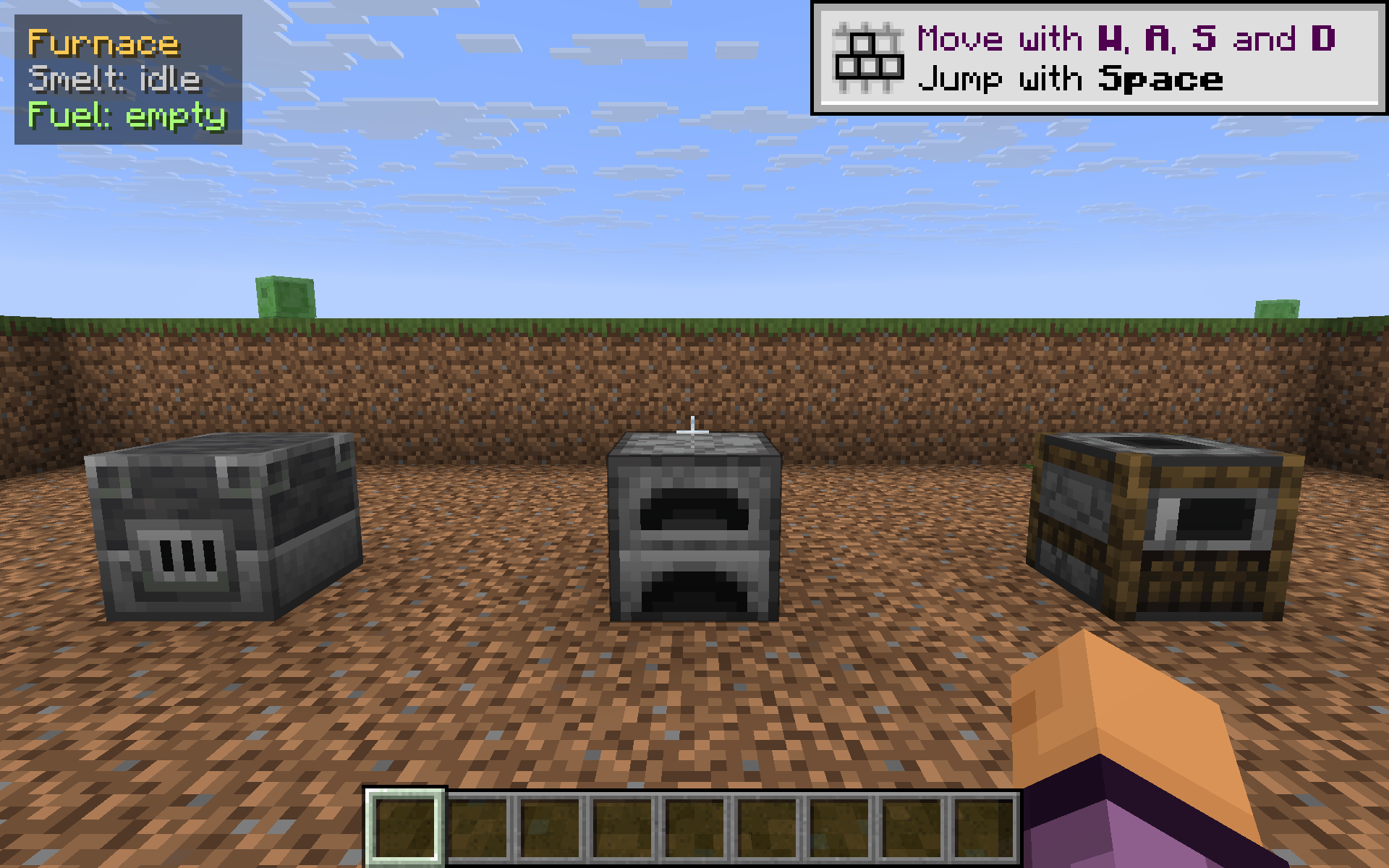
Look at a furnace, blast furnace, or smoker and a small top-left HUD shows the exact seconds left on the current smelt and how long the fuel will last. Toggle with K.

Community voices
Reviews
No reviews yet. Be the first to review this project!
Get it on
Available Platforms
Compatibility
Supported Environments
Runs entirely on the client. Works on vanilla servers.
About
Project Details
For authors
Embed Badge
If you're the author of this project, you can embed a live badge anywhere that supports HTML or Markdown. It updates automatically whenever ratings change.
Use HTML for any page that supports it, or Markdown for README files and Markdown-based descriptions.
Identifiers
Platform IDs
Resources
External Links
About
Description
FurnaceHUD turns the vanilla furnace progress arrow into something you can actually plan around. Aim your crosshair at a furnace, blast furnace, or smoker (within ~7 blocks) and a compact panel appears in the top-left corner:
Furnace
Smelt: 6.0s left (40%)
Fuel:  15s left
No GUI to open, no clicking, no waiting for the door to close — just look at it and you know. Walk away, look at a different furnace, glance back; it always reflects whatever your crosshair is on.
What it shows
- Title line — which kind of furnace you're looking at (
Furnace,Blast Furnace, orSmoker). - Smelt line — seconds remaining on the current item plus the % complete. Shows
idlewhen nothing is cooking andpaused (no fuel)when an item is queued but the fire is out. - Fuel line — seconds left on the currently burning fuel, or
emptywhen there's none.
Times are computed from live tick counters, so a 6.0s left line really means six seconds — no rough estimates.
Why
The vanilla furnace screen only tells you what's happening when the GUI is open, and the progress arrow has no numeric scale. If you're running four blast furnaces in parallel, or you want to start a long smoker batch before logging off, eyeballing arrows is annoying. FurnaceHUD lets you stand back and read a number.
How it works
- Reads
cookTime,cookTimeTotal, andburnTimestraight from the furnace'sPropertyDelegate(the same fields the in-game UI uses). Cross-version safe — no hardcoded field names. - Renders through Fabric's
HudRenderCallback, so F1 (hide HUD) hides it like any vanilla overlay. - Read-only — never opens the furnace, never changes a block, never sends a packet.
- Singleplayer only: dedicated servers do not sync furnace progress to clients, so the HUD will simply not appear when looking at a server-side furnace. (This is a vanilla limitation, not a bug.)
Controls
- K — toggle the HUD on / off (default: on)
The key is polled via raw GLFW so it works identically across every supported version without a rebind screen.
Compatibility
Works on Minecraft 1.21.8, 1.21.9, 1.21.10, and 1.21.11 with Fabric Loader 0.16+. One JAR for all four versions — install with Fabric API and drop into your mods/ folder.
- Pure client-side; safe to install on any server (HUD simply hides itself on multiplayer furnaces).
- Zero config files; nothing to set up.
- Hides automatically with the rest of the HUD on F1.
Screenshots
Gallery
-
 FurnaceHUD
Versions
Files
Relations
Project Relations
More like this
Similar Mods
Suggestions use data such as tags, dependencies, dependents, descriptions, titles, and more to rank how much they overlap with this mod.
On ModDex
Community snapshot
By the numbers
Statistics

 (opens in a new tab)
Get it on
Available Platforms
On ModDex
Community snapshot
By the numbers
Statistics
Resources