
Community listing page, reviews here may not be monitored by the author.
G1axAgenticAI

No reviews yet
G1axAgenticAI puts an AI assistant inside Minecraft. It can understand your game, check your inventory, analyze nearby chunks, find recipes, fix performance issues, read logs, and even run commands when Trust Mode is on.
Community voices
Reviews
No reviews yet. Be the first to review this project!
Get it on
Available Platforms
Compatibility
Supported Environments
Runs entirely on the client. Works on vanilla servers.
About
Project Details
For authors
Embed Badge
If you're the author of this project, you can embed a live badge anywhere that supports HTML or Markdown. It updates automatically whenever ratings change.
Use HTML for any page that supports it, or Markdown for README files and Markdown-based descriptions.
Identifiers
Platform IDs
About
Description
G1axAgenticAI
Client-side AI assistant for Minecraft 1.21 Fabric.
Feature demonstrations are available in the Gallery tab.
G1axAgenticAI brings a language model directly into Minecraft. It can understand your current game state, inspect your inventory, analyze nearby entities, look up recipes, diagnose performance issues, read logs and configuration files, and optionally execute Minecraft commands when Trust Mode is enabled.
Features
- ReAct-based tool execution
- Live inventory and player information
- Nearby chunk & entity analysis
- Recipe lookup and craftability checks
- Performance diagnostics
- Configuration management
- Log and crash analysis
- Optional command execution
- Groq support
- Gemini support
Capabilities
Game State
- Inventory
- Player information
- World information
- Nearby entities
- Targeted block
- Nearby loaded chunk inspection
Crafting
- Recipe lookup
- Craftability analysis
System
- Performance information
- Installed mods
- Configuration files
- Log analysis
- Crash reports
Actions
- Execute Minecraft commands
- Send chat messages
- Optimize supported mod configurations
Commands
/mcai <message>
/mcai config
/mcai toggle
/mcai reset
/mcai status
/mcai trust <on|off>
/mcai key <groq|gemini> <key>
/mcai provider <auto|groq|gemini>
/mcai analyze
/mcai optimize <low|medium|high>
/mcai list mods
/mcai list configs
/mcai about
Installation
- Install Fabric Loader.
- Install Fabric API.
- Place G1axAgenticAI inside your
modsfolder. - Launch Minecraft.
- Run:
/mcai config
- Enter your Groq or Gemini API key.
- Start chatting:
/mcai <message>
Trust Mode
By default, G1axAgenticAI operates in Safe Mode.
Enabling Trust Mode allows the assistant to:
- Execute Minecraft commands
- Send chat messages
- Modify supported configuration files
Only enable Trust Mode if you want the assistant to perform actions on your behalf.
Requirements
- Minecraft 1.21.x
- Fabric Loader
- Fabric API
- Groq or Gemini API key
Disclaimer
This project is provided without warranty. You are responsible for any actions performed while Trust Mode is enabled. Always back up important worlds and configuration files before allowing automated actions.
Gallery
The Gallery tab contains full-resolution demonstrations of:
- Nearby Chunk Analysis & Live Inventory
- Player State, World Information & Crafting
- Natural Language Command Execution
- AI Configuration Optimizer
License
Licensed under CC0 1.0.
Screenshots
Gallery
-
 Feature 1 : Ability To Look Up Nearby Chunks + Live Inventory Command: /mci <message> Test: /mcai how much hostile mobs are nearby me? around my render chunks and what items my inventory contains and which block and im standing right on?
 -
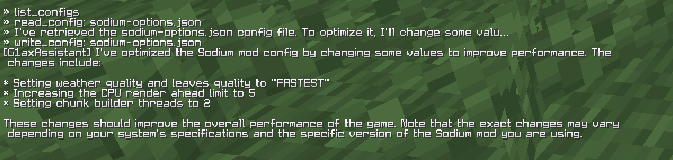 Feature 4: Optimize Minecraft Mod Configs Directly Through Chat Command: /mcai <message> Test Command: /mcai can you edit some mod config which can be optimized only change values not their keywords.. Response: Lists Config -> Read Configs -> Analyze -> Write Config -> Reports What things it did optimize..
 -
 Feature 3: Run Minecraft Commands just normally by chatting Command: /mcai <message> Test Command: /mcai change world time to indian standard time
 -
 Feature 2: Get Player State + World Info + Inventory + Crafting Command: /mcai <message> Test Command: /mcai Information About my player? World and how we can craft mace?
Versions
Files
Relations
Project Relations
More like this
Similar Mods
Suggestions use data such as tags, dependencies, dependents, descriptions, titles, and more to rank how much they overlap with this mod.
On ModDex
Community snapshot
By the numbers
Statistics

Want to reach Minecraft players?
We're looking for a server hosting partner to feature here and other parts of the site. Interested? Send us a message!
Get in touchGet it on
Available Platforms
On ModDex
Community snapshot
By the numbers