Community listing page, reviews here may not be monitored by the author.
Gamepad Hotbar


No reviews yet
A mod for Minecraft which makes the HUD hotbar more gamepad friendly by rearranging the slots and adding new control binds.

Community voices
Reviews
No reviews yet. Be the first to review this project!
Get it on
Available Platforms
Compatibility
Supported Environments
Runs entirely on the client. Works on vanilla servers.
About
Project Details
For authors
Embed Badge
If you're the author of this project, you can embed a live badge anywhere that supports HTML or Markdown. It updates automatically whenever ratings change.
Use HTML for any page that supports it, or Markdown for README files and Markdown-based descriptions.
Identifiers
Platform IDs
About
Description
Gamepad Hotbar

 Supports NeoForge and Fabric.
Gamepad Hotbar is a client mod for Minecraft which makes the HUD hotbar more gamepad friendly by rearranging the slots and adding new control binds.
The first 8 slots of the hotbar are split into four pairs and placed into adjacent quadrants on one side of the screen. The 9th and off-hand slots are placed into their own pair on the other side of the screen. They're arranged to resemble the directional-pad and face buttons of a standard game controller.
In each of the in-game menu screens, this mod adds distinct icons to each of the inventory hotbar slots to make it clear where each gamepad hotbar slot corresponds.
Control binds 🎮
Five new control binds have been added for making hotbar slot selection more accessible on gamepads:
Cycle Hotbar Left → cycles through the item pair in the left quadrant
Cycle Hotbar Up → cycles through the item pair in the up quadrant
Cycle Hotbar Right → cycles through the item pair in the right quadrant
Cycle Hotbar Down → cycles through the item pair in the down quadrant
Cycle Weapon Slot → selects the 9th hotbar slot (a.k.a. "weapon slot")
By default, these control binds are unmapped. The ideal way to assign them is to have the cycle hotbar quadrants correspond to directions on your controller's d-pad and map the weapon button to something different, such as a face button or shoulder button. Alternatively, hotbar quadrants could be mapped to the four face buttons, and the weapon slot to a d-pad button.
Configurable ⚙️
A mod configuration screen is included where users can adjust the position of the hotbar on their display. Multiple options are available to suit a variety of user tastes. This also serves to account for mods that alter the positions of other HUD elements.
Gamepad Hotbar
 Supports NeoForge and Fabric.
Gamepad Hotbar is a client mod for Minecraft which makes the HUD hotbar more gamepad friendly by rearranging the slots and adding new control binds.
The first 8 slots of the hotbar are split into four pairs and placed into adjacent quadrants on one side of the screen. The 9th and off-hand slots are placed into their own pair on the other side of the screen. They're arranged to resemble the directional-pad and face buttons of a standard game controller.
In each of the in-game menu screens, this mod adds distinct icons to each of the inventory hotbar slots to make it clear where each gamepad hotbar slot corresponds.
Control binds 🎮
Five new control binds have been added for making hotbar slot selection more accessible on gamepads:
Cycle Hotbar Left→ cycles through the item pair in the left quadrantCycle Hotbar Up→ cycles through the item pair in the up quadrantCycle Hotbar Right→ cycles through the item pair in the right quadrantCycle Hotbar Down→ cycles through the item pair in the down quadrantCycle Weapon Slot→ selects the 9th hotbar slot (a.k.a. "weapon slot")
By default, these control binds are unmapped. The ideal way to assign them is to have the cycle hotbar quadrants correspond to directions on your controller's d-pad and map the weapon button to something different, such as a face button or shoulder button. Alternatively, hotbar quadrants could be mapped to the four face buttons, and the weapon slot to a d-pad button.
Configurable ⚙️
A mod configuration screen is included where users can adjust the position of the hotbar on their display. Multiple options are available to suit a variety of user tastes. This also serves to account for mods that alter the positions of other HUD elements.
Screenshots
Gallery
-
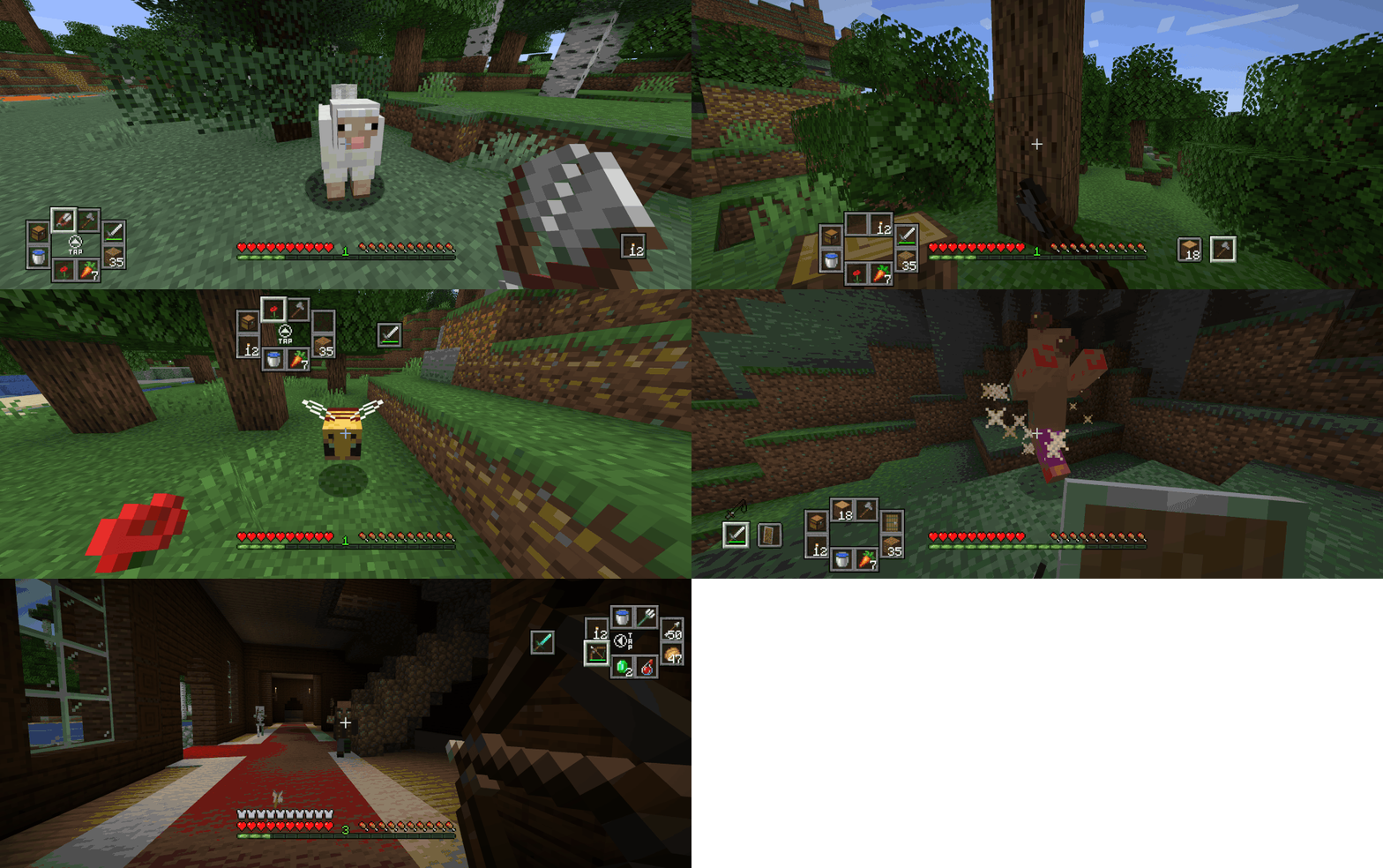 Configuration Compilation of Minecraft screenshots showing the gamepad hotbar in different positions of the screen.
 -
 Gamepad demonstration Animated image of Minecraft gameplay and a gamepad overlay (source: https://gamepadvision.com/gpvision) showing control functions.
 -
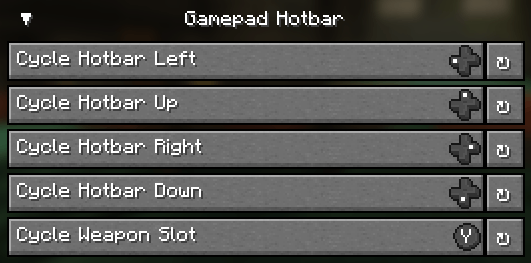 Control binds An example of the gamepad control binds using the Controlify mod (https://www.curseforge.com/minecraft/mc-mods/controlify)
 -
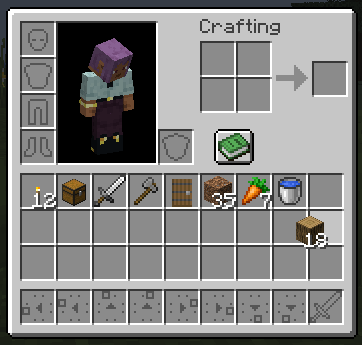 Inventory icons Screenshot of the Minecraft inventory screen, showing custom icons for the hotbar slots.
 -
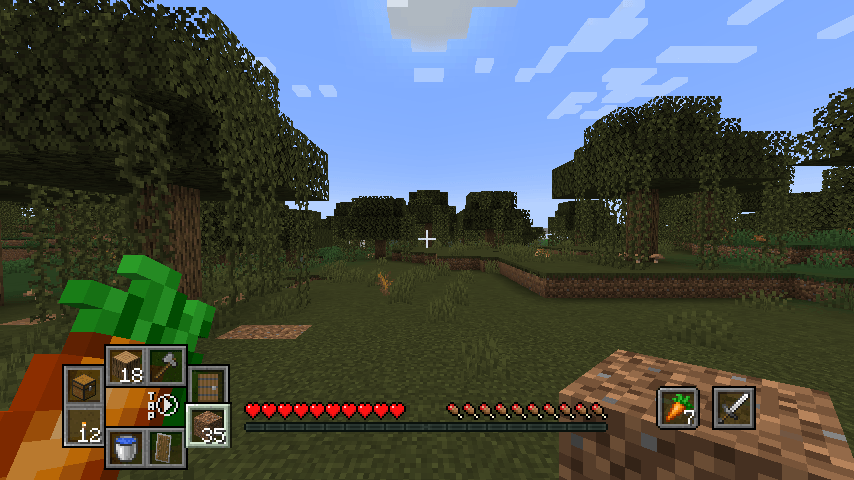 Gamepad Hotbar Screenshot of Minecraft gameplay displaying rearranged hotbar slots.
-
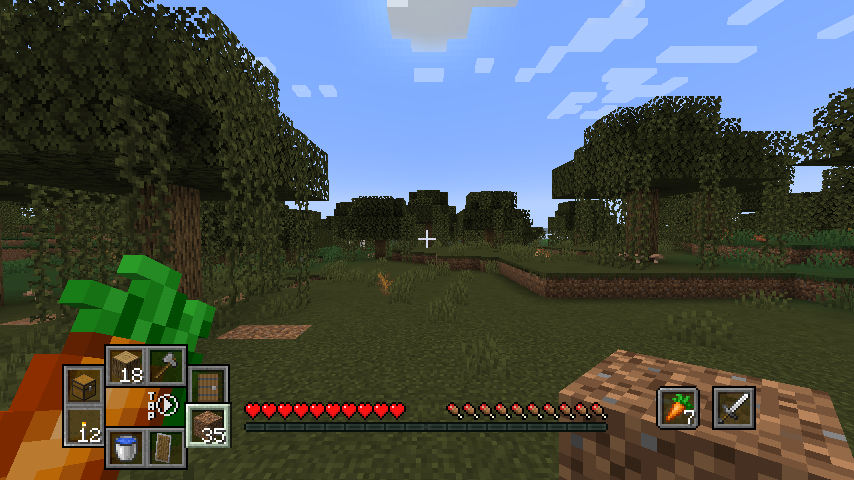 Gamepad Hotbar Screenshot of Minecraft gameplay displaying rearranged hotbar slots.
 -
 Inventory icons Screenshot of the Minecraft inventory screen, showing custom icons for the hotbar slots.
 -
 Control binds An example of the gamepad control binds using the Controlify mod (https://modrinth.com/mod/controlify)
 -
 Gamepad demonstration Animated image of Minecraft gameplay and a gamepad overlay (source: https://gamepadvision.com/gpvision) showing control functions.
 -
 Configuration Compilation of Minecraft screenshots showing the gamepad hotbar in different positions of the screen.
Versions
Files
Relations
Project Relations
More like this
Similar Mods
Suggestions use data such as tags, dependencies, dependents, descriptions, titles, and more to rank how much they overlap with this mod.
On ModDex
Community snapshot
By the numbers
Statistics
 (opens in a new tab)
Get it on
Available Platforms
On ModDex
Community snapshot
By the numbers