
Community listing page, reviews may not be monitored by the author.
GearHud

No reviews yet
See equipped armor and hand-item durability in a compact Fabric HUD, with color-coded bars and remaining/max values.

Community voices
Reviews
No reviews yet. Be the first to review this project!
Get it on
Available Platforms
Compatibility
Supported Environments
Runs entirely on the client. Works on vanilla servers.
About
Project Details
For authors
Embed Badge
If you're the author of this project, you can embed a live badge anywhere that supports HTML or Markdown. It updates automatically whenever ratings change.
Use HTML for any page that supports it, or Markdown for README files and Markdown-based descriptions.
Identifiers
Platform IDs
Resources
External Links
About
Description
GearHud
Keep equipped item durability visible while you play, with a compact vertical HUD for armor, main-hand, and off-hand slots.
Features
- Equipped-item icons and names
- Durability bars that change from green to yellow to red
- Numeric remaining/maximum durability for damageable items
- Configurable HUD X and Y position
How to use
Equip armor or hold an item and the HUD appears automatically. Open Mod Menu → GearHud to adjust its position.
Installation
Client-side Fabric mod. Choose a file marked for your Minecraft version. Requires Fabric Loader 0.17.2 or newer, Java 21, Fabric API, and YetAnotherConfigLib (YACL). Mod Menu is optional for opening settings.
Screenshots
Gallery
-
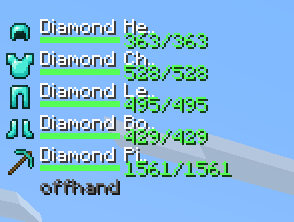 Armor and tool durability HUD Equipped armor and a held tool shown with item icons, durability bars, and remaining/max durability values.
Versions
Files
Relations
Project Relations
More like this
Similar Mods
Suggestions use data such as tags, dependencies, dependents, descriptions, titles, and more to rank how much they overlap with this mod.
On ModDex
Community snapshot
By the numbers
Statistics


Get it on
Available Platforms
On ModDex
Community snapshot
By the numbers
Statistics
Resources