
Community listing page, reviews here may not be monitored by the author.
GearSwap

No reviews yet
Save and instantly swap complete equipment setups — hotbar, armor, and offhand. One key, one click.
Community voices
Reviews
No reviews yet. Be the first to review this project!
Get it on
Available Platforms
Compatibility
Supported Environments
Runs entirely on the client. Works on vanilla servers.
About
Project Details
For authors
Embed Badge
If you're the author of this project, you can embed a live badge anywhere that supports HTML or Markdown. It updates automatically whenever ratings change.
Use HTML for any page that supports it, or Markdown for README files and Markdown-based descriptions.
Identifiers
Platform IDs
Resources
External Links
About
Description
GearSwap
Tired of rearranging your hotbar every time you switch tasks? Loadouts lets you save your complete equipment setup — hotbar, armor, and offhand — and restore it in one click.
Features
Save Any Setup
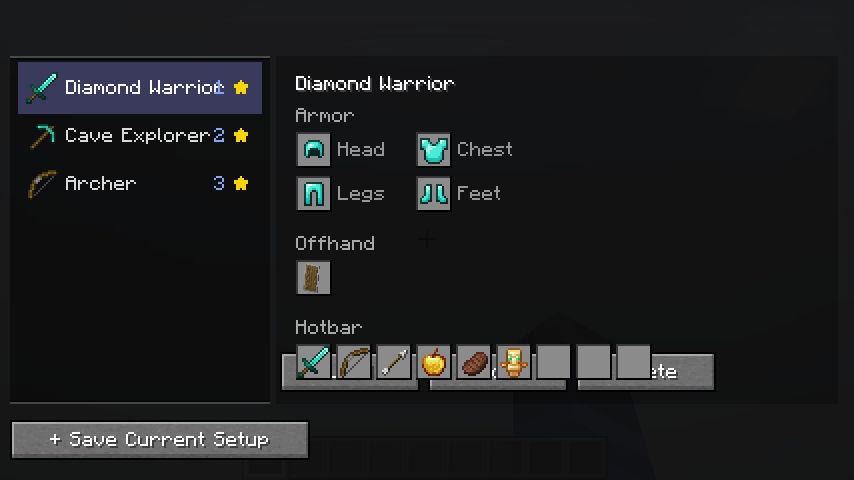
Capture your current hotbar (9 slots), armor (4 slots), and offhand as a named loadout with a custom icon. Loadouts are stored per-world or globally across all worlds.
Load in One Click
Open the loadout screen with L, select a loadout, and hit Load. Items are moved using standard inventory clicks — fully compatible with vanilla servers, Realms, and multiplayer.
Radial Quick-Switch Menu
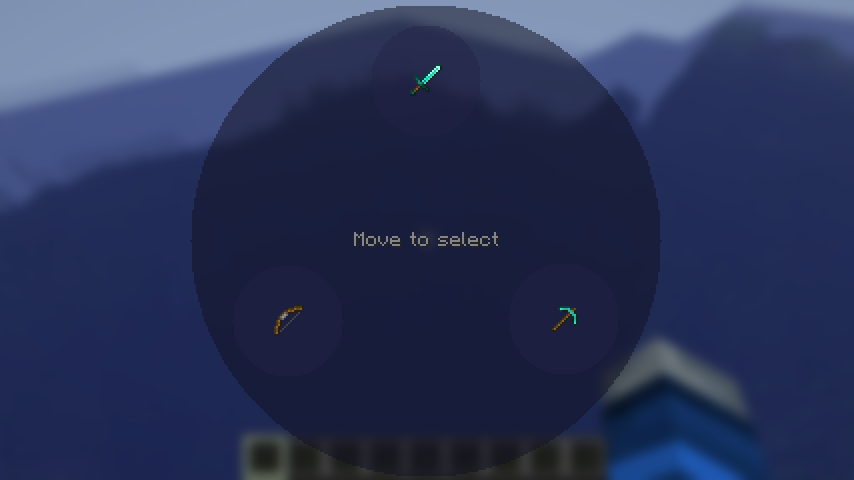
Hold L to open a radial wheel showing all your loadouts. Move your mouse to the one you want and release to apply it instantly — no menus needed.
Direct Hotkeys
Bind loadouts to L + 1–9 for instant one-handed switching without opening any screen.
Smart Item Matching
Loadouts find your items wherever they are in your inventory. Choose simple matching (any matching item) or exact matching (same enchantments and custom name).
Toast Notifications
Get a clean slide-in notification when a loadout is applied, including which items couldn't be found.
Controls
| Key | Action |
|---|---|
| L (tap) | Open loadout management screen |
| L (hold) | Open radial quick-switch menu |
| L + 1–9 | Apply loadout bound to that number |
Configuration
Config file: config/loadouts/settings.json
Options include click delay (for anti-cheat compatibility), radial menu opacity, max loadouts per world/global, and whether to close the screen after loading.
Compatibility
- Client-side only — works on any server including vanilla and Realms
- Fabric 0.18.4+ for Minecraft 1.21.11
- Requires Fabric API
Screenshots
Gallery
Versions
Files
Relations
Project Relations
More like this
Similar Mods
Suggestions use data such as tags, dependencies, dependents, descriptions, titles, and more to rank how much they overlap with this mod.
On ModDex
Community snapshot
By the numbers
Statistics

Want to reach Minecraft players?
We're looking for a server hosting partner to feature here and other parts of the site. Interested? Send us a message!
Get in touchGet it on
Available Platforms
On ModDex
Community snapshot
By the numbers
Statistics
Resources