
Community listing page, reviews here may not be monitored by the author.
GFX-Debuggers (NSight and Renderdoc Injector)

No reviews yet
Helps you inject graphics debuggers (NSight and Renderdoc) into Minecraft, without fiddling with launchers or JVM arguments.
Community voices
Reviews
No reviews yet. Be the first to review this project!
Get it on
Available Platforms
Compatibility
Supported Environments
Runs entirely on the client. Works on vanilla servers.
About
Project Details
For authors
Embed Badge
If you're the author of this project, you can embed a live badge anywhere that supports HTML or Markdown. It updates automatically whenever ratings change.
Use HTML for any page that supports it, or Markdown for README files and Markdown-based descriptions.
Identifiers
Platform IDs
About
Description
GFX Debuggers
This version-agnostic Fabric mod allows you to inject NSight or Renderdoc into Minecraft, without having to fiddle around with launchers, args or environment variables. At launch, it will ask you which debugger you want to attach, and injection can be skipped by closing the dialog. Supports both Linux and Windows, and should work with any version of Minecraft[citation needed], as long as Fabric was ported to it. Requires Fabric Loader 0.14.0+ and Java 17+.
Usage
- Install Fabric.
- Drop the mod into your mods folder
- Launch the game, pick the debugger you want to use
- Attach to the game process via your debugger of choice
- Profit?
Advanced usage
You can skip the dialog (useful for dev environments) by setting the debugger system property.
Allowed options are:
-Ddebugger=nsight-frame   # Launch with NSight Frame Debugger
-Ddebugger=nsight-gpu     # Launch with NSight GPU Trace Profiler
-Ddebugger=renderdoc      # Launch with RenderDoc
-Ddebugger=last           # Re-use the last picked debugger and options
-Ddebugger=skip           # Skip injection entirely, launch the game normally
The last option reads the saved configuration from the picker dialog (stored in .minecraft/config/gfx-debuggers.properties), including the selected debugger, platform, and any GPU Trace options. If no saved config exists, it falls back to showing the picker dialog.
NSight Graphics configuration
If the mod can't find your NSight installation, you can tell it where ngfx is:
Use either a JVM system property or an environment variable (the system property takes priority):
| Method | Example |
|---|---|
| System property | -Dngfx.path=C:\Program Files\NVIDIA Corporation\Nsight Graphics 2025.5\host\windows-desktop-nomad-x64\ngfx.exe |
| Environment variable | NGFX_PATH=C:\Program Files\NVIDIA Corporation\Nsight Graphics 2025.5 |
Both accept a direct path to the ngfx executable, an NSight Graphics installation root directory, or a directory containing the executable directly.
Search paths
Windows:
%ProgramFiles%\NVIDIA Corporation\Nsight Graphics *\host\windows-desktop-nomad-x64\ngfx.exe%ProgramFiles(x86)%\NVIDIA Corporation\Nsight Graphics *\host\windows-desktop-nomad-x64\ngfx.exe
Linux:
~/nvidia/NVIDIA-Nsight-Graphics-*/host/linux-desktop-nomad-x64/ngfx
NSight is kind of a pain to find, as many people install it on different drives and on linux it doesn't really have a standard location outside
~/nvidia/. The newest version is preferred when multiple installations are found. If you have issues, check the logs to see where it's looking and add the path manually if needed.
RenderDoc configuration
If the mod can't find your RenderDoc installation, you can tell it where the library is:
Use either a JVM system property or an environment variable (the system property takes priority):
| Method | Example |
|---|---|
| System property | -Drenderdoc.path=C:\Program Files\RenderDoc |
| Environment variable | RENDERDOC_PATH=C:\Program Files\RenderDoc |
Both accept either a direct path to the library file (renderdoc.dll / librenderdoc.so) or the directory containing it.
On Linux, the legacy environment variable RENDERDOC_LIB_PATH (expects a direct path to librenderdoc.so) is still supported.
Search paths
Windows
-Drenderdoc.pathsystem propertyRENDERDOC_PATHenvironment variable%ProgramFiles%\RenderDoc\renderdoc.dll- Versioned folders in
%ProgramFiles%(e.g.RenderDoc v1.32) - Same searches under
%ProgramFiles(x86)% %USERPROFILE%\RenderDoc\renderdoc.dll
Linux
-Drenderdoc.pathsystem propertyRENDERDOC_PATHenvironment variableRENDERDOC_LIB_PATHenvironment variable (legacy)- Common system library paths (
/usr/lib64/renderdoc/,/usr/lib/,/usr/lib/x86_64-linux-gnu/,/usr/local/lib/, etc.) ~/.local/lib/librenderdoc.so
Paths are searched in the order listed, and the first valid library found is used. If it can't find a valid .dll/.so, it will bail out and won't inject. Everything should be logged if anything goes wrong, so check the logs if you have issues.
Screenshots
Gallery
-
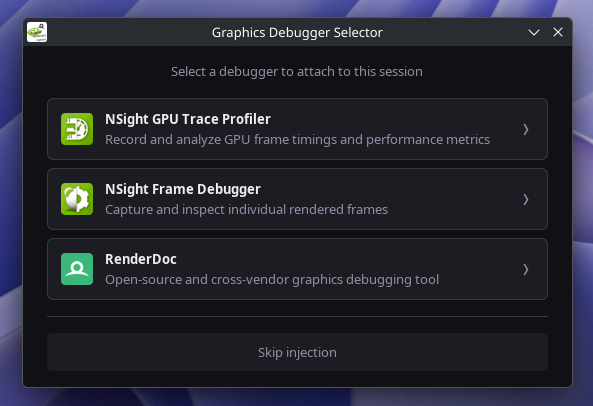 Debug selection menu On startup, you will be prompted to pick a debugger to inject. Closing the modal or skipping will not inject anything and boot the game normally.
Versions
Files
Relations
Project Relations
More like this
Similar Mods
Suggestions use data such as tags, dependencies, dependents, descriptions, titles, and more to rank how much they overlap with this mod.
On ModDex
Community snapshot
By the numbers
Statistics

Want to reach Minecraft players?
We're looking for a server hosting partner to feature here and other parts of the site. Interested? Send us a message!
Get in touchGet it on
Available Platforms
On ModDex
Community snapshot
By the numbers