
Community listing page, reviews here may not be monitored by the author.
Ghost Utils

No reviews yet
Useful, client-sided layouts

Community voices
Reviews
No reviews yet. Be the first to review this project!
Get it on
Available Platforms
About
Project Details
For authors
Embed Badge
If you're the author of this project, you can embed a live badge anywhere that supports HTML or Markdown. It updates automatically whenever ratings change.
Use HTML for any page that supports it, or Markdown for README files and Markdown-based descriptions.
Identifiers
Platform IDs
About
Description
Ghost Utilities are a small client-sided mod with useful overlays.
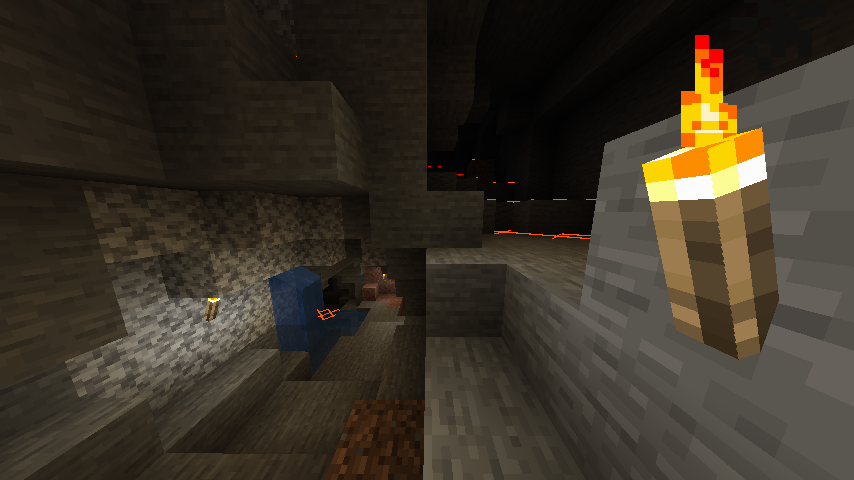 You probably have seen something like this. Yes, it's another Light Overlay. Shows 'X' signs on surfaces that hostile mobs can be spawned.
- X is colored yellow if there's enough sunlight to prevent mob spawning in daytime.
- X is colored orange if there's not enough sunlight to prevent mob spawning.
- And, X is colored red if there's no light present.
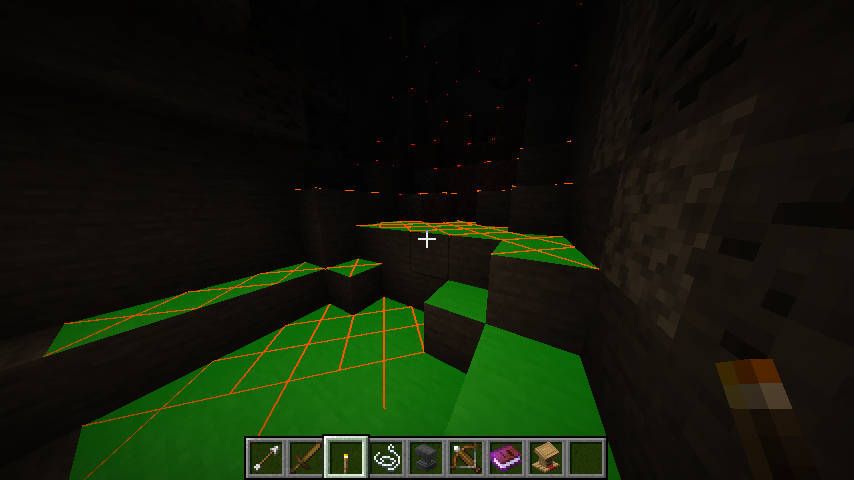 In addition to the overlay, Ghost Utilities add Light Source Preview. When you look some block while holding light source, green translucent area will be displayed. This overlay represents the area light source can prevent mob spawning when placed.
You can toggle this overlay with F7 key by default.
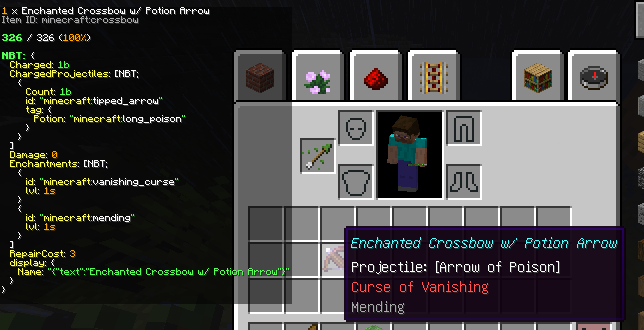
Ghost Utilities adds another overlay, called Item Info Overlay. Item Info Overlay displays information of the item picked up by cursor, or below cursor. It shows:
- Item name & count
- Internal Item/Block ID
- Durability
- Item/Block Tags (1.16+), Ore Dictionary (1.12)
- NBT data
The overlay is, by default, set to small size. Pressing Sneak key (LShift by default) enlarges the overlay.
If the text overflows under the screen, you can scroll up and down the overlay by picking up the item and moving it.
You can toggle this overlay with F9 key by default.
Config Options:
[Light Overlay]
- Enable/Disable
[Item Info Overlay]
- Enable/Disable
- Zoom level
- Zoom level while sneaking
Screenshots
Gallery
-
Item Data View
-
Light Source Preview
-
Light Overlay
-
![[1.12] Light Overlay / Light Source Preview](https://media.forgecdn.net/attachments/247/924/cap-2019-03-04-15-36-44-317.png) [1.12] Light Overlay / Light Source Preview
[1.12] Light Overlay / Light Source Preview -
![[1.12] Item Data View](https://media.forgecdn.net/attachments/247/923/honeycam-2019-03-05-01-10-29.gif) [1.12] Item Data View Meadows Queen from mod Forestry, obviously
[1.12] Item Data View Meadows Queen from mod Forestry, obviously
Versions
Files
Relations
Project Relations
More like this
Similar Mods
Suggestions use data such as tags, dependencies, dependents, descriptions, titles, and more to rank how much they overlap with this mod.
On ModDex
Community snapshot
By the numbers
Statistics
 (opens in a new tab)
Get it on
Available Platforms
On ModDex
Community snapshot
By the numbers