Community listing page, reviews here may not be monitored by the author.
Glideplate


No reviews yet
Allows chestplates and Elytra to be combined in an anvil without XP costs or prior-work penalties.
Community voices
Reviews
No reviews yet. Be the first to review this project!
Get it on
Available Platforms
Compatibility
Supported Environments
Required on the server. Installing it on the client adds functionality.
About
Project Details
For authors
Embed Badge
If you're the author of this project, you can embed a live badge anywhere that supports HTML or Markdown. It updates automatically whenever ratings change.
Use HTML for any page that supports it, or Markdown for README files and Markdown-based descriptions.
Identifiers
Platform IDs
About
Description
Languages
Glideplate
A server-side and client-side Fabric mod that lets players combine a chestplate with an elytra, then gives the resulting item proper Glideplate visuals.
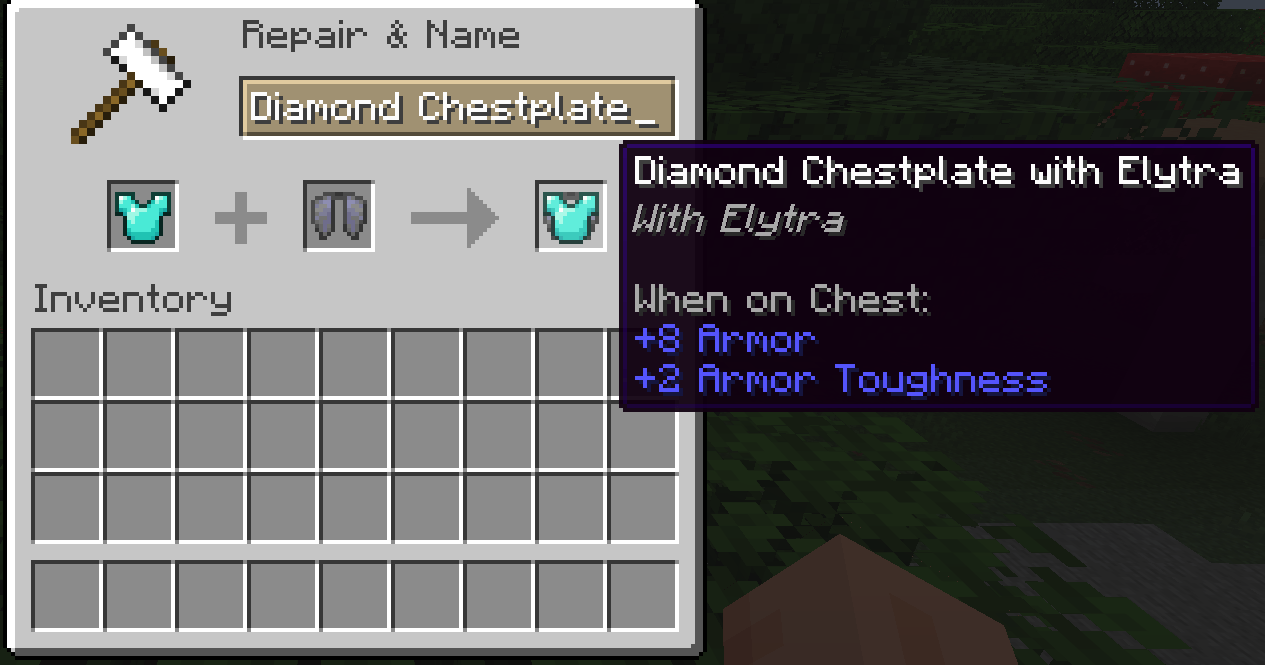
Place a chestplate in the left anvil slot and an elytra in the right slot. The output keeps the chestplate as armor, adds gliding support, and carries item data that identifies it as a Glideplate.
When installed on the client, Glideplate also improves the appearance of marked chestplates: the item model shows an elytra under the chestplate, and equipped Glideplates render with elytra wings.
Features
- Supports leather, copper, chainmail, iron, golden, diamond and netherite chestplates
- Combines only in one direction: chestplate on the left, elytra on the right
- Keeps the chestplate's durability, enchantments, trims and other item data
- Ignores the elytra's durability, damage and enchantments
- Updates marked chestplate item models with an elytra-and-chestplate appearance
- Keeps normal chestplates rendering normally
- Shows elytra wings when a marked chestplate is equipped
- Adds localized item names and tooltip text with English fallback text
- Costs no XP and does not add anvil prior-work penalty
- Works on dedicated servers
Usage
Use an anvil:
- Put a supported chestplate in the left slot.
- Put an elytra in the right slot.
- Take the Glideplate output.
The output item remains a chestplate, but it can also be used for elytra gliding.
Compatibility
Glideplate can be installed on servers, clients, or both.
Install it on the server to enable anvil crafting and gameplay support. Players do not need the mod installed to join, but without the mod on their client, Glideplates will render like regular chestplates.
Install it on the client to see enhanced Glideplate item models and equipped elytra wings.
Supported Versions
- Minecraft 26.3
- Fabric Loader 0.19.5+
- Fabric API 0.160.5+
- Java 25
License
MIT
Languages
Glideplate
A server-side and client-side Fabric mod that lets players combine a chestplate with an elytra, then gives the resulting item proper Glideplate visuals.
Place a chestplate in the left anvil slot and an elytra in the right slot. The output keeps the chestplate as armor, adds gliding support, and carries item data that identifies it as a Glideplate.
When installed on the client, Glideplate also improves the appearance of marked chestplates: the item model shows an elytra under the chestplate, and equipped Glideplates render with elytra wings.
Features
- Supports leather, copper, chainmail, iron, golden, diamond and netherite chestplates
- Combines only in one direction: chestplate on the left, elytra on the right
- Keeps the chestplate's durability, enchantments, trims and other item data
- Ignores the elytra's durability, damage and enchantments
- Updates marked chestplate item models with an elytra-and-chestplate appearance
- Keeps normal chestplates rendering normally
- Shows elytra wings when a marked chestplate is equipped
- Adds localized item names and tooltip text with English fallback text
- Costs no XP and does not add anvil prior-work penalty
- Works on dedicated servers
Usage
Use an anvil:
- Put a supported chestplate in the left slot.
- Put an elytra in the right slot.
- Take the Glideplate output.
The output item remains a chestplate, but it can also be used for elytra gliding.
Compatibility
Glideplate can be installed on servers, clients, or both.
Install it on the server to enable anvil crafting and gameplay support. Players do not need the mod installed to join, but without the mod on their client, Glideplates will render like regular chestplates.
Install it on the client to see enhanced Glideplate item models and equipped elytra wings.
Supported Versions
- Minecraft 26.3
- Fabric Loader 0.19.5+
- Fabric API 0.160.5+
- Java 25
License
MIT
Screenshots
Gallery
-
 Preview
-
 Preview
Versions
Files
Relations
Project Relations
More like this
Similar Mods
Suggestions use data such as tags, dependencies, dependents, descriptions, titles, and more to rank how much they overlap with this mod.
On ModDex
Community snapshot
By the numbers
Statistics
Want to reach Minecraft players?
We're looking for a server hosting partner to feature here and other parts of the site. Interested? Send us a message!
Get in touchGet it on
Available Platforms
On ModDex
Community snapshot
By the numbers