
Community listing page, reviews may not be monitored by the author.
Graphics Optimizer

No reviews yet
This mod adds a button to the Minecraft options menu, allowing you to easily manage and customize your game settings.

Community voices
Reviews
No reviews yet. Be the first to review this project!
Get it on
Available Platforms
About
Project Details
For authors
Embed Badge
If you're the author of this project, you can embed a live badge anywhere that supports HTML or Markdown. It updates automatically whenever ratings change.
Use HTML for any page that supports it, or Markdown for README files and Markdown-based descriptions.
Identifiers
Platform IDs
Resources
External Links
About
Description
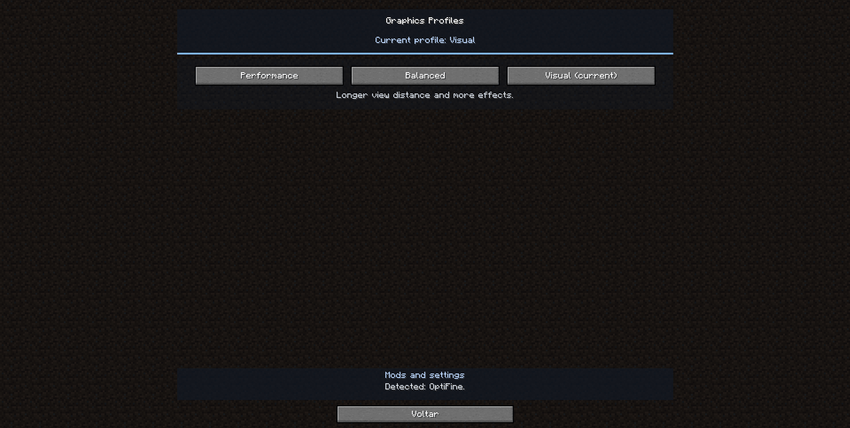
Graphics Optimizer is a Minecraft mod that lets you switch between Performance, Balanced, and Visual graphics profiles from the Options menu.
Each profile adjusts Minecraft’s graphics settings with one click. When supported optimization mods are installed, Graphics Optimizer can also adjust their known settings. With OptiFine, it can tune shader quality and apply a shader pack’s built-in quality profile when available.
Shader packs are not included. External mod settings may require restarting Minecraft to take effect.
Compatible mods
- Embeddium
- Rubidium
- Sodium
- OptiFine
- Entity Culling
- ImmediatelyFast
- ModernFix
- FerriteCore
- Canary
- Radium
- Starlight
- Memory Leak Fix
- Saturn
- Performant
Warning: Some mods may conflict with OptiFine.
Recognized shader packs
- Complementary Reimagined
- Complementary Unbound
- BSL
- Sildur’s Vibrant
- SEUS Renewed
- Chocapic13
- MakeUp Ultra Fast
- projectLUMA
- Nostalgia
Screenshots
Gallery
Versions
Files
Relations
Project Relations
More like this
Similar Mods
Suggestions use data such as tags, dependencies, dependents, descriptions, titles, and more to rank how much they overlap with this mod.
On ModDex
Community snapshot
By the numbers
Statistics

Get it on
Available Platforms
On ModDex
Community snapshot
By the numbers
Statistics
Resources