
GreatCrafts
No reviews yet
Adds custom crafting recipes to your server
Paper is a fork of Spigot that adds its own plugin API on top of the Bukkit API. All Spigot plugins are compatible with paper, not all paper plugins are compatible with Spigot.
Spigot is a popular software for running dedicated servers that can load Plugins created with the Bukkit API.
Community voices
Reviews
Click once to include, again to exclude, again to clear
No reviews yet. Be the first to review this project!
Get it on
Available Platforms
 Modrinth
Compatibility
Supported Environments
About
Project Details
For authors
Embed Badge
If you're the author of this project, you can embed a live badge anywhere that supports HTML or Markdown. It updates automatically whenever ratings change.
Use HTML for any page that supports it, or Markdown for README files and Markdown-based descriptions.
Identifiers
Platform IDs
About
Description
GreatCrafts
No other plugin allows for stacked items in recipe ingredients!
Have fun with your enchanted diamond block that requires 25,600 diamonds, or if you're even meaner, diamond blocks, to make!
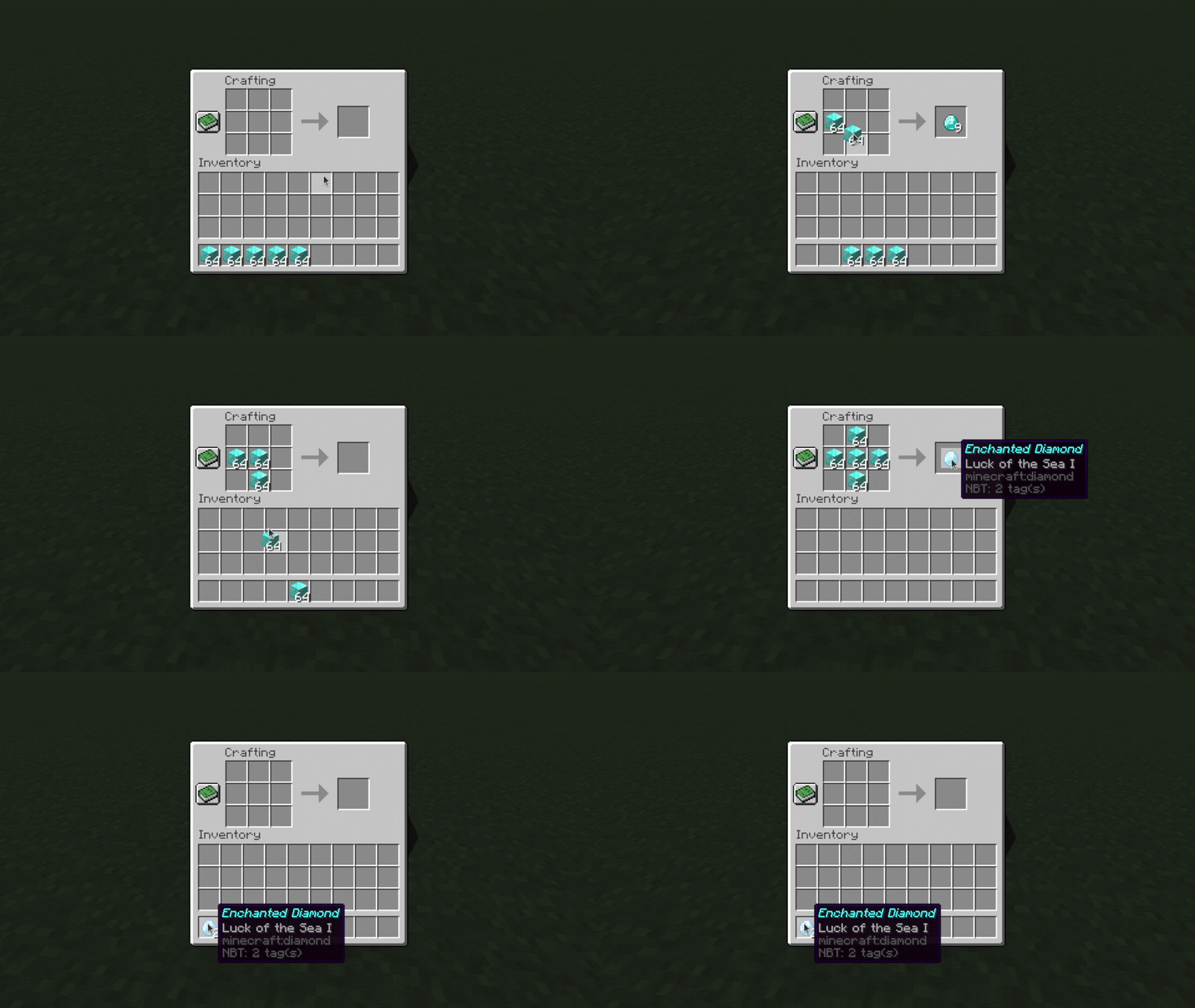
GreatCrafts is a crafting recipe plugin that allows you to create and customize your own crafting table recipes.
⚠ Make sure you download the correct file! There are two different files for Minecraft 1.19-1.20 and 1.21+.
Features
- Supports shaped and shapeless recipes
- Supports exact NBT matching, customizable for each ingredient item
- Supports multiple choices for an ingredient (e.g., any type of wood plank)
- Adds stacked item recipes, which require stacks of ingredients
- This allows you to require up to 576 ingredients to craft a single item
- Exact choice still works, and both shaped and shapeless stacked item recipes are supported
- Supports 1.21+ crafters for all recipes, including stacked items
- Has a simple to use GUI for both players and admins
Installation
Download the jar file, place it in the plugins folder, and restart the server!
Commands
/recipes - Opens a menu of all custom recipes (can be used by all players)
/viewrecipe <namespace:name> - View the crafting grid for a recipe (can be used by all players)
/addrecipe <namespace:name> - Add a new custom recipe
/editrecipe <namespace:name> - Edit a custom recipe
/deleterecipe <namespace:name> - Delete a custom recipe
/reloadrecipes - Reloads any changes to recipes (if they weren't already reloaded/activated already)
/greatcraftsutil - Contains utility commands (see below)
Permissions
greatcrafts.viewrecipes - Allows viewing recipes through /recipes and /viewrecipes
greatcrafts.modifyrecipes - Allows modifying recipes through /addrecipe and /editrecipe and /reloadrecipes
greatcrafts.greatcraftsutil - Allows /greatcraftsutil
greatcrafts.greatcraftscommand - Allows /greatcrafts (and /greatcrafts reload)
Creating/editing recipes
Video tutorials:
Shaped recipe demo

Shapeless recipe demo

Exact choice demo
Material choice demo

Run /addrecipe <craft> or /editrecipe <craft>.
For the <craft> argument, include both the namespace and name, for example myspecialnamespace:mycustomcraft.
Note: If your namespace is minecraft:..., you will overwrite the existing recipe, if any, in that name.
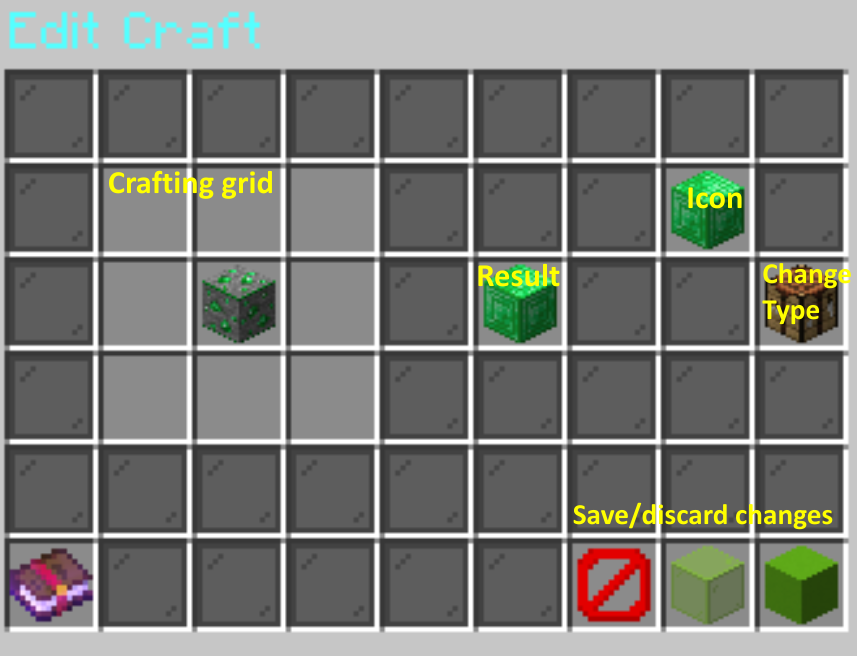
Place the items in the 3x3 crafting grid to the left, the result slot in the middle, and the icon slot (used to label the craft in the /recipes menu) in the top right.
You can put stacks of items or items with NBT in the ingredients and they will be saved, but players will only have to match the item type unless you enable exact choice and/or stacked items.
For each ingredient, you can also enable exact choice or material choice. Exact choice requires an exact match of NBT data (e.g., an item with a specific name or an item with specific enchantments), and material choice allows one of any item type to be used (e.g., any type of plank). Shift left click on an ingredient to toggle exact choice, and shift right click to toggle material choice.
Click on the crafting table to the right to change the type of the recipe:
- Shaped (most recipes in the game; shape of the grid matters)
- Shapeless (the ingredients can be in any order)
- Stacked items shaped (require stacks of ingredients in each slot instead of just a single item)
- Stacked items shapeless
Finally, click the barrier block to discard your changes, the green glass to save your changes, or the green concrete to save and activate your changes. Activating your changes makes the craft available to players immediately, although the client doesn't recognize the craft until you disconnect and reconnect.
Viewing recipes
/recipes shows all recipes available to the player, and clicking on a recipe will show the crafting grid for that recipe.
/viewrecipe <namespace:name> shows the crafting grid for a specific recipe.
Stacked items
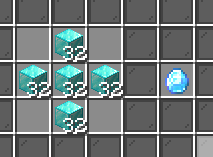
Video tutorial:

Stacked items are a special type of recipe that require stacks of each ingredient instead of just 1 of each. In the example shown, it would take 160 diamond blocks to make 1 enchanted diamond. (Players will get an error message if they try to craft it with fewer diamond blocks.)
Creating them is the same process; just put stacks of items in the crafting grid. Make sure to also click on the crafting table on the right to change the recipe type to stacked items.
These can also be combined with exact choice the same way as before, so if you're really mean you can require 160 enchanted diamonds to make an enchanted diamond block...
Note for shapeless stacked items: Multiple stacks of the same item type are supported, and they must be matched exactly. For example, if a stack of 16 and a stack of 32 diamonds are required, players must use exactly 16 and 32 diamonds in the recipe. Other ways, like 48 diamonds in 1 slot, or 16 diamonds in 3 slots, will not work.
Extra settings
These are some extra settings that you can add to recipes.
You can edit them with /editrecipe <recipe> <setting name> <new value>, or by clicking the paper icon in the editor GUI.
Automatically unlocking recipes
Recipes can be automatically unlocked for players under certain conditions.
This can be configured under automatically-unlock-recipes in the config file.
never- Never automatically unlocks custom recipeshave-each- Automatically unlocks custom recipes if the player has each of the required ingredientshave-one- Automatically unlocks custom recipes if the player has at least one of the required ingredientsalways- Automatically unlocks all custom recipes immediately
For more fine-grained control, you can also use /editrecipe <recipe> auto-unlock-setting <enter a setting> to adjust it for each recipe specifically.
Permission requirements
You can require a permission to make a specific recipe with /editrecipe <recipe> permission-requirement <enter a permission>.
Note that this will prevent crafters from using the recipe as well.
Craft limits
You can limit the number of times a recipe can be made with /editrecipe <recipe> craft-limit <number>.
This limit is per-player and only applies to stacked item recipes.
(If you have a non-stacked item recipe, just change it to stacked items with stack sizes of 1 for the same effect.)
You can also customize whether craft limits reset on server restart (e.g. minigames) or are permanent via the persistent-crafting-limits option in config.yml.
Utility commands
/greatcraftsutil setcustomname <name... (use & for colors)>
Sets the custom name of the item in your hand to the specified name.
Colors are supported (e.g., &agreen text).
/greatcraftsutil setloreline <line # (starts from 0)> [<lore line... (use & for colors)>]
Modifies the lore of the item in your hand. Specify the line number (starting from 0) and the lore to set on that line, or leave blank to clear it. You can specify a line number that is longer than the current lore (or if there is no current lore) and empty lore lines will automatically be added.
/greatcraftsutil deletelorelines <line # (starts from 0)> [<line #> <line #> ...]
Deletes the specified line numbers. You can specify multiple line numbers to delete.
/greatcraftsutil enchant <enchantment (Minecraft ID)> <level (0 to remove)>
Adds an enchant to the item in your hand.
You can use this command to add higher levels or incompatible enchants to items.
The enchantment argument uses Minecraft IDs without the minecraft: prefix.
/greatcraftsutil duplicaterecipe <source namespace:name> <target namespace:name>
Duplicates a recipe.
The source and target recipe arguments are both in the namespace:name format.
Support
To get support, report bugs, or make feature requests, please go to the issues page.
Screenshots
Gallery
Versions
Files
Relations
Project Relations
More like this
Similar Mods
Suggestions use data such as tags, dependencies, dependents, descriptions, titles, and more to rank how much they overlap with this mod.
On ModDex
Community snapshot
By the numbers
Statistics

Want to reach Minecraft players?
We're looking for a server hosting partner to feature here and other parts of the site. Interested? Send us a message!
Get in touchGet it on
Available Platforms
On ModDex
Community snapshot
By the numbers