
Grid updated
No reviews yet
Updated mod from gbl to 1.21+, which displays a configurable grid-like overlay over the world
Fabric is a mod loader for versions 1.14+ of Minecraft, particularly popular for client side and optimization mods.
Community voices
Reviews
Click once to include, again to exclude, again to clear
No reviews yet. Be the first to review this project!
Get it on
Available Platforms
 Modrinth
Compatibility
Supported Environments
About
Project Details
For authors
Embed Badge
If you're the author of this project, you can embed a live badge anywhere that supports HTML or Markdown. It updates automatically whenever ratings change.
Use HTML for any page that supports it, or Markdown for README files and Markdown-based descriptions.
Identifiers
Platform IDs
About
Description
Updated Grid by gbl. The original mod is end of life and I got request to update this mod...
if u find a bug/ crash, report to my discord/ github.
original discription
Sometimes you want to place blocks in a regular pattern, so you need to count blocks, and if you mess up once, the error propagates to all subsequent blocks.
This mod displays a grid-like overlay over the world, with configurable spacing, so the blocks you're interested in get highlighted automatically.
For example, you're building a railroad and want to place a powered rail ever 20th block. Type /grid 20, walk to the first powered rail, type /grid here (or press the c button, can be configured), and the mod will highlight every 20th block from where you're standing.
Or, if you want to place torches in an area to prevent spawns, type /grid 5 - this highlights every 5th block; placing torches on each of them will light everything up enough.
You can switch between block mode (to highlight blocks to place stuff on) or line mode (to display borders; for example /grid chunks followed by grid lines will turn Grid into a chunk border highlighter), have the y-coordinate of the display floating with the player or fixed, and choose different X and Z spacings if you want that.
commands
/grid show and /grid hide: show/hide the grid, bound to the B key.
/grid here: set the origin of the grid to where the player is standing. Bound to C (for center)
/grid blocks: set Block mode: show blue squares above marked blocks
/grid lines: set Line mode: show yellow lines to the N/W of marked blocks
/grid chunks: set X and Y spacing to 16 and the origin to chunk borders. Use together with /grid lines to get a chunk border display that's less intrusive than F3-G
/grid : and are numbers; set the grid spacing to n in X direction and m in Y direction
/grid : set the grid spacing to n in both horizontal directions
/grid fixy: toggle between floating the y coordinate of the grid with the player, or fixing it to where the player stands when you use the command. Bound to the Y key.
/grid spawns: show possible mob spawn locations
/grid circles: shows circle overlays. In line mode, this shows regular circles; in block mode, it tries to find and mark the blocks you should build on to get a circle. Obviously, this can't work well with very small diameters, for example, trying to mark a 3x3 circle will give you a square.
/grid distance : sets the range in blocks, that the grid is rendered around you. If you use very large spacings/circle diameters, you need to adjust this too. Be careful though, high values for distance absolutely kill your framerate when you turn spawn locations on.
/grid biome : draw a marker on all blocks in a certain biome. For example, /grid biome river helps when you want to build a drowned or squid farm. (Only with Grid version 1.5+).
/grid hex: Draw a hex grid. In block mode, you get the corners of each hex; in line mode, you get lines around the hexes. (Only with Grid version 1.6+)
All keys can be reconfigured using the standard Controls UI.
Spoiler
i know this mod is niche and i havent used this mod before, but must be good for aesthetic and OCD
Screenshots
Gallery
-
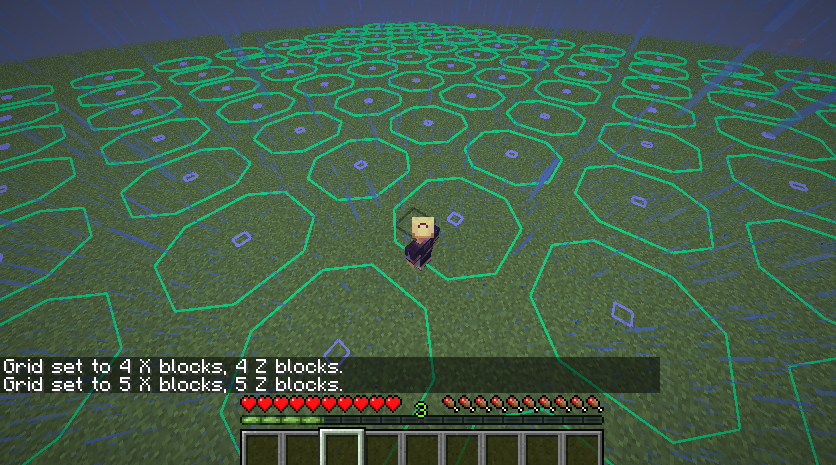 example usage with circles
Versions
Files
Relations
Project Relations
More like this
Similar Mods
Suggestions use data such as tags, dependencies, dependents, descriptions, titles, and more to rank how much they overlap with this mod.
On ModDex
Community snapshot
By the numbers
Statistics

Want to reach Minecraft players?
We're looking for a server hosting partner to feature here and other parts of the site. Interested? Send us a message!
Get in touchGet it on
Available Platforms
On ModDex
Community snapshot
By the numbers