
GUI Maker
No reviews yet
This datapack allows the player to create GUIs in their worlds freely and avoiding the hassle to hardcode them!
Provides a framework or library for other mods to use.
Data Packs were introduced to vanilla Minecraft in version 1.13 and allow the server to modify data about the game, or run commands. Data Packs are compatible with all mod loaders.
Forge is a popular mod loader for versions 1.1+ of Minecraft.
Neoforge is a fork of the Minecraft Forge available for versions 1.20.1+ of Minecraft. Many Forge mods are compatible with Neoforge and vice versa.
Fabric is a mod loader for versions 1.14+ of Minecraft, particularly popular for client side and optimization mods.
Quilt is a fork of the Fabric mod loader. Many Fabric mods are compatible with Quilt and vice versa.
Community voices
Reviews
Click once to include, again to exclude, again to clear
No reviews yet. Be the first to review this project!
Get it on
Available Platforms
 Modrinth
Compatibility
Supported Environments
About
Project Details
For authors
Embed Badge
If you're the author of this project, you can embed a live badge anywhere that supports HTML or Markdown. It updates automatically whenever ratings change.
Use HTML for any page that supports it, or Markdown for README files and Markdown-based descriptions.
Identifiers
Platform IDs
About
Description

- 1.20.2-1.21.11+ supported! (make sure to check versions before installing!)
- Make sure to follow this project to get notified about new features!
- For versions 1.21.6+, Restart your World upon uploading the datapack.
About Me
GUI Maker is a datapack mapmaking tool that allows mapmakers to create Inventory GUI in their minecraft worlds! This is a storage-based datapack which stores page layout details in appropriate storage paths and draws from them with the help of macros. This datapack is released under MIT license, meaning that if you wish to make changes, you can download its source code and modify accordingly.
Features
-
Create Multiple Inventory GUI
This datapack allows for an easy way to create multiple GUI in the same minecraft world! It also allows for easy navigation and page-changing feature!
-
Performance-Efficient!
This datapack has been made to account for performance load and prevent lag spikes caused by its functions. If you feel that the datapack is not efficient enough and can be further improved, feel free to contact me or make your own version of this datapack.
Points to Note
-
Setup ALL of your GUI Layouts before Using!
It is advised that users set up everything relating to the pages before attempting to use this datapack. If you do this, it will surely speed up your creation process.
How to Make a GUI
Key Note: Once you've uploaded the datapack onto the world, you need to rejoin the world if you're in singleplayer, or restart the server if you're using the datapack in a server. This is because the datapack uses a new /dialog system and that is only reloaded upon world restart.
Here's a video tutorial.
-
First, Make a GUI
- Open the GUI Maker v2.0 Menu™ by running the function /function gm:menu
- Click on CREATE GUI
- Click "CREATE GUI PROFILE"
- A GUI ID will be displayed in the chat, keep it in mind!
- Now, to append pages to your GUI, open the menu again.
- Click on CREATE GUI, then click on Append a Page instead.
- Find the GUI you've made by recalling the GUI ID.
That way, you've created the GUI. Now, the next step is to make buttons do things.
-
Second, Edit the Page
- Open the GUI Maker v2.0 Menu™ by running the function /function gm:menu.
- Click on Edit Page.
- Navigate to your GUI ID and PAGE
- Choose between Editing Page Name and Editing Contents
- Once you press Editing Contents, a prototypical layout of the Menu will be displayed to you. If your GUI has empty slots, only the slots which have items will be shown.
- Hovering over the Button gives detail about the Item present in that slot, use it to find the button you want to make changes to. Once you've found it, press on it
- Another Dialog Menu will pop up. Here, make all the changes you need. Do not keep the text inputs empty. Once done, click Apply.
-
Lastly, Spawn the GUI
- Open the GUI Maker v2.0 Menu™ by running the function /function gm:menu, again.
- Click on "Spawn GUI"
- Navigate to the Page you want to Summon.
- Choose between Spawning it as a Barrel or Chest Minecart.
- Once the button is clicked, a message will appear in chat for the command to summon the GUI without dialog, this can be copied by the developer to put it in specific parts of their datapack.
Other
You must NOT re-upload this exact datapack under any circumstances.
You can package this datapack + your function files and upload them, as you wish.
You can make changes you want as you wish and use it/upload it as you wish.
You are allowed to use this datapack in your creations and upload this datapack with your creation combined.
Extras
Thanks for reading the description of this project. Since the last version of the datapack, alot of changes have made. Initially, the datapack was split into two parts. But this time, they've been merged into one. Until Mojang makes major changes with dialogs, the current system will be upgraded/maintained for future minecraft versions to come.
Thank you!
- Thanks for downloading this datapack (if you've downloaded it)!
- Thanks for using this datapack in your creations!
- Thanks for showing interest in this datapack project!
Screenshots
Gallery
-
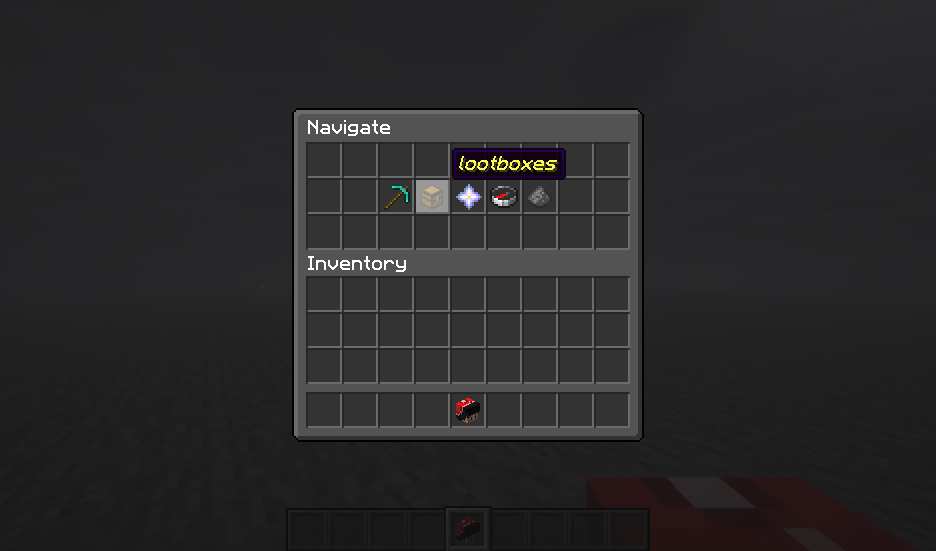 Pseudo-Server Nav Menu proof of concept.
 -
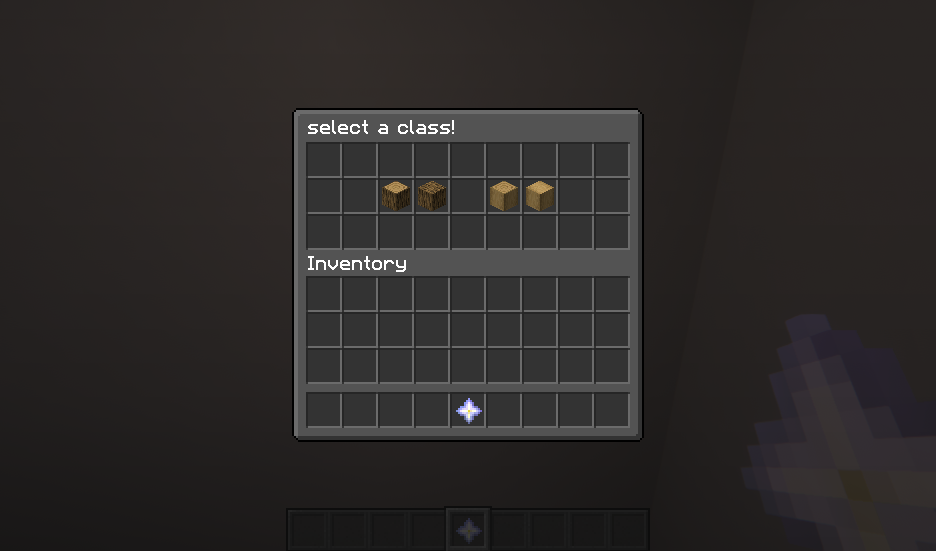 class selection this is done by holding an item with custom nbt.
Versions
Files
Relations
Project Relations
More like this
Similar Mods
Suggestions use data such as tags, dependencies, dependents, descriptions, titles, and more to rank how much they overlap with this mod.
On ModDex
Community snapshot
By the numbers
Statistics

Want to reach Minecraft players?
We're looking for a server hosting partner to feature here and other parts of the site. Interested? Send us a message!
Get in touchGet it on
Available Platforms
On ModDex
Community snapshot
By the numbers