
Community listing page, reviews here may not be monitored by the author.
GuideME


No reviews yet
A guidebook toolkit for mods and modpack makers alike with comfortable markdown formatting, and live 3d scenes!

Community voices
Reviews
No reviews yet. Be the first to review this project!
Get it on
Available Platforms
Compatibility
Supported Environments
Must be installed on both the client and the server.
About
Project Details
For authors
Embed Badge
If you're the author of this project, you can embed a live badge anywhere that supports HTML or Markdown. It updates automatically whenever ratings change.
Use HTML for any page that supports it, or Markdown for README files and Markdown-based descriptions.
Identifiers
Platform IDs
About
Description
GuideME
This project offers the foundation for your mods or modpacks guidebook. Based on the technology powering Applied Energistics 2s guidebook, it allows you to write your guide in simple Markdown, while embedding 3d scenes straight from structure files.
For players, guides based on GuideME offer:
- Smooth scrolling goodness
- Content being front and center, with an advanced text layout engine supporting reflow and inline elements
- Interactive 3D scenes with annotations, intuitively illustrating concepts from your mod
- Cross-linking between topics and quick information in link tooltips
- Showing inline-recipes in your guidebook "JEI-Style"
- Offers the ability to "hold G" to quickly jump to the relevant guidebook page in any item tooltip
For modders, it offers a rich extensibility API, allowing you to:
- Add custom inline or block tags to Markdown, backed by a custom Widget system
- Extend the recipe rendering to display your custom recipes in the guide
- Use custom Markdown front-matter to easily add arbitrary information to guidebook pages
- Use custom indices to quickly find pages based on custom attributes
- Allow resource packs or addons to add their own content to your guide
Documentation
Documentation for content authors and modders can be found on our website guideme.appliedenergistics.org, and you can reach out to us directly on the AE2 Discord.
Example
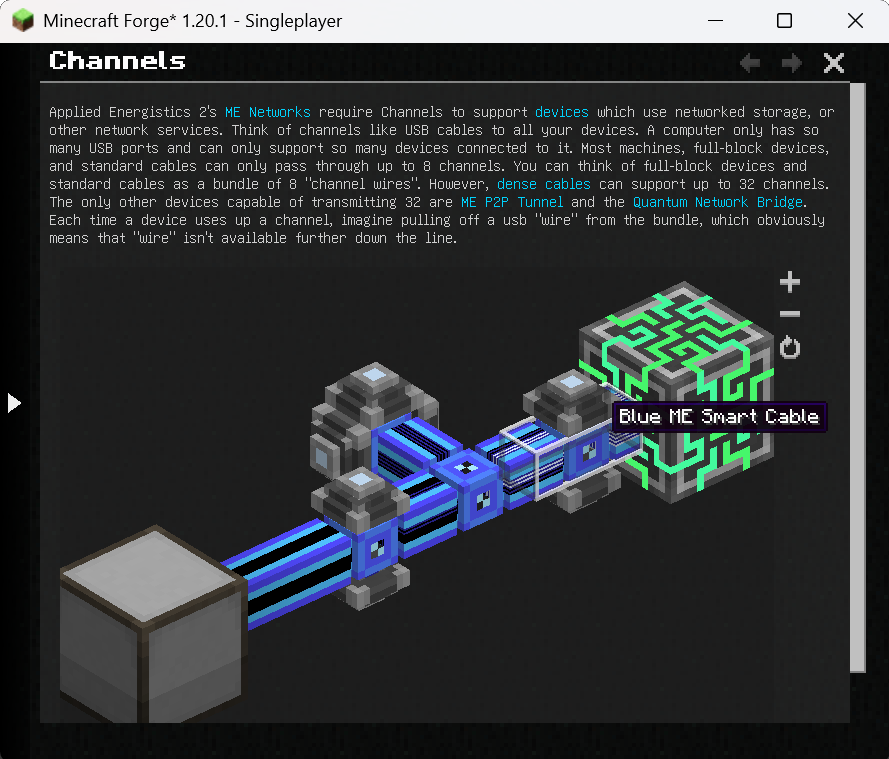
The following is an example page from the AE2 guidebook (source).
---
navigation:
  parent: ae2-mechanics/ae2-mechanics-index.md
  title: Channels
  icon: controller
---

# Channels

Applied Energistics 2's [ME Networks](me-network-connections.md) require
Channels to support [devices](../ae2-mechanics/devices.md) which use networked storage, or other network
services. Think of channels like USB cables to all your devices. A computer only has so many USB ports and can only support
so many devices connected to it. Most machines, full-block devices, and standard cables can only pass through
up to 8 channels. You can think of full-block devices and standard cables as a bundle of 8 "channel wires". However, [dense cables](../items-blocks-machines/cables.md#dense-cable) can support up
to 32 channels. The only other devices capable of transmitting 32 are <ItemLink id="me_p2p_tunnel" />
and the [Quantum Network Bridge](../items-blocks-machines/quantum_bridge.md). Each time a device uses up a channel, imagine pulling off a usb "wire" from
the bundle, which obviously means that "wire" isn't available further down the line.

<GameScene zoom="7" interactive={true}>
  <ImportStructure src="../assets/assemblies/channel_demonstration_1.snbt" />
</GameScene>
GuideME
This project offers the foundation for your mods or modpacks guidebook. Based on the technology powering Applied Energistics 2s guidebook, it allows you to write your guide in simple Markdown, while embedding 3d scenes straight from structure files.
For players, guides based on GuideME offer:
- Smooth scrolling goodness
- Content being front and center, with an advanced text layout engine supporting reflow and inline elements
- Interactive 3D scenes with annotations, intuitively illustrating concepts from your mod
- Cross-linking between topics and quick information in link tooltips
- Showing inline-recipes in your guidebook "JEI-Style"
- Offers the ability to "hold G" to quickly jump to the relevant guidebook page in any item tooltip
For modders, it offers a rich extensibility API, allowing you to:
- Add custom inline or block tags to Markdown, backed by a custom Widget system
- Extend the recipe rendering to display your custom recipes in the guide
- Use custom Markdown front-matter to easily add arbitrary information to guidebook pages
- Use custom indices to quickly find pages based on custom attributes
- Allow resource packs or addons to add their own content to your guide
Example
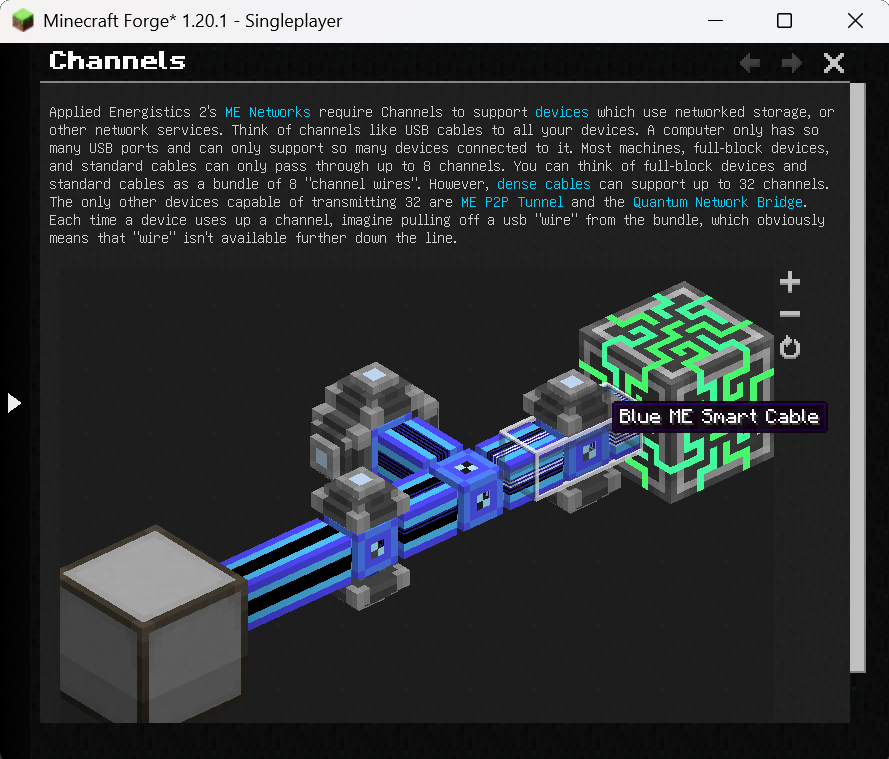
The following is an example page from the AE2 guidebook (source).
---
navigation:
  parent: ae2-mechanics/ae2-mechanics-index.md
  title: Channels
  icon: controller
---

# Channels

Applied Energistics 2's [ME Networks](me-network-connections.md) require
Channels to support [devices](../ae2-mechanics/devices.md) which use networked storage, or other network
services. Think of channels like USB cables to all your devices. A computer only has so many USB ports and can only support
so many devices connected to it. Most machines, full-block devices, and standard cables can only pass through
up to 8 channels. You can think of full-block devices and standard cables as a bundle of 8 "channel wires". However, [dense cables](../items-blocks-machines/cables.md#dense-cable) can support up
to 32 channels. The only other devices capable of transmitting 32 are <ItemLink id="me_p2p_tunnel" />
and the [Quantum Network Bridge](../items-blocks-machines/quantum_bridge.md). Each time a device uses up a channel, imagine pulling off a usb "wire" from
the bundle, which obviously means that "wire" isn't available further down the line.

<GameScene zoom="7" interactive={true}>
  <ImportStructure src="../assets/assemblies/channel_demonstration_1.snbt" />
</GameScene>
Screenshots
Gallery
Versions
Files
Relations
Project Relations
More like this
Similar Mods
Suggestions use data such as tags, dependencies, dependents, descriptions, titles, and more to rank how much they overlap with this mod.
On ModDex
Community snapshot
By the numbers
Statistics
 (opens in a new tab)
Get it on
Available Platforms
On ModDex
Community snapshot
By the numbers