
HailWall
No reviews yet
Server-side mod whitelist/blacklist: checks each player's client mods on join and kicks disallowed ones. (Install on server + client.)
Neoforge is a fork of the Minecraft Forge available for versions 1.20.1+ of Minecraft. Many Forge mods are compatible with Neoforge and vice versa.
Fabric is a mod loader for versions 1.14+ of Minecraft, particularly popular for client side and optimization mods.
Community voices
Reviews
Click once to include, again to exclude, again to clear
No reviews yet. Be the first to review this project!
Get it on
Available Platforms
 Modrinth
Compatibility
Supported Environments
About
Project Details
For authors
Embed Badge
If you're the author of this project, you can embed a live badge anywhere that supports HTML or Markdown. It updates automatically whenever ratings change.
Use HTML for any page that supports it, or Markdown for README files and Markdown-based descriptions.
Identifiers
Platform IDs
About
Description
HailWall — Mod Whitelist
HailWall checks the mods installed on a player's client when they join, and kicks them if they have disallowed mods (or are missing a required one). It's a modern, lightweight take on the classic Mod Whitelist idea.
⚠️ Install it on BOTH the server and every client. A purely server-side mod cannot read a client's full mod list — vanilla simply doesn't send it. So, like every mod of this kind, HailWall needs a tiny companion running on the client.
✨ Features
- Whitelist mode (default) — block everything except the mods you allow. The essentials (
minecraft, the loader,java,hailwall) are always allowed. - Blacklist mode — allow everything except specific mods (cheat clients, x-ray, …).
- Required mods — kick players who are missing a mandatory mod.
- Operator bypass — server operators are never kicked, even with extra mods (like a
usePermissiontoggle). - Transition / monitor mode (
enforce: false) — kick nobody, but still record everyone's mods. Perfect for rolling HailWall out without disrupting players while you build your list. - Access log — one JSON-Lines file per day (kept under
config/, so it's reachable even on hosts like Aternos) listing who joined and with which mods. Old files are pruned automatically. - Signed handshake — HMAC + per-connection challenge to stop trivial packet spoofing.
- Zero gameplay overhead — everything happens once, during login; the log is written off-thread. No per-tick cost.
⚙️ How it works
During the login handshake the server asks the client for its mod list. The client replies with its installed top-level mods (id + version), signed with HMAC. The server verifies the signature, compares the list against your config, and either lets the player in or disconnects them — all before they enter the world.
| Situation | Result |
|---|---|
| Installed on client and server | ✅ Full verification |
| Installed only on the client | You can still play on other servers; here it protects nothing |
| Installed only on the server | A client without HailWall can't join (when requireCompanionMod is on) |
📦 Setup
- Install the correct version of your chosen mod loader (e.g., Fabric, Forge, or NeoForge) and any required APIs on the server and on every client.
- Drop the
hailwall-x.y.z.jarinto themods/folder of the server and of each client. - Start the server once to generate
config/hailwall.json, edit it, and restart.
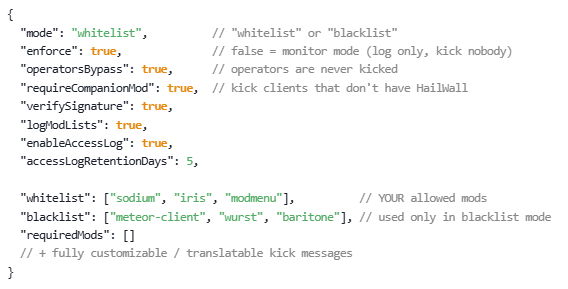
🔧 Configuration — config/hailwall.json
{
  "mode": "whitelist",          // "whitelist" or "blacklist"
  "enforce": true,              // false = monitor mode (log only, kick nobody)
  "operatorsBypass": true,      // operators are never kicked
  "requireCompanionMod": true,  // kick clients that don't have HailWall
  "verifySignature": true,
  "logModLists": true,
  "enableAccessLog": true,
  "accessLogRetentionDays": 5,

  "whitelist": ["sodium", "iris", "modmenu"],          // YOUR allowed mods
  "blacklist": ["meteor-client", "wurst", "baritone"], // used only in blacklist mode
  "requiredMods": []
  // + fully customizable / translatable kick messages
}
Find any mod's id in its mod.json (the id field). Easier: read it straight from the access log, or from the client's logs/latest.log, where HailWall prints the reported mod list.
🔒 Privacy & data
- The client sends only mod ids + versions of top-level mods — no file paths, no system info, no personal data.
- That data is used to allow/deny the join and is recorded only in the server's own access log (default 5-day retention). It's never sent anywhere else, and other players can't see it.
- Open source — you can verify exactly what it does.
🛡️ Honest security note
Like every client-side mod check, HailWall is not bulletproof: a determined user could still bypass it. The HMAC + challenge stops casual spoofing, not an expert. It works great against normal players and is best paired with online-mode=true. Treat it as one solid layer, not a silver bullet.
Screenshots
Gallery
Versions
Files
Relations
Project Relations
More like this
Similar Mods
Suggestions use data such as tags, dependencies, dependents, descriptions, titles, and more to rank how much they overlap with this mod.
On ModDex
Community snapshot
By the numbers
Statistics

Want to reach Minecraft players?
We're looking for a server hosting partner to feature here and other parts of the site. Interested? Send us a message!
Get in touchGet it on
Available Platforms
On ModDex
Community snapshot
By the numbers