
Community listing page, reviews here may not be monitored by the author.
Handy Shulker


No reviews yet
Shulker boxes should work like bundles. Click to insert items, hover to preview contents, and scroll to extract — all without placing the box down.
Community voices
Reviews
No reviews yet. Be the first to review this project!
Get it on
Available Platforms
Compatibility
Supported Environments
Must be installed on both the client and the server.
About
Project Details
For authors
Embed Badge
If you're the author of this project, you can embed a live badge anywhere that supports HTML or Markdown. It updates automatically whenever ratings change.
Use HTML for any page that supports it, or Markdown for README files and Markdown-based descriptions.
Identifiers
Platform IDs
About
Description

Handy Shulker
Shulker boxes should work like bundles. That's it.
Vanilla Minecraft gave bundles a slick click-to-insert and hover-to-preview interface - but shulker boxes, the OG portable storage, still require you to place them down every single time. Handy Shulkers fixes that with two simple interactions:
Features
🖱️ Click to Insert
Hold a shulker box in your inventory and click items onto it to store them — exactly like bundles. No more placing, opening, inserting, closing, and breaking. Just click.
🔍 Hover + Scroll to Browse
Hover over a shulker box to preview its contents in a 9×3 grid. Scroll to cycle through items and click to extract — all without ever placing the box.
📊 Fullness Bar
Shulker boxes display a colored bar showing how full they are — just like bundles. Spot your empties at a glance.
🎨 Color-Tinted Tooltips
The tooltip border matches your shulker box's dye color. Pink shulker? Pink border.
🔢 Item Count Badges
When you select an item, the tooltip shows the total count across all slots — no more mental math. "Cobblestone ×204" tells you exactly what you've got.
📦 Compact Mode
Hold Shift to view a condensed grid of unique items with aggregated counts and no empty slots. Large counts are abbreviated (1000+ → "1.0k", 10000+ → "10k"). Perfect for quickly checking "do I have enough iron?"
⚙️ Fully Configurable
Every feature can be toggled individually. No game restart needed. Install Mod Menu and YACL for an in-game config screen, or just edit config/handyshulkers.json by hand. Both are optional - the mod works out of the box with sensible defaults.
Why This Mod?
The average Minecraft builder interacts with shulker boxes about 30 times per session. Each time, you go through the same ritual: find a surface, place the box, wait for the opening animation, open the GUI, move your items, close it, mine it back, pick it up. That's roughly 5.6 seconds per interaction — and over the course of a year, it adds up to about 6.9 hours of just placing and breaking shulker boxes. We did the math so you don't have to. You're welcome. Shulker boxes are 27-slot portable chests, yet they have none of the quality-of-life that bundles got in 1.21. Handy Shulkers brings that same vanilla-feeling UX to your shulkers.
- Vanilla-esque — no new items, no new blocks, no config screens. Just better shulker UX.
- Lightweight — does one thing well. No library dependencies beyond Fabric API.
- Respects vanilla balance — shulker-in-shulker nesting is still blocked, stack sizes are unchanged.
Compatibility
- Requires Fabric API
- ✅ Mouse Tweaks compatible — works cleanly alongside Mouse Tweaks and other inventory mods
- ✅ ItemScroller / MaLiLib compatible — scroll events are intercepted at the GLFW input level, so inventory mods won't interfere
- Should work alongside most inventory mods — if you run into conflicts, open an issue
- ⚙️ Optional: Mod Menu + YACL for in-game config screen (not required)
Installation
Single Player
- Install Fabric Loader
- Install Fabric API
- Drop
handyshulkers-x.x.x.jarinto yourmods/folder - Launch the game!
Server
The mod is required on both the server and all connecting clients. Players without the mod installed will not be able to use shulker box interactions correctly.
- Install Fabric Loader on your server
- Place Fabric API and Handy Shulker in the server's
mods/folder - Each connecting player needs Fabric Loader, Fabric API, and Handy Shulker installed
Inspiration
This mod exists because of Xisuma and his Bundle Boutique in Hermitcraft Season 11. Watching that episode was the moment bundles finally clicked - and immediately made me wonder why shulker boxes, the original portable storage, couldn't do the same thing.
Handy Shulkers is open source under the MIT license.
Handy Shulker
Shulker boxes should work like bundles. That's it.
Vanilla Minecraft gave bundles a slick click-to-insert and hover-to-preview interface - but shulker boxes, the OG portable storage, still require you to place them down every single time. Handy Shulker fixes that with two simple interactions:
Features
🖱️ Click to Insert
Hold a shulker box in your inventory and click items onto it to store them — exactly like bundles. No more placing, opening, inserting, closing, and breaking. Just click.
🔍 Hover + Scroll to Browse
Hover over a shulker box to preview its contents in a 9×3 grid. Scroll to cycle through items and click to extract — all without ever placing the box.
📊 Fullness Bar
Shulker boxes display a colored bar showing how full they are — just like bundles. Spot your empties at a glance.
🎨 Color-Tinted Tooltips
The tooltip border matches your shulker box's dye color. Pink shulker? Pink border.
🔢 Item Count Badges
When you select an item, the tooltip shows the total count across all slots — no more mental math. "Cobblestone ×204" tells you exactly what you've got.
📦 Compact Mode
Hold Shift to view a condensed grid of unique items with aggregated counts and no empty slots. Large counts are abbreviated (1000+ → "1.0k", 10000+ → "10k"). Perfect for quickly checking "do I have enough iron?"
⚙️ Fully Configurable
Every feature can be toggled individually. No game restart needed. Install Mod Menu and YACL for an in-game config screen, or just edit config/handyshulkers.json by hand. Both are optional - the mod works out of the box with sensible defaults.
Why This Mod?
The average Minecraft builder interacts with shulker boxes about 30 times per session. Each time, you go through the same ritual: find a surface, place the box, wait for the opening animation, open the GUI, move your items, close it, mine it back, pick it up. That's roughly 5.6 seconds per interaction — and over the course of a year, it adds up to about 6.9 hours of just placing and breaking shulker boxes. We did the math so you don't have to. You're welcome. Shulker boxes are 27-slot portable chests, yet they have none of the quality-of-life that bundles got in 1.21. Handy Shulker brings that same vanilla-feeling UX to your shulkers.
- Vanilla-esque — no new items, no new blocks, no config screens. Just better shulker UX.
- Lightweight — does one thing well. No library dependencies beyond Fabric API.
- Respects vanilla balance — shulker-in-shulker nesting is still blocked, stack sizes are unchanged.
Compatibility
- Requires Fabric API
- ✅ Mouse Tweaks compatible — works cleanly alongside Mouse Tweaks and other inventory mods
- ✅ ItemScroller / MaLiLib compatible — scroll events are intercepted at the GLFW input level, so inventory mods won't interfere
- Should work alongside most inventory mods — if you run into conflicts, open an issue
- ⚙️ Optional: Mod Menu + YACL for in-game config screen (not required)
Installation
Single Player
- Install Fabric Loader
- Install Fabric API
- Drop
handyshulkers-x.x.x.jarinto yourmods/folder - Launch the game!
Server
The mod is required on both the server and all connecting clients. Players without the mod installed will not be able to use shulker box interactions correctly.
- Install Fabric Loader on your server
- Place Fabric API and Handy Shulker in the server's
mods/folder - Each connecting player needs Fabric Loader, Fabric API, and Handy Shulker installed
Inspiration
This mod exists because of Xisuma and his Bundle Boutique in Hermitcraft Season 11. Watching that episode was the moment bundles finally clicked - and immediately made me wonder why shulker boxes, the original portable storage, couldn't do the same thing.
Part of the Handy series
Small Fabric mods that smooth over vanilla friction points:
- Handy Bookshelf — enchantment glint and name tags for chiseled bookshelves
- Handy Trader — bookmark your favorite villager trades
- Handy Indicator — visual indicators on container blocks
Handy Shulker is open source under the MIT license.
Screenshots
Gallery
-
 Handy Shulker Shulker boxes should work like bundles. Click to insert items, hover to preview contents, and scroll to extract - all without placing the box down.
 -
 Usage showcase Use it just like bundles. Hover, scroll, right click to fetch the item. Drop an item over a shulker and it'll put it in. Or drop a shulker over an item - same thing :-)
 -
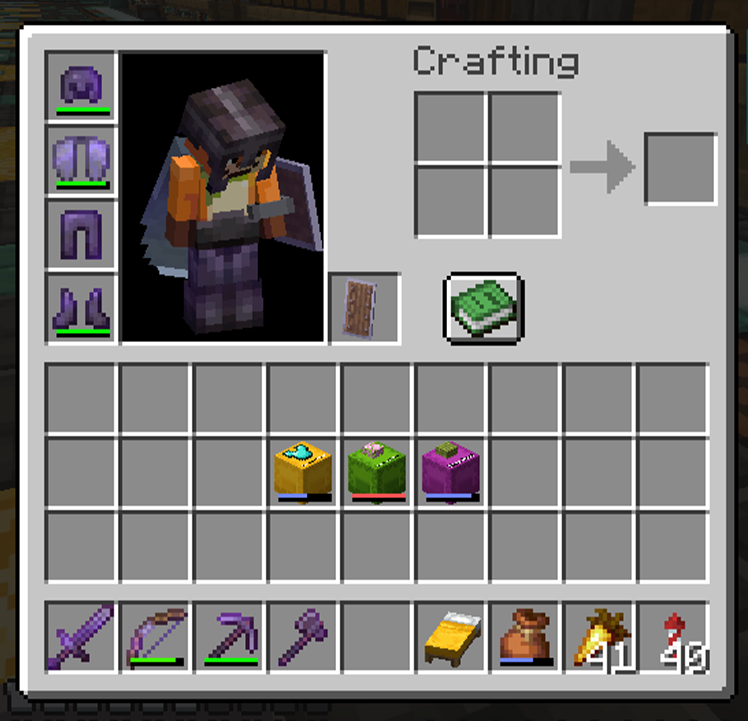 Fullness bar Shulker boxes show a colored bar indicating how full they are - just like bundles
 -
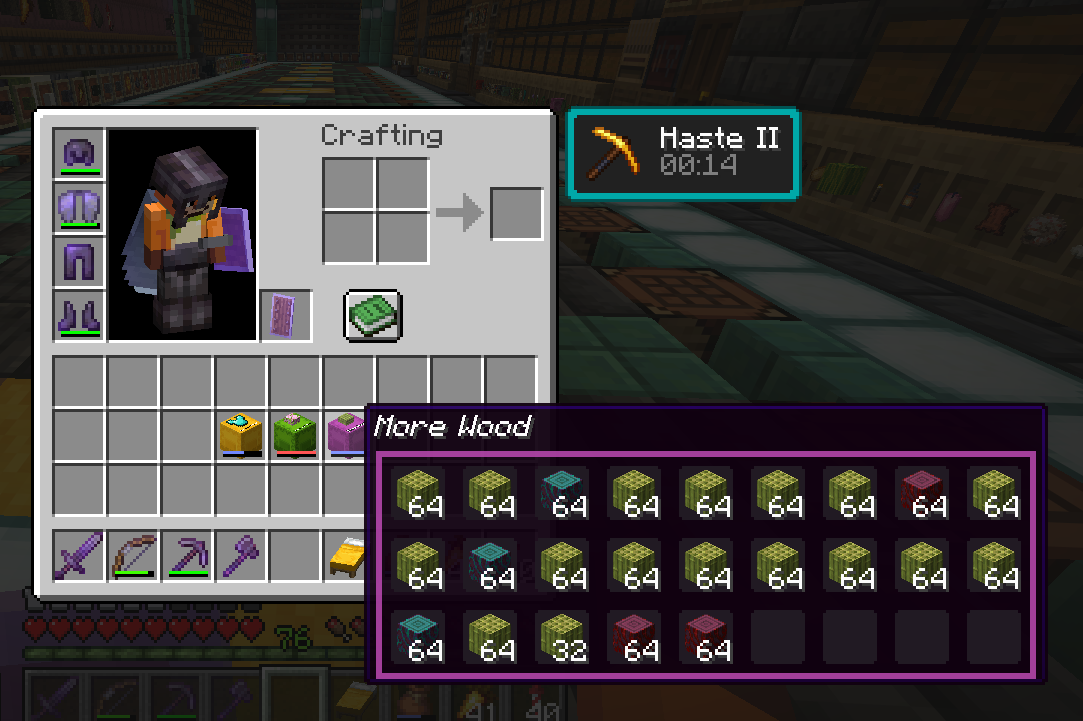 Custom name and color Shows the custom name of the Shulker as well as a colored outline - same as the box itself.
 -
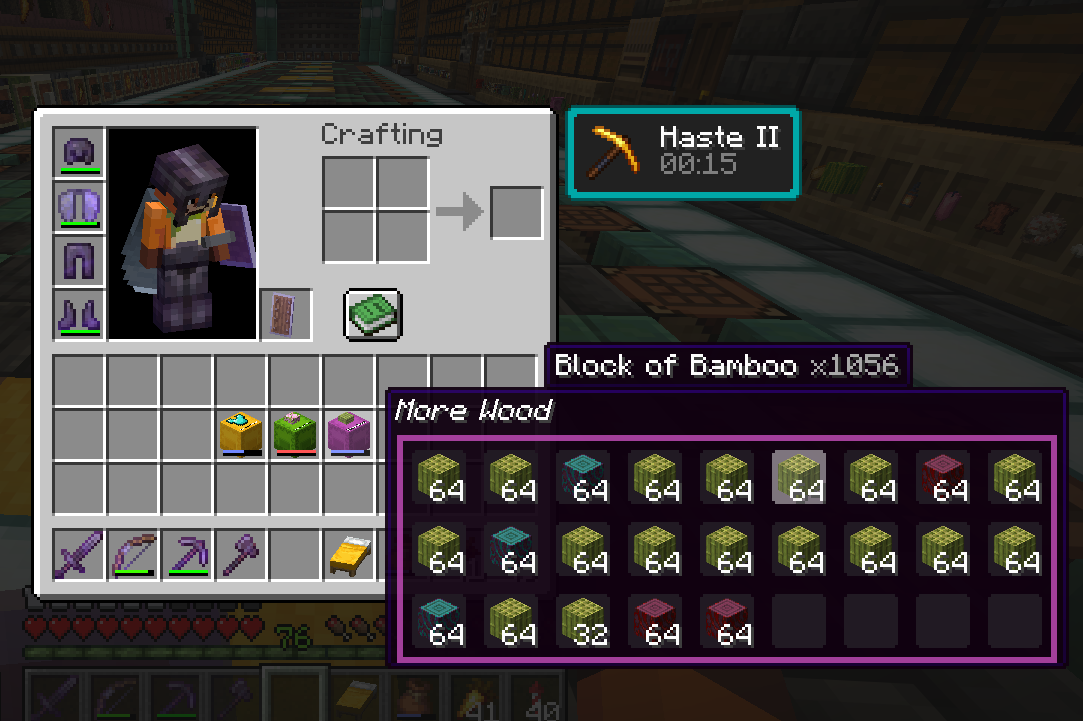 Aggregated count on scroll Scrolling to a stack will show you the aggregated count inside this shulker
 -
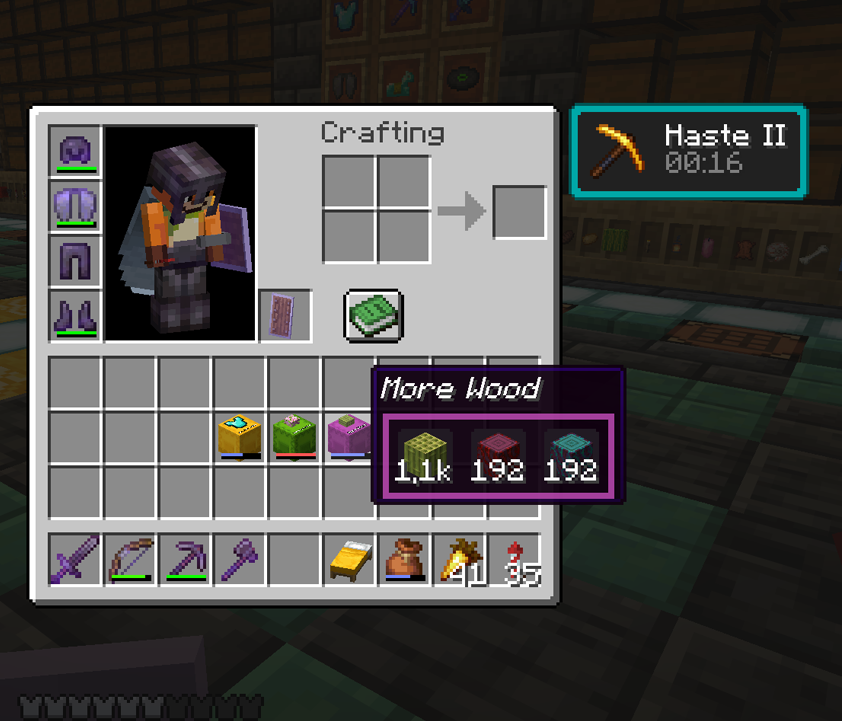 Compact view Holding shift shows a compacted view of all items - with proper count!
 -
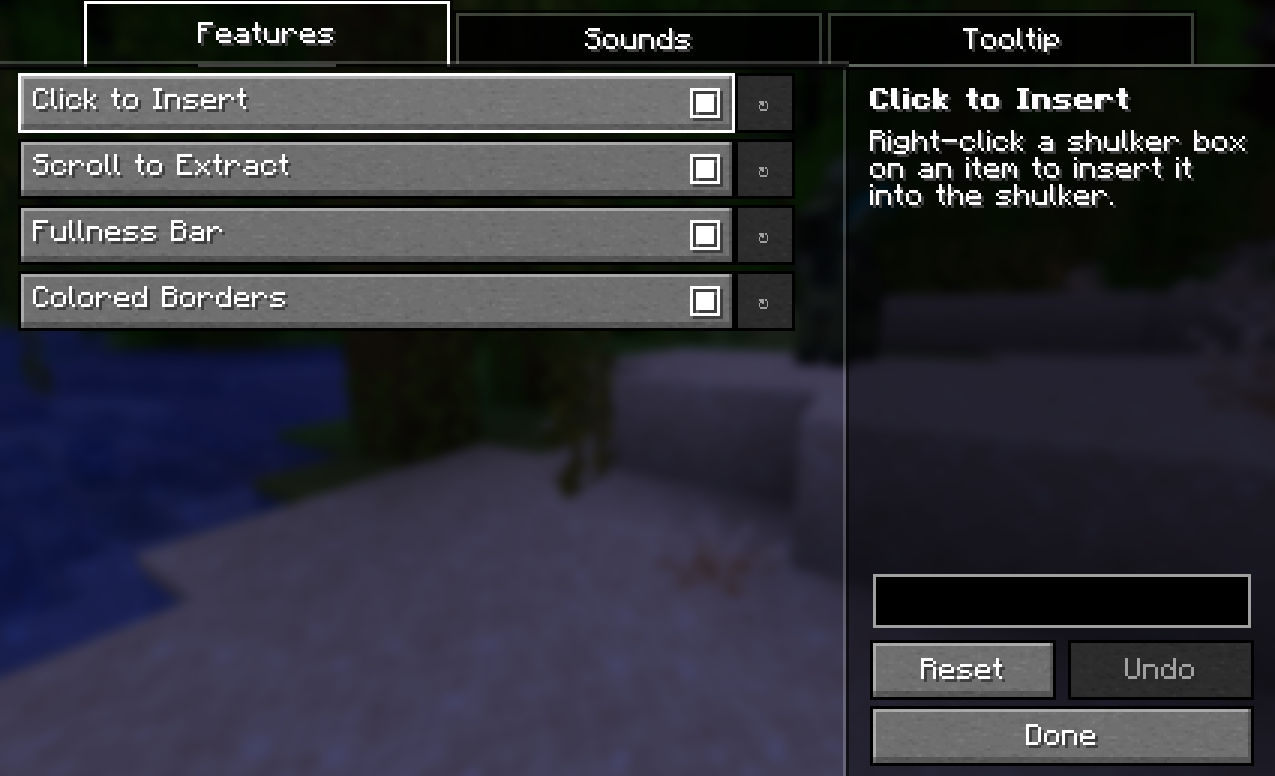 Config Screen "Features" All features can be toggled on and off - click to insert, scroll to extract, visibility of the "fullness" bar and even the colored borders of the dyed shulkers themselves
 -
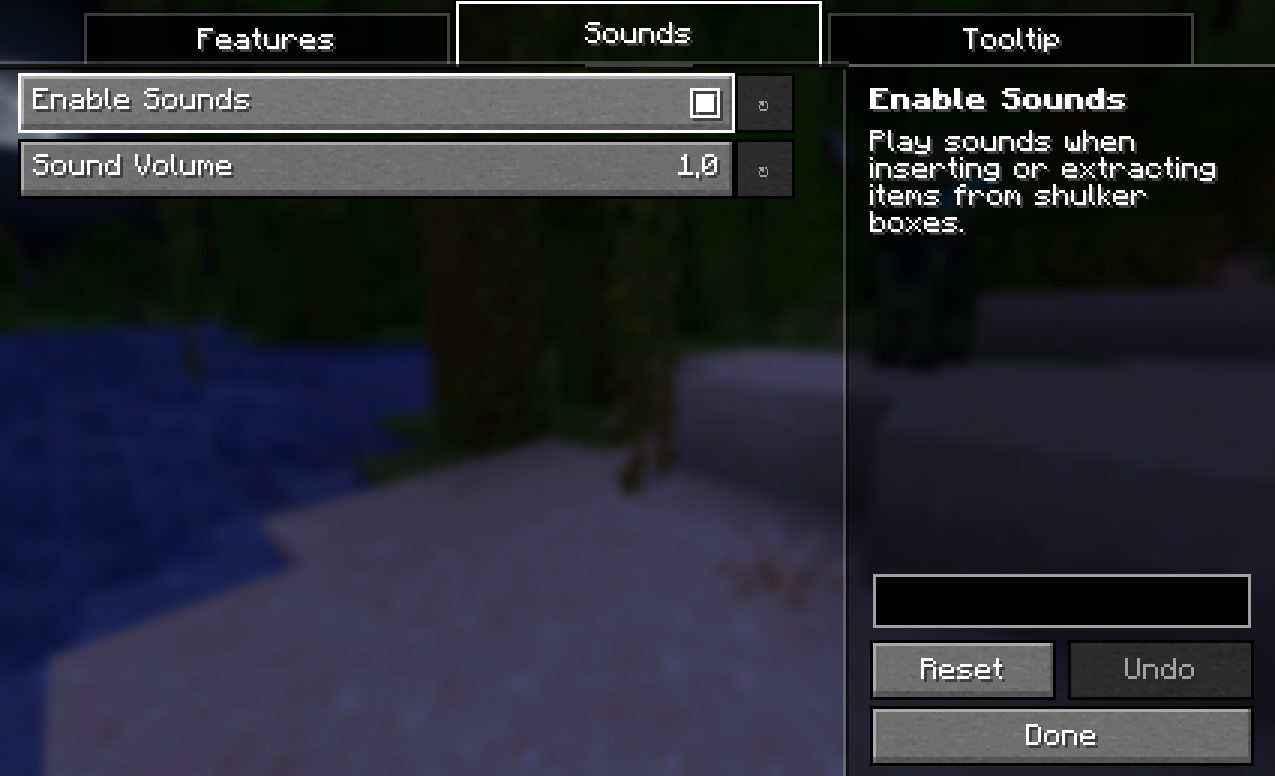 Config Screen "Sounds" Toggle on/off and adjust volume.
 -
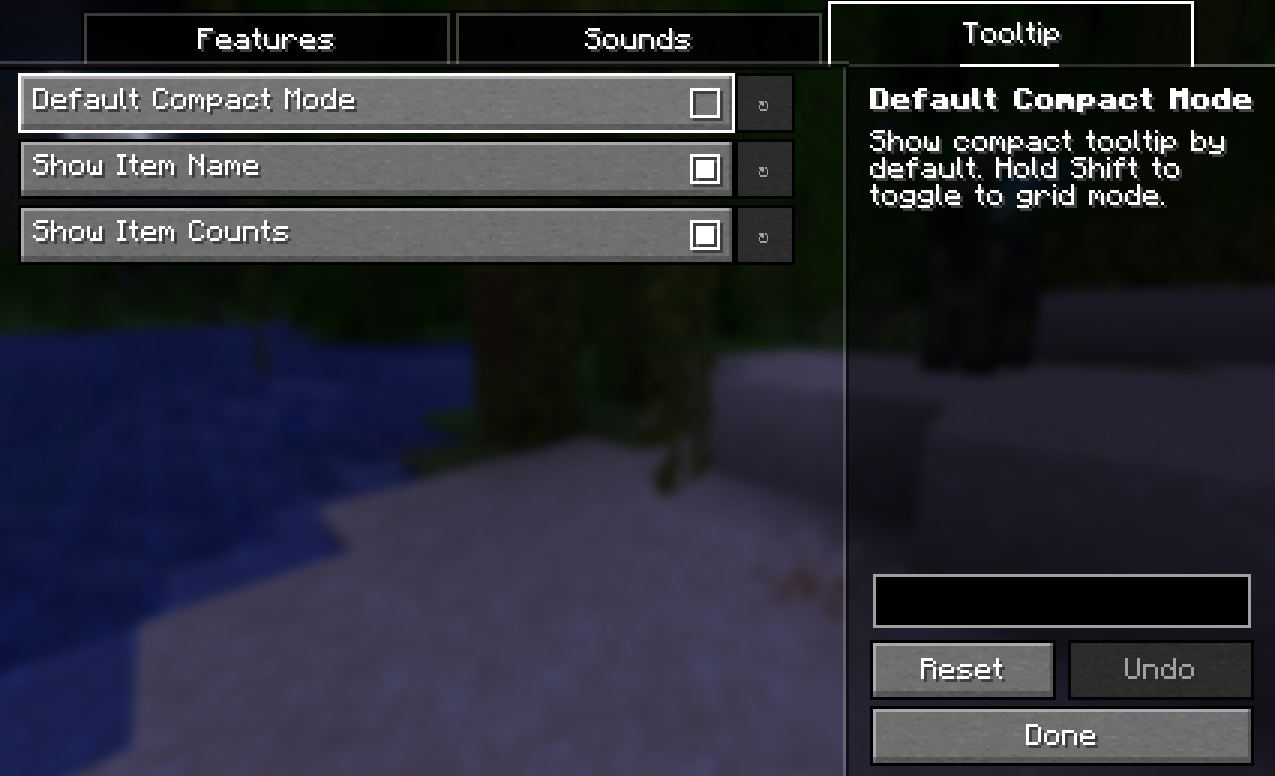 Config Screen "Tooltip" Enable "Compact mode" as default or toggle with shift. Show item names and counts.
Versions
Files
Relations
Project Relations
More like this
Similar Mods
Suggestions use data such as tags, dependencies, dependents, descriptions, titles, and more to rank how much they overlap with this mod.
On ModDex
Community snapshot
By the numbers
Statistics
Want to reach Minecraft players?
We're looking for a server hosting partner to feature here and other parts of the site. Interested? Send us a message!
Get in touchGet it on
Available Platforms
On ModDex
Community snapshot
By the numbers