Community listing page, reviews here may not be monitored by the author.
Hermes

No reviews yet
A re-imagination of the control panel

Community voices
Reviews
No reviews yet. Be the first to review this project!
Get it on
Available Platforms
About
Project Details
For authors
Embed Badge
If you're the author of this project, you can embed a live badge anywhere that supports HTML or Markdown. It updates automatically whenever ratings change.
Use HTML for any page that supports it, or Markdown for README files and Markdown-based descriptions.
Identifiers
Platform IDs
Resources
External Links
About
Description
CONTROLLER SUPPORT COMING SOON
NUMPAD AND ARROW KEYS WILL ALSO BE BACK NEXT UPDATE
We’ve all seen it happen. You download a modpack (or a huge collection of mods) and want to change your controls. But when you open the menu, you’re greeted by a massive list of keybinds and are left in the dark about which keys are still available and which are already assigned.
Here comes Hermes to the rescue!
We decided to scrap the old system and replace it with a more user-friendly interface to help both new and veteran players.
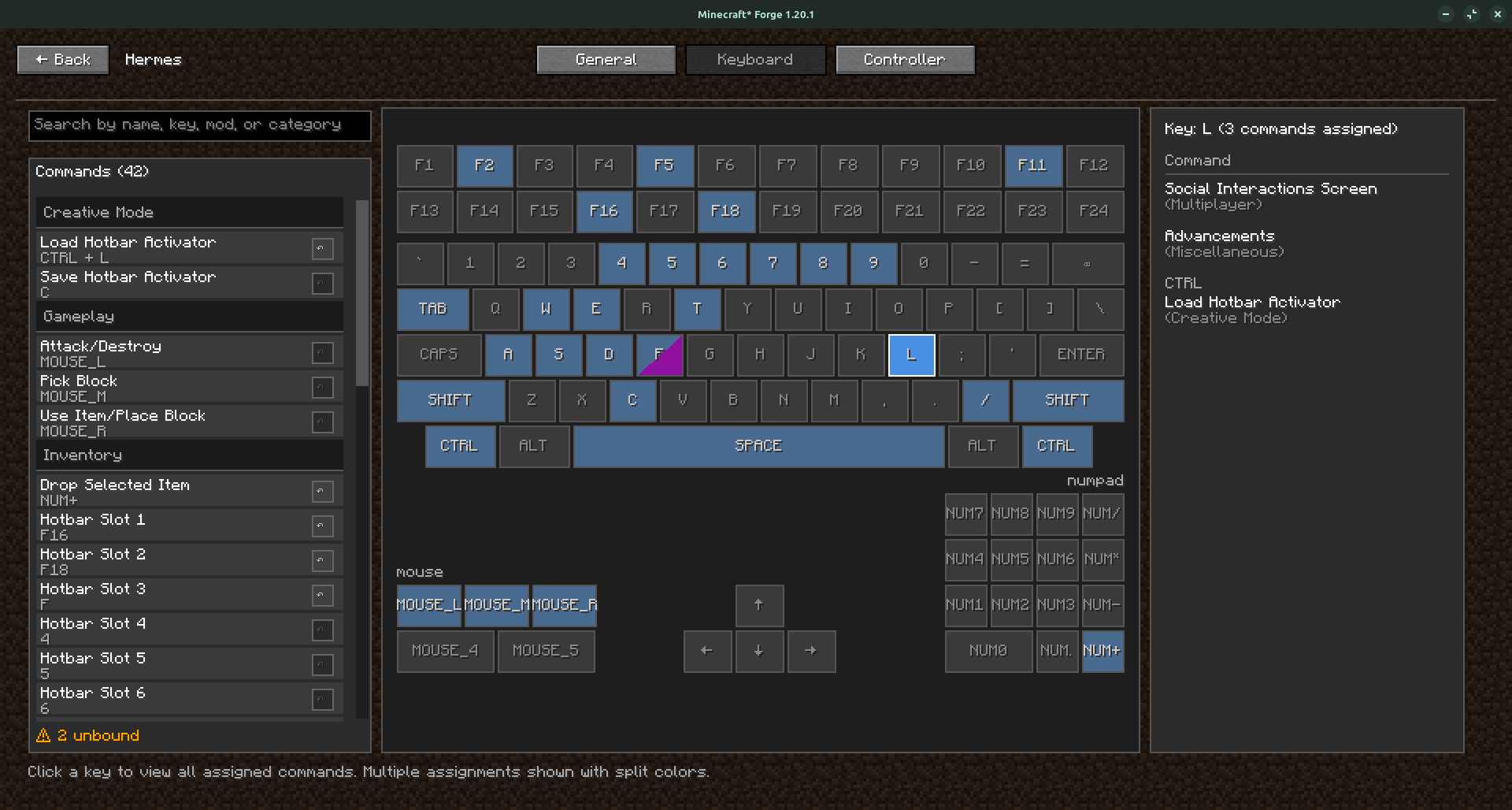
This new interface allows you to press any key and immediately see what is assigned to it. The list is still available on the left side, and double-clicking an item allows you to edit the keybind.
A new feature we’ve added allows users to stack modifiers on keys. This means we now support crazy combos like SHIFT + CTRL + ALT + T!
Keep in mind that this project is still in beta, and we’re actively fixing bugs as we come across them.
If you encounter any issues, feel free to let us know in the comments or on GitHub!
Screenshots
Gallery
-
 Screenshot from 2026-02-09 12-46-06.png Screenshot from 2026-02-09 12-46-06.png
Versions
Files
Relations
Project Relations
More like this
Similar Mods
Suggestions use data such as tags, dependencies, dependents, descriptions, titles, and more to rank how much they overlap with this mod.
On ModDex
Community snapshot
By the numbers
Statistics
 (opens in a new tab)
Get it on
Available Platforms
On ModDex
Community snapshot
By the numbers
Statistics
Resources