
HITWtimer
No reviews yet
HITWtimer is a Minecraft mod designed specifically for MCC Island's "Hole in the Wall" minigame. It serves as a precise trap timing assistant, helping players improve their timing when passing through moving walls. The mod provides high-accuracy timing,
Fabric is a mod loader for versions 1.14+ of Minecraft, particularly popular for client side and optimization mods.
Community voices
Reviews
Click once to include, again to exclude, again to clear
No reviews yet. Be the first to review this project!
Get it on
Available Platforms
 Modrinth
Compatibility
Supported Environments
About
Project Details
For authors
Embed Badge
If you're the author of this project, you can embed a live badge anywhere that supports HTML or Markdown. It updates automatically whenever ratings change.
Use HTML for any page that supports it, or Markdown for README files and Markdown-based descriptions.
Identifiers
Platform IDs
About
Description
HITWtimer
纯客户端 Fabric + Kotlin 模组 · Minecraft 26.1.2 · 作者 KCl · 许可证 CC0-1.0
面向 HITW(Hole in the Wall) 等小游戏:根据屏幕字幕 / 标题或聊天自动识别陷阱(trap),并在 HUD 上显示多阶段倒计时(含可选 Preparation 准备阶段、颜色与音效提示)。
本模组不修改服务端玩法,只在客户端读字幕/聊天并画 HUD,可在 Hypixel 等服务器正常使用。
English documentation: jump to English Documentation at the end of this file.
目录
- 功能一览
- 安装与依赖
- 快速开始
- 快捷键
- 命令
- HUD 说明
- 使用案例:Falling Sand
- 配置系统总览
- overallconfig.txt(全局配置)
- traplist 文件(陷阱列表)
- 怎么写一个 Trap
- 检测匹配详解
- Preparation 准备阶段
- 事件(events)格式
- 调试技巧
- 构建
- 文件结构
- 常见问题
功能一览
| 模块 | 说明 |
|---|---|
| 字幕 / 聊天检测 | 通过 Title/Subtitle Mixin + 聊天事件匹配 trap;可按 trap 指定 SUBTITLE / CHAT / BOTH |
| 多阶段计时 | 每个 trap 配置多个阶段;HUD 显示当前阶段倒计时 + 后续阶段预览 |
| Preparation | 字幕触发时可自动在阶段列表第一行插入英文 Preparation 倒计时(chat 触发永不插入) |
| HUD | 深色半透明背景、多 trap 同时显示、颜色可配 |
| HUD 编辑 | 按 K 打开编辑层:拖动位置、滚轮缩放、Esc/K 保存 |
| 三级配置 | overall(全局)→ traplist 头部默认 → 单个 trap 覆盖 |
| 多列表 | 多个 traplist*.txt,命令运行时 enable/disable |
| 热重载 | 按 L 或 /hitwtimer reload 即时生效 |
| 按键绑定 | 出现在原版「控制 → 按键绑定」的 HITWtimer / HITW 计时器 分类下 |
| 双语 | en_us / zh_cn 语言文件;配置模板中英注释 |
安装与依赖
| 依赖 | 版本要求 |
|---|---|
| Minecraft | ~26.1.2 |
| Fabric Loader | ≥ 0.19.2 |
| Fabric API | 与 26.1.2 匹配 |
| Fabric Language Kotlin | 与环境匹配 |
| Java | ≥ 25 |
将构建产物 hitwtimer-*.jar 放入 .minecraft/mods/,与 Fabric 一起启动客户端即可。
首次启动会自动在:
.minecraft/config/hitwtimer/
生成示例配置(overallconfig.txt、traplist1.txt 等)。
快速开始
- 安装模组并进入游戏。
- 确认
config/hitwtimer/overallconfig.txt里:enabled=true enabled_lists=traplist1 detect_subtitle=true - 编辑
config/hitwtimer/traplist1.txt,写好 trap 的pattern=(必须与游戏实际字幕/聊天文字匹配)。 - 游戏内按 L 热重载(或
/hitwtimer reload)。 - 进入 HITW;当字幕出现匹配文字时,HUD 自动开始计时。
- 按 K 调整 HUD 位置与大小,再按 Esc/K 保存。
建议调试时临时打开:
debug=true
匹配时会在控制台打日志,触发时聊天也会有提示。
快捷键
均可在 选项 → 控制 → 按键绑定 → HITW 计时器 / HITWtimer 中修改。
| 默认键 | 名称 | 功能 |
|---|---|---|
| H | 切换 HUD 显示 | 显示 / 隐藏计时 HUD(不清除正在跑的计时器逻辑,只控制是否绘制) |
| K | HUD 编辑模式 | 打开半透明编辑层:左键拖动移动、滚轮缩放;Esc 或再按 K 保存并退出 |
| L | 重载配置 | 重新加载 overallconfig + 所有启用的 traplist,并清空检测去重缓存 |
HUD 编辑模式细节
- 必须打开编辑 Screen 才能拖动(游戏内鼠标锁定时无法自由拖拽,因此用 Screen 释放光标)。
- 编辑时即使没有激活 trap,也会显示占位面板,方便定位。
- 退出时写入
overallconfig.txt的hud_x/hud_y/hud_scale。
命令
客户端命令(聊天中输入):
/hitwtimer
/hitwtimer list
/hitwtimer reload
/hitwtimer enable <name>
/hitwtimer disable <name>
/hitwtimer settings
| 命令 | 作用 |
|---|---|
/hitwtimer |
显示可用子命令 |
list |
列出当前启用的 traplist(绿字名称 + 灰字 description) |
reload |
等同按 L:重载配置与列表 |
enable <name> |
启用名为 name 的列表(文件名不含 .txt,如 traplist1),并自动 reload |
disable <name> |
禁用该列表并 reload |
settings |
打开简易设置界面(预览全局配置等) |
列表文件必须先存在于 config/hitwtimer/。enable/disable 会改运行时启用集合;若要长期固定,请同步改 overallconfig.txt 的 enabled_lists=。
HUD 说明
显示结构
每个激活的 trap 大致如下:
falling sand 18.0s ← trap 名 + 总剩余时间
Preparation 3.0s ← 自动插入的第一阶段(仅字幕+允许时)
stop falling ← 后续阶段(未到则灰色预览)
sands gone
准备结束后:
falling sand 15.0s
Preparation ← 已过:灰色、无倒计时
stop falling 10.0s ← 当前阶段:彩色 + 倒计时
sands gone ← 未到:灰色预览
- Preparation 标签固定为英文
Preparation,作为 trap 阶段列表的第一行(与其它事件同一列)。 - 不要在
events=里手动写 Preparation 行。 - 多个 trap 同时触发时会纵向排列,中间空行分隔。
外观相关配置(overallconfig)
| 键 | 默认 | 说明 |
|---|---|---|
hud_x / hud_y |
10 / 10 | 左上角位置(GUI 坐标,可用 K 编辑) |
hud_scale |
1.0 | 缩放 0.4~4.0 |
render_background |
true | 是否画深色半透明底 |
hud_horizontal_padding |
8 | 背景水平内边距 |
hud_vertical_padding |
6 | 背景垂直内边距 |
使用案例:Falling Sand
以 HITW 常见陷阱 Falling Sand(落沙) 为例,完整走通「配置 → 检测 → 显示」。
1. 场景
游戏字幕/标题出现类似:
Falling Sand
或聊天/其它文案含 sand。你希望:
- 先有 3 秒 Preparation(站位准备)
- 再倒计时 10 秒 到「stop falling」
- 再 5 秒 到「sands gone」
2. 在 traplist1.txt 中写入
# 列表头部默认(第一个 name= 之前)
enabled=true
description=Classic HITW traps
subtitle_preparation=true
preparation_time=3.0
preparation_color=#55FF55
main_color=#FFFFFF
source=SUBTITLE
match_mode=CONTAINS
case_sensitive=false
# ---------- 单个 trap ----------
name=falling sand
enabled=true
source=SUBTITLE
subtitle_preparation=true
main_color=#FFAA00
preparation_time=3.0
preparation_color=#55FF55
start_sound=block.note_block.pling
end_sound=block.note_block.bell
pattern=falling sand|sand
match_mode=CONTAINS
case_sensitive=false
events=
stop falling|10|#FF5500|entity.blaze.shoot
sands gone|15|
关于 events 时间:实现里各阶段的时间为相对「主阶段开始」(Preparation 结束后)的绝对偏移秒数,按数值排序。
上例中stop falling在 prep 结束后 10s 处,sands gone在 15s 处(即 stop falling 后再约 5s)。
若写成sands gone|5,会排在 10 之前,顺序会与预期相反。
3. 确保列表已启用
overallconfig.txt:
enabled=true
enabled_lists=traplist1
detect_subtitle=true
subtitle_preparation=true
preparation_time=3.0
游戏内执行:
/hitwtimer reload
或按 L。
4. 时间线(字幕触发)
| 时刻 | HUD 表现 |
|---|---|
| t=0 字幕匹配 | 出现 falling sand,第一行 Preparation 3.0s…,下面灰色预览两个事件 |
| t=3 | Preparation 结束,播放 start_sound,进入 stop falling 倒计时 |
| t=13 | 到达 stop falling 节点(可播事件音),进入下一阶段 |
| t=18 | 到达 sands gone,计时结束,播放 end_sound |
5. 若字幕对不上
- 设
debug=true,重载后看控制台匹配日志。 - 把
pattern改成字幕实际原文(可先用CONTAINS缩短关键词)。 - 确认语言/大小写:
case_sensitive=false时不区分大小写。 - 确认
source与检测源一致(字幕用SUBTITLE或BOTH)。
6. 若不想要 Preparation
name=falling sand
subtitle_preparation=false
pattern=falling sand
events=
stop falling|10
sands gone|15
subtitle_preparation=false 在 trap 级为严格优先:即使列表/全局为 true,该 trap 也绝无准备阶段。
7. 若只想从聊天触发、不要准备
name=falling sand
source=CHAT
pattern=falling sand
events=
stop falling|10
sands gone|15
Chat 来源永远不会插入 Preparation。
配置系统总览
config/hitwtimer/
├── overallconfig.txt # 全局 / 模组级
├── traplist1.txt # 列表 1(头部 = 列表默认 + 多个 name= trap)
├── traplist2.txt # 你可自建更多
└── ...
三级优先级(高 → 低)
- trapconfig:某个
name=块内的字段 - traplistconfig:该 txt 里第一个
name=之前的头部默认 - overallconfig:全局回退
特例:trap 级 subtitle_preparation=false 严格无准备,不回退列表/全局的 true。
解析时键名大小写不敏感,下划线可省略(如 preparation_time / preparationtime)。
overallconfig.txt(全局配置)
完整示例
# HITWtimer Overall Config
# --- Master ---
enabled=true
# --- Lists(要加载的列表文件名,逗号分隔,不要写 .txt)---
enabled_lists=traplist1
# enabled_lists=traplist1,pvp,custom
# --- Detection ---
detect_subtitle=true
detect_chat=true
# --- Preparation defaults(可被 list/trap 覆盖)---
subtitle_preparation=true
preparation_time=3.0
preparation_color=#55FF55
main_color=#FFFFFF
# --- HUD(可用游戏内 K 编辑后自动写回)---
hud_x=10
hud_y=10
hud_scale=1.0
render_background=true
hud_horizontal_padding=8
hud_vertical_padding=6
# --- Behavior ---
auto_reload_keywords=hitw,hole in the wall,游戏开始
# --- Misc ---
debug=false
键说明
| 键 | 默认 | 说明 |
|---|---|---|
enabled |
true | 模组总开关 |
enabled_lists |
traplist1 | 启动时加载的列表 |
detect_subtitle |
true | 是否检测字幕/标题 |
detect_chat |
true | 是否检测聊天 |
subtitle_preparation |
true | 全局:字幕是否默认带 Preparation |
preparation_time |
3.0 | 默认准备秒数 |
preparation_color |
#55FF55 | 准备阶段颜色 |
main_color |
#FFFFFF | 默认事件颜色 |
hud_* |
见上 | HUD 位置/缩放/背景 |
auto_reload_keywords |
… | 预留关键词(部分逻辑) |
debug |
false | 详细匹配日志 + 触发聊天提示 |
颜色支持 #RRGGBB 或 RRGGBB。
traplist 文件(陷阱列表)
文件命名
- 任意名,如
traplist1.txt、pvp.txt、mytraps.txt - 在
enabled_lists或/hitwtimer enable <name>中用不带扩展名的名字
文件结构
# 注释任意
# ===== traplistconfig:头部默认(必须在第一个 name= 之前)=====
enabled=true
description=经典 HITW 列表
subtitle_preparation=true
preparation_time=3.0
...
# ===== 一个或多个 trap =====
name=trap_a
pattern=...
events=
...
name=trap_b
pattern=...
events=
...
头部常用键
| 键 | 说明 |
|---|---|
enabled |
列表是否启用(列表本身) |
description |
/hitwtimer list 里显示的说明 |
subtitle_preparation |
本列表 trap 的默认是否准备 |
preparation_time / preparation_color |
本列表准备默认 |
main_color |
本列表默认主色 |
start_sound / end_sound |
默认开始/结束音效 ID |
source |
默认检测源 |
match_mode / case_sensitive |
默认匹配方式 |
怎么写一个 Trap
必填
| 字段 | 说明 |
|---|---|
name= |
唯一 ID,也作 HUD 标题回退 |
pattern= |
匹配字幕/聊天的关键词(支持 a|b|c OR) |
events= + 至少一行阶段 |
阶段列表 |
可选(不写则 list → overall)
| 字段 | 说明 |
|---|---|
enabled |
true/false |
source |
SUBTITLE / CHAT / BOTH |
subtitle_preparation |
true/false(false = 严格无准备) |
preparation_time |
秒 |
preparation_color |
#RRGGBB |
main_color |
事件默认色 |
start_sound / end_sound |
原版音效 ID,如 block.note_block.pling |
match_mode |
CONTAINS / EQUALS / STARTS_WITH / REGEX |
case_sensitive |
默认 false |
最小可用示例
name=my_trap
pattern=关键词
events=
phase1|5
phase2|10
完整示例模板(可复制)
name=your_trap_id
enabled=true
source=SUBTITLE
subtitle_preparation=true
preparation_time=3.0
preparation_color=#55FF55
main_color=#FFFFFF
start_sound=block.note_block.pling
end_sound=block.note_block.bell
pattern=english text|中文关键词
match_mode=CONTAINS
case_sensitive=false
events=
stage one|5.0|#FFAA00|entity.experience_orb.pickup
stage two|12.0|
stage three|20.0|#55FFFF|
检测匹配详解
匹配在 SubtitleDetector 中进行:对每个启用 trap,用其 pattern + match_mode + case_sensitive 测 component.string。
pattern
- 必填
- 非 REGEX 时:
a|b|c表示 OR(任一命中即可) - REGEX 时:整段作正则,
|为正则语法
match_mode
| 模式 | 行为 |
|---|---|
CONTAINS(默认) |
文本包含 pattern |
EQUALS |
整段相等 |
STARTS_WITH |
以 pattern 开头 |
REGEX |
正则 containsMatchIn |
示例
| pattern | mode | 能匹配的例子 |
|---|---|---|
falling sand|sand |
CONTAINS | Falling Sand!、sand is coming |
Falling Sand |
EQUALS | 仅整段等于(受 case_sensitive 影响) |
anvil.*fall |
REGEX | Anvil is falling |
来源过滤
source=SUBTITLE:只响应字幕/标题source=CHAT:只响应聊天source=BOTH:两者皆可
全局还需 detect_subtitle / detect_chat 为 true。
去重
短时间内相同消息 / 同名 trap 不会重复狂触发,避免字幕刷新刷屏。
Preparation 准备阶段
| 规则 | 行为 |
|---|---|
字幕触发 + subtitle_preparation 解析为 true |
自动插入 Preparation |
字幕触发 + trap 级 subtitle_preparation=false |
严格无准备 |
| 聊天触发 | 永远无准备 |
| HUD 文案 | 固定英文 Preparation,作为阶段列表第一行 |
| 时长 / 颜色 | trap → list → overall 的 preparation_time / preparation_color |
start_sound |
在 Preparation 结束、进入主阶段时播放 |
不要在 events= 里写 Preparation 行。
事件(events)格式
events=
显示名|偏移秒数|颜色(可选)|声音(可选)
| 段 | 必填 | 说明 |
|---|---|---|
| 显示名 | 是 | HUD 上显示的阶段名 |
| 偏移秒数 | 是 | 相对 Preparation 结束后(无 prep 则相对触发时刻)的绝对时间点(秒) |
| 颜色 | 否 | #RRGGBB;缺省用 trap main_color → list → overall → 白 |
| 声音 | 否 | 原版 namespace:path 风格音效 ID |
多行缩进写在 events= 下方。实现会按偏移秒数排序。
颜色回退顺序
事件指定 → trap main_color → list 默认 → overall main_color → 白色。
编写建议
- 用递增的时间点表示阶段边界,例如
5、12、20,而不是把「每段时长」写成乱序小数。 - 事件名用你容易看懂的英文/中文均可(Preparation 本身除外,那是自动的)。
调试技巧
-
打开 debug
debug=true然后按 L。控制台会打印每次字幕/聊天匹配尝试;触发时聊天有
trap started类信息。 -
先放宽 pattern
用短关键词 +CONTAINS,确认能触发后再收紧。 -
确认字幕原文
不同服务器/语言的 Title 文本不同,以你屏幕上实际为准。 -
确认列表启用
/hitwtimer list -
改完必重载
改 txt 后按 L 或/hitwtimer reload。 -
HUD 看不见
按 H 确认未隐藏;按 K 看是否移出屏幕外;检查enabled=true。
构建
# Windows
.\gradlew.bat build -x test
# Linux / macOS
./gradlew build -x test
产物:build/libs/hitwtimer-*.jar(另有 sources jar 可忽略)。
开发调试:
.\gradlew.bat runClient
配置会写在运行目录 run/config/hitwtimer/。
文件结构
hitwtimer/
├── src/
│ ├── main/ # 模组入口、fabric.mod.json、语言文件
│ └── client/
│ ├── kotlin/... # 配置、检测、计时、HUD、命令、编辑屏
│ └── java/.../mixin/ # Options / Gui / Title 等 Mixin
├── config/hitwtimer/ # 运行时配置(首次启动生成,不在源码树)
├── README.md
├── build.gradle.kts
└── gradle.properties
核心逻辑入口:
| 路径 | 职责 |
|---|---|
HITWtimerClient.kt |
客户端初始化、按键、tick |
SubtitleDetector.kt |
字幕/聊天匹配与启动计时 |
ActiveTimer.kt / TimerManager.kt |
阶段推进与音效 |
HudRenderer.kt + GuiHudRenderMixin |
HUD 数据与绘制 |
HudEditScreen.kt |
编辑模式 |
ConfigLoader.kt |
配置解析与模板生成 |
HitwCommands.kt |
/hitwtimer 命令 |
常见问题
Q: Controls 里找不到按键?
A: 打开「控制 → 按键绑定」,找分类 HITW 计时器(中文)或 HITWtimer(英文)。
Q: 按 K 没反应 / 拖不动?
A: 编辑必须进入 HudEditScreen(按 K 后应有顶部黄字提示)。在菜单界面时不会打开;请在世界内、无其它界面时按 K。
Q: 字幕出了但不计时?
A: 查 pattern、source、enabled、列表是否在 enabled_lists、是否 detect_subtitle=true,并开 debug=true。
Q: Preparation 不出现?
A: 是否 chat 触发?是否 subtitle_preparation=false?全局/列表是否关闭?
Q: 改了配置没变化?
A: 必须 L 或 /hitwtimer reload。
Q: 音效没声音?
A: 确认音效 ID 合法(原版注册表内),且游戏音量/UI 音量未关。
Q: 能多个列表同时用吗?
A: 可以。enabled_lists=traplist1,pvp 或多次 enable。
License
CC0-1.0 — 可自由使用、修改与再分发。
提示:首次运行生成的 config/hitwtimer/ 与 generated-config-examples/(若有)含带注释的模板。最稳妥的路径是:复制 falling sand 示例 → 改 pattern 为你服字幕原文 → debug=true 验证 → 关掉 debug 日常使用。
如需扩展(多 HUD 并列布局、更多命令、配置 GUI 完整编辑 trap 等),可在此模组结构上继续迭代。
English Documentation
Client-only Fabric + Kotlin mod · Minecraft 26.1.2 · Author KCl · License CC0-1.0
HITWtimer is for HITW (Hole in the Wall) and similar minigames. It watches subtitles / titles and chat, matches configurable traps, and shows a multi-stage countdown HUD (optional auto Preparation stage, colors, and sounds).
This mod does not change server gameplay. It only reads client subtitle/chat text and draws a HUD. Safe for servers such as Hypixel.
Table of contents
- Features
- Install and dependencies
- Quick start
- Keybinds
- Commands
- HUD
- Worked example: Falling Sand
- Config system
- overallconfig.txt
- Trap list files
- Writing a trap
- Matching
- Preparation
- Events format
- Debugging
- Build
- FAQ
- License
Features {#features-en}
| Area | Description |
|---|---|
| Subtitle / chat detection | Title/subtitle mixin + chat events; per-trap SUBTITLE / CHAT / BOTH |
| Multi-stage timers | Each trap defines stages; HUD shows current countdown and upcoming stages |
| Preparation | On subtitle triggers, can auto-insert English Preparation as the first stage row (never for chat) |
| HUD | Semi-transparent background, multi-trap layout, colors |
| HUD modes | ALWAYS / ON_TRAP / DISABLED (H cycles; DISABLED = no HUD, no detect, no sound) |
| Background opacity | Configurable; default 50%; editable in HUD edit mode |
| HUD edit | K opens free-cursor editor: drag, scroll scale, Shift+scroll opacity |
| 3-level config | overall → traplist header defaults → per-trap override |
| Multiple lists | Several traplist*.txt; enable/disable at runtime |
| Hot reload | L or /hitwtimer reload |
| Keybinds | Shown under Controls → HITWtimer |
| i18n | en_us / zh_cn lang files |
Install and dependencies {#install-and-dependencies-en}
| Dependency | Requirement |
|---|---|
| Minecraft | ~26.1.2 |
| Fabric Loader | ≥ 0.19.2 |
| Fabric API | Matching 26.1.2 |
| Fabric Language Kotlin | Matching your stack |
| Java | ≥ 25 |
Put hitwtimer-*.jar in .minecraft/mods/ and launch with Fabric.
First run creates:
.minecraft/config/hitwtimer/
with sample overallconfig.txt and traplist1.txt.
Quick start {#quick-start-en}
- Install the mod and enter a world.
- Check
config/hitwtimer/overallconfig.txt:enabled=true enabled_lists=traplist1 detect_subtitle=true hud_mode=ON_TRAP hud_bg_opacity=0.5 - Edit
traplist1.txtso each trappattern=matches real subtitle/chat text. - Press L (or
/hitwtimer reload). - Play HITW; matching text starts the HUD timer.
- Press K to move/scale/opacity the HUD; Esc/K to save.
For debugging:
debug=true
Keybinds {#keybinds-en}
Change under Options → Controls → Key Binds → HITWtimer.
| Default | Name | Action |
|---|---|---|
| H | Cycle HUD mode | ALWAYS → ON_TRAP → DISABLED → … (saves to config) |
| K | HUD edit mode | Drag move, scroll scale, Shift+scroll opacity, M mode, B background, Esc/K save |
| L | Reload configs | Reload overall + enabled lists; clear match dedup |
HUD modes
| Mode | Behavior |
|---|---|
| ALWAYS | HUD always drawn (placeholder when no trap) |
| ON_TRAP | HUD only while a trap timer is active (default) |
| DISABLED | No HUD, no detection, no sounds/timers |
HUD edit mode
- Requires an open edit screen so the mouse is free (in-game grab cannot drag UI).
- Placeholder panel appears while editing even with no trap.
- Saves
hud_x,hud_y,hud_scale, opacity, mode, etc. tooverallconfig.txton exit.
Commands {#commands-en}
Client commands:
/hitwtimer
/hitwtimer list
/hitwtimer reload
/hitwtimer enable <name>
/hitwtimer disable <name>
/hitwtimer settings
| Command | Effect |
|---|---|
/hitwtimer |
List subcommands |
list |
Enabled trap lists (name + description) |
reload |
Same as L |
enable <name> |
Enable list file name.txt and reload |
disable <name> |
Disable list and reload |
settings |
Simple settings preview screen |
Lists must exist under config/hitwtimer/. For permanent enable sets, also edit enabled_lists= in overallconfig.txt.
HUD {#hud-en}
Layout
falling sand 18.0s
Preparation 3.0s
stop falling
sands gone
After prep:
falling sand 15.0s
Preparation
stop falling 10.0s
sands gone
- Label is always English Preparation as the first stage row.
- Do not put Preparation in
events=. - Multiple traps stack vertically with a blank separator.
Appearance keys (overallconfig)
| Key | Default | Meaning |
|---|---|---|
hud_x / hud_y |
10 / 10 | Top-left (GUI coords) |
hud_scale |
1.0 | Scale 0.4–4.0 |
hud_mode |
ON_TRAP | ALWAYS / ON_TRAP / DISABLED |
render_background |
true | Draw panel background |
hud_bg_opacity |
0.5 | 0.0–1.0 (50% default) |
hud_horizontal_padding |
8 | Horizontal padding |
hud_vertical_padding |
6 | Vertical padding |
Worked example: Falling Sand {#worked-example-falling-sand-en}
Scenario
Subtitle like Falling Sand. You want:
- 3s Preparation
- Stage at 10s:
stop falling - Stage at 15s:
sands gone(~5s after stop falling)
traplist1.txt
enabled=true
description=Classic HITW traps
subtitle_preparation=true
preparation_time=3.0
preparation_color=#55FF55
main_color=#FFFFFF
source=SUBTITLE
match_mode=CONTAINS
case_sensitive=false
name=falling sand
enabled=true
source=SUBTITLE
subtitle_preparation=true
main_color=#FFAA00
preparation_time=3.0
preparation_color=#55FF55
start_sound=block.note_block.pling
end_sound=block.note_block.bell
pattern=falling sand|sand
match_mode=CONTAINS
case_sensitive=false
events=
stop falling|10|#FF5500|entity.blaze.shoot
sands gone|15|
Event times are absolute offsets in seconds after Preparation ends (or after trigger if no prep), sorted by value.
stop falling|10thensands gone|15is correct.sands gone|5would sort before 10.
overallconfig snippet
enabled=true
enabled_lists=traplist1
detect_subtitle=true
subtitle_preparation=true
preparation_time=3.0
hud_mode=ON_TRAP
hud_bg_opacity=0.5
Then /hitwtimer reload or L.
Timeline (subtitle)
| Time | HUD |
|---|---|
| t=0 match | falling sand + Preparation countdown |
| t=3 | Prep ends, start_sound, enter stop falling |
| t=13 | stop falling node |
| t=18 | sands gone, end, end_sound |
No preparation
name=falling sand
subtitle_preparation=false
pattern=falling sand
events=
  stop falling|10
  sands gone|15
Trap-level subtitle_preparation=false is strict (ignores list/global true).
Chat only (never prep)
name=falling sand
source=CHAT
pattern=falling sand
events=
  stop falling|10
  sands gone|15
Config system {#config-system-en}
config/hitwtimer/
├── overallconfig.txt
├── traplist1.txt
└── ...
Priority (high → low)
- trapconfig — fields under a
name=block - traplistconfig — header before the first
name= - overallconfig — global fallback
Exception: trap subtitle_preparation=false is strict no-prep.
Keys are case-insensitive; underscores may be omitted.
overallconfig.txt {#overallconfigtxt-en}
enabled=true
enabled_lists=traplist1
detect_subtitle=true
detect_chat=true
subtitle_preparation=true
preparation_time=3.0
preparation_color=#55FF55
main_color=#FFFFFF
hud_x=10
hud_y=10
hud_scale=1.0
hud_mode=ON_TRAP
render_background=true
hud_bg_opacity=0.5
hud_horizontal_padding=8
hud_vertical_padding=6
auto_reload_keywords=hitw,hole in the wall,游戏开始
debug=false
| Key | Default | Meaning |
|---|---|---|
enabled |
true | Master switch |
enabled_lists |
traplist1 | Lists to load (no .txt) |
detect_subtitle / detect_chat |
true | Detection sources |
subtitle_preparation |
true | Default prep for subtitle |
preparation_time / preparation_color |
3.0 / #55FF55 | Prep defaults |
main_color |
#FFFFFF | Default event color |
hud_mode |
ON_TRAP | ALWAYS / ON_TRAP / DISABLED |
hud_bg_opacity |
0.5 | Background alpha 0–1 (also accepts % or 0–255) |
debug |
false | Verbose match logs + chat |
Colors: #RRGGBB or RRGGBB.
Trap list files {#trap-list-files-en}
- Any name:
traplist1.txt,pvp.txt, … - Reference without extension in
enabled_listsor/hitwtimer enable <name>.
# traplistconfig header (before first name=)
enabled=true
description=Classic HITW list
...
name=trap_a
pattern=...
events=
...
Header keys: enabled, description, prep/color/sound/source/match defaults.
Writing a trap {#writing-a-trap-en}
Required
| Field | Meaning |
|---|---|
name= |
Unique id / HUD title fallback |
pattern= |
Match text (a|b OR for non-REGEX) |
events= + ≥1 stage |
Stage list |
Optional (else list → overall)
enabled, source, subtitle_preparation, preparation_time, preparation_color, main_color, start_sound, end_sound, match_mode, case_sensitive
Minimal
name=my_trap
pattern=keyword
events=
phase1|5
phase2|10
Full template
name=your_trap_id
enabled=true
source=SUBTITLE
subtitle_preparation=true
preparation_time=3.0
preparation_color=#55FF55
main_color=#FFFFFF
start_sound=block.note_block.pling
end_sound=block.note_block.bell
pattern=english text|other keyword
match_mode=CONTAINS
case_sensitive=false
events=
stage one|5.0|#FFAA00|entity.experience_orb.pickup
stage two|12.0|
stage three|20.0|#55FFFF|
Matching {#matching-en}
| Mode | Behavior |
|---|---|
CONTAINS (default) |
Substring |
EQUALS |
Full string |
STARTS_WITH |
Prefix |
REGEX |
Regex |
Non-REGEX pattern=a|b|c is OR. REGEX treats | as regex.
source=SUBTITLE / CHAT / BOTH. Global detect_* must allow the source.
Dedup avoids rapid re-triggers from the same text/trap.
Preparation {#preparation-en}
| Rule | Result |
|---|---|
| Subtitle + prep allowed | Auto insert Preparation |
Trap subtitle_preparation=false |
Strict no prep |
| Chat trigger | Never prep |
| HUD label | Always English Preparation as first row |
start_sound |
Plays when prep ends |
Do not add Preparation to events=.
Events format {#events-format-en}
events=
label|offsetSeconds|color(optional)|sound(optional)
Offsets are absolute seconds after prep ends (or after trigger), sorted ascending.
Color fallback: event → trap main_color → list → overall → white.
Debugging {#debugging-en}
debug=truethen L — console match logs.- Loosen
pattern+CONTAINSfirst. - Copy real on-screen subtitle text.
/hitwtimer listfor enabled lists.- Always reload after editing files.
- HUD missing: check H mode, K position,
enabled/hud_mode.
Build {#build-en}
# Windows
.\gradlew.bat build -x test

# Linux / macOS
./gradlew build -x test
Output: build/libs/hitwtimer-*.jar
Dev: .\gradlew.bat runClient → configs under run/config/hitwtimer/.
FAQ {#faq-en}
Keys missing in Controls?
Look under category HITWtimer.
K does nothing / cannot drag?
Must be in-world with no other screen; yellow edit banner should appear.
Subtitle shows but no timer?
Check pattern, source, list enable, detect_subtitle, hud_mode not DISABLED, debug=true.
No Preparation?
Chat source? Trap subtitle_preparation=false? Global/list off?
Config changes ignored?
Press L or /hitwtimer reload.
No sound?
Valid vanilla sound ids; master/UI volume on.
Multiple lists?
Yes: enabled_lists=traplist1,pvp or repeated enable.
Not for Minecraft 26.2?
Built for ~26.1.2. 26.2 needs dependency and GUI API updates (not a drop-in).
License {#license-en}
CC0-1.0 — free to use, modify, and redistribute.
Tip: Copy the falling sand sample → set pattern to your server’s real subtitle text → debug=true until it triggers → turn debug off for normal play.
Screenshots
Gallery
-
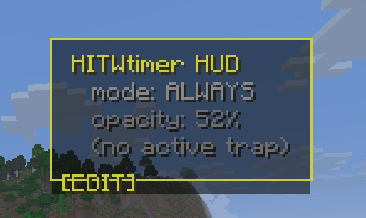 Edit mode
 -
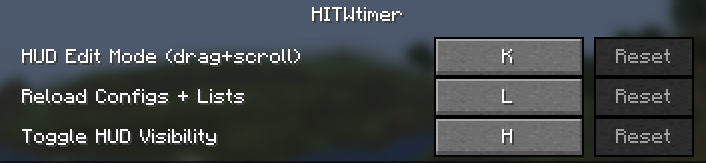 controls HUD
 -
 Hole in the wall
Versions
Files
Relations
Project Relations
More like this
Similar Mods
Suggestions use data such as tags, dependencies, dependents, descriptions, titles, and more to rank how much they overlap with this mod.
On ModDex
Community snapshot
By the numbers
Statistics

Want to reach Minecraft players?
We're looking for a server hosting partner to feature here and other parts of the site. Interested? Send us a message!
Get in touchGet it on
Available Platforms
On ModDex
Community snapshot
By the numbers