
Community listing page, reviews here may not be monitored by the author.
Hogwarts Craft

No reviews yet
Hogwarts Craft; Bring the Harry Potter universe to the game!

Community voices
Reviews
No reviews yet. Be the first to review this project!
Get it on
Available Platforms
About
Project Details
For authors
Embed Badge
If you're the author of this project, you can embed a live badge anywhere that supports HTML or Markdown. It updates automatically whenever ratings change.
Use HTML for any page that supports it, or Markdown for README files and Markdown-based descriptions.
Identifiers
Platform IDs
Resources
External Links
About
Description
First of all, this is my first mod and I'm a bit of a beginner, sorry about that ^_____^
Bring the Harry Potter universe to Minecraft with this mod!
Note: Many features are currently missing from the game. They will all be fixed as soon as possible...
Let's start by crafting a basic wand... Making a first-level wand is quite easy; you just need to find 4 Diamonds, 2 Lapis Lazuli, and 1 Obsidian. Once you have these materials, you can create a Wand Core.
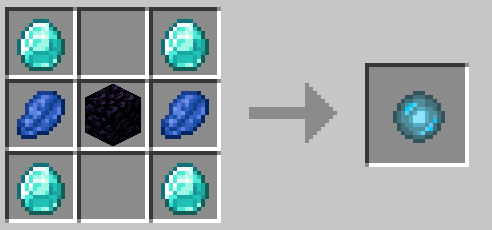
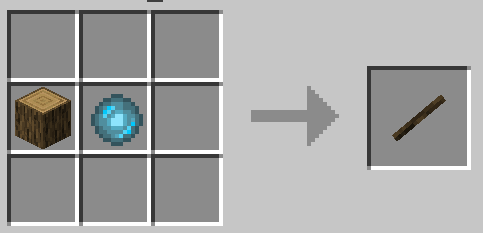
After that, you can obtain your wand by combining a type of wood with the wand core, as shown in the picture.
Learning Spells:
The mechanics of learning magic are quite simple; we offer you some books... these are the types of books you can use for research... The Simple Magic Atlas can be obtained from level 2 Librarian Villagers (remember, this is based on chance). More advanced books with authors can appear at level 4.
There are currently 5 different books in the game;
The first is the Atlas of Basic Spells, where you will learn simpler level spells. Basic level spells include: Revelio, Leviosa, Accio, Depulso, Glacius, and Incendio. Remember that you unlock all of these with specific items and level requirements. (Note: Cast spells on living beings to level up.)
Our second book is titled "Flitwick Spells Research Notes"... These are some lecture notes left for you by Professor Flitwick from Hogwarts. In these notes you will find: Alowhomora, Reparo, Caterwauling, Protego Maxima, Piertotum Locomotor, Patronus.
Our third book is titled "McGonell's Transfiguration Guide"...
These are guides left to you by McGonanell... in this guide you will learn Transfiguration spells.
Our fourth book is titled "Moody's Survival Guide"...
Here, Moody gives you knowledge of essentially stealth and neutralization spells...
Our fifth book is titled "Sprout's Greenhouse Records"...
This book teaches you Herbology Spells (not yet completed, content will be increased as soon as possible)
Mechanical Knowledge:
The game has several techniques, the first of which is:
Basic Cast Spell: Assigned to the "R" key by default, you can cast a Basic Cast Spell while your wand is in your hand.
Edit Spell Wheel: Assigned to the "J" key by default, it is used to edit the screen where you will make selections before applying spells.
Spell Wheel: Assigned to the "G" key by default, it is used to open the Spell Selection Wheel while you have your wand in your hand (the selected spell is applied with a Right Click).
Quick Switching Between Slots: The first 4 slots are reserved for quick access. You can quickly switch between Slot 1, Slot 2, Slot 3 and Slot 4 using the numlock keys.
Hogwarts Team Mechanics
If you type "/team-hogwarts", a menu will open (this menu is experimental and still under development). There you can select 4 enemy factions, for example, Monsters, Neutral Creatures, Harmless Creatures, and Players. Your actions will be shaped according to which faction you choose (you can also specify only one target player). In addition, there are mechanics that allow you to control actions such as "Follow," etc. The logic is as follows:
The factions you choose will:
Be targeted and damaged by the Protego Maxima spell,
Be perceived as dangerous by Caterwauling and trigger an alarm,
And finally, become a natural enemy faction for the stone statues animated by the Piertotum Locomotor spell.
NOTE: THIS FEATURE IS EXPERIMENTAL AND STILL UNDER DEVELOPMENT.
Future Plans:
Planned updates after version 1.1.0:
Coming Soon:
Improving Sprut's botany content,
completing the mechanic for Scrolls, a new mechanic for spells not yet accessible in survival mode. Scrolls are currently added to the game but only accessible from the creative mode tab (e.g., Arresto Momentum, Apparate, etc.)
Planned for Future Releases:
Half-Prince content,
Adding Unforgivable Curses (Avada Kedavra, Imperio, and Crucio)
Spell List & Descriptions
General Spells
-
Accio: Pulls items and entities directly toward you.
-
Alohomora: Unlocks and opens any type of door.
-
Apparition: Teleports you safely to a designated safe zone when cast normally. If cast while sneaking, it teleports you directly to your target location.
-
Arresto Momentum: Freezes the target mid-air, halting their movement temporarily.
-
Basic Transfiguration: A foundational spell. Currently has no functional effect (under development).
-
Bombarda: Triggers a powerful explosion at the target location.
-
Chameleon Spell: Grants the caster a temporary invisibility effect to blend into the surroundings.
-
Caterwauling Charm: Marks a specific area. If an enemy enters this zone, a loud alarm bell rings. (Note: Enemies are determined via the
team-hogwartscommand). -
Depulso: Powerfully repels and pushes away items and targets.
-
Episkey: Heals your target when cast normally. If cast while sneaking, it heals you instead.
-
Item Transfiguration: Customizes and alters the appearance/form of vanilla game items.
-
Expelliarmus: Forces the target to disarm, dropping whatever item they are currently holding.
-
Finite Incantatem: Removes active magical effects. Clears effects from the target when cast normally, or from yourself if cast while sneaking.
-
Glacius: Freezes water into ice and inflicts a freezing effect on entities.
-
Protego Maxima: Generates a protective barrier zone. All spells cast within this area are blocked. Additionally, any enemy attempting to enter the zone receives a lethal Wither effect. (Note: Enemies are determined via the
team-hogwartscommand). -
Reparo: Fixes the tool you are currently holding in your off-hand. Only works on tools and equipment.
-
Revelio: Highlights the targeted entity, making them glow through walls.
-
Revelio Maxima: Reveals all entities within a large radius by applying a glowing effect to them.
-
Vulnera Sanentur: Deeply heals wounds. Cast normally to heal a target, or sneak while casting to heal yourself.
Herbology Spells
-
Herbifors: Instantly applies a bone meal growth effect to crops and plants.
-
Herbivicus: Traps a target entity inside a basic, restrictive plant trap.
-
Advanced Herbivicus: Traps a target entity inside a mid-tier, stronger plant trap with longer duration.
Advanced & Transfiguration Magic
-
Obsidian Transfiguration: Mystically liquefies solid Obsidian blocks back into flowing Lava.
-
Petrificus Totalus: Completely binds the target, severely restricting their movement.
-
Piertotum Locomotor: Animates nearby stone statues to fight for you. (Note: Animated statues are controlled and allied via the
team-hogwartscommand). -
Age Manipulation: Modifies the age and growth stage of targeted entities (e.g., turning adults into babies or vice versa).
-
Form Transfiguration: Alters the variant of specific mobs (e.g., transforming a regular Zombie into a Drowned).
-
Advanced Form Transfiguration: High-tier transfiguration that turns blocks into living creatures. For example: turns leaves into parrots, bone blocks into wolves, emerald blocks into villagers, or wool into sheep.
Screenshots
Gallery
Versions
Files
Relations
Project Relations
More like this
Similar Mods
Suggestions use data such as tags, dependencies, dependents, descriptions, titles, and more to rank how much they overlap with this mod.
On ModDex
Community snapshot
By the numbers
Statistics
 (opens in a new tab)
Get it on
Available Platforms
On ModDex
Community snapshot
By the numbers
Statistics
Resources