
Hold My Button!
No reviews yet
Turn any Minecraft control into a toggle: press once to hold it, press again to release it. Configure multiple keyboard and mouse hold bindings in-game.
Fabric is a mod loader for versions 1.14+ of Minecraft, particularly popular for client side and optimization mods.
Community voices
Reviews
Click once to include, again to exclude, again to clear
No reviews yet. Be the first to review this project!
Get it on
Available Platforms
 Modrinth
Compatibility
Supported Environments
About
Project Details
For authors
Embed Badge
If you're the author of this project, you can embed a live badge anywhere that supports HTML or Markdown. It updates automatically whenever ratings change.
Use HTML for any page that supports it, or Markdown for README files and Markdown-based descriptions.
Identifiers
Platform IDs
Resources
External Links
About
Description
Description (English)
Hold My Button
Turn any Minecraft control into a convenient toggle.
Choose a Minecraft key or mouse button to hold, then assign an activator key. Press the activator once to keep the selected control held; press it again to release it.
For example, bind Right Mouse Button to F7: pressing F7 starts holding right-click, and pressing F7 again releases it.
Features
- Configure multiple independent hold toggles in-game.
- Supports keyboard keys and mouse buttons.
- Works with any Minecraft action already bound to the selected key, including attack, use, movement, jump, sneak, and sprint.
- Displays a chat message whenever a hold is enabled or disabled.
- English and Russian localization.
- Client-side only: install it on the player client; it is not required on a server.
How to use
- Press F to open the Hold My Button menu. The menu key can be changed in Minecraft Controls.
- Select Add hold binding.
- Click Hold and press the Minecraft key or mouse button that should stay held.
- Click Activator and press the key that will toggle the hold.
- Press the activator in-game to enable the hold; press it again to disable it.
Requirements
- Minecraft Java 26.2
- Fabric Loader 0.19.3 or newer
- Fabric API 0.154.2+26.2 or compatible newer release
- Java 25
Description (Russian)
Hold My Button
Превращает любую игровую кнопку Minecraft в удобный переключатель удержания.
Выберите игровую клавишу или кнопку мыши, которую надо удерживать, и назначьте клавишу-активатор. Первое нажатие активатора включает постоянное удержание, повторное — выключает его.
Например, можно назначить ПКМ на F7: F7 включит удержание ПКМ, а следующее F7 отпустит его.
Возможности
- Несколько независимых переключателей удержания.
- Поддержка клавиатуры и кнопок мыши.
- Работает с уже назначенными действиями Minecraft: атакой, использованием, движением, прыжком, красться и бегом.
- Сообщение в чате при включении и выключении удержания.
- Русская и английская локализации.
- Только клиентский мод: на сервер устанавливать не требуется.
Screenshots
Gallery
-
 Keybind toggle message - English
 -
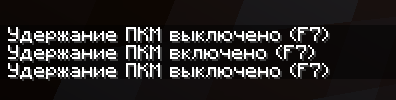 Keybind toggle message - Russian
 -
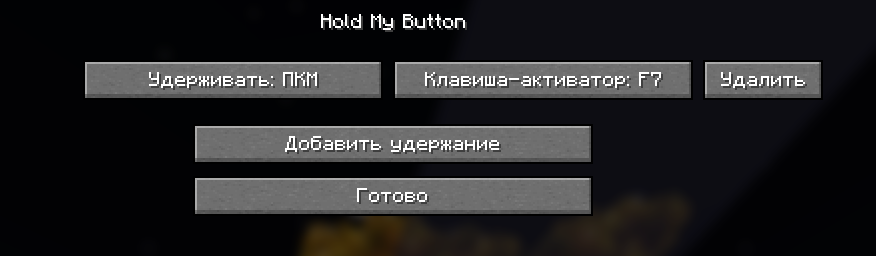 Mod Setting - Russian
 -
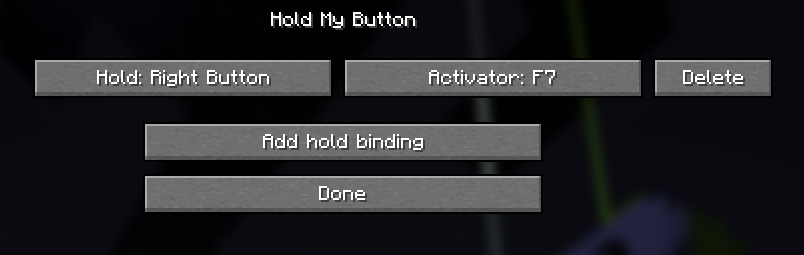 Mod Settings - English
Versions
Files
Relations
Project Relations
More like this
Similar Mods
Suggestions use data such as tags, dependencies, dependents, descriptions, titles, and more to rank how much they overlap with this mod.
On ModDex
Community snapshot
By the numbers
Statistics

Want to reach Minecraft players?
We're looking for a server hosting partner to feature here and other parts of the site. Interested? Send us a message!
Get in touchGet it on
Available Platforms
On ModDex
Community snapshot
By the numbers
Statistics
Resources