
Community listing page, reviews here may not be monitored by the author.
Homabric


No reviews yet
🏠 Little yet powerful home management mod for Fabric

Community voices
Reviews
No reviews yet. Be the first to review this project!
Get it on
Available Platforms
Compatibility
Supported Environments
Must be installed on both the client and the server.
Works on the client or the server alone, but does more when on both.
Varies by version.
About
Project Details
For authors
Embed Badge
If you're the author of this project, you can embed a live badge anywhere that supports HTML or Markdown. It updates automatically whenever ratings change.
Use HTML for any page that supports it, or Markdown for README files and Markdown-based descriptions.
Identifiers
Platform IDs
About
Description

Homabric
Little yet powerful home management mod for Fabric


⚠️This mod is in early stage of development, you can use all functions that are listed below, but they may be changed in future. Code quality might be very poor sometimes and it will be improved in future.
Features
- ⭐ Sharing homes with players.
- ⭐ Max home limits per group or player via permissions.
- ⭐ Using GUI for teleportation and viewing all home information.
- ⭐ Editing home icons for GUI with support for modded items.
- ⭐ Ability to easily configure the mod and view player locations.
- ⭐ Teleport timeout with ability to prevent teleportation if player moved or got damaged.
Planned features
- [ ] Ability to define teleport timeout using permissions.
- [ ] Ability to define
/homecommand aliases in config. - [ ] Rewrite code for better readability.
Languages
- 🇬🇧 English
- 🇷🇺 Russian
- 🇨🇳 Chinese (@Neubulae)
Commands
You can use homabric.teleport.bypass permission to bypass teleport timeout.
Players
- /h OR /home
homabric.base.use - /h <name?>
homabric.base.byName - /h set <name?>
homabric.base.set - /h remove <home>
homabric.base.remove - /h p <player> <home>
homabric.base.others - /h list
homabric.base.list - /h allow <player> <home>
homabric.base.allow - /h disallow <player> <home>
homabric.base.disallow - /h setIcon <home> <item identificator>
homabric.base.setIcon
Admins
You can access to admin commands by using /homabric.
- /homabric
homabric.admin.use - /homabric reload
homabric.admin.reload - /homabric teleport <player> <home>
homabric.admin.teleport - /homabric set <player> <home>
homabric.admin.set - /homabric remove <player> <home>
homabric.admin.remove - /homabric list <player>
homabric.admin.list
Classic Commands
You can disable these commands in configuration file by setting enableClassicCommands to false.
- /sethome <name>
homabric.base.set - /removehome <home>
homabric.base.remove - /playerhome <player> <home>
homabric.base.others - /listhome
homabric.base.list - /allowhome <player> <home>
homabric.base.allow - /disallowhome <player> <home>
homabric.base.disallow
Configuration
I developed this mod with simplicity in mind, I decided to store home data inside the configuration file instead of NBT in Entity or World, this allows server owners fast migration between maps without loosing data and editing them which saves a lot of time.
⚠️ Starting from version 2.0.0 the configuration file are now split into two different ones.
Migration from 1.x.x
Due to breaking changes in 2.0.0 you are required to manually edit your config file and move players section from original config to new one called homabric.homes.conf.

Homabric
Little yet powerful home management mod for Fabric


⚠️ This mod is being partially rewritten, you can use all functions that are listed below, but they may be changed in future. Code quality might vary and it will be hopefully improved in future.
Features
- ⭐ Sharing homes with players.
- ⭐ Max home limits per group or player via permissions.
- ⭐ Using GUI for teleportation and viewing all home information.
- ⭐ Editing home icons for GUI with support for modded items.
- ⭐ Ability to easily configure the mod and view player locations.
- ⭐ Teleport timeout with ability to prevent teleportation if player moved or got damaged.
Planned features
- Ability to define teleport timeout using permissions.
- Rewrite code for better readability.
- Ability to define
/homecommand aliases in config.
Languages
- 🇬🇧 English
- 🇷🇺 Russian
- 🇨🇳 Chinese (@Neubulae)
Commands
You can use homabric.teleport.bypass permission to bypass teleport timeout.
To disable limits on homes for players give them homabric.limit.bypass permission.
You can also specify aliases for commands in config.
Currently, default aliases are:
- Home Teleportation (home-command-aliases):
h,home - Home Management (homes-command-aliases):
hs,homes
Players
In many cases <home?> defaults to home if name is empty
Teleportation
- /h
homabric.base.use - /h <home?>
homabric.base.byName
Management
- /hs
homabric.base.use- shows GUI with your homes by default - /hs set <home?>
homabric.base.set - /hs remove <home>
homabric.base.remove - /hs p <player> <home>
homabric.base.others - /hs allow <player> <home>
homabric.base.allow - /hs disallow <player> <home>
homabric.base.disallow - /hs setIcon <home> <item identificator>
homabric.base.setIcon
Admins
You can access to admin commands by using /homabric.
- /homabric
homabric.admin.use - /homabric reload
homabric.admin.reload - /homabric teleport <player> <home>
homabric.admin.teleport - /homabric set <player> <home>
homabric.admin.set - /homabric remove <player> <home>
homabric.admin.remove - /homabric list <player>
homabric.admin.list
Classic Commands
You can disable these commands in configuration file by setting enableClassicCommands to false.
- /sethome <name>
homabric.base.set - /removehome <home>
homabric.base.remove - /playerhome <player> <home>
homabric.base.others - /listhome
homabric.base.list - /allowhome <player> <home>
homabric.base.allow - /disallowhome <player> <home>
homabric.base.disallow
Configuration
I developed this mod with simplicity in mind, I decided to store home data inside the configuration file instead of NBT in Entity or World, this allows server owners fast migration between maps without loosing data and editing them which saves a lot of time.
⚠️ Starting from version 2.0.0 the configuration file are now split into two different ones.
homabric.config.conf
This file stores Homabric settings.
# Examples and help: https://github.com/rogi27/Homabric/blob/master/README.md#configuration
# Do not touch this value, it allows mod to check if config file is outdated or not.
config-version=3
# This option enables alternative command variants like /sethome, /removehome and etc.
enable-classic-commands=true
# Allows you to specify aliases for home teleportation commands.
home-command-aliases=[
    home,
    h
]
# Allows you to specify aliases for home management commands.
homes-command-aliases=[
    homes,
    hs
]
# Sets the maximum amount of homes per player.
homes-limit=2
# Sets the timeout in seconds before player will be teleported home.
# You can disable this feature by setting it to 0.
teleport-cooldown=3
# You can define permissions that will override home limit for the players if they have them.
# Permission names are transformed to permissions like 'homabric.homelimit.<permissionName>'
# Example permission: vip: { max-homes=6 }
# If you want to disable limit use 'homabric.limit.bypass' permission.
permissions-home-limit {}
homabric.homes.conf
This file contains all homes that are created by players.
# List of players with their homes.
players {
    "27rogi" {
        homes {
            test {
                world="minecraft:overworld"
                x=-2.43
                y=70.0
                z=54.55
                yaw=105.9000015258789
                pitch=11.850000381469727
                # Must be an identifier. Example: 'minecraft:cobblestone'
                icon="minecraft:map"
                allowed-players=[]
            }
            home {
                world="minecraft:the_nether"
                x=-69.09
                y=68.0
                z=67.99
                yaw=57.599998474121094
                pitch=24.75
                # Must be an identifier. Example: 'minecraft:cobblestone'
                icon="minecraft:map"
                allowed-players=[]
            }
        }
    }
}
Migration from 1.x.x
Due to breaking changes in 2.0.0 you are required to manually edit your config file and move players section from original config to new one called homabric.homes.conf.
Screenshots
Gallery
-
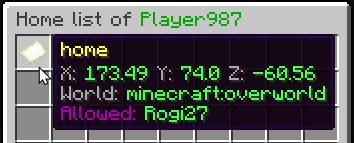 gui example
 -
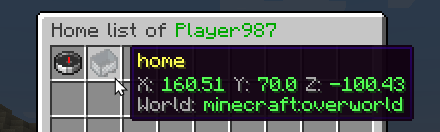 different icons and ability to set them
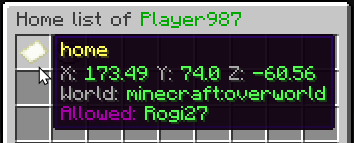
Versions
Files
Relations
Project Relations
More like this
Similar Mods
Suggestions use data such as tags, dependencies, dependents, descriptions, titles, and more to rank how much they overlap with this mod.
On ModDex
Community snapshot
By the numbers
Statistics
 (opens in a new tab)
Get it on
Available Platforms
On ModDex
Community snapshot
By the numbers