Community listing page, reviews here may not be monitored by the author.
HUDForge

No reviews yet
Build your own HUD in-game — create custom widgets from templates with live data (coordinates, FPS, armor durability, and more), then drag and style them. Client-side, works on any server.
Community voices
Reviews
No reviews yet. Be the first to review this project!
Get it on
Available Platforms
Compatibility
Supported Environments
Runs entirely on the client. Works on vanilla servers.
About
Project Details
For authors
Embed Badge
If you're the author of this project, you can embed a live badge anywhere that supports HTML or Markdown. It updates automatically whenever ratings change.
Use HTML for any page that supports it, or Markdown for README files and Markdown-based descriptions.
Identifiers
Platform IDs
Resources
External Links
About
Description
Build your own HUD in Minecraft — no config files, no code.
HudForge is a client-side Fabric mod that lets you create custom HUD widgets from templates, drag them anywhere on screen, and style them live in an in-game editor. Show coordinates, FPS, armor durability, biome, real-world time, and much more — however you want it.
Features
- In-game editor — press H, drag widgets anywhere, no editing files by hand.
- Template widgets — build any widget from a text template with live data placeholders, e.g.
XYZ {x} {y} {z}or{helmet_icon} {helmet}. - Item icons — show armor and held-item icons right next to their durability.
- Multi-line widgets — combine several lines into one widget.
- Full styling — per-widget background opacity, text opacity, and scale, all with sliders.
- Presets — one-click ready-made widgets (Coordinates, Armor, Speed, Health, and more).
- Client-side — works on any server, and other players don't need the mod.
How to use
- Press H in-game to open the editor.
- Click + Add and pick a preset, or add an empty template.
- Select a widget to edit it: drag to move, right-click to toggle, use the panel to style it.
- For template widgets, type your own format or click placeholders from the list to insert them.
- Use
|(or the new-line button) to split a widget into multiple lines.
Available data
Coordinates, chunk position, direction, biome, day, in-game time, real-world time, FPS, speed, light level, difficulty, health, hunger, armor points, XP level, tool durability, armor durability per slot, distance walked — plus item icons for armor and held items.
Installation
- Install Fabric Loader for Minecraft 1.21.11.
- Install Fabric API.
- Drop the mod into your
modsfolder.
Compatibility
Minecraft 1.21.11, Fabric. Client-side only — safe to use on any server.
Screenshots
Gallery
-
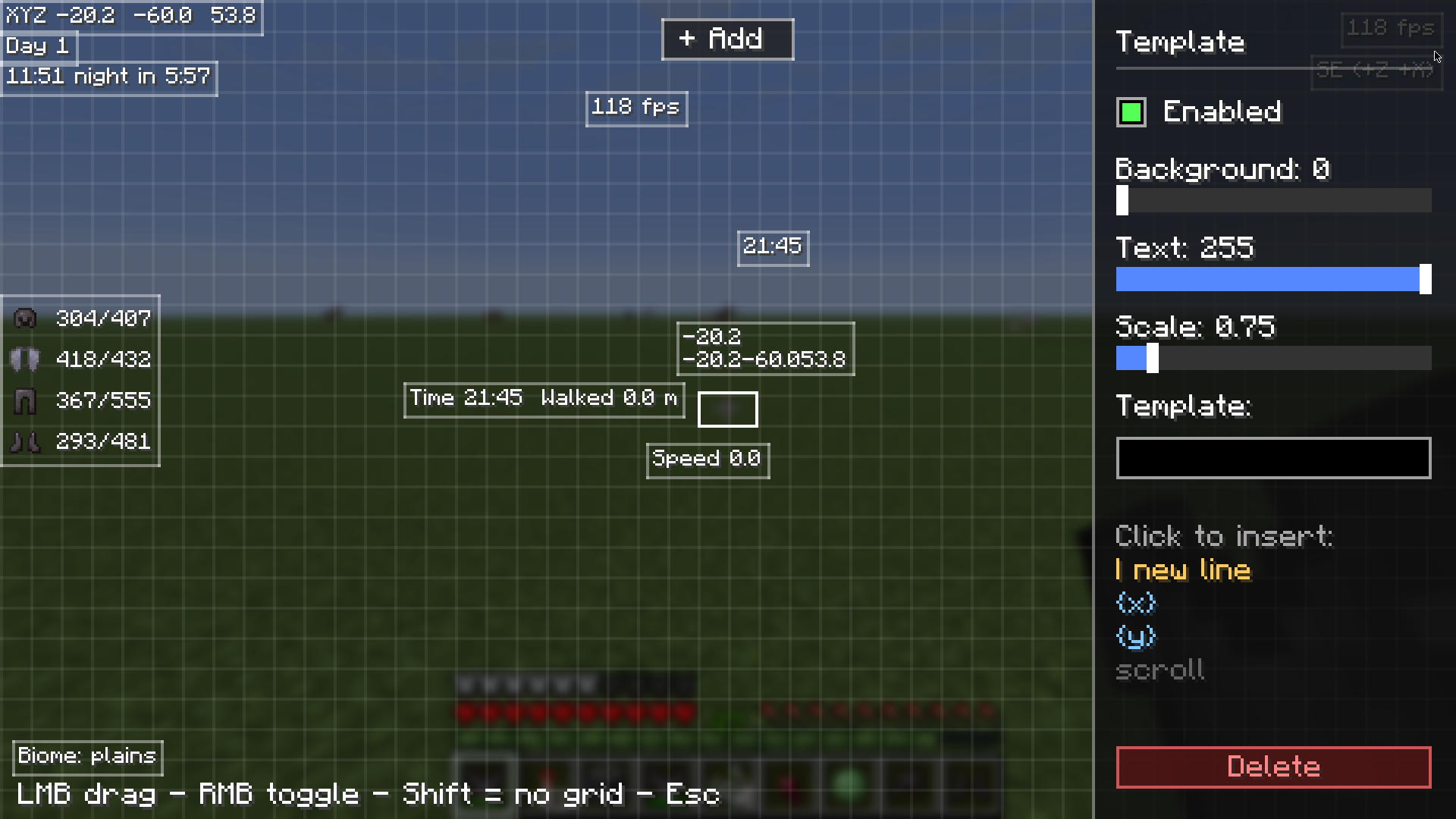 In-game HUD editor The editor: drag widgets, tweak opacity and scale, and build custom widgets from templates.
Versions
Files
Relations
Project Relations
More like this
Similar Mods
Suggestions use data such as tags, dependencies, dependents, descriptions, titles, and more to rank how much they overlap with this mod.
On ModDex
Community snapshot
By the numbers
Statistics

Want to reach Minecraft players?
We're looking for a server hosting partner to feature here and other parts of the site. Interested? Send us a message!
Get in touchGet it on
Available Platforms
On ModDex
Community snapshot
By the numbers
Statistics
Resources