Community listing page, reviews here may not be monitored by the author.
HudTweaks StationAPI

No reviews yet
HUD tweaks mod for b1.7.3 babric. Scroll through chat logs and move up hotbar as well as a few other optional small tweaks.
Community voices
Reviews
No reviews yet. Be the first to review this project!
Get it on
Available Platforms
Compatibility
Supported Environments
Runs entirely on the client. Works on vanilla servers.
About
Project Details
For authors
Embed Badge
If you're the author of this project, you can embed a live badge anywhere that supports HTML or Markdown. It updates automatically whenever ratings change.
Use HTML for any page that supports it, or Markdown for README files and Markdown-based descriptions.
Identifiers
Platform IDs
About
Description
HudTweaks StationAPI for Minecraft Beta 1.7.3
A StationAPI mod for Minecraft Beta 1.7.3 that adds some HUD tweaks.
HUD Tweaks
You will need ModMenu and GlassConfigAPI if you want to tweak different parts of the mod. See installation instructions below.
List of Changes:
- Increased chat history size.
- Ability to scroll up/down in chat history.
- Ability to change chat message fade time.
- Ability to disable, randomize, or show player coordinates in debug overlay.
- Ability to disable rendering the crosshair.
- Ability to disable rendering the vignette.
- Ability to draw very basic Xbox X and Y buttons.
- Ability to enable hotbar item selection tooltips.
- Ability to change hotbar item selection tooltip fade time.
- Ability to move hotbar, status icons, and overlay message anywhere on the screen.
- Disabled - the in-game HUD will be in the vanilla position
- Simple - move in-game HUD all together with a single config category
- Advanced - move hotbar, status icons, and overlay message independently of each other in multiple config categories
- Ability to put status icons and/or overlay message below the hotbar.
Installation using Prism Launcher
- Download an instance of Babric for Prism Launcher: https://github.com/Glass-Series/babric-prism-instance
- Install Java 17 and set the instance to use it: https://adoptium.net/temurin/releases/
- Add GlassConfigAPI 3.0.2+ to the mod folder for the instance: https://modrinth.com/mod/glass-config-api
- Add Glass Networking to the mod folder for the instance: https://modrinth.com/mod/glass-networking
- (Optional) Add StationAPI to the mod folder for the instance: https://modrinth.com/mod/stationapi
- (Optional) Add Mod Menu to the mod folder for the instance: https://modrinth.com/mod/modmenu-beta
- Add this mod to the mod folder for the instance: https://github.com/telvarost/BetaTweaks-StationAPI/releases
- Run and enjoy! 👍
FAQ
- Q. Why is minecraft so small and part of my screen white?
- A. You probably have screen scaling on or are using a high DPI screen. There are 5 possible ways to fix this:
- The best option is to install Gambac: https://modrinth.com/mod/gambac
- You could also pass the following string in as a java argument in the settings tab
-Dsun.java2d.uiScale=1.0
- You could also install ClientsideEssentials mod or UniTweaks and use their screen scaling fix from GCAPI config options (fix may produce small artifacts with this option)
- You could also change the DPI settings for Prism Launcher to system
- Or, you could change your screen scaling to 100%
- A. You probably have screen scaling on or are using a high DPI screen. There are 5 possible ways to fix this:
Feedback
Got any suggestions on what should be added next? Feel free to share it by creating an issue. Know how to code and want to do it yourself? Then look below on how to get started.
Contributing
Thanks for considering contributing! To get started fork this repository, make your changes, and create a PR.
If you are new to StationAPI consider watching the following videos on Babric/StationAPI Minecraft modding: https://www.youtube.com/watch?v=9-sVGjnGJ5s&list=PLa2JWzyvH63wGcj5-i0P12VkJG7PDyo9T
Screenshots
Gallery
-
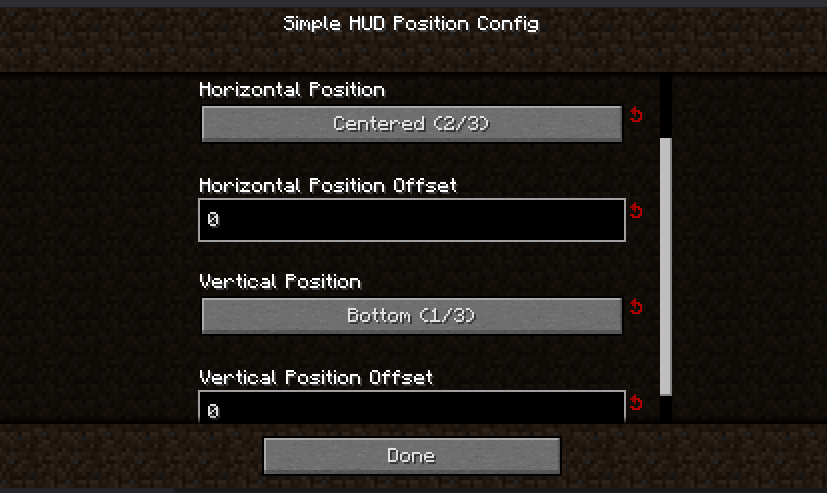 Simple HUD Position Config Relative positioning offsets
 -
 Very Basic Xbox X And Y Buttons
 -
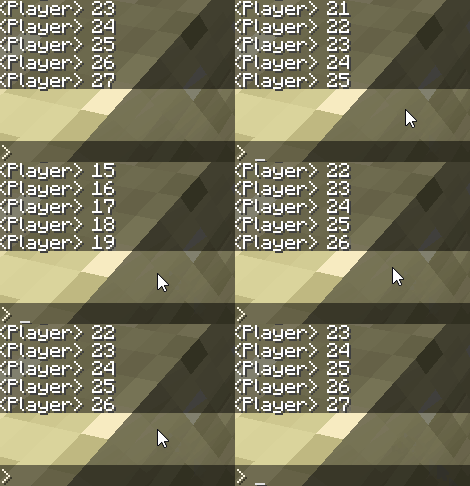 Chat Scrolling
 -
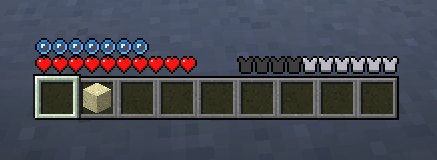 Xbox Hotbar
Versions
Files
Relations
Project Relations
More like this
Similar Mods
Suggestions use data such as tags, dependencies, dependents, descriptions, titles, and more to rank how much they overlap with this mod.
On ModDex
Community snapshot
By the numbers
Statistics

Want to reach Minecraft players?
We're looking for a server hosting partner to feature here and other parts of the site. Interested? Send us a message!
Get in touchGet it on
Available Platforms
On ModDex
Community snapshot
By the numbers