
Hulis Z-Crystals
No reviews yet
Adds Z-Crystals to Cobblemon
Inspired by anime series and other cultural phenomena, often featuring recognizable characters and settings.
Features role-playing elements like character progression, quests, and story-driven gameplay.
Includes aesthetic items like decoration, clothing, and visual effects.
Adds extra features or content to an existing mod.
Features high-quality textures and models.
Inspired by or including content related to the Pokemon franchise.
Fabric is a mod loader for versions 1.14+ of Minecraft, particularly popular for client side and optimization mods.
Community voices
Reviews
Click once to include, again to exclude, again to clear
No reviews yet. Be the first to review this project!
Get it on
Available Platforms
 Modrinth
Compatibility
Supported Environments
About
Project Details
For authors
Embed Badge
If you're the author of this project, you can embed a live badge anywhere that supports HTML or Markdown. It updates automatically whenever ratings change.
Use HTML for any page that supports it, or Markdown for README files and Markdown-based descriptions.
Identifiers
Platform IDs
About
Description
Hulis Z-Crystals
Hulis Z-Crystals is a mod that adds Z-Crystals to Minecraft
If you like my work consider supporting me on Ko-fi
Thanks to Sanji for making the Textures
Configuration
The Configuration file for this mod is located in the
configfolder underzcrystalsCOMMAND_Z_RING_PERMISSION_LEVEL: The Permission Level required to use the
/keyitemcommand
Default:4SERVERSIDE: If the Mod should be launched Serverside only or require it to be installed on clients
Default:false
Getting Started
To get started you need 2 things:
Some Blank Z-Crystals
A Z-RingOnce you have the Z-Ring you need to right-click in the Air to enable using Z-Moves
Once you do that you will have a button for Z-Moves in your Battle GUI when
a Pokémon is holding a Z-Crystal that can use a Z-Move.

Obtaining Z-Crystals
Z-Crystals are obtained by right-clicking certain Blocks/Entities with a Blank Z-Crystal
The Z-Crystal will be consumed, and you will get a Z-CrystalNormalium Z
Made by crafting a Blank Z-Crystal with nothing in a shapeless recipe
Fightinium Z
Made by right-clicking a Bamboo Block with a Blank Z-Crystal
Firium Z
Made by right-clicking a Magma Block with a Blank Z-Crystal
Waterium Z
Made by right-clicking a Wet Sponge with a Blank Z-Crystal
Electrium Z
Made by right-clicking a Copper Block with a Blank Z-Crystal
Grassium Z
Made by right-clicking a Wheat Crop with a Blank Z-Crystal
Icium Z
Made by right-clicking Powder Snow with a Blank Z-Crystal
Rockium Z
Made by right-clicking Bedrock with a Blank Z-Crystal
Steelium Z
Made by right-clicking an Iron Golem with a Blank Z-Crystal
Poisonium Z
Made by right-clicking a Potato Crop with a Blank Z-Crystal (Peaceful Mode Only)
Made by right-clicking a Cave Spider with a Blank Z-Crystal (Every Mode except Peaceful)Ghostium Z
Made by right-clicking Soul Sand with a Blank Z-Crystal
Darkinium Z
Made by right-clicking Reinforced Deepslate with a Blank Z-Crystal
Fairium Z
Made by right-clicking an Allay with a Blank Z-Crystal (Peaceful Mode Only)
Made by right-clicking a Vex with a Blank Z-Crystal (Every Mode except Peaceful)
~~~~Dragonium Z
Made by right-clicking an End Portal Frame with a Blank Z-Crystal
Buginium Z
Made by right-clicking a Beehive with a Blank Z-Crystal
Psychium Z
Made by right-clicking an End Gateway with a Blank Z-Crystal
Groundium Z
Made by right-clicking a Mud Block with a Blank Z-Crystal
Flyinium Z
Made by right-clicking a Chicken with a Blank Z-Crystal

Pokémon Specific Z-Crystals
Aloraichium Z
Made by right-clicking an Alolan Raichu with an Electrium Z
Decidium Z
Made by right-clicking a Decidueye with a Grassium Z
Incinium Z
Made by right-clicking an Incineroar with a Firium Z
Primarium Z
Made by right-clicking a Primarina with a Waterium Z
Pikanium Z
Made by right-clicking a Pikachu with an Electrium Z
Pikashunium Z
Made by right-clicking a Hat Pikachu with an Electrium Z
Tapunium Z
Made by right-clicking any Tapu with a Fairium Z
Marshadium Z
Made by right-clicking a Marshadow with a Ghostium Z
Mimikium Z
Made by right-clicking a Mimikyu with a Ghostium Z
Lycanium Z
Made by right-clicking a Lycanroc with a Rockium Z
Kommonium Z
Made by right-clicking a Kommo-o with a Dragonium Z
Solganium Z
Made by right-clicking a Solgaleo with a Psychium Z
Lunalium Z
Made by right-clicking a Lunala with a Psychium Z
Ultranecrozium Z
Made by right-clicking a Necrozma with a Psychium Z (Currently not working in battle)
Eevium Z
Made by right-clicking an Eevee with a Normalium Z
Mewnium Z
Made by right-clicking a Mew with a Psychium Z
Snorlium Z
Made by right-clicking a Snorlax with a Normalium Z
Serverside Resource Pack
The Mod comes with a Serverside Resource Pack that changes the Z-Crystals to look like the ones from the games
You will need to merge the resource pack with your own Server Resource Pack if you have one
You can find the Resource Pack in this GitHub Repository Hulis-Z-Crystals-Resource-Pack.zip
Screenshots
Gallery
-
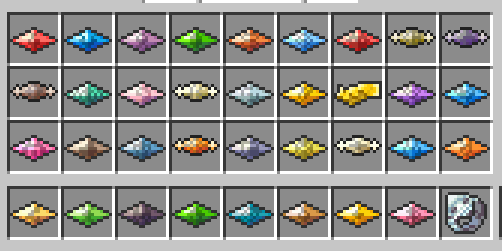 Available Z-Crystals
 -
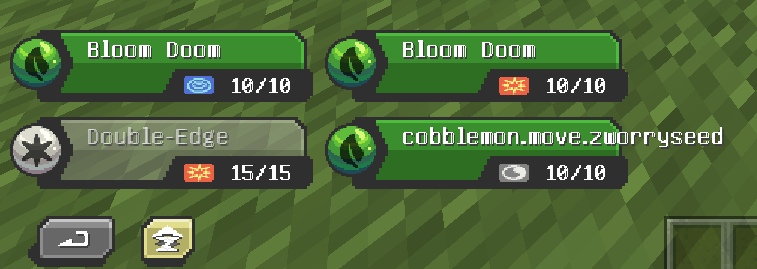 A Pokemon using a Z-Move in Battle
Versions
Files
Relations
Project Relations
More like this
Similar Mods
Suggestions use data such as tags, dependencies, dependents, descriptions, titles, and more to rank how much they overlap with this mod.
On ModDex
Community snapshot
By the numbers
Statistics

Want to reach Minecraft players?
We're looking for a server hosting partner to feature here and other parts of the site. Interested? Send us a message!
Get in touchGet it on
Available Platforms
On ModDex
Community snapshot
By the numbers