
Community listing page, reviews may not be monitored by the author.
IconExporter


No reviews yet
Exports item, block, and fluid icons to files

Community voices
Reviews
No reviews yet. Be the first to review this project!
Get it on
Available Platforms
Compatibility
Supported Environments
Must be installed on both the client and the server.
About
Project Details
For authors
Embed Badge
If you're the author of this project, you can embed a live badge anywhere that supports HTML or Markdown. It updates automatically whenever ratings change.
Use HTML for any page that supports it, or Markdown for README files and Markdown-based descriptions.
Identifiers
Platform IDs
About
Description
This mod requires the Cyclops Core library!
Come talk to us in #iconexporter on the Cyclops Discord server!
This mod exports all item and block icons to PNG files.
This is a client-side mod, and should only be used a single time if you want to create an export of all icons in the game.
Notable features:
- Iterates over all items in the item registry, and will consider all possible item variants.
- Processes both vanilla and modded items.
- Outputs PNG images with transparent backgrounds.
- Can output images in any size.
- Metadata of items and fluids can be optionally exported via /iconexporter exportmetadata
- Filter exports by mod (id or regex)
How to use:
- Start the game with IconExporter installed client-side.
- Run the
/iconexporter exportcommand. (Optionally, the image size can be passed, defaults to64) - Wait until all icons are rendered. (can be stopped by pressing Escape)
- Find all icons in
icon-exports-x64in your Minecraft directory. (Next to yourscreenshotsdirectory.)
File structure: <modid>__<itemid>__<metadata>[__<NBT>].png
For example:
integrateddynamics__cable__0.pngminecraft__dropper__0.pngminecraft__lingering_potion__0__{Potion__"minecraft__strong_leaping"}.png
Optionally, NBT tags can be hashed (MD5) in file names when the fileNameHashTag config option is enabled.
This is useful when you have items with large NBT tags that result in very long file names.
If enabled, an auxiliary txt file will be created with the same base name containing the full tag contents.
For example:
minecraft__potion__0__d4272645c61d50de18ce399e7093de8f.pngminecraft__potion__0__d4272645c61d50de18ce399e7093de8f.txt
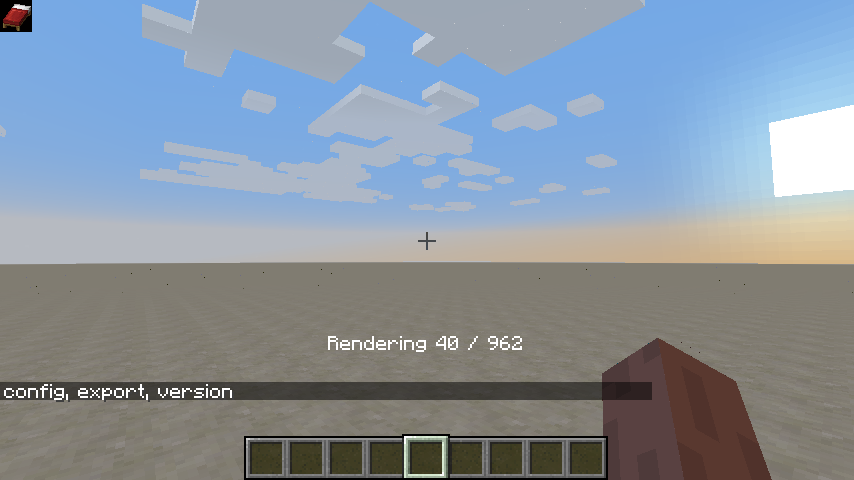
Progress is shown while rendering icons:

Support us via the referral code cyclops when renting a server at Bisect Hosting, and get 25% off your first month!

If you like this mod, consider supporting me on Patreon!
This mod exports all item and block icons to PNG files.
This is a client-side mod, and should only be used a single time if you want to create an export of all icons in the game.
Notable features:
- Iterates over all items in the item registry, and will consider all possible item variants.
- Processes both vanilla and modded items.
- Outputs PNG images with transparent backgrounds.
- Can output images in any size.
- Metadata of items and fluids can be optionally exported via /iconexporter exportmetadata
- Filter exports by mod (id or regex)
How to use:
- Start the game with IconExporter installed client-side.
- Run the
/iconexporter exportcommand. (Optionally, the image size can be passed, defaults to64) - Wait until all icons are rendered. (can be stopped by pressing Escape)
- Find all icons in
icon-exports-x64in your Minecraft directory. (Next to yourscreenshotsdirectory.)
File structure: <modid>__<itemid>__<metadata>[__<NBT>].png
For example:
integrateddynamics__cable__0.pngminecraft__dropper__0.pngminecraft__lingering_potion__0__{Potion__"minecraft__strong_leaping"}.png
Optionally, NBT tags can be hashed (MD5) in file names when the fileNameHashTag config option is enabled.
This is useful when you have items with large NBT tags that result in very long file names.
If enabled, an auxiliary txt file will be created with the same base name containing the full tag contents.
For example:
minecraft__potion__0__d4272645c61d50de18ce399e7093de8f.pngminecraft__potion__0__d4272645c61d50de18ce399e7093de8f.txt
Progress is shown while rendering icons:
Support us via the referral code cyclops when renting a Bisect Hosting server, and get 25% off!

If you like this mod, consider supporting me on Patreon!
Screenshots
Gallery
-
Rendering
Versions
Files
Relations
Project Relations
More like this
Similar Mods
Suggestions use data such as tags, dependencies, dependents, descriptions, titles, and more to rank how much they overlap with this mod.
On ModDex
Community snapshot
By the numbers
Statistics

Get it on
Available Platforms
On ModDex
Community snapshot
By the numbers