
Iconic
No reviews yet
Upload your own icons to chat, fully client side!
Community voices
Reviews
Click once to include, again to exclude, again to clear
No reviews yet. Be the first to review this project!
Get it on
Available Platforms
 Modrinth
Compatibility
Supported Environments
About
Project Details
For authors
Embed Badge
If you're the author of this project, you can embed a live badge anywhere that supports HTML or Markdown. It updates automatically whenever ratings change.
Use HTML for any page that supports it, or Markdown for README files and Markdown-based descriptions.
Identifiers
Platform IDs
About
Description
Iconic
Upload your own icons to chat, fully client side!
The following document is relevant for Iconic 2.0.0.
Using the Mod
To insert an icon into chat, begin by typing :. Autocomplete suggestions will pop up.
Upon sending a message with icons, the icons will be sent to other clients, which will then show it on screen.
The mod works by hiding an icon id in the chat. If the actual chat message sent exceeds the maximum length of 256 characters, a warning will be shown. Don't icon spam too much.
These commands also support including icons:
/me, /msg, /teammsg, /tell, /tellraw, /tm, /w, /reply, /r, /last, /l (last 4 are common reply commands on servers).
Adding Your Own Icons
Add icons by clicking the star button at the bottom left of the chat bar. A directory will be opened where you can add icons.
Alternatively, navigate to your dotminecraft and open the icons directory.
Icons over 1 megabyte will be rejected. Only images in the .png format are accepted.
If an image is wider than taller (width > height), or the image is wider than 256, it will automatically be corrected to a 256px width square image.
Alternatively, you can use one of the provided icon generators:
Icon Generators
URL
Downloads an icon from the internet by URL, and saves it to the icon directory as a PNG.
Usage: /iconic url [icon name] [url of image]
Player Skin
Generates a 3D render of a player skin.
Usage: /iconic player [player name or UUID]
PetPet Animation
Adds the petpet animation to any other icon.
Usage: /iconic petpet [other icon name]
Built-in Icons
The mod comes with some built-in icons. Here's a list:
Built-in Icons List
axolotlbananaspin(A spinning banana)birdspin(A dancing bird)boatjeb(Jeb in a boat)bruhcatbop(Bopping cat)cathello(Cat waving hello)concernconfusioncreepereggemotionaldamage(EMOTIONAL DAMAGE!!!)explosion(Planet annihilation)eyesfabric(FabricMC logo)firehearthellothere(Obi-Wan Kenobi hello there)iapproveminecraft(Minecraft logo)missing(Missing texture cube)modrinth(Modrinth logo)neverdie(Tribute)partypopperpogpotatoprideflagrage(Angry seagull)rainbowrickroll(Rick Astley)shut(Shut seagull)skullsnailsobsus(Among Us character)tater(FabricMC mascot?)thanossnap(Fading away)thumbsdownthumbsupwheeze
Animated Icons
Icons can be animated too! Here's how:
Adding Animated Icons
To add an animated icon, create an image with a height greater than the width. For example, a 64x256 image would have 4 frames, each 64x64 pixels.
Each frame is rendered for approximately 37.5 milliseconds (0.0375 seconds), and loops after reaching the last frame.
Here's a tool you can use to convert a gif into an icon that can be used.
Make sure to set Tile Alignment to Vertical and Tile Size to 256x256 (or a smaller square).
Mod Compatibility
Here are the mods that have been tested alongside Iconic:
Mod Compatibility
| Mod | Compatibility |
|---|---|
| Fabric API | Required |
| Fabric Language Kotlin | Required |
| No Chat Reports | Compatible |
| Figura | Compatible and Extended |
| Symbol Chat | Incompatible |
Screenshots
Gallery
-
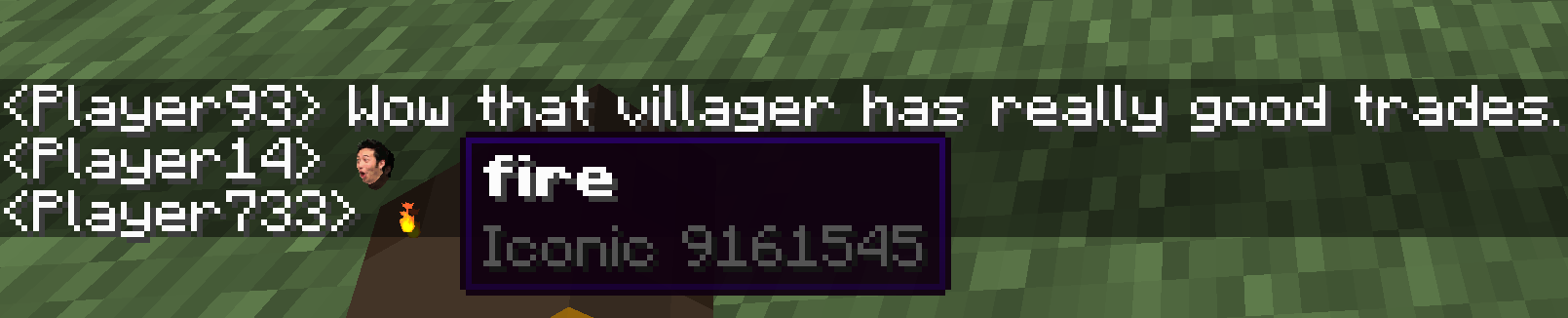 A "Normal" Conversation That's *fire*.
 -
 Icon Spam Spamming the chat with icons.
 -
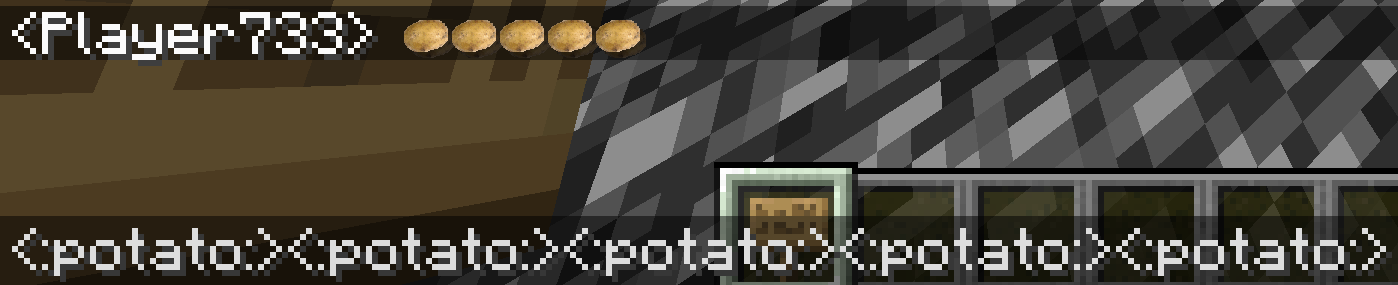 Potatoes Please note that this is the old icon format. The new icon format would be `:potato:` instead of `<:potato:>`.
 -
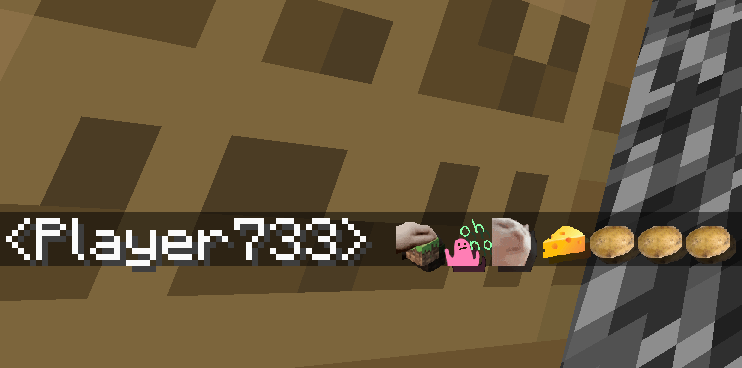 More Icon Spam Who doesn't love some icon spam in Discord servers? Now you can icon spam people in Minecraft too.
Versions
Files
Relations
Project Relations
More like this
Similar Mods
Suggestions use data such as tags, dependencies, dependents, descriptions, titles, and more to rank how much they overlap with this mod.
On ModDex
Community snapshot
By the numbers
Statistics

Want to reach Minecraft players?
We're looking for a server hosting partner to feature here and other parts of the site. Interested? Send us a message!
Get in touchGet it on
Available Platforms
On ModDex
Community snapshot
By the numbers