Community listing page, reviews here may not be monitored by the author.
I'm Recording Mod

No reviews yet
Shows who's recording
Community voices
Reviews
No reviews yet. Be the first to review this project!
Get it on
Available Platforms
About
Project Details
For authors
Embed Badge
If you're the author of this project, you can embed a live badge anywhere that supports HTML or Markdown. It updates automatically whenever ratings change.
Use HTML for any page that supports it, or Markdown for README files and Markdown-based descriptions.
Identifiers
Platform IDs
About
Description
Features
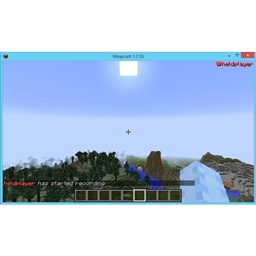
- Shows players names in red with a red 'recording' dot when they register themselves as recording.
- Shows players names in blue with a blue 'paused' sign to signify a user has halted recording and is going to resume soon.
- Shows players names in green with a green 'paused' sign to signify a user is requesting others to not record/pause recording.
- Allows players to hide the overlay, will still notify you of people changing their state unless disabled in config.
- Shows your state when in the main menu.
- Slowly fades out users when they are recording/halted recording if the overlay is disabled.
Config Options
general:lockOverlay (default: true) - makes you unable to toggle your own state when enabled and the overlay has been disabled. Use this if you don't record yourself.
general:screenLocation (default: top-right) - determines the location of the recording player list, can be set to "top-left", "top-right", "bottom-left" and "bottom-right".
general:chatMessages (default: true) - if set to true broadcasts your current recording state when it changes to every player via chat as well as the overlay. Requires the server to have this mod installed to work. Useful for when other players don't have this mod installed.
general:instantHide (default: false) - determines whether the overlay instantly hides when you toggle it.
Key Bindings
Recording Toggle (default: R) - Toggles your recording state, if you are not recording you will be marked as recording, otherwise you will be marked as non-recording.
Paused Toggle (default: P) - Toggles your recording state, if you are recording you will be marked as pausing the recording, otherwise you will be marked as recording. Hold for longer than half a second to request others to stop/pause recording.
Overlay Toggle (default: 0) - Hides the in-game overlay of recording players, will let the usernames fade out. Will show state changes to prevent you from missing somebody from starting his recording. Will also disable the other key bindings if "lock-overlay-when-hidden" in the config is set to true.
Disclaimer
This mod does not detect if any recording software is running, nor does it actually record anything. It is up to the user to let the other players of a server know they are recording.
Screenshots
Gallery
Versions
Files
Relations
Project Relations
More like this
Similar Mods
Suggestions use data such as tags, dependencies, dependents, descriptions, titles, and more to rank how much they overlap with this mod.
On ModDex
Community snapshot
By the numbers
Statistics
Want to reach Minecraft players?
We're looking for a server hosting partner to feature here and other parts of the site. Interested? Send us a message!
Get in touchGet it on
Available Platforms
On ModDex
Community snapshot
By the numbers