
Community listing page, reviews here may not be monitored by the author.
Impersonate


No reviews yet
Impersonate: to assume or act the character of

Community voices
Reviews
No reviews yet. Be the first to review this project!
Get it on
Available Platforms
Compatibility
Supported Environments
Runs entirely on the server. Also works in singleplayer.
About
Project Details
For authors
Embed Badge
If you're the author of this project, you can embed a live badge anywhere that supports HTML or Markdown. It updates automatically whenever ratings change.
Use HTML for any page that supports it, or Markdown for README files and Markdown-based descriptions.
Identifiers
Platform IDs
About
Description
Have you ever wanted to impersonate another player ? Be it for making machinimas, roleplaying, playing 5D chess in factions, or just pranking friends, there are lots of (relatively) good reasons to assume the identity of someone else.
Requires the latest version of Fabric API
Overview
Impersonate allows players to take on the name and appearance of other players. When impersonating someone, a player will:
- have the skin of the impersonated player
- have the nameplate of the impersonated player
- send every chat message as if they were the impersonated player
- appear as the impersonated players in online player lists
- sign books as if they were the impersonated player
- etc.
They will however not fool the impersonated player's pets, if any.
To avoid moderation chaos, server logs will always display the actual player's name, alongside their fake identity. Server operators will have ongoing impersonations revealed in the same way.
This mod works serverside (compatible with vanilla clients), but installation on clients is still recommended, notably for server operators.
Commands
Impersonate adds the /impersonate command, allowing server operators and mapmakers to interact with the API through commands.
/impersonate disguise/impersonate disguise as <name> [<targets>] [<key>]: disguises one or more players<name>: Name of the player to impersonate. Does not have to be online or even real.[<targets>](optional) : If specified, must be either a player's username or a target selector. If unspecified, defaults to the player using the command. When used in a command block, player is not optional.[<key>](optional) : If specified, must be a valid identifier serving as a key for the impersonation.
/impersonate disguise clear [<targets>] [<key>]: stops the impersonation of one or more players[<targets>](optional) : If specified, must be either a player's username or a target selector. If unspecified, defaults to the player using the command. When used in a command block, player is not optional.[<key>](optional) : If specified, must be a valid identifier that was previously used as a key to start an impersonation. If left unspecified, the command will clear every active impersonation.
Permissions
If you have LuckPerms installed, the above commands can be used by players with the impersonate.command.disguise permission. If you only grant impersonate.command.disguise.self, players will only be able to use the commands on themselves.
Gamerules
impersonate:fakeCapes: Whether impersonators should get the cape and elytra of impersonated players. Defaults tofalse.impersonate:opRevealImpersonations: Whether impersonations should be revealed to online server operators. Defaults totrue.impersonate:logRevealImpersonations: Whether ongoing impersonations should be revealed in the server logs. Defaults totrue.
Using Impersonate (for developers)
Mod developers can use gradle to add Impersonate as a dependency. More information is available in the Github Readme.
Have you ever wanted to impersonate another player ? Be it for making machinimas, roleplaying, playing 5D chess in factions, or just pranking friends, there are lots of (relatively) good reasons to assume the identity of someone else.
Requires the latest version of Fabric API
Overview
Impersonate allows players to take on the name and appearance of other players. When impersonating someone, a player will:
- have the skin of the impersonated player
- have the nameplate of the impersonated player
- send every chat message as if they were the impersonated player
- appear as the impersonated players in online player lists
- sign books as if they were the impersonated player
- etc.
They will however not fool the impersonated player's pets, if any.
To avoid moderation chaos, server logs will always display the actual player's name, alongside their fake identity. Server operators will have ongoing impersonations revealed in the same way.
This mod works serverside (compatible with vanilla clients), but installation on clients is still recommended, notably for server operators.
Commands
Impersonate adds the /impersonate command, allowing server operators and mapmakers to interact with the API through commands.
/impersonate disguise/impersonate disguise as <name> [<targets>] [<key>]: disguises one or more players<name>: Name of the player to impersonate. Does not have to be online or even real.[<targets>](optional) : If specified, must be either a player's username or a target selector. If unspecified, defaults to the player using the command. When used in a command block, player is not optional.[<key>](optional) : If specified, must be a valid identifier serving as a key for the impersonation.
/impersonate disguise clear [<targets>] [<key>]: stops the impersonation of one or more players[<targets>](optional) : If specified, must be either a player's username or a target selector. If unspecified, defaults to the player using the command. When used in a command block, player is not optional.[<key>](optional) : If specified, must be a valid identifier that was previously used as a key to start an impersonation. If left unspecified, the command will clear every active impersonation.
Gamerules
impersonate:fakeCapes: Whether impersonators should get the cape and elytra of impersonated players. Defaults tofalse.impersonate:opRevealImpersonations: Whether ongoing impersonations should be revealed to online server operators. Defaults totrue.impersonate:logRevealImpersonations: Whether ongoing impersonations should be revealed in the server logs. Defaults totrue.
Using Impersonate as a mod developer
You can add Impersonate to your development environment by inserting the following in your build.gradle :
repositories {
    jcenter()
	maven {
        name = "Ladysnake Libs"
        url = 'https://dl.bintray.com/ladysnake/libs' }
    }
}

dependencies {
    modImplementation "io.github.ladysnake:Impersonate:${impersonate_version}"
    include "io.github.ladysnake:Impersonate:${impersonate_version}"
    // Impersonate dependencies
    include "com.github.onyxstudios.Cardinal-Components-API:cardinal-components-base:${cca_version}"
    include "com.github.onyxstudios.Cardinal-Components-API:cardinal-components-entity:${cca_version}"
}
You can then add the library version to your gradle.propertiesfile:
# Impersonate
impersonate_version = 1.x.y
# Cardinal Components
cca_version = 2.x.y
You can find the current version of Impersonate in the versions tab, and the latest CCA version in the appropriate repository.
Screenshots
Gallery
-
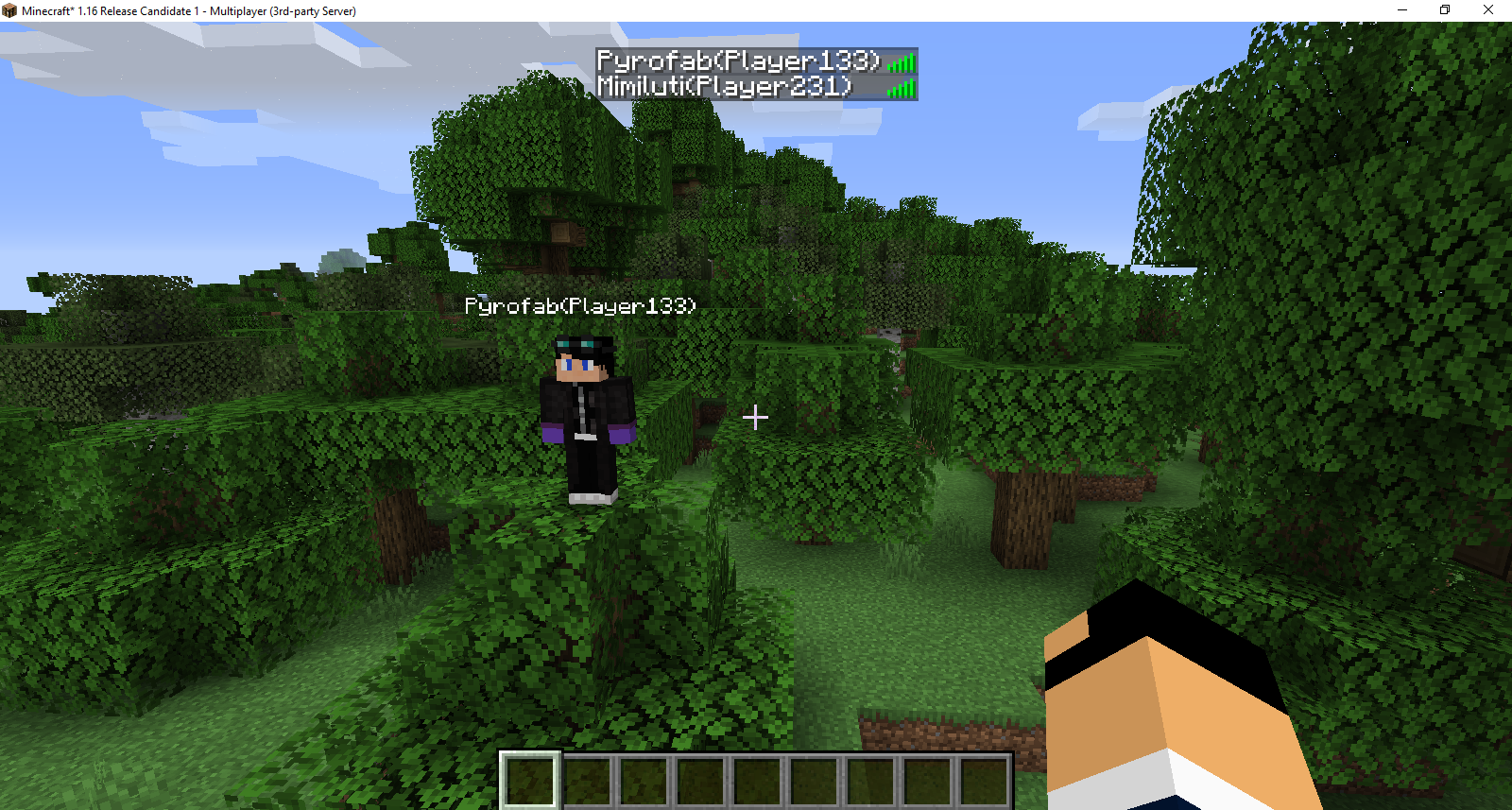 Impersonation seen by an OP Server operators see impersonation through nameplates, player lists, and chat. This can be disabled with the appropriate gamerule.
 -
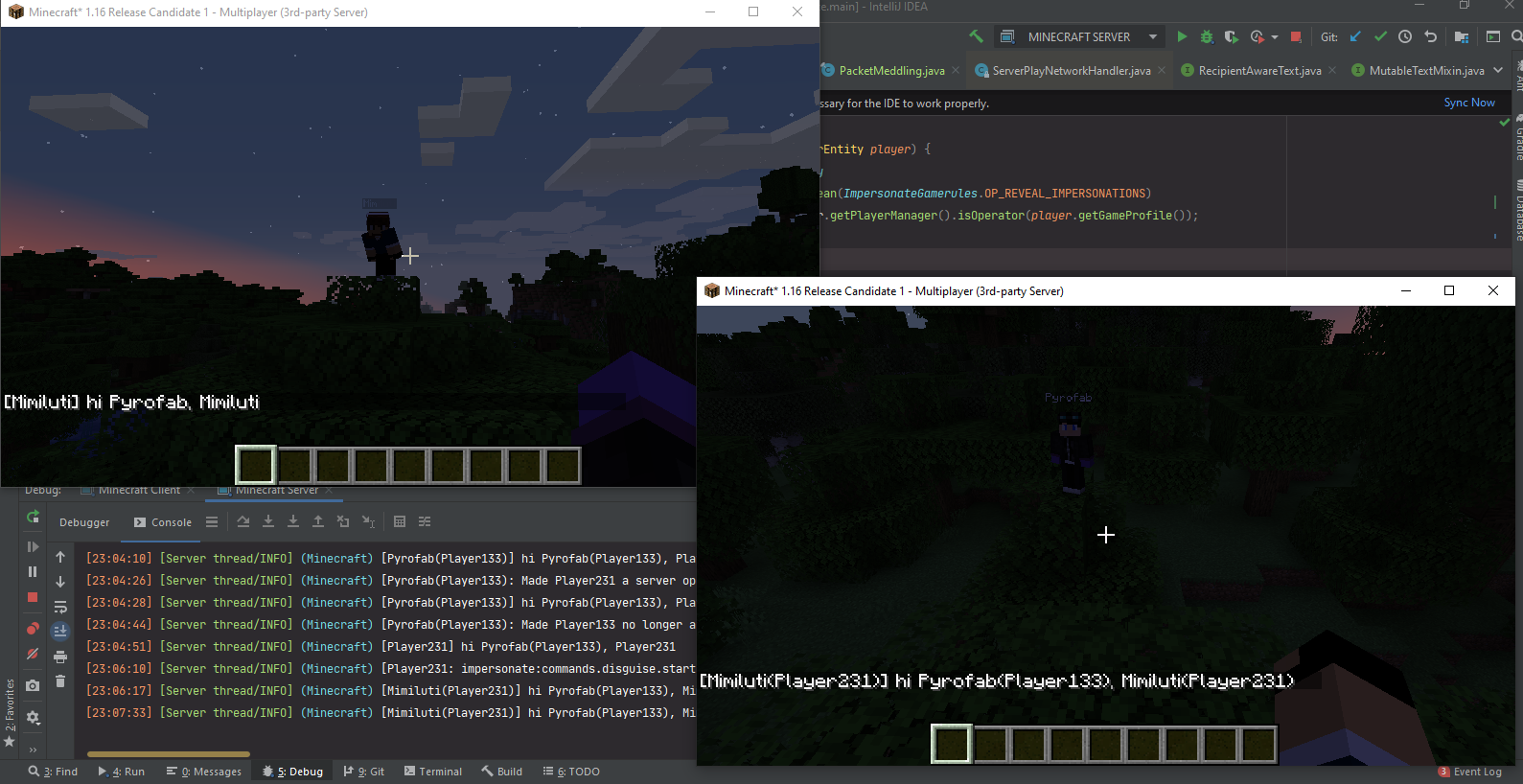 Impersonation showcase 1 A server operator and a regular player both impersonating people (chat is the result of "/say hi @a").
Versions
Files
Relations
Project Relations
More like this
Similar Mods
Suggestions use data such as tags, dependencies, dependents, descriptions, titles, and more to rank how much they overlap with this mod.
On ModDex
Community snapshot
By the numbers
Statistics
 (opens in a new tab)
Get it on
Available Platforms
On ModDex
Community snapshot
By the numbers