![[INDL] EMERGENCY OP](https://media.forgecdn.net/avatars/thumbnails/1681/411/256/256/639068409209397044.png)
Community listing page, reviews here may not be monitored by the author.
[INDL] EMERGENCY OP

No reviews yet
Grant temporary OP safely. Daily rotating passwords, full blackbox audit logging, command blacklist, anti-duplication Clean Room system, and Admin GUI panel. Every action tracked — commands, blocks, items, containers. No permanent OP, full accountability.

Community voices
Reviews
No reviews yet. Be the first to review this project!
Get it on
Available Platforms
About
Project Details
For authors
Embed Badge
If you're the author of this project, you can embed a live badge anywhere that supports HTML or Markdown. It updates automatically whenever ratings change.
Use HTML for any page that supports it, or Markdown for README files and Markdown-based descriptions.
Identifiers
Platform IDs
Resources
External Links
About
Description
[INDL] EMERGENCY OP: Controlled Emergency Operator Access
Grant temporary OP safely. INDL Emergency OP is a server/client-side security mod that lets trusted admins grant themselves temporary operator status using a daily rotating password. Every single action during the session is recorded in a full blackbox audit log — commands, blocks, items, containers — nothing goes unnoticed.
Why choose INDL Emergency OP?
Giving OP to a player is one of the most dangerous actions on a server. INDL Emergency OP makes it safe and accountable — sessions are time-limited, critical commands are blocked, inventories are isolated, and every action is logged with forensic detail.
No permanent OP. No trust issues. Full accountability.
The Hybrid Cipher — Daily Rotating Passwords
The password system is deterministic and offline — no internet required, no database to hack.
Password = SHA-256(secretWord + DDMMYYYY) → INDL-XXXXXXXX| Concept | Description |
|---|---|
| Secret Word | A shared secret between server and admin. Set in the config file. |
| Date | Today's date in DDMMYYYY format. The password changes every day. |
| Hash | SHA-256 produces a unique 64-char hex string. Only the first 8 chars are used. |
| Format | INDL- + 8 hex characters (e.g., INDL-a3f7b2c1) |
How it works
Admin knows: secretWord = "MyS3cretK3y"
Today's date: 16022026

SHA-256("MyS3cretK3y16022026") → "a3f7b2c1e4d5..."
Password = INDL-a3f7b2c1
Even if someone sees today's password, it's useless tomorrow. And without the secret word, they can't predict the next one.
Cipher Generator Tool
A standalone HTML tool is included to calculate the daily password without needing access to the server. Simply enter the secret word and today's date.
Clean Room — Anti-Duplication System
When a session starts, the player's inventory is completely saved and cleared. They begin the emergency session with an empty inventory.
Session Start ───→ Inventory saved ───→ Inventory cleared ───→ OP granted
                                                                │
Session End ←──── Inventory restored ←──── OP removed ←────────┘
This prevents every duplication vector:
- ✅ Items traded to other players → irrelevant, original inventory returns
- ✅ Creative mode items → tracked and logged, then removed
Full Blackbox Audit
Every action during an emergency OP session is recorded with millisecond timestamps to a JSON log file. The audit log is a forensic record of exactly what happened.
Tracked Events
| Icon | Event | Description |
|---|---|---|
| ▶ | Session Start | Session initiated with duration |
| ■ | Session End | Session ended (manual or timeout) |
| 🔧 | Command | Any command executed |
| 🚫 | Command Blocked | Blacklisted command attempt |
| 📦 | Creative Item | Items taken from Creative mode |
| ⛏ | Block Break | Block broken with position |
| 🧱 | Block Place | Block placed with position |
| 📂 | Container Open | Chest/barrel/hopper opened |
| 📥 | Container Add | Items added to a container |
| 📤 | Container Remove | Items taken from a container |
| 📁 | Container Close | Container closed |
| 🎮 | Gamemode Change | Creative/Survival/Adventure switch |
| ⚠ | Alert | Security alert or anomaly |
Example Log Entry
{
  "playerName": "Admin123",
  "startTime": 1708100000000,
  "durationMinutes": 5,
  "events": [
    { "timestamp": 0, "type": "SESSION_START", "details": "Sesión iniciada - Duración: 5 min" },
    { "timestamp": 5230, "type": "COMMAND", "details": "/gamemode creative", "x": 100, "y": 64, "z": 200 },
    { "timestamp": 12450, "type": "BLOCK_PLACE", "details": "minecraft:diamond_block", "x": 101, "y": 65, "z": 201 },
    { "timestamp": 300000, "type": "SESSION_END", "details": "Sesión finalizada (timeout)" }
  ]
}
Admin Audit Panel (GUI)
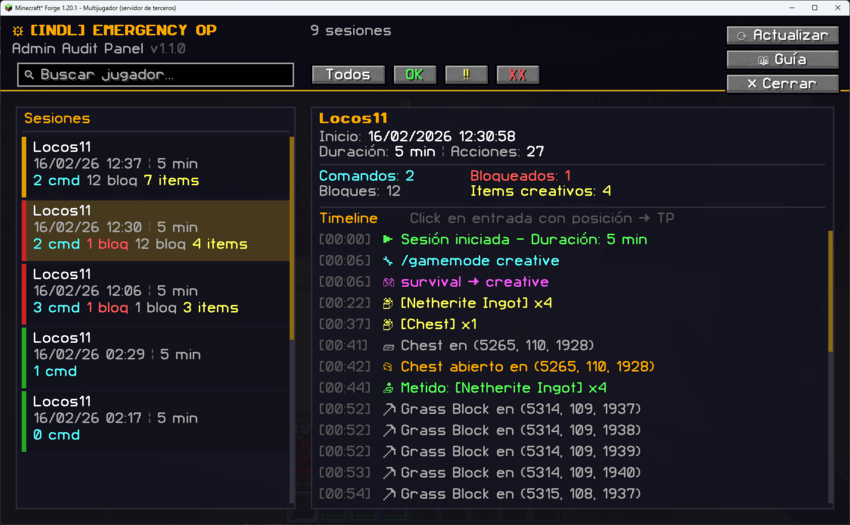
Open the Admin Panel with /eop gui for a visual inspection of all sessions and their timeline.
Features:
- Session list with colored risk badges (✅ Clean, ⚠ Warning, ❌ Danger)
- Full event timeline with icons, timestamps, and details
- Click-to-teleport — click any entry with coordinates to teleport there
- Search and filter — find sessions by player name or risk level
- Interactive guide — built-in icon reference panel
- Refresh button — live data from the server
Risk Classification
| Badge | Condition |
|---|---|
| ✅ Clean | No blocked commands, fewer than 5 creative items, fewer than 50 blocks modified |
| ⚠ Warning | More than 5 creative items or more than 50 blocks modified |
| ❌ Danger | One or more blocked commands attempted |
Command Blacklist
Critical commands are blocked during emergency OP sessions, even with full operator permissions:
/stop, /op, /deop, /ban, /ban-ip, /pardon, /pardon-ip, /emergencyop, /eop, /whitelistAll blocked attempts are logged as COMMAND_BLOCKED events. The blacklist is fully configurable.
Key Features
- ✅ Time-Limited Sessions — Auto-expires after configurable duration (default: 5 min)
- ✅ Daily Rotating Passwords — SHA-256 based Hybrid Cipher, changes every day
- ✅ Full Blackbox Audit — Every action logged with timestamps and positions
- ✅ Command Blacklist — Critical commands blocked even with OP
- ✅ Clean Room Inventory — Anti-duplication: inventory saved, cleared, and restored
- ✅ Admin GUI Panel — Visual session inspector with click-to-teleport
- ✅ Creative Item Tracking — Detects items taken from Creative menu
- ✅ Container Tracking — Logs every item added/removed from chests
- ✅ Block Tracking — Logs every block broken or placed with coordinates
- ✅ Admin Notifications — All OPs receive real-time session alerts
- ✅ Cipher Generator Tool — Standalone HTML page to calculate passwords
- ✅ Fully Configurable — Duration, blacklist, audit granularity, and more
Commands & Permissions
| Command | Alias | Permission | Description |
|---|---|---|---|
/emergencyop login <password> |
/eop login |
Level 0 | Start emergency OP session (validated by cipher) |
/emergencyop logout |
/eop logout |
Level 0 | End your own session early |
/emergencyop help |
/eop help |
OP (2) | Show help menu |
/emergencyop gui |
/eop gui |
OP (2) | Open the Admin Audit Panel |
/emergencyop status |
/eop status |
OP (2) | View active sessions and today's password |
/emergencyop history |
/eop history |
OP (2) | View recent session summaries |
Note:
loginandlogoutare accessible by ANY player (level 0), but are validated by the Hybrid Cipher password. All other commands require OP Level 2.
Configuration
File: config/indl-emergencyop-common.toml
The mod is highly configurable. You control session behavior, password generation, security policies, and audit granularity.
#=== Session Settings ===
[session]
    # Duration of emergency OP session in minutes (1-60, default: 5)
    sessionDurationMinutes = 5

    # Max concurrent sessions (1-5, default: 1)
    maxActiveSessions = 1

#=== Hybrid Cipher Settings ===
[cipher]
    # Secret word for password generation. Share only with trusted admins.
    # Set to 'AUTO_GENERATE' to create a random 10-char string on first boot.
    secretWord = "AUTO_GENERATE"

    # Number of hex characters from the SHA-256 hash (4-16, default: 8)
    hashLength = 8

#=== Security Settings ===
[security]
    # Commands blocked during emergency OP sessions
    commandBlacklist = ["/stop", "/op", "/deop", "/ban", "/ban-ip", "/pardon",
                        "/pardon-ip", "/emergencyop", "/eop", "/whitelist"]

    # Allow switching to Creative mode during session
    allowCreativeMode = true

    # Save and restore inventory on session start/end (Clean Room system)
    restoreInventoryOnEnd = true

#=== Audit / Blackbox Settings ===
[audit]
    # Save session logs to config/indl-emergencyop/sessions/
    logToFile = true

    # Log events to server console in real-time
    logToConsole = true

    # Log block breaks and placements
    logBlockChanges = true

    # Log container interactions (chests, barrels, hoppers)
    logContainerAccess = true

    # Log items taken from Creative menu
    logCreativeItems = true
File Structure
The mod generates the following files in config/indl-emergencyop/:
| File / Directory | Description |
|---|---|
indl-emergencyop-common.toml |
Main configuration file |
sessions/ |
JSON audit logs, one per session |
inventory_snapshots/ |
Saved inventories (Clean Room system) |
Example session filename:
Admin123_2026-02-16_12-30-00.jsonImportant Notes
- The secret word is critical. Anyone who knows it can calculate today's password. Store it securely and share only with trusted admins.
- Changing the secret word invalidates all current passwords. Useful for emergency revocation.
- Session logs are permanent. Even if the mod is removed, the JSON files remain as forensic evidence.
- The Clean Room system prevents ALL duplication vectors. The player starts with an empty inventory and gets their original back when the session ends.
- Blocked commands are logged, not silently dropped. Admins can see exactly what was attempted.
Links
- Cipher Generator: locos11.github.io/INDL_Emergency-OP
- Part of the [INDL] ecosystem — Compatible with all mods.
Screenshots
Gallery
-
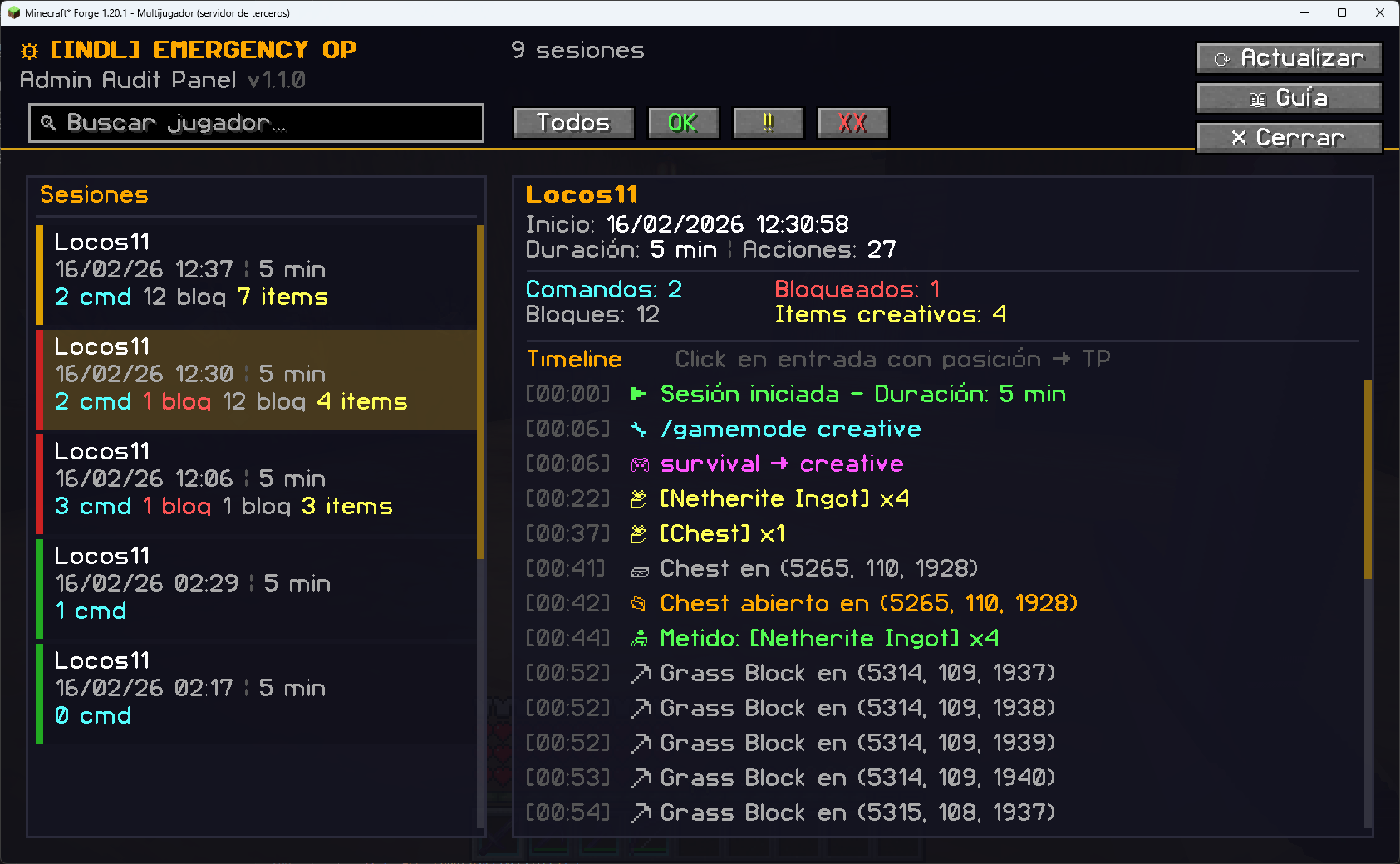 Great GUI for administrators A simple and minimalist GUI, but above all, a complete one.
 -
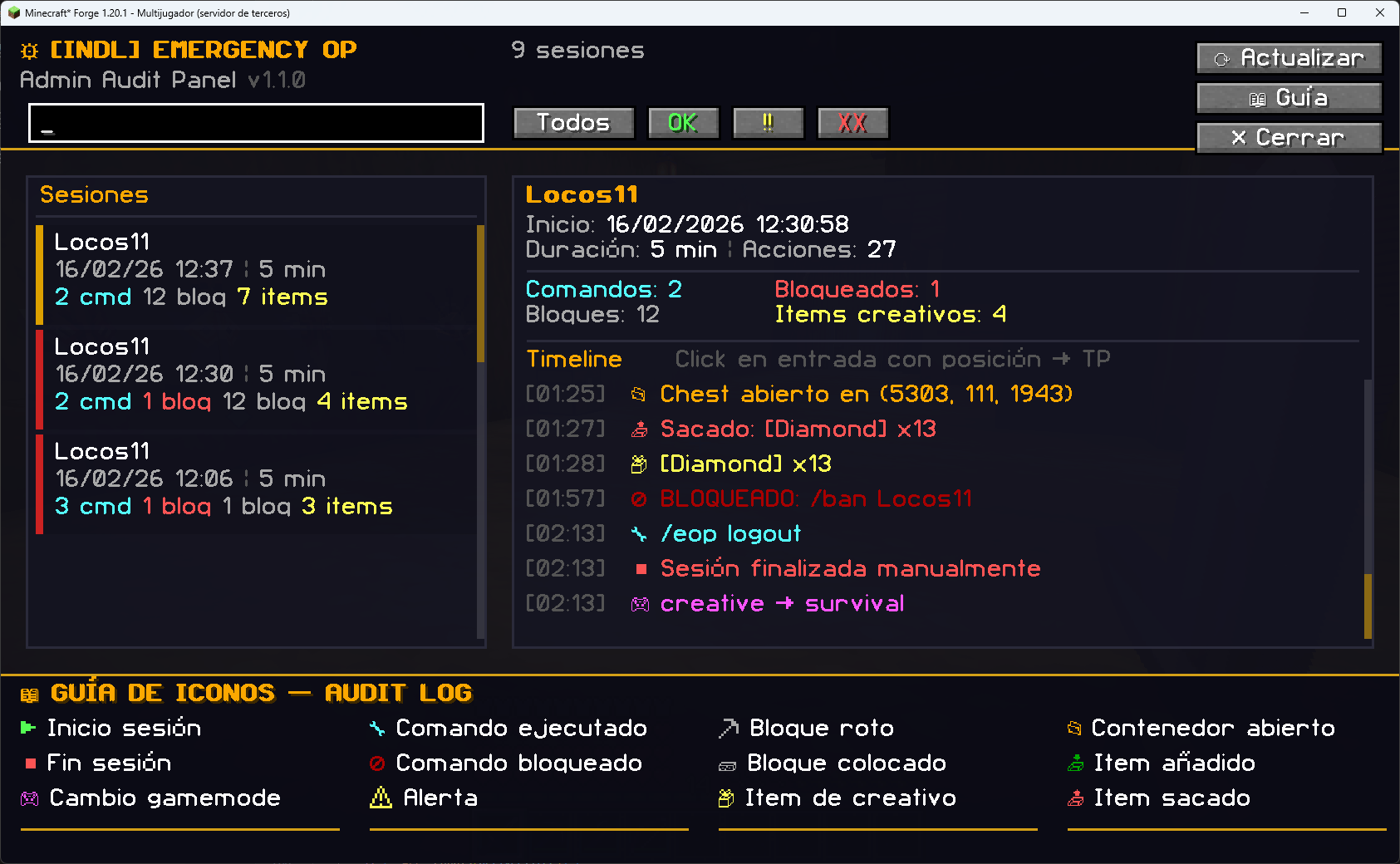 GUI with help GUI with administrator help, very easy to use.
 -
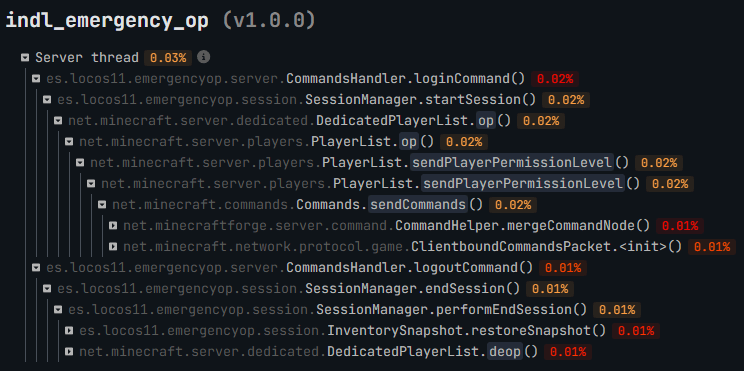 Mod performance Excellent server performance, measured with SPARK
Versions
Files
Relations
Project Relations
More like this
Similar Mods
Suggestions use data such as tags, dependencies, dependents, descriptions, titles, and more to rank how much they overlap with this mod.
On ModDex
Community snapshot
By the numbers
Statistics
 (opens in a new tab)
Get it on
Available Platforms
On ModDex
Community snapshot
By the numbers
Statistics
Resources