Community listing page, reviews may not be monitored by the author.
Infinite Inventory

No reviews yet
A Minecraft mod that adds a magical sack with truly infinite storage capacity.

Community voices
Reviews
No reviews yet. Be the first to review this project!
Get it on
Available Platforms
About
Project Details
For authors
Embed Badge
If you're the author of this project, you can embed a live badge anywhere that supports HTML or Markdown. It updates automatically whenever ratings change.
Use HTML for any page that supports it, or Markdown for README files and Markdown-based descriptions.
Identifiers
Platform IDs
Resources
External Links
About
Description
Infinite Inventory
A Minecraft NeoForge mod (1.21.1+) that adds a magical sack with truly infinite storage capacity.
Overview
The Infinite Sack solves your inventory problems forever. Unlike other storage mods that just give you more slots, this sack offers:
- Unlimited unique item slots - Store as many different items as you want
- Unlimited stack sizes - Uses BigInteger internally, so there's literally no cap
- Built-in crafting - Craft directly from your sack's contents
- Full automation support - Works with hoppers and item pipes
Features
🎒 Infinite Storage
Store any number of unique items with truly unlimited stack sizes. Items persist across game sessions and never get lost.
🔨 Built-in Crafting
- Floating 3x3 crafting grid (draggable)
- Full JEI integration - click the [+] button to transfer recipes
- Pulls ingredients from both your player inventory AND the sack
🔍 Search & Sort
- Item name search - Type to filter items
- Mod filter - Use
@modname(e.g.,@minecraft sword) - Tag filter - Use
#tagname(e.g.,#logs) - Sort modes - Click the sort button to cycle between:
- Count (highest first)
- Mod (alphabetical by mod)
- Name (alphabetical by item name)
⚡ Quick Deposit
- Deposit All button - Deposits entire inventory (excludes hotbar)
- Shift-click - Deposit a single stack
- Shift-right-click - Deposit one item
- Shift-double-click - Deposit all items of that type
- Space+click - Deposit all items at once
🧲 Magnet Mode
Toggle the magnet feature to automatically pick up items within a 6-block range directly into your sack. The magnet status is shown in the item tooltip.
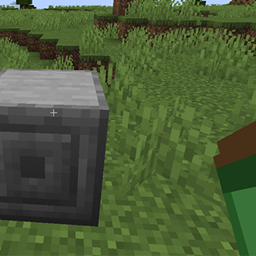
🏛️ Sack Pedestal
Place your sack on a pedestal block for:
- Stationary access without holding the sack
- Automation support - Hoppers and pipes can insert/extract items from any side
- Shared access point for your base
💎 Curios Integration (Optional)
When Curios is installed:
- Wear the sack in your charm slot
- Magnet feature works while worn
- Hotkey still opens the inventory
⌨️ Hotkey
Press X (configurable) to open your sack inventory from anywhere - works whether the sack is in your inventory or equipped in a Curios slot.
Recipes
Infinite Sack
L L L
L C L
L L L
- L = Leather
- C = Chest
Sack Pedestal
S S S
S S
S S S
- S = Stone Bricks
Installation
- Install NeoForge for Minecraft 1.21.1
- Download the mod JAR file
- Place it in your
modsfolder - (Optional) Install JEI for recipe integration
- (Optional) Install Curios for charm slot support
Dependencies
- Required: NeoForge 21.1.77+
- Optional: JEI 19.21.0+ (recipe integration)
- Optional: Curios 9.0.0+ (charm slot support)
Usage Tips
- First time: Craft the sack and right-click to open
- Depositing: Shift-click items from your inventory to deposit them
- Extracting: Click items in the sack to pull them out (shift-click for full stacks)
- Crafting: Drag the crafting window to a convenient position; it remembers its location
- Searching: Combine filters like
@minecraft #logsto find oak/birch/etc logs from vanilla - Automation: Place sack in pedestal, connect hoppers to insert/extract items automatically
License
MIT License
Credits
Created with ❤️ for the Minecraft modding community.
Screenshots
Gallery
Versions
Files
Relations
Project Relations
More like this
Similar Mods
Suggestions use data such as tags, dependencies, dependents, descriptions, titles, and more to rank how much they overlap with this mod.
On ModDex
Community snapshot
By the numbers
Statistics

Get it on
Available Platforms
On ModDex
Community snapshot
By the numbers
Statistics
Resources