Community listing page, reviews here may not be monitored by the author.
InfoHUD+

No reviews yet
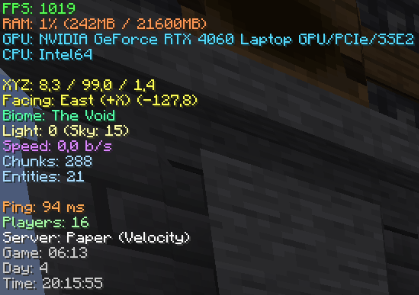
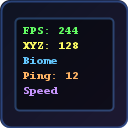
A beautiful F3 replacement — shows FPS, coordinates, GPU, CPU, RAM, biome, speed, ping and more on a clean customizable HUD.
Community voices
Reviews
No reviews yet. Be the first to review this project!
Get it on
Available Platforms
Compatibility
Supported Environments
Runs entirely on the client. Works on vanilla servers.
About
Project Details
For authors
Embed Badge
If you're the author of this project, you can embed a live badge anywhere that supports HTML or Markdown. It updates automatically whenever ratings change.
Use HTML for any page that supports it, or Markdown for README files and Markdown-based descriptions.
Identifiers
Platform IDs
Resources
External Links
About
Description
InfoHUD+
A lightweight, optimized F3 replacement that displays all the information you need on a clean, color-coded HUD.
Why InfoHUD+?
The default F3 screen is ugly and cluttered. InfoHUD+ replaces it with a minimal, beautiful overlay that shows only what you want.
Information Displayed
Performance
- FPS counter
- RAM usage (percentage + MB)
- GPU name
- CPU name
- Java version
World
- XYZ coordinates
- Facing direction + degrees
- Biome name
- Light level (block + sky)
- Movement speed (blocks/sec)
- Loaded chunks
- Entity count
Server
- Ping (ms)
- Player count
- Server brand
Time
- In-game time
- Day counter
- Real-world clock
Features
- Replaces F3 — press F3 to see your clean HUD instead of the vanilla debug screen
- Color-coded lines — each info type has its own color for easy reading
- Every element toggleable — show only what you need
- Dark background — semi-transparent panel for readability
- 4 anchor positions — top-left, top-right, bottom-left, bottom-right
- Optimized — data updates every 500ms, not every frame. Zero FPS impact
- GUI settings — press Right Shift or use Mod Menu
Keybinds
| Key | Action |
|---|---|
| F3 | Show/hide InfoHUD+ (replaces vanilla F3) |
| F6 | Toggle HUD on/off |
| Right Shift | Open settings |
All keybinds are rebindable in Controls settings.
Supported Versions
Fabric: 1.20 — 1.21.11, 26.1
Requirements
- Fabric Loader
- Fabric API
Optional
- Mod Menu (for settings button)
Client-Side Only
No server mod needed. Works on any server.
Screenshots
Gallery
Versions
Files
Relations
Project Relations
More like this
Similar Mods
Suggestions use data such as tags, dependencies, dependents, descriptions, titles, and more to rank how much they overlap with this mod.
On ModDex
Community snapshot
By the numbers
Statistics

Want to reach Minecraft players?
We're looking for a server hosting partner to feature here and other parts of the site. Interested? Send us a message!
Get in touchGet it on
Available Platforms
On ModDex
Community snapshot
By the numbers
Statistics
Resources