Community listing page, reviews here may not be monitored by the author.


Community voices
Reviews
No reviews yet. Be the first to review this project!
Get it on
Available Platforms
Compatibility
Supported Environments
Must be installed on both the client and the server.
About
Project Details
For authors
Embed Badge
If you're the author of this project, you can embed a live badge anywhere that supports HTML or Markdown. It updates automatically whenever ratings change.
Use HTML for any page that supports it, or Markdown for README files and Markdown-based descriptions.
Identifiers
Platform IDs
About
Description
InfoPanelMod
A feature-rich HUD mod for NeoForge 1.21.1. Inspired by MiniHUD by masady.
🌟 Features
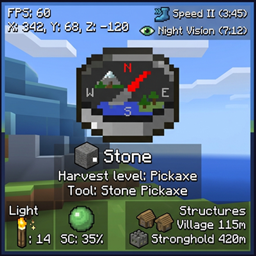
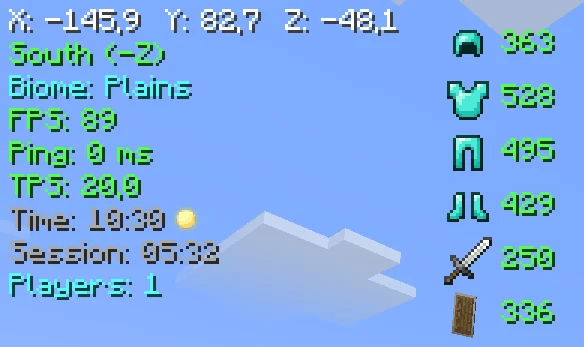
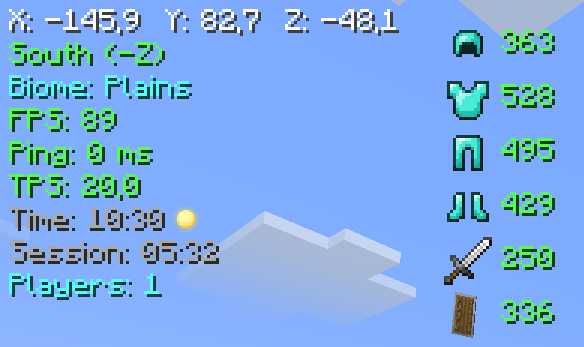
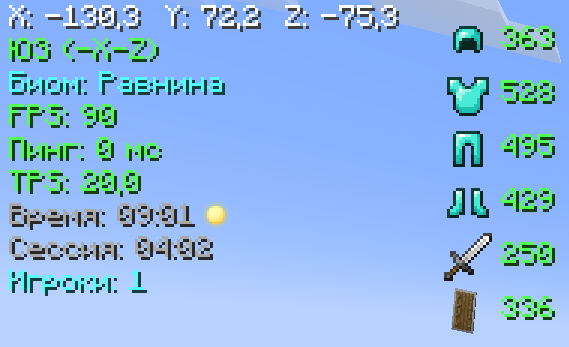
📊 Main Panel
- Coordinates (XYZ)
- Direction (compass)
- Biome
- FPS
- Ping (ms)
- TPS
- In-game time (day/night)
- Session time
- Online players count
🛡️ Item Durability
- Armor (helmet, chestplate, leggings, boots)
- Main hand weapon
- Offhand items
🧭 Compass Bar
An animated bar with 8 directions (N, NE, E, SE, S, SW, W, NW)
🧪 Effect Timers
Shows remaining duration of potion effects on their icons
🔍 WAILA (What Am I Looking At)
- Block / entity name
- Entity health (❤)
💡 Light Overlay (F7)
Highlights blocks where light level ≤ 7 (mobs can spawn)
🟢 Slime Chunks (F9)
Displays chunk boundaries where slimes can spawn
🏗️ Structure Overlay
Shows structure boundaries for:
- Villages
- Pillager Outposts
- Ocean Monuments
- Strongholds
- Desert Temples
- Nether Fortresses
- Bastions
🔧 Compatibility
- Terralith — biome name translations (Russian)
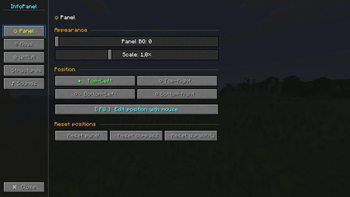
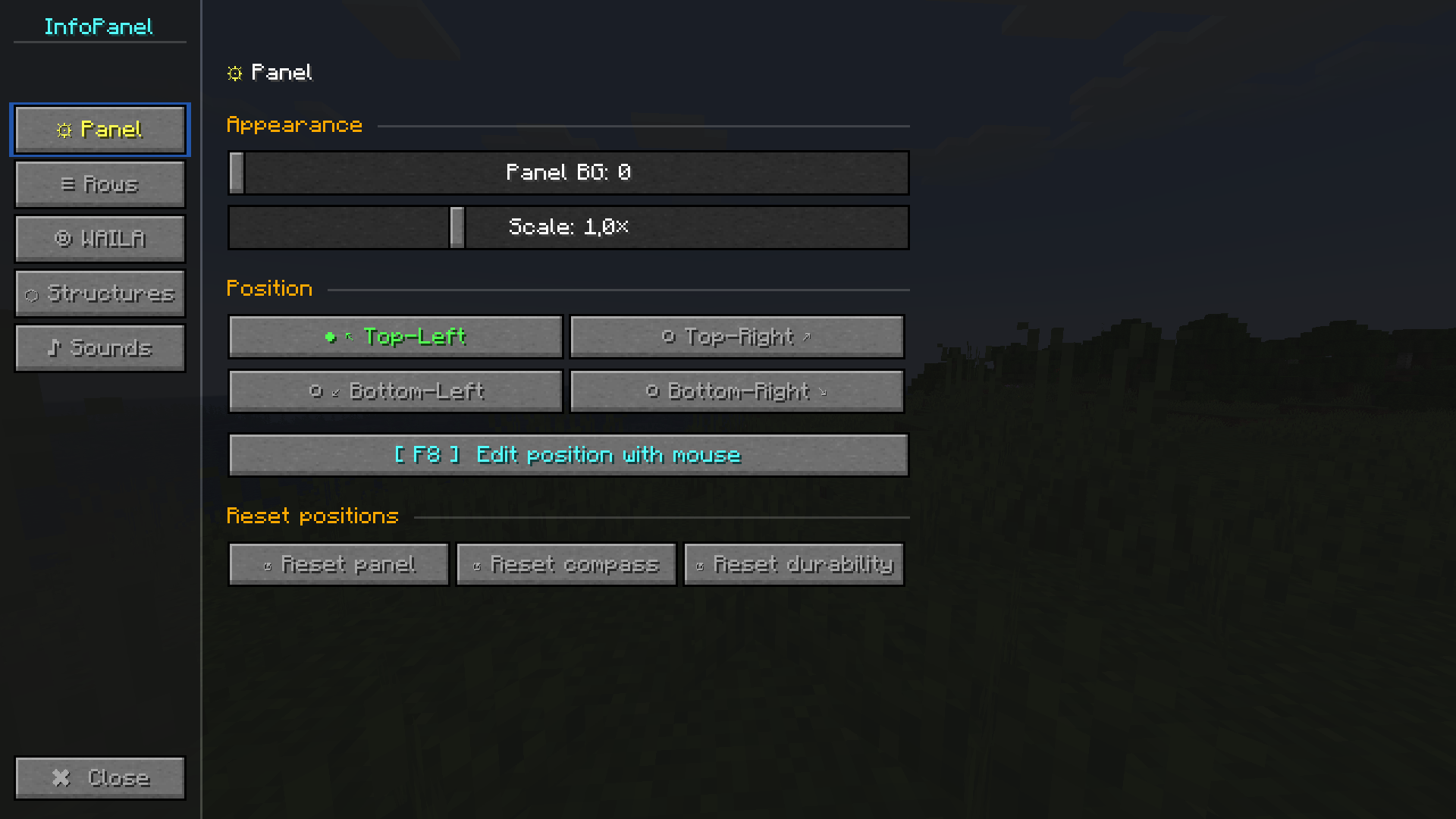
⚙️ Configuration (press Y)
Panel Tab
- Background opacity
- Scale (0.5× – 2.0×)
- Position (4 corners)
- Drag & drop layout editor (F8)
- Reset position
Lines Tab
- Toggle any line on/off
- Custom colors for each line (13 colors)
WAILA Tab
- Background opacity
- Position (4 options)
- Block name color
Structures Tab
- Master toggle for all structures
- Individual toggles for each structure
⌨️ Key Bindings
- H — toggle HUD
- Y — open settings
- F7 — light overlay
- F8 — layout editor (drag & drop)
- F9 — slime chunks
🖱️ Layout Editor (F8)
- Drag main panel, compass bar, and durability bar
- Pulsing borders (blue — panel, yellow — compass, green — durability)
- Shows current coordinates
- Labels below each element
- Esc — save and exit
🎨 Color Palette
White, light gray, gray, red, orange, yellow, green, dark green, cyan, blue, dark blue, pink, purple.
📜 License
MIT License — free to use in any modpack.
InfoPanelMod
A feature-rich HUD mod for NeoForge 1.21.1. Inspired by MiniHUD by masady.
🌟 Features
📊 Main Panel
- Coordinates (XYZ)
- Direction (compass)
- Biome
- FPS
- Ping (ms)
- TPS
- In-game time (day/night)
- Session time
- Online players count
🛡️ Item Durability
- Armor (helmet, chestplate, leggings, boots)
- Main hand weapon
- Offhand items
🧭 Compass Bar
An animated bar with 8 directions (N, NE, E, SE, S, SW, W, NW)
🧪 Effect Timers
Shows remaining duration of potion effects on their icons
🔍 WAILA (What Am I Looking At)
- Block / entity name
- Entity health (❤)
💡 Light Overlay (F7)
Highlights blocks where light level ≤ 7 (mobs can spawn)
🟢 Slime Chunks (F9)
Displays chunk boundaries where slimes can spawn
🏗️ Structure Overlay
Shows structure boundaries for:
- Villages
- Pillager Outposts
- Ocean Monuments
- Strongholds
- Desert Temples
- Nether Fortresses
- Bastions
🔧 Compatibility
- Terralith — biome name translations (Russian)
⚙️ Configuration (press Y)
Panel Tab
- Background opacity
- Scale (0.5× – 2.0×)
- Position (4 corners)
- Drag & drop layout editor (F8)
- Reset position
Lines Tab
- Toggle any line on/off
- Custom colors for each line (13 colors)
WAILA Tab
- Background opacity
- Position (4 options)
- Block name color
Structures Tab
- Master toggle for all structures
- Individual toggles for each structure
⌨️ Key Bindings
- H — toggle HUD
- Y — open settings
- F7 — light overlay
- F8 — layout editor (drag & drop)
- F9 — slime chunks
🖱️ Layout Editor (F8)
- Drag main panel, compass bar, and durability bar
- Pulsing borders (blue — panel, yellow — compass, green — durability)
- Shows current coordinates
- Labels below each element
- Esc — save and exit
🎨 Color Palette
White, light gray, gray, red, orange, yellow, green, dark green, cyan, blue, dark blue, pink, purple.
📜 License
MIT License — free to use in any modpack.
Screenshots
Gallery
-
 1.png 1.png
 -
 2.png 2.png
Versions
Files
Relations
Project Relations
More like this
Similar Mods
Suggestions use data such as tags, dependencies, dependents, descriptions, titles, and more to rank how much they overlap with this mod.
On ModDex
Community snapshot
By the numbers
Statistics
Want to reach Minecraft players?
We're looking for a server hosting partner to feature here and other parts of the site. Interested? Send us a message!
Get in touchGet it on
Available Platforms
On ModDex
Community snapshot
By the numbers