Community listing page, reviews here may not be monitored by the author.
Initial Dim Choice

No reviews yet
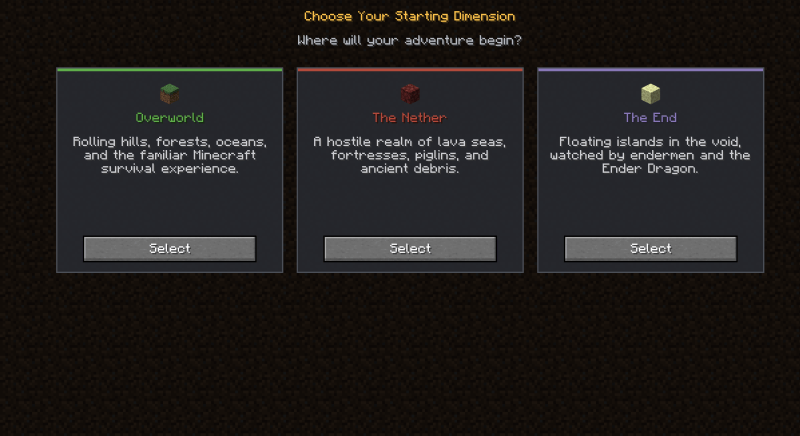
Choose your initial dimension before joining the world!
Community voices
Reviews
No reviews yet. Be the first to review this project!
Get it on
Available Platforms
About
Project Details
For authors
Embed Badge
If you're the author of this project, you can embed a live badge anywhere that supports HTML or Markdown. It updates automatically whenever ratings change.
Use HTML for any page that supports it, or Markdown for README files and Markdown-based descriptions.
Identifiers
Platform IDs
Resources
External Links
About
Description
Choose your starting dimension before joining the world!
Initial Dim Choice is a data-driven mod for Minecraft 1.20.1 Forge that lets players pick their starting dimension when first joining a world. The mod automatically finds a safe landing spot, sets the respawn point in the chosen dimension, and teleports the player there.
For modpack developers who only want to change the default spawn dimension, a silent mode is also available — no selection screen is shown, and players are sent directly to a preset dimension.
Everything is highly customizable and data-driven, giving developers full freedom to tailor the experience.
✨ Features
- First-Join Selection Screen — Players choose their starting dimension from a clean, intuitive UI when joining a world for the first time.
- Safe Spawn Search — Multiple built-in spawn-finding algorithms (heightmap, Y-range, fixed position, end islands) ensure players never spawn in the void or inside walls.
- Forced Spawn Platform — Optionally generates a 3×3 cobblestone platform and clears the space above, guaranteeing a safe landing in even the harshest dimensions.
- Graceful Fallback — If a configured dimension isn't loaded, the option is silently hidden without crashing or breaking datapack loading.
- Fully Data-Driven — Add or modify dimension choices easily via datapacks.
⚙️ Configuration
All behavior is configured through simple JSON files:
- A global config toggles the selection screen and sets the default dimension choice.
- Dimension choice files define each option — target dimension, translation keys, icon, UI color, display order, and spawn search settings.
- Four spawn search types are supported: fixed, y_range, heightmap, and end_islands, each with optional parameters such as y_anchor and enable_spawn_platform.
See the README on GitHub for full configuration documentation.
Screenshots
Gallery
Versions
Files
Relations
Project Relations
More like this
Similar Mods
Suggestions use data such as tags, dependencies, dependents, descriptions, titles, and more to rank how much they overlap with this mod.
On ModDex
Community snapshot
By the numbers
Statistics
Want to reach Minecraft players?
We're looking for a server hosting partner to feature here and other parts of the site. Interested? Send us a message!
Get in touchGet it on
Available Platforms
On ModDex
Community snapshot
By the numbers
Statistics
Resources