Community listing page, reviews here may not be monitored by the author.
InstantWorldMirror


No reviews yet
Create an instant mirror copy of the current world to safely test, explore, and build without affecting your original save.
Community voices
Reviews
No reviews yet. Be the first to review this project!
Get it on
Available Platforms
Compatibility
Supported Environments
Must be installed on both the client and the server.
About
Project Details
For authors
Embed Badge
If you're the author of this project, you can embed a live badge anywhere that supports HTML or Markdown. It updates automatically whenever ratings change.
Use HTML for any page that supports it, or Markdown for README files and Markdown-based descriptions.
Identifiers
Platform IDs
Resources
External Links
About
Description
InstantWorldMirror - Instant World Mirror



English | 中文
Instant Sandbox - Explore Without Consequences
InstantWorldMirror provides Minecraft players with an instant sandbox testing ground. Using the Dimension Mirror, Heaven Mirror, First Dream Mirror, or Stranded Mirror, you can create a mirror copy of the surrounding area or initial seed terrain at any location, freely explore, test, and experiment—or even replicate structures across saves and game versions—without worrying about any impact on the original world.
Bilibili:https://www.bilibili.com/video/BV1DQtJ6jEkG/?vd_source=fc6f13c2949d8c062913a6f8f219ebe9
Core Use Cases
- Mod Testing: Test new mod functionality and compatibility in the mirror world without risking your main save.
- Redstone Debugging: Copy your redstone contraptions for repeated testing and debugging without teardown costs.
- Adventure Scouting: Before entering a dangerous area (e.g., Ancient City, Twilight Forest), use a mirror to replicate the world, scout ahead safely, and then return to the main world to avoid deadly combat.
- Building Design: Using the Heavenly Mirror, preview the architectural scheme in the mirror in creative mode. It can be directly replicated in the main world with the help of the WorldEdit Mod.
- Resource & Boss Regeneration: Use the First Dream Mirror to solve the dilemma of depleted structures or unspawned bosses in multiplayer servers, allowing new players to re-challenge bosses and loot fresh resources.
- Server Events / PVP: Provide safe, zero-cleanup activity spaces or temporal PVP arenas for players, with automatic cleanup after events.
Features
The Four Mystic Mirrors
Dimension Mirror (映界之镜)
- Right-click any solid block to create an entry portal.
- Inside the Mirror World, long-press the right button with the mirror to instantly teleport back to the entrance, or right-click any solid block to create a return portal anywhere.
Heaven Mirror (天堂之镜)
- Shifts your game mode to Creative Mode upon entering for free testing and architectural prototyping.
- Upon entry, your inventory is temporarily cleared (only retaining the Heaven Mirror). You cannot create return portals anywhere else—you must return via the entrance or by long-pressing right-click. Returning to the main world restores your original inventory and status instantly (like waking from a dream).
First Dream Mirror (初梦之镜)
- Instantly generates a pristine, unedited parallel world based on your current world's seed.
- Creation rules and general mechanics are the same as above. Combined with the exclusive Revival enchantment, it provides a perfect solution for regenerating looted structures and bosses in multiplayer servers.
Stranded Mirror (搁浅之镜)
- Replicates or reads world models from other save files and game versions, breaking the barriers between isolated world lines.
- Takes the mirror as the origin to copy a 10-chunk radius of world terrain and building structures, saving and naming them in the local cache. Players can then directly use the Stranded Mirror to read and load these saved world slices inside any other save file (fully supports loading lower-version saves into higher-version saves, such as reading 1.20.1 saves in 1.21.1).
Mirror World Mechanics
- World Replication: Copies terrain within a configurable radius centered on the portal (default 10 chunks, configurable 1-32 chunks). Complete copying of blocks, block entities, biome data, and structure information.
- Dungeon & Exploration Fixes: Fully resolved bugs where loot chests were empty, mob spawners and trial spawners failed to spawn mobs, and chunks appeared fractured in certain scenarios, delivering a seamless exploration experience.
- Entity Isolation: Optional entity copying. Natural mob spawning is disabled by default to optimize performance, but can be enabled via commands or config.
- Time & Weather Sync: Automatic synchronization of source world weather and time.
- Death & Annihilation: Dying in the mirror world triggers an immediate respawn back in the main world. When all players leave, the mirror world automatically enters an annihilation and cleanup process.
Multiplayer Support
- Supports up to 8 parallel mirror dimensions, allowing multiple players to use their own mirror worlds simultaneously.
- Host & Guest Rules: Multiple players can enter the same mirror session through the same portal. However, visitors can only enter after the "Mirror Master" (the player who placed the mirror) enters first. When the Host returns to the main world, all visiting players are forcefully teleported back together.
- Comprehensive permission system for server admins to control player access and item transfer rules.
Enchantment System
All mirrors can be enchanted via Enchanting Tables or Enchantment Books:
- Efficiency (通用附魔 - 效率): Reduces the mirror's usage cooldown by 20% per level (Default max level reduces CD to 30s). Note: Mirrors have no cooldown in Creative Mode.
- Permanence (通用附魔 - 永久): Press
Shift + Right-Clickinside a mirror world to permanently save or delete it. In the main world,Shift + Right-Clickwith the mirror allows you to teleport back to any saved permanent world, rename them, or destroy them completely. - Superflat (天堂之镜专属 - 超平坦): Exclusive to the Heaven Mirror. When used alone, it replaces copied terrain with a clean creative building platform (bedrock + dirt + grass) at entrance height. When combined with Permanence, the temporary mirror will replicate the source world terrain as normal, but will unlock an extra Superflat option in the permanent world list for saving and teleports.
- Revival (初梦之镜专属 - 复苏): Exclusive to the First Dream Mirror. Unlocks the ecological seal of the parallel universe, enabling natural mob spawning and resource refreshing, turning it into a perfect parallel farming dimension.
In-Game UI Configuration System
The mod introduces an in-game UI configuration system. Players and server administrators no longer need to edit config files manually—simply navigate to Options -> Instant World Mirror Settings(选项-世界之镜设置) in the game menu to customize rules easily.
Recommended Default Configuration:
| Type | Permission | Default generated creature | Can bring back supplies | Copy block size |
|---|---|---|---|---|
Dimension Mirror |
All players | off | off | 10 |
Heaven Mirror |
All players | off | off | 10 |
First Dream Mirror |
All players | on | on | 10 |
| Stranded Mirror | All players | off | off | 10 |
Performance Optimization
- Heightmap Scanning: Heightmap scanning technology skips air columns, significantly reducing unnecessary copying.
- Section-Level Operations: Processes terrain via section-level operations instead of block-by-block processing.
- Sequential Queue: Sequential queue processing to avoid server overload.
- Smart Cleanup: Smart cleanup mechanism only processes modified chunks when players leave.
Future Outlook (What's Coming Next)
In upcoming versions, a new "Core Gadget" will be introduced, which can be combined with the three mirrors to craft advanced derivative tools:
- Dimension Mirror Derivative: Used to mark a specific player. Right-click to teleport to them anytime, or even breach walls to enter their saved "Permanent Worlds".
- Heaven Mirror Derivative: Used to mark a specific chest. Allows you to remotely transfer items into that chest wirelessly from any dimension or location.
- First Dream Mirror Derivative: Projects primal power back into reality. When used in the Overworld, it forcefully reverts a small surrounding area back to its original seed topography (perfect for one-click fixing Creeper craters or regenerating mined-out veins).
Installation
- Install NeoForge 1.21+
- Download this mod JAR file
- Place in
.minecraft/modsfolder - Launch the game
Crafting Recipe
Dimension Mirror
[Glass]    [Obsidian] [Glass]
[Obsidian] [Ender Pearl] [Obsidian]
[Glass]    [Obsidian] [Glass]

Heaven Mirror
[Glowstone]    [Redstone Dust] [Glowstone]
[Redstone Dust] [Ender Pearl] [Redstone Dust]
[Glowstone]    [Redstone Dust] [Glowstone]

First Dream Mirror
[Oak Spaling]    [Glass] [Oak Spaling]
[#minecraft:oak_logs] [Ender Pearl] [#minecraft:oak_logs]
[Oak Spaling]    [Glass] [Oak Spaling]

Stranded Mirror
[Glass] [Black Concrete] [Glass]
[Coal] [Ender Pearl] [Coal]
[Glass] [Black Concrete] [Glass]
Commands
All commands start with /iwm:
| Command | Description | Permission |
|---|---|---|
/iwm return |
Force return to source world | All players |
/iwm mob on/off/status |
Control mirror world mob spawning | OP (Level 2) |
/iwm allow <player> |
Allow player to use mirror feature | OP (Level 2) |
/iwm deny <player> |
Deny player from using mirror feature | OP (Level 2) |
/iwm itemtransfer <player> <true/false> |
Control player item transfer permission | OP (Level 2) |
/iwm status |
View dimension pool status and player info | OP (Level 2) |
/iwm forceclear <dimension> |
Force clear specified mirror dimension | OP (Level 3) |
/iwm purge |
Completely delete all mirror world saves (requires restart) | OP (Level 3) |
Configuration
Config file located at config/instantworldmirror-common.toml
Dimension Pool Settings
| Config | Default | Description |
|---|---|---|
| dimensionPoolSize | 4 | Mirror dimension pool size (1-8), determines max concurrent mirror sessions |
World Copy Settings
| Config | Default | Description |
|---|---|---|
| copyChunkRadius | 10 | Copy radius (chunks), total chunks = (radius*2+1)^2 |
| copyChunksPerTick | 2 | Chunks copied per tick, higher = faster but may cause lag |
| cleanupChunksPerTick | 4 | Chunks cleaned per tick |
| edgeCleanupRadius | 3 | Extra radius for BFS edge cleanup scan |
Portal Settings
| Config | Default | Description |
|---|---|---|
| entryPortalLifetime | 300 | Entry portal duration (seconds), -1 for permanent |
| returnPortalLifetime | -1 | Return portal duration (seconds), -1 for permanent |
| maxPortalLoadingTime | 600 | Maximum portal loading wait time (seconds) |
Item and Mob Settings
| Config | Default | Description |
|---|---|---|
| allowItemTransfer | false | Whether to allow players to bring items back by default |
| mirrorCooldown | 300 | Dimension Mirror cooldown (seconds), reduced by Efficiency |
| copyEntities | false | Whether to copy mob entities |
| copyDecorationEntities | true | Whether to copy decoration entities (paintings, item frames, etc.) |
| enableMobSpawning | false | Whether to allow natural mob spawning in mirror world |
Environment Settings
| Config | Default | Description |
|---|---|---|
| copyBiomes | true | Whether to copy biome data |
| copyStructures | true | Whether to copy structure data |
| copyHeightmaps | true | Whether to copy heightmap data |
Server Limits
| Config | Default | Description |
|---|---|---|
| maxMirrorWorldsPerPlayer | 1 | Maximum concurrent mirror sessions per player |
| staleSessionCleanupInterval | 300 | Stale session cleanup check interval (seconds) |
Client Settings
Client config located at config/instantworldmirror-client.toml
| Config | Default | Description |
|---|---|---|
| showCooldownHud | false | Show cooldown timer HUD in top-left corner |
Important Notes
- Automatic Cleanup: The mirror world automatically triggers an annihilation and cleanup process the moment all players leave, ready for its next use.
- Item Retention: By default, items obtained in the Dimension Mirror and Heaven Mirror are NOT kept when returning. However, items obtained in the First Dream Mirror can be brought back entirely.
- Stat & Buff Transfer: Character buffs, potion effects, and hunger levels gained from fighting mobs inside the mirrors WILL carry back to the main world.
- No Nested Dimensions: You cannot build Nether or End portals inside the mirror world (strictly no nested space dimension looping!).
- Admin Controls: Server admins have full control over player access permissions, dimension pools, and item transfer filters via commands and configuration.
Downloads
- CurseForge - Mod download
- GitHub - Source code
License
Apache License 2.0
🪞 InstantWorldMirror (IWM)
Have you ever wanted to test a high-risk Redstone contraption without destroying your survival world? Or wished you could explore a dangerous Ancient City risk-free? InstantWorldMirror allows you to create temporary or permanently saved mirror dimensions right at your current location, offering a perfect, non-destructive sandbox environment!
✨ Key Features & The Four Mirrors
1. Dimension Mirror (映界之镜)
"Reflects the world at this very moment."
- What it does: Creates an instant, mirrored duplicate of your surroundings.
- How to use: Long-click Right-Click inside the mirror to instantly teleport back to the starting entrance. Right-clicking any solid block inside creates an exit portal back to the Overworld.
- Gameplay: Perfect for scouting high-difficulty structures (like Ancient Cities or Twilight Forest dungeons). While items found inside cannot be brought back, all XP, mob drops, status buffs, and hunger values are fully retained in the main world! It also provides a zero-risk sandbox for testing dangerous TNT or Redstone tech.
2. Heaven Mirror (天堂之镜)
"Above the heavenly light, anything can be tested..."
- What it does: Instantly switches your game mode to Creative Mode upon entering, designed specifically for free building and designing.
- How to use: Your inventory is temporarily cleared upon entry (holding only the mirror). You can only exit by long-clicking Right-Click or returning to the entrance. Once you wake up from this "dream," your original inventory and status are completely restored.
- Gameplay: Highly recommended for survival players to plan mega-builds on the spot. Works flawlessly with WorldEdit—design your blueprint in the dream, copy it, and bring it back to reality!
3. First Dream Mirror (初梦之镜)
"Where the dream begins..."
- What it does: Instantly generates a pristine parallel world based on your current world seed, completely untouched by human hands.
- How to use: Creation rules and general mechanics are the same as above. Combined with the exclusive Revival enchantment, it provides a perfect solution for regenerating looted structures and bosses in multiplayer servers.
- Gameplay: Rediscover how your long-term survival world looked at day one. It also completely solves the issue in multiplayer servers where structures are stripped clean and bosses don't respawn, allowing new players to loot fresh resources and unlock achievements.
4. Stranded Mirror (搁浅之镜)
"A world from the other side, stranded right here..."
- What it does: Replicates or reads world models from other save files and game versions, breaking the barriers between isolated world lines.
- How to use: Takes the mirror as the origin to copy a 10-chunk radius of world terrain and building structures, saving and naming them in local cache. Players can use it in any save file to read and load these saved world slices (fully supports reading lower-version saves in higher versions, e.g., opening 1.20.1 saves in 1.21.1).
- Gameplay: Seamlessly transfer large-scale builds, complex Redstone contraptions, or dramatic canyons into your new main survival world across saves and game versions—no complex external tools required!
🔮 Custom Enchantment System
Mirrors can be enchanted via Enchanting Tables or Enchantment Books (Permanence via trading/enchanting, Revival as rare loot):
- Efficiency (Universal): Reduces the mirror's cooldown by 20% per level (down to 30 seconds at max level). Cooldowns are bypassed in Creative Mode.
- Permanence (Universal): Shift + Right-Click inside a mirror to permanently save or delete that dimension. In the main world, Shift + Right-Click allows you to rename, manage, or teleport back to any of your saved permanent worlds.
- Revival (First Dream Mirror Exclusive): Unlocks natural mob spawning and block updates in the pristine seed world, turning it into a perfect resource and hunting dimension.
- Superflat (Heaven Mirror Exclusive): Replaces copied terrain with a clean creative building platform (bedrock + dirt + grass) at entrance height, perfect for prototyping builds from scratch.
⚙️ Core Mechanisms & Rules
- Generation: Right-click any solid block to spawn an entrance portal. The spinning mirror indicates it's loading. It duplicates a configurable radius (default: 10 chunks, adjustable from 1-32 via config) and syncs the exact weather and time of the main world.
- Performance Optimization: To ensure high performance, natural mob spawning and entity copying are disabled by default inside mirrors (can be toggled via commands/configs).
- Death & Annihilation: Dying in a mirror world teleports you safely back to your main world spawn point. Once all players leave a temporary mirror, the dimension automatically triggers a cleanup process.
- Multiplayer Rules: Visitors can only enter after the "Owner of the Mirror" goes in. When the owner leaves, all visitors are safely pulled back to the main world together.
⚠️ Limitations & Emergency Fail-Safe
- Nether and End Portals cannot be constructed inside mirror dimensions to prevent space nesting loops.
- Cross-dimension travel is supported—you can use mirrors while in the Nether, the End, or modded dimensions.
- Emergency Return: If you ever get stuck, you can use the fail-safe command
/iwm returnat any time to safely force-return to the main world.
🛠️ Configurations & Source
For the full list of commands, configuration documentations, and future roadmaps (including upcoming utility gadgets, derivative tools, and dimension UI differentiation), please visit our GitHub repository: 👉 InstantWorldMirror Documentation & GitHub
Screenshots
Gallery
-
 logo.png logo.png
-
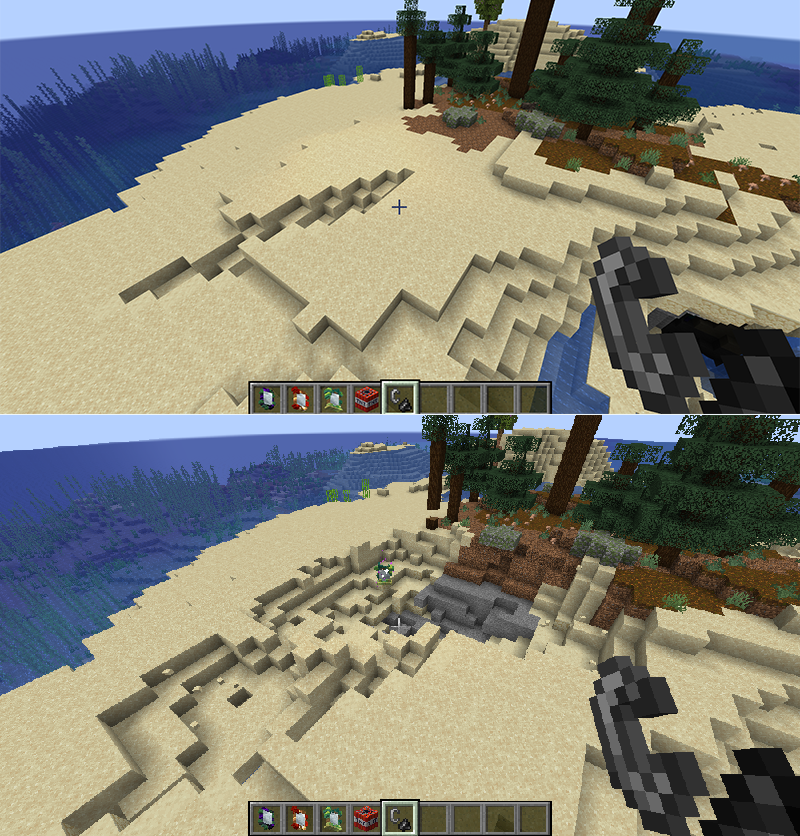 Mirror world of independent dimensions Any destruction done in the mirror world will not affect the main world
 -
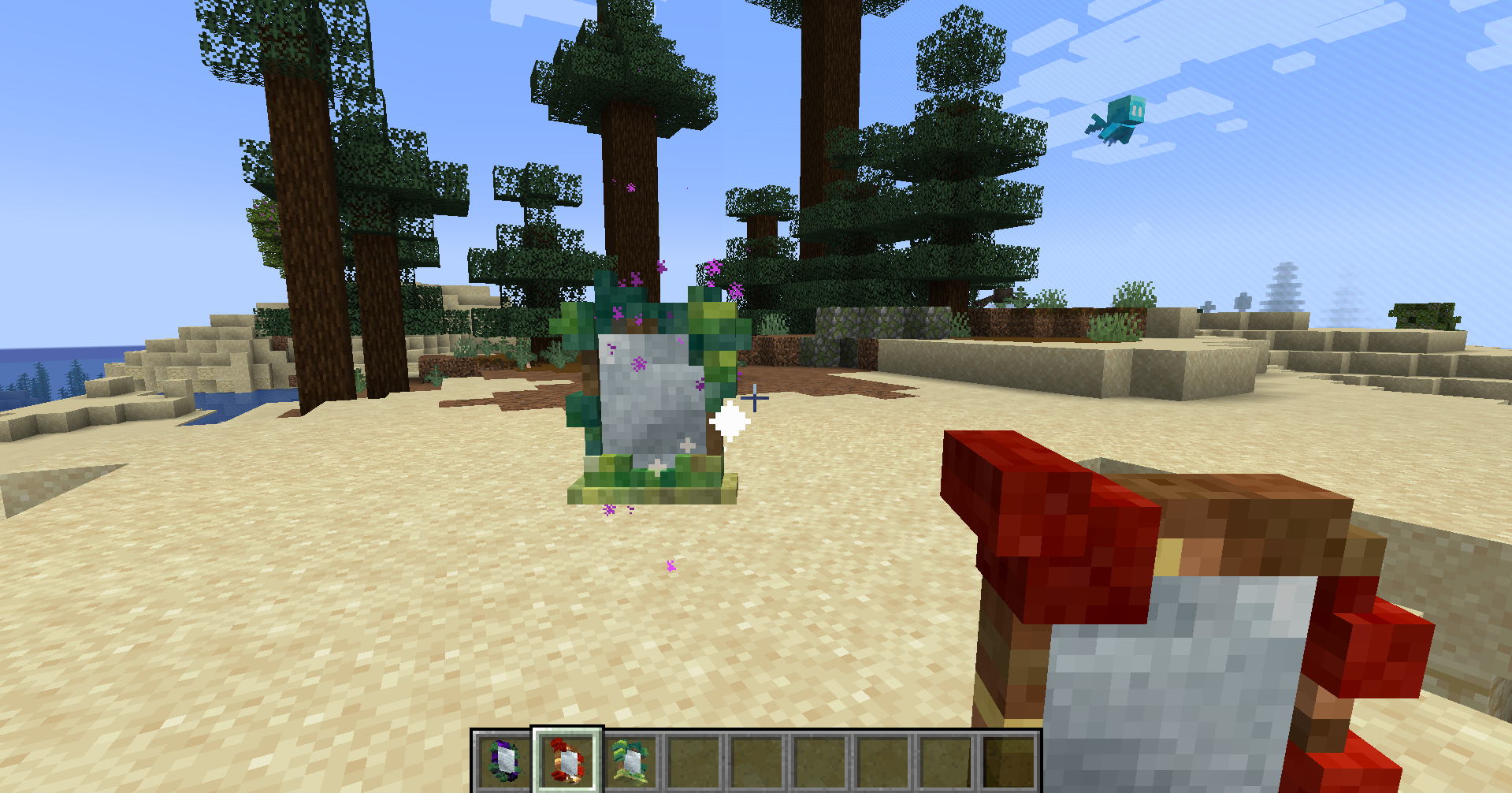 Using a mirror to replicate the world When the mirror stops spinning, it indicates that the world has been fully replicated
 -
 Cover
Cover
Versions
Files
Relations
Project Relations
More like this
Similar Mods
Suggestions use data such as tags, dependencies, dependents, descriptions, titles, and more to rank how much they overlap with this mod.
On ModDex
Community snapshot
By the numbers
Statistics
Want to reach Minecraft players?
We're looking for a server hosting partner to feature here and other parts of the site. Interested? Send us a message!
Get in touchGet it on
Available Platforms
On ModDex
Community snapshot
By the numbers
Statistics
Resources