
Community listing page, reviews may not be monitored by the author.
Inventory Armor Trims

No reviews yet
Display full trim decoration in your inventory

Community voices
Reviews
No reviews yet. Be the first to review this project!
Get it on
Available Platforms
About
Project Details
For authors
Embed Badge
If you're the author of this project, you can embed a live badge anywhere that supports HTML or Markdown. It updates automatically whenever ratings change.
Use HTML for any page that supports it, or Markdown for README files and Markdown-based descriptions.
Identifiers
Platform IDs
Resources
External Links
About
Description
Inventory Armor Trims
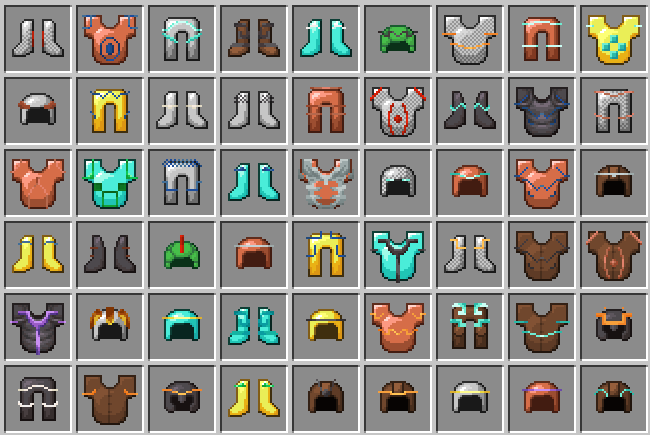
Inventory Armor Trims makes armor trim items in your inventory look as detailed as they do everywhere else.
In vanilla Minecraft, trimmed armor item icons are mostly separated by armor material and trim material. That means different trim patterns can look the same in your inventory, even though they are visually distinct on the armor model. This resource pack fixes that by giving every armor trim pattern its own inventory overlay.
Features
- Adds distinct inventory item visuals for every vanilla armor trim pattern.
- Supports all armor pieces covered by the pack, including leather, chainmail, iron, golden, diamond, netherite, copper, and turtle helmet variants.
- Supports vanilla trim materials, including resin.
- Keeps the vanilla item style and palette system.
Why This Exists
Armor trims are already fully visible on worn armor and in other rendered contexts, but inventory item icons lose part of that identity. This pack brings the missing pattern detail back to the item itself, so a Coast trim, a Wayfinder trim, and a Silence trim no longer collapse into the same generic trimmed armor icon.
Compatibility
This pack targets modern Minecraft versions using item model definitions and item components. Check the listed supported game versions on the version page before downloading.
It should work with other packs that do not replace the same armor item definitions or trim item textures. Packs that heavily modify armor item icons may conflict.
Installation
- Download the correct version of the pack.
- Open Minecraft and go to Options → Resource Packs.
- Select Open Pack Folder and place the downloaded
.zipfile inside. - Return to Minecraft and move Inventory-Armor-Trims into the selected packs list.
Credits
Support the creators
Enjoying the pack? You can help support its creators:
- EclairDeFeu360: Buy Me a Coffee
- Goldawn: Join on YouTube or subscribe on Twitch
Screenshots
Gallery
-
A bunch of armor with full trim decoration in an inventory.
Versions
Files
Relations
Project Relations
More like this
Similar Mods
Suggestions use data such as tags, dependencies, dependents, descriptions, titles, and more to rank how much they overlap with this mod.
On ModDex
Community snapshot
By the numbers
Statistics


Get it on
Available Platforms
On ModDex
Community snapshot
By the numbers
Statistics
Resources