Community listing page, reviews here may not be monitored by the author.
Inventory Sorter Buttons

No reviews yet
a lightweight Forge mod that adds one-click sort buttons to your inventory and container screens, instantly stacking and organizing their contents, available for every Minecraft version from 1.7.10 through 26.2.

Community voices
Reviews
No reviews yet. Be the first to review this project!
Get it on
Available Platforms
About
Project Details
For authors
Embed Badge
If you're the author of this project, you can embed a live badge anywhere that supports HTML or Markdown. It updates automatically whenever ratings change.
Use HTML for any page that supports it, or Markdown for README files and Markdown-based descriptions.
Identifiers
Platform IDs
Resources
External Links
About
Description
Inventory Sorter Buttons - Inventory Tweaks, Revived
The classic chest sorting buttons are back on every GUI, for every mod.
Inventory Sorter Buttons is a faithful revival of Inventory Tweaks (the Tekkit Classic era, 1.41b) for modern Forge 1.19.2. The same 10×10 buttons with the same pixel-drawn glyphs, the same settings screens, the same rules and item tree files, rebuilt from the ground up with server-authoritative sorting that works on any mod's containers.
The Buttons
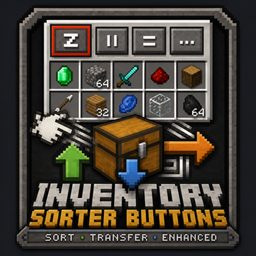
Four little buttons on every chest-like GUI, exactly where you remember them:
- z — sort (merge stacks, order by category)
- || — sort in columns (each item type gets its own column)
- = — sort in rows (each item type gets its own row)
- ... — open the settings screen
Vanilla GUIs get the classic horizontal row in the top-right corner. Modded GUIs, Iron Chests, storage mods, machine buffers, anything. Get the classic vertical column off the left edge. Any menu with 9+ freely-usable container slots qualifies automatically, no per-mod support needed.
Sorting Everywhere
- Middle-click any container to sort it, hover your own inventory to sort that instead
- R sorts your main inventory (rebindable in Controls), in and out of GUIs
- Your hotbar is never touched, just like the original's
D LOCKEDrule - Sorting runs on the server through each menu's own slots, so it's safe with any mod's containers and on dedicated servers. No client-side click simulation
The Classic Extras
- Auto-refill: when a hotbar stack runs out or a tool breaks, it refills from your inventory
- Shortcuts: the original mappings: Ctrl+Click moves one item, Ctrl+Shift+Click moves all stacks of that item, Space+Click moves everything in that section, Alt+Click drops the whole stack
- Sort on pickup and auto-equip armor: the "More options..." page is all here, PvP warning included
- Every feature has its toggle in the recreated "Inventory and chests settings" screen
Rules & Item Tree Files
The heart of Inventory Tweaks, modernized:
InvSortButtonsRules.txt:the same grid rules you remember:A foodfills the top row with food,1 pickaxefills the first column,A1-C4 block,B FROZEN... plus modern keywords: registry names (A1 minecraft:cobblestone) and item tags (B #forge:ores).InvSortButtonsTree.txt:the same XML item tree, but leaves match by registry name, item tag, or item class (class="sword"matches every sword from every mod), so modded items categorize themselves.- Edit a file, press the sort key, and it reloads: exactly like the original. On multiplayer, every player gets their own rules, synced automatically.
- Broke a file? Delete it and the default regenerates.
For Modders
A small stable API (com.invsortbuttons.api) lets you put our buttons right inside your own GUI: implement ISortButtonHost on your screen to anchor the button strip wherever you want (or hide it), implement ISortableMenu on your menu to define exactly which slots are sortable (or opt out), and call InvSortButtonsApi.sortOpenContainer(mode) to trigger sorts yourself. Full documentation is on the wiki.
Requirements
- Minecraft 1.19.2
- Forge 43+
- Install on both client and server (needed for server-side sorting)
- No other dependencies
New in 1.1.0 — Move All buttons (Inventory Profiles Next style): a down-arrow Take All button next to the sort buttons empties the container into your main inventory (never your hotbar — overflow stays in the chest), and an up-arrow Put All button above your inventory slots moves your main inventory into the container (hold Shift to include the hotbar). Works entirely client-side, on vanilla and modded GUIs alike.
Credits
- Jimeo Wan (Marwane Kalam-Alami) — creator of Inventory Tweaks, one of the most beloved quality-of-life mods ever made. The buttons, glyphs, layouts, sorting algorithms, settings screens, and config file formats here are all recreated from Inventory Tweaks 1.41b. The original was released under the MIT license, which is what makes this faithful recreation possible — thank you.
Screenshots
Gallery
-
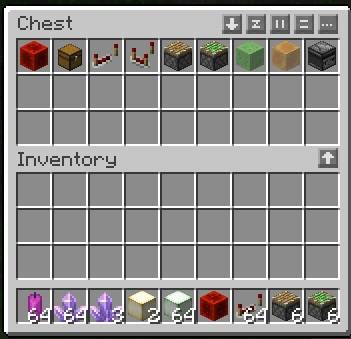 GUI.jpg GUI.jpg
 -
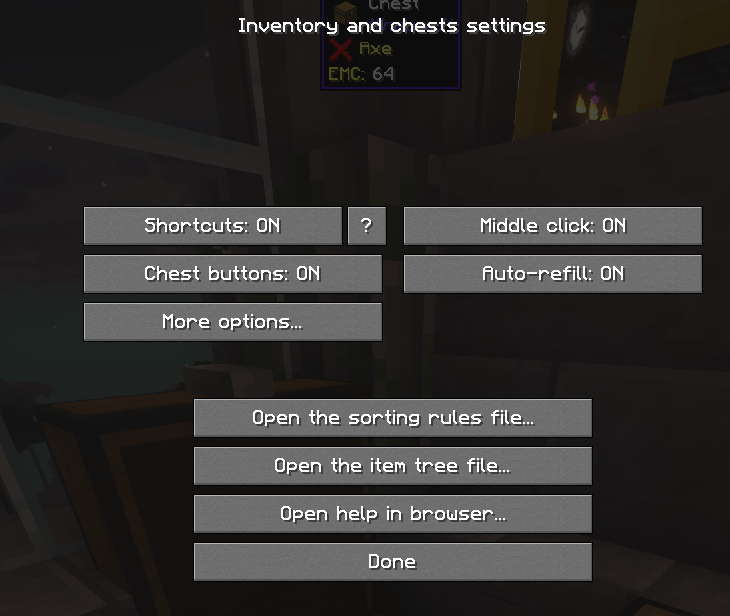 2.png 2.png
Versions
Files
Relations
Project Relations
More like this
Similar Mods
Suggestions use data such as tags, dependencies, dependents, descriptions, titles, and more to rank how much they overlap with this mod.
On ModDex
Community snapshot
By the numbers
Statistics
 (opens in a new tab)
Get it on
Available Platforms
On ModDex
Community snapshot
By the numbers
Statistics
Resources