
Community listing page, reviews here may not be monitored by the author.
InventoryTweaks StationAPI

No reviews yet
Inventory tweaks mod for b1.7.3 babric adding the modern Left-Click + Drag and Right-Click + Drag mechanics to the game along with some other optional mouse tweaks.
Community voices
Reviews
No reviews yet. Be the first to review this project!
Get it on
Available Platforms
Compatibility
Supported Environments
Runs entirely on the client. Works on vanilla servers.
About
Project Details
For authors
Embed Badge
If you're the author of this project, you can embed a live badge anywhere that supports HTML or Markdown. It updates automatically whenever ratings change.
Use HTML for any page that supports it, or Markdown for README files and Markdown-based descriptions.
Identifiers
Platform IDs
About
Description
InventoryTweaks StationAPI Edition for Minecraft Beta 1.7.3
A StationAPI mod for Minecraft Beta 1.7.3 that adds some inventory tweaks and ports some of the tweaks from the MouseTweaks mod.
Inventory Tweaks
This mod is incompatible with the regular version of MojangFix. If you would like to use that mod you will need the compatibility version of the mod for InventoryTweaks found here: https://modrinth.com/mod/mojangfix-stationapi-edition
This version of the mod now supports multiplayer!
- Features on multiplayer are slightly simplified to accommodate what vanilla servers are capable of.
List of Changes:
- Note that all changes can be enabled/disabled in the config menu if you have ModMenu and GlassConfigAPI installed. (Optional) Install SmoothBeta to improve performance.
Crafting Result Changes
- Adds
Ctrl-Clickcrafting mechanic for quickly crafting a single stack of items into your inventory - Adds
Right-Clickcrafting mechanic for quickly crafting a single stack of items into your cursor - Adds
Shift-Clickcrafting mechanic for quickly crafting all resources in crafting grid into inventory- Adds ability to stop
Shift-Clickcrafting when crafting result changes (default: true)
- Adds ability to stop
Modern Minecraft Changes
- Adds modern double
Left-Clickto fill empty cursor with picked up item (searches open inventory screen for the item to fill the cursor). - Adds
Shift + Clickto move armor onto player armor slots when in player inventory. - Adds
Shift + Clickto move items into and out of dispensers when in dispenser inventories.- Mod must be installed on both the server and the client and the config must be enabled on the server for this setting to work in multiplayer.
- Adds
Shift + Clickto move smeltable/fuel items into furnaces when furnace screen is open (same behavior as modern, logs will go into smelt slot rather than fuel slot). - Adds
Left-Click + Dragmechanic to evenly distribute held items over empty slots/slots with the same item as in modern Minecraft. - Adds
Right-Click + Dragmechanic to distribute one item from held items over empty slots/slots with the same item as in modern Minecraft. LCtrl + DROP_KEYto drop a whole stack of items.- Move items from player inventory to the hotbar by pressing the number key corresponding to the desired hotbar slot while hovering the cursor over the item to move.
MouseTweaks Changes
- MouseTweaks
Right-Click + Drag- Very similar to the standard RMB dragging mechanic, with one difference: if you drag over a slot multiple times, an item will be put there multiple times. Replaces the standard mechanic if enabled.
- MouseTweaks
Left-Click + Drag(with item)- Lets you quickly pick up or move items of the same type.
- Move items to another inventory if holding
Shift
- MouseTweaks
Left-Click + Drag + Shift(without item)- Quickly move items into another inventory.
- Original take on the scroll wheel
- Scroll to move items between the cursor and the hovered slot
- Note: MouseTweaks scroll will eventually be added as well if I can figure it out
Installation using Prism Launcher
- Download an instance of Babric for Prism Launcher: https://github.com/Glass-Series/babric-prism-instance
- Install Java 17 and set the instance to use it: https://adoptium.net/temurin/releases/
- Add GlassConfigAPI 3.0.2+ to the mod folder for the instance: https://modrinth.com/mod/glass-config-api
- Add Glass Networking to the mod folder for the instance: https://modrinth.com/mod/glass-networking
- (Optional) Add StationAPI to the mod folder for the instance: https://modrinth.com/mod/stationapi
- (Optional) Add Mod Menu to the mod folder for the instance: https://modrinth.com/mod/modmenu-beta
- Add this mod to the mod folder for the instance: https://github.com/telvarost/BetaTweaks-StationAPI/releases
- Run and enjoy! 👍
FAQ
- Q. Why is minecraft so small and part of my screen white?
- A. You probably have screen scaling on or are using a high DPI screen. There are 5 possible ways to fix this:
- The best option is to install Gambac: https://modrinth.com/mod/gambac
- You could also pass the following string in as a java argument in the settings tab
-Dsun.java2d.uiScale=1.0
- You could also install ClientsideEssentials mod or UniTweaks and use their screen scaling fix from GCAPI config options (fix may produce small artifacts with this option)
- You could also change the DPI settings for Prism Launcher to system
- Or, you could change your screen scaling to 100%
- A. You probably have screen scaling on or are using a high DPI screen. There are 5 possible ways to fix this:
Feedback
Got any suggestions on what should be added next? Feel free to share it by creating an issue. Know how to code and want to do it yourself? Then look below on how to get started.
Contributing
Thanks for considering contributing! To get started fork this repository, make your changes, and create a PR.
If you are new to StationAPI consider watching the following videos on Babric/StationAPI Minecraft modding: https://www.youtube.com/watch?v=9-sVGjnGJ5s&list=PLa2JWzyvH63wGcj5-i0P12VkJG7PDyo9T
Screenshots
Gallery
-
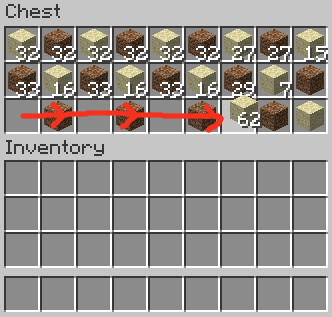 Example of using LClick + Drag to pick up Items
 -
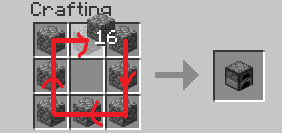 Example of using RClick + Drag to drop over the same Slot Disabled by default in v2.3.1+
 -
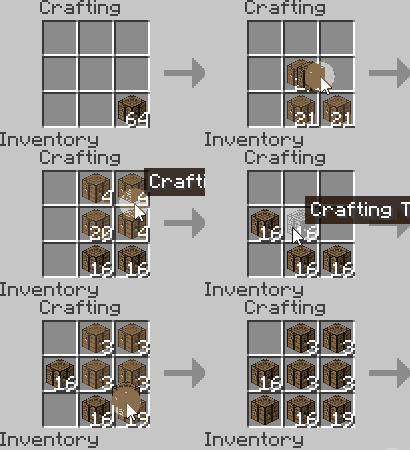 Left-Click + Drag Demo
 -
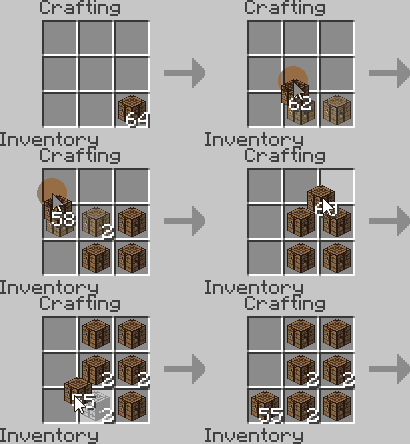 Right-Click + Drag Demo
Versions
Files
Relations
Project Relations
More like this
Similar Mods
Suggestions use data such as tags, dependencies, dependents, descriptions, titles, and more to rank how much they overlap with this mod.
On ModDex
Community snapshot
By the numbers
Statistics

Want to reach Minecraft players?
We're looking for a server hosting partner to feature here and other parts of the site. Interested? Send us a message!
Get in touchGet it on
Available Platforms
On ModDex
Community snapshot
By the numbers