
Community listing page, reviews here may not be monitored by the author.
Iridium

No reviews yet
A Fabric optimization mod that complements Sodium and Lithium by covering the gaps they don't touch — without reducing visual quality.
Community voices
Reviews
No reviews yet. Be the first to review this project!
Get it on
Available Platforms
Compatibility
Supported Environments
Works on the client or the server alone, but does more when on both.
About
Project Details
For authors
Embed Badge
If you're the author of this project, you can embed a live badge anywhere that supports HTML or Markdown. It updates automatically whenever ratings change.
Use HTML for any page that supports it, or Markdown for README files and Markdown-based descriptions.
Identifiers
Platform IDs
About
Description
Iridium is a modern Fabric optimization mod for Minecraft 1.21.1, designed to complement Sodium and Lithium by covering optimizations they do not include — entity and particle culling, block-entity culling, server-side throttles for hoppers, explosions, villager AI, projectiles, and dynamic FPS when the game window is unfocused.
Iridium is a companion to Sodium and Lithium, not a replacement. Conflicting rendering mixins auto-disable at load time when Sodium is detected — and beyond Sodium, Iridium also detects EntityCulling, MoreCulling, ImmediatelyFast and Dynamic FPS: overlapping features automatically yield so there is no double-work or stutter from duplicate hooks.
It works on both client and dedicated server. Each feature set no-ops when the environment doesn't apply.
Performance
Tested on Minecraft 1.21.1 with Sodium + Lithium as the baseline (the realistic starting point for any optimization-focused player). Identical scene, with many entities, particles, and block entities visible.
| Setup | Avg FPS | 1% low | 0.2% low |
|---|---|---|---|
| Sodium + Lithium | 454.7 | 133.6 | 80.4 |
| Sodium + Lithium + Iridium | 499.0 | 139.7 | 89.8 |
+9.7% avg FPS · +4.6% 1% low · +11.7% 0.2% low
The largest gain is in the 0.2% low percentile — the worst frames. Iridium's main contribution is smoothing stutter in scenes with many entities, particles, and block entities, not raising an already-high average ceiling.
Note: Performance varies depending on hardware, software, and the scene being rendered. The numbers above come from our internal benchmark on the following configuration:
Hardware: Intel Core i7-10700, NVIDIA RTX 5060, 32 GB DDR4-2933, Windows 11 Software: Java 21, Fabric Loader 0.15.11, Sodium 0.6.x, Lithium latest
Reproductions and counter-tests are welcomed — open an issue with your scene and your numbers.
✨ What Iridium does
Client-side (rendering)
- Entity Culling — skips entities outside the camera frustum.
- Particle Culling + Cap — frustum-culls particles and caps active counts (separate cap for fireworks).
- Block Entity Culling — chests, furnaces, beacons, shulkers outside the frustum are skipped.
- Animation Culling — skips client-side animation steps for off-screen entities.
- Beacon Beam Culling — skips the beacon beam when its column is outside the frustum.
- Held Item Culling — skips item-in-hand render for off-screen mobs.
- Nametag Cache — caches rendered nametag text between frames; invalidated on change.
- Map Texture Cache — skips map texture re-upload when map data hasn't changed.
- Dynamic FPS — drops frame rate drastically when the window is minimized or unfocused (~90% CPU/GPU saved on Alt-Tab).
Server-side (tick)
- Hopper Throttle — idle hoppers tick less frequently (configurable).
- Explosion Ray Cache — caches raycasts for simultaneous nearby explosions.
- Random Tick Throttle — skips random block ticks in chunks with no nearby player.
- Item Entity Merge Throttle — merge scans run every N ticks instead of every tick.
- Villager AI Throttle — reduces sensor/brain frequency when no player is within range.
- Fire Spread Throttle — slows fire propagation in chunks with no nearby player.
- Projectile Tick Throttle — far projectiles tick 1-in-3, with a short-lookahead raycast guard so hit detection stays intact.
Quality of life
- In-game config screen (ModMenu integration).
- Defaults tuned for maximum performance out of the box; every feature individually toggleable.
- Debug overlay showing culled entities, particles, hoppers and estimated savings (bind hotkey in Controls).
- Optional toggle hotkeys for Entity Culling, Particle Culling and Dynamic FPS.
/iridium reloadcommand reloadsconfig/iridium.jsonwithout restart.
🎨 Visual quality
Iridium never reduces visual quality to gain FPS. No distance-based culling, no adaptive LOD, no "drop quality when FPS is low" tricks. Only geometry outside the camera frustum — which by definition you can't see — is skipped. Server-side throttles only activate when no player is in range to observe the difference.
This rule is enforced throughout the codebase and is not a config option you can turn off.
🗺️ Roadmap
Iridium 0.1.0 targets Minecraft 1.21.1 only. Beyond that, here's the direction for future versions — directions, not dated promises:
- Broader Minecraft version support. Once 0.1.0 stabilizes, Iridium will expand to the most popular long-lived Minecraft releases using Stonecutter so a single source tree can produce builds for multiple MC versions. Planned targets: 1.21.4 (Winter Drop) first as a pilot, then 1.20.1 (the version still dominant in large modpack ecosystems like Create and Cobblemon). Short-lived minors (1.21.2 / 1.21.3) will likely be skipped.
- New optimization gaps. Features are added based on measured wins, not hype. The design philosophy stays the same: fill specific gaps left by Sodium and Lithium, never reduce visual quality to gain FPS. Community suggestions via GitHub issues are welcome.
- What will not change. No network calls, no telemetry, no shading, no distance-based culling, no adaptive quality tricks. These are enforced by design, not toggles you have to turn off.
Versions older than 1.20.1 are not planned — maintenance cost beyond three supported releases grows faster than the expected benefit.
✅ Compatibility
Iridium is designed to coexist with the rest of the Fabric optimization ecosystem.
| Mod | Status |
|---|---|
| Sodium 0.6.x | Conflicting rendering mixins auto-disable at load time. All other features stay on. |
| Lithium | No conflicts. Iridium covers gaps Lithium doesn't (hopper, villager AI, fire, projectiles). |
| EntityCulling (tr7zw) | Entity and block-entity culling auto-yield. No double-culling overhead. |
| MoreCulling | Beacon beam culling auto-yields. |
| ImmediatelyFast | Map texture cache auto-yields. |
| Dynamic FPS (juliand665) | Dynamic FPS feature auto-yields to prevent duplicate frame throttling. |
| Starlight | No conflicts. |
| FerriteCore | No conflicts. |
| ModernFix | No conflicts. |
| ModMenu | Optional. Used for the in-game config screen. |
No network calls. No telemetry. No shading. Released under PolyForm Shield 1.0.0 — the same source-available license used by Sodium.
Need even more performance?
By design, Iridium only fills specific gaps. For the best overall result we recommend installing it alongside Sodium (rendering pipeline) and Lithium (game logic). They cover the parts Iridium does not.
📦 Modpack Policy
You are completely free to include Iridium in any modpack — public or private, free or paid. No credit or permission required.
The only thing the PolyForm Shield license does not allow is repackaging Iridium's source code into a competing optimization mod. Normal modpack usage is always fine.
📥 Installation
- Install Fabric Loader 0.15.11 or newer for Minecraft 1.21.1.
- Drop Fabric API into your
mods/folder. - Drop the Iridium
.jarintomods/. - (Recommended) Add Sodium and Lithium for best results.
- (Optional) Add ModMenu to get the in-game config screen.
Launch the game. The config file is generated at config/iridium.json on first run.
🐛 How to report issues
Please use the issue tracker to report bugs, crashes and unexpected behavior. When opening an issue, include:
- Minecraft version, Fabric Loader version, and Iridium version
- Other mods installed (especially other optimization mods)
- Crash log or
latest.logif applicable - Steps to reproduce
Screenshots
Gallery
-
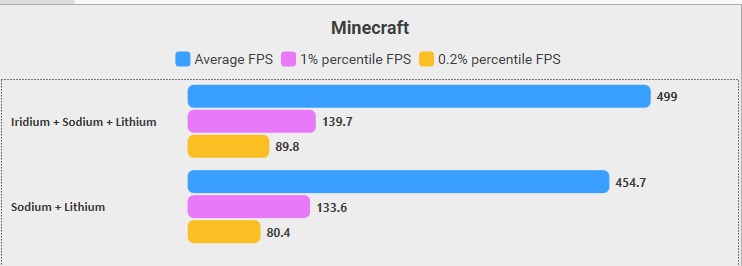 Iridium + Sodium + Lithium vs Sodium + Lithium (1.21.1) Same scene, same settings. Adding Iridium on top of Sodium + Lithium: +9.7% avg FPS, +4.6% 1% low, +11.7% 0.2% low. The largest gain is on the 0.2% low percentile — the worst frames — meaning Iridium's main contribution is smoothing stutter.
Versions
Files
Relations
Project Relations
More like this
Similar Mods
Suggestions use data such as tags, dependencies, dependents, descriptions, titles, and more to rank how much they overlap with this mod.
On ModDex
Community snapshot
By the numbers
Statistics

Want to reach Minecraft players?
We're looking for a server hosting partner to feature here and other parts of the site. Interested? Send us a message!
Get in touchGet it on
Available Platforms
On ModDex
Community snapshot
By the numbers